
L
O
A
D
I
N
G


Zoho, Odoo, ERPNext, Dynamics 365 and custom ERP, delivered by one accountable team.

Payroll automation replaces the monthly spreadsheet rebuild with rules: inputs arrive from attendance and HR, calculations run in the system, and people review only the exceptions.
UAE companies automate payroll by replacing manual edits with rules and data feeds: attendance and overtime from the time system, approved leave from HR, scheduled loan recoveries and contract allowances. One calculation then produces the WPS Salary Information File, payslips and the accounting journal. A variance report and finance approval remain before payment, so staff review only exceptions.
Payroll automation in the UAE means the monthly salary run is driven by rules and data feeds instead of manual edits. Attendance and overtime arrive from the time system, approved leave and unpaid days arrive from HR, loan and advance recoveries are scheduled, allowances follow the contract, and the system produces the WPS Salary Information File, payslips and accounting journal from the same calculation.
Many UAE companies already own payroll software but still run payroll semi-manually. The payroll officer exports attendance, fixes it in Excel, types overtime into the system, adjusts deductions by hand and then builds the SIF file in the bank portal. Automation removes those steps. It does not remove review: a good design keeps a variance check and an approval before money moves.
This page covers the monthly run itself. Data exchange with banks, attendance devices and other systems is covered under payroll integration, and the specifics of the bank file under WPS payroll.

These are the errors we find most often when we review payroll in UAE companies.
Site attendance comes in on paper or as a spreadsheet days after the cut-off. The payroll officer corrects punches by hand and nobody can trace which hours were changed.
Normal, night and rest-day overtime carry different premiums under the Labour Law and contracts. When rates are applied by hand, two workers on the same crew are paid differently.
Unpaid leave approved late in the month never reaches payroll, so full salary is paid and recovered later, causing disputes.
Advances are kept in a separate sheet. Installments are skipped or deducted twice, and the outstanding balance at final settlement is wrong.
Wrong routing codes, IBANs or employee IDs cause rejections, and payroll scrambles to fix them before the salary deadline.
New joiners, leavers and salary changes from a mid-month effective date are calculated by hand, and gratuity and leave salary bases are not updated.
This is the sequence we configure. Steps one to five run automatically; steps six and seven are the human control points.
One shared database: every step updates stock, finance and reports in real time.
Each of these removes a manual step from the run.
Basic, housing, transport and other allowances defined per grade or contract, so the calculation never depends on a spreadsheet formula.
Punches from biometric devices converted into worked hours, late minutes and overtime by shift, with a clear cut-off date.
Separate rates for normal, night and rest-day or public holiday overtime, with caps and approval status checked before payment.
Unpaid leave, sick leave stages and leave salary paid in advance flow straight into the month, using the leave salary calculation rules.
Repayment schedules that deduct installments each month and show the balance on the payslip.
SIF file in the required format with employer and employee records, ready to upload to the bank or exchange house.
Payslips published to the employee portal or app after lock, in English and Arabic where needed.
Monthly gratuity, leave salary and air ticket accruals posted with the salary journal by cost center.
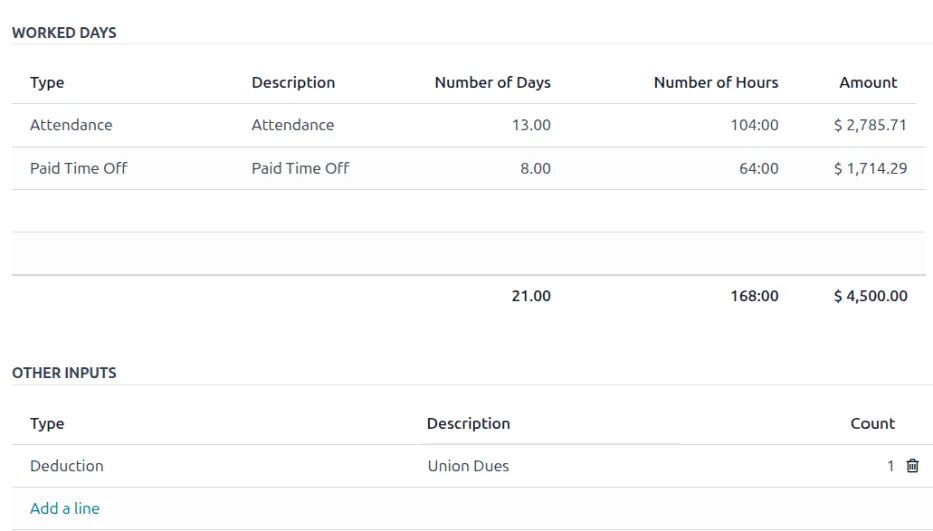
The payroll officer and finance manager see the run status and the exceptions that need attention.
All four can run UAE payroll; the level of local readiness differs. Confirm current localization and edition details before choosing.
| Zoho | Odoo | ERPNext | Dynamics 365 | |
|---|---|---|---|---|
| UAE payroll engine | Zoho Payroll with a UAE edition | Odoo Payroll (Enterprise) with UAE localization in recent versions | ERPNext payroll with salary structures and components | Payroll usually through a partner payroll solution built on Dynamics 365 |
| Attendance to payroll | Zoho People attendance feeds Zoho Payroll | Attendances and work entries generate payable time | Attendance and timesheets drive payment days and overtime via additional salary or formulas | Time and attendance module or partner add-on |
| Overtime rules | Configurable components; check overtime options for your plan | Work entry types with rates, often extended for UAE rules | Formula-based components, easily customized | Configured in the payroll solution |
| WPS SIF | SIF generation supported for UAE; confirm bank format | WPS SIF export in recent UAE localization; verify version | Usually via a localization app or custom report | Provided by the payroll add-on |
| Gratuity and leave salary accrual | Gratuity supported in UAE edition | Configurable, sometimes with custom rules | Configurable through components and custom scripts | Provided by the payroll add-on |
| Best fit | SMEs already using Zoho Books or Zoho One | Companies running Odoo for operations and accounts | Teams wanting full control and low license cost | Mid-size and larger groups on Microsoft |
These are the systems the payroll run reads from and writes to.
The system applies the rules you configure; HR and your advisors remain responsible for the legal position.
Salaries for MOHRE-registered employees are paid through WPS via approved banks or agents using the SIF file. Automation should produce the file from locked payroll and keep the bank's acknowledgment. See WPS-compliant payroll for detail.
Overtime premiums, unpaid leave, sick leave pay stages and end-of-service gratuity follow Federal Decree-Law No. 33 of 2021 and your contracts. We configure the rules you approve and test them against worked examples.
Some free zone employers use their own salary payment arrangements, and DIFC and ADGM have their own employment laws and employee savings schemes. Confirm which rules apply to each entity.
Locked payroll runs, changes after lock and approvals should be logged and retained with your other business records.
General information, not tax or legal advice. Rules change; confirm current FTA, MOHRE and Ministry of Finance guidance with your advisor.
Benefits depend on how many manual steps you start with; these are the usual outcomes.
Inputs arrive on time and calculations run in minutes, leaving the team time to review exceptions.
Overtime and deductions follow one rule set, which reduces disputes and complaints.
Bank details are validated before the SIF file is built, so errors are caught before upload.
Every adjustment has a source and an approver, building on the broader ERP workflow automation approach.
Most projects include at least one parallel run. Durations vary with headcount, entities and data quality.
Durations are typical ranges; your plan is agreed after discovery.
Document salary structures, overtime rules, leave policies and recovery rules, and check employee bank data.
Set up components, attendance import, overtime rules, SIF format and journal mapping.
Run the new payroll alongside the old one and reconcile every difference employee by employee.
First live runs with close support, then handover of the monthly checklist to the payroll team.
We configure the system for the rules UAE businesses report against, and test it before go-live.
General information, not tax or legal advice. Confirm current requirements with the FTA, MOHRE or your advisor. See all UAE compliance guides.
On-site workshops in Dubai, Abu Dhabi and Sharjah, and remote or on-site delivery across the Northern Emirates and free zones.
Official sources and references
Facts on this page were checked against these sources in October 2026. Rules change, so confirm current requirements before acting.
Still have a question? Our consultants are happy to help.
Ask an ExpertWe do not recommend it. Calculations can run automatically, but a variance review and a finance approval before the WPS upload are essential controls. Automation shrinks review to the exceptions.
Devices at each site feed one attendance system, or supervisors submit approved timesheets in an app. The payroll run uses a fixed cut-off and treats anything after it as next month's adjustment. See biometric attendance integration.
Yes. Pro-rata calculations by calendar or working days are configured once, and the final settlement for leavers can be processed with or separately from the monthly run.
Advances and loans run on repayment schedules. Other deductions need a documented basis and approval and must respect the Labour Law limits on deductions; we configure them as approved one-time components.
Usually not. The system produces the SIF file in the format your bank or exchange house accepts. Some banks also offer host-to-host or API upload, which can be added later.
Mainly for anomaly detection and answering employee payslip queries, with human review. We cover realistic options under our AI automation pages.
Related Solutions
Related Industries
Related ERP Platforms
Walk us through your current payroll month and we will show which steps can be automated and where checks stay.
Dubai, United Arab Emirates










