
L
O
A
D
I
N
G


Zoho, Odoo, ERPNext, Dynamics 365 and custom ERP, delivered by one accountable team.

Know what each part of the business really costs. We design cost center structures, tagging rules and allocation cycles in Zoho, Odoo, ERPNext and Dynamics 365.
Cost center accounting in an ERP starts with a cost center tree that matches how managers are held accountable. Cost center tags are then made mandatory on bills, journals, payroll and stock issues, shared overheads are allocated monthly on agreed drivers, and managers receive cost center P&L and variance reports that tie to the ledger. Zoho, Odoo, ERPNext and Dynamics 365 support this.
Cost center accounting assigns every expense to the unit that caused it: a clinic floor, a warehouse, a fleet, a sales team, a production line or a shared service such as IT. An ERP for cost center accounting in the UAE makes that assignment part of the transaction itself, so the AP clerk, the storekeeper and the payroll officer tag costs at source instead of a finance analyst re-sorting the general ledger in Excel at month end.
In many Dubai and Sharjah companies the chart of accounts is doing two jobs. Accounts such as "Rent - Al Quoz warehouse" and "Salaries - Jebel Ali showroom" multiply until the ledger has hundreds of lines, and nobody can produce a clean cost-per-unit report. Moving that detail into a separate cost center dimension keeps the chart short, keeps the VAT return mapping simple in your VAT accounting software and gives management a view the ledger alone cannot.
This page covers the cost center process itself: designing the hierarchy, enforcing tags, running overhead allocations and reporting. Departmental P&L ownership is covered in department accounting, and job-level costing in project accounting.

These are the patterns we see most often when UAE finance teams run cost centers outside the ERP or with optional tagging.
Cost center fields are optional, so a share of supplier bills and journals post with no center at all. The "unallocated" bucket grows every month and the cost center report never ties to the trial balance.
Locations and teams are built into GL account names. Every new branch or van adds accounts, mapping to VAT and corporate tax schedules gets harder, and comparisons across centers need manual regrouping.
Head office rent, DEWA, IT licenses and visa costs are split by a percentage someone agreed years ago. Nobody can show the driver, so managers dispute their numbers instead of acting on them.
WPS salary runs post as a single salaries journal. Staff who work across two centers, or who move mid-month, are not split, so labor cost per center is wrong in exactly the businesses where it matters most.
Cost center packs are built in Excel after close, often two to three weeks into the next month. By then the overspend has already happened again.
The flow below is how we usually configure cost center accounting so tagging happens at source and allocations run as a controlled month-end step.
One shared database: every step updates stock, finance and reports in real time.
Cost centers only work when every module that creates a ledger entry carries the tag.
Cost center or analytic dimension defined once and attached to journal lines, with rules that block posting to P&L accounts without it.
Supplier bills and expense claims carry a cost center per line, defaulted from the purchase order or requester.
Employee master holds a home cost center, with split percentages for shared staff, so the WPS payroll journal posts by center.
Stock issues to internal use, consumables and spare parts post their cost to the consuming center.
Depreciation is charged to the center that uses the asset, including vehicles and equipment that move between sites.
Rules that distribute pooled costs on drivers such as headcount, square meters, revenue or machine hours.
Annual budget by cost center and account, used for variance reporting and spend checks.
Cost center trial balance, P&L by center, allocation audit report and trend views.
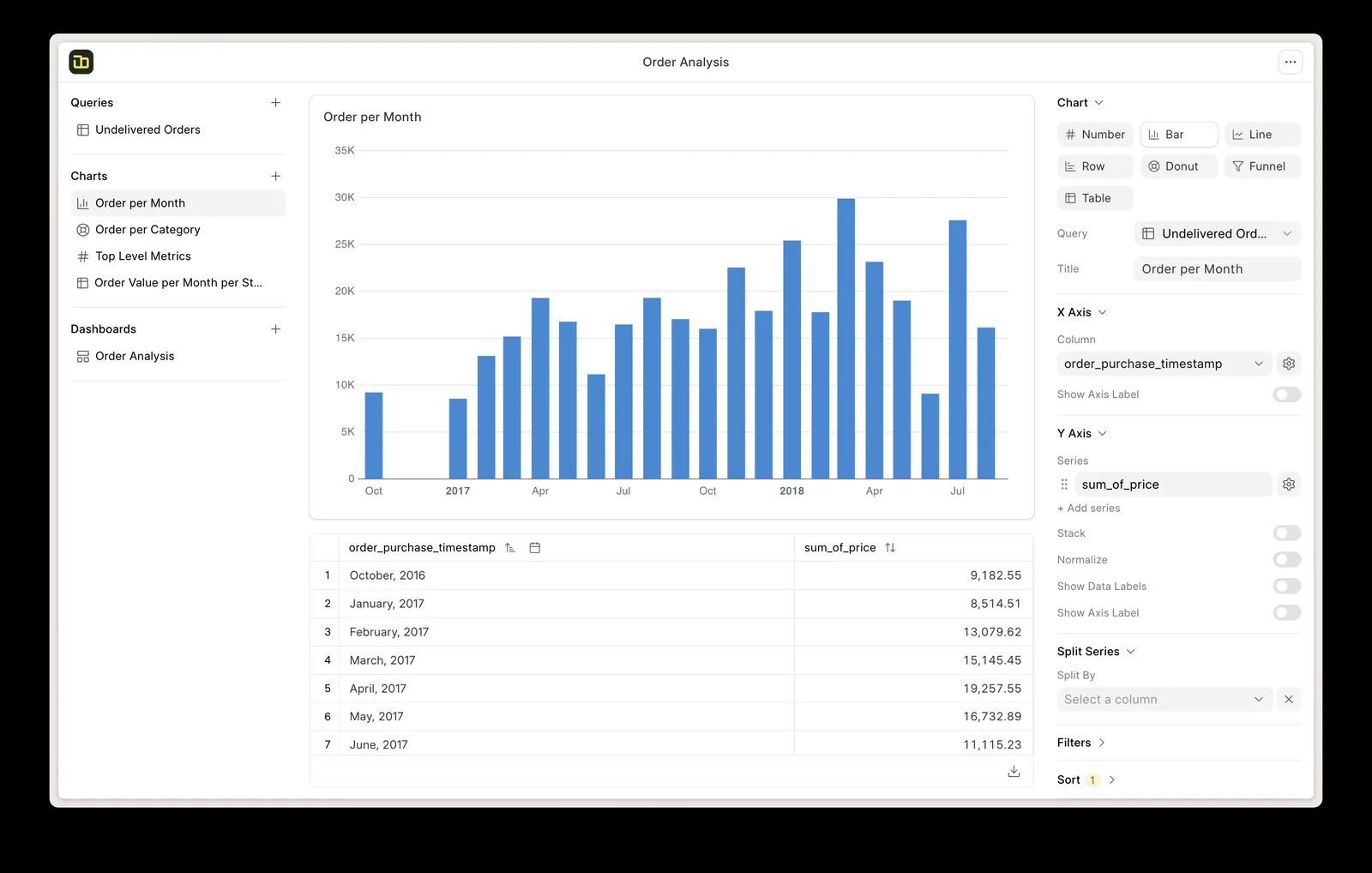
Once tagging is enforced, the reports come straight from posted entries.
All four platforms we implement support cost center accounting; they model it differently. Capabilities depend on edition and version, so confirm for yours.
| Zoho | Odoo | ERPNext | Dynamics 365 | |
|---|---|---|---|---|
| Where cost centers live | Reporting tags in Zoho Books, attached to transactions and line items | Analytic accounts grouped into analytic plans | Native Cost Center doctype in a tree, plus custom accounting dimensions | Financial dimensions (Business Central and Finance) |
| Hierarchy | Tag options are flat; hierarchy usually handled in reporting | Plans and sub-plans give a structure; deeper roll-ups via reporting | Group and child cost centers with roll-up reports | Dimension values with totaling ranges and hierarchies |
| Mandatory tagging | Tags can be set as mandatory on transactions in recent editions | Analytic distribution can be required per account or plan | Cost center is mandatory on P&L accounts by default | Default dimension rules can make a value mandatory per account |
| Split across centers | Line-level tags; splits by entering multiple lines | Analytic distribution by percentage on each line, with distribution models | Line-level cost center; accounting dimensions per line | Dimension sets per line; allocation accounts in Business Central |
| Overhead allocation | Usually manual journals or a custom function | Manual or scripted allocation entries; check your version | Period-end journals or custom scripts | Allocation rules and accounts are native (more extensive in Finance) |
| Budget by cost center | Budgets by account and tag | Budgets on analytic accounts | Budget doctype against cost center with spend control | G/L budgets by dimension |
Recommendations depend on your volume and structure. See accounting ERP software for UAE companies for a wider comparison.
Cost tags should travel with the data from every source system into the ledger.
Cost centers are a management tool, but they touch tax records. Confirm specific treatments with your tax advisor.
Where a center makes exempt supplies, such as residential rent or certain financial services, input VAT may need apportionment. Tagging costs by center helps identify which inputs relate to which supplies.
Non-deductible items such as entertainment are easier to isolate when the cost center and account structure separate them cleanly from operating expenses.
Companies with a qualifying free zone activity and other income streams often use cost centers to support the split of costs between activities; document the allocation basis.
Allocation journals and their driver data are accounting records and should be retained with supporting schedules for at least five years under the tax record rules.
General information, not tax or legal advice. Rules change; confirm current FTA, MOHRE and Ministry of Finance guidance with your advisor.
The benefits come from tagging at source and running allocations as a repeatable step.
Cost center totals reconcile to the trial balance because every P&L entry carries a center.
Managers see the driver and rate behind each allocated cost, so reviews focus on spend, not on the method.
Location and team detail moves into the dimension, which simplifies VAT and tax mapping.
Cost center P&L is available as soon as the period is posted, not weeks later.
Durations are indicative; adding cost centers to a live ERP is faster than doing it inside a full implementation. See what drives ERP implementation cost for budgeting.
Durations are typical ranges; your plan is agreed after discovery.
Agree the cost center tree with management, map old GL sub-accounts to new centers and define allocation pools and drivers.
Set up dimensions, mandatory rules, defaults on users, items, employees and assets, and allocation rules.
Re-tag opening balances or the current year if needed, test postings from AP, payroll and inventory, and test an allocation run.
Run the first month-end with the new reports and fix tagging gaps before locking the period.
We configure the system for the rules UAE businesses report against, and test it before go-live.
General information, not tax or legal advice. Confirm current requirements with the FTA, MOHRE or your advisor. See all UAE compliance guides.
On-site workshops in Dubai, Abu Dhabi and Sharjah, and remote or on-site delivery across the Northern Emirates and free zones.
Official sources and references
Facts on this page were checked against these sources in October 2026. Rules change, so confirm current requirements before acting.
Still have a question? Our consultants are happy to help.
Ask an ExpertA cost center is measured on spend only, such as HR, IT or a warehouse. A profit center also carries revenue, such as a branch or a product line. Most ERPs use the same dimension for both and distinguish them in reporting.
A separate dimension is almost always better. It keeps the chart short and stable, lets one expense account be analyzed by many centers and avoids remapping VAT and tax reports whenever a site opens or closes.
Choose a driver that reflects consumption: headcount for HR and IT, floor area for rent and DEWA, revenue or transactions for finance. The ERP posts the allocation journal, and the driver data is kept as support.
Yes. The employee record holds a home center or split percentages, and the payroll journal posts by center. Timesheet-based splits are possible where staff work across several centers.
Any company with several sites or service lines, for example medical centers with separate departments, fitness centers with multiple clubs, and trading firms with several warehouses.
Usually yes. The work is design, configuration and retraining users, plus a decision on whether to re-tag history. We review the existing setup first and recommend the least disruptive approach.
Related Solutions
Related Industries
Related ERP Platforms
We review your chart of accounts and reporting, then design cost centers and allocations in the ERP you use.
Dubai, United Arab Emirates










