
L
O
A
D
I
N
G


Zoho, Odoo, ERPNext, Dynamics 365 and custom ERP, delivered by one accountable team.

Most UAE companies already own biometric terminals. The weak link is what happens after the punch: USB exports, Excel clean-up and overtime typed into payroll by hand.
Biometric attendance integration connects fingerprint, palm, card or face terminals to the ERP so punches flow automatically into a check-in log instead of USB exports and Excel. Device IDs are mapped to employee codes, punches are paired with shifts including overnight work, exceptions go to supervisors, and approved hours and overtime feed payroll and the WPS salary file.
Biometric attendance integration in the UAE is the link between fingerprint, palm, card or face-recognition terminals at your gates and the attendance records in your ERP. Construction sites, warehouses in Jebel Ali and Al Quoz, hotels, clinics and security companies rely on these terminals because they stop buddy punching and work for staff who never sit at a computer. The terminals themselves are usually reliable. The trouble starts when the raw punch log has to become a payroll input.
Without integration, an HR assistant downloads logs from each device by USB or a vendor desktop tool, pastes them into Excel, guesses which punch is IN and which is OUT, fixes night shifts that cross midnight, and emails a summary to payroll. With integration, punches flow automatically into the ERP's check-in log, are matched to the employee's shift, and produce attendance, late-coming and overtime records that payroll reads directly. This is a specific case of the wider ERP integrations we build, and it sits underneath the attendance management software layer.
This page is about the device-to-ERP connection and data quality. Rostering is covered under shift management, and the hand-off of approved hours into salary is covered under payroll integration.

These are the recurring problems behind late payrolls and attendance disputes in UAE operations.
Site supervisors are asked to download and send logs every week, and some weeks they do not. Payroll then runs on estimates and corrections follow.
Terminal enrollment numbers were assigned ad hoc years ago. New joiners, transfers and rehires end up with duplicate or missing mappings, and their punches drop out of reports.
A security guard who starts at 7 pm and leaves at 7 am appears as two half days. Staff who punch three or four times show impossible hours unless pairing rules are applied.
Overtime rates differ for normal days, nights and rest days, and the spreadsheet formulas are maintained by one person. Mistakes affect pay and labour compliance.
Terminals that are not time-synced can be minutes out. Late-coming deductions based on a wrong clock become a grievance rather than a control.
This is the flow we design, whether the devices push data to a cloud endpoint or a small connector pulls from them on the local network.
One shared database: every step updates stock, finance and reports in real time.
The integration is more than a sync job. These components need to be in place for the data to be usable.
A cloud push endpoint or an on-site service that pulls logs over the device SDK or protocol and forwards them securely.
A field on the employee record that holds the terminal enrollment ID, with checks for duplicates.
Raw punches stored with timestamp, device and location, never edited, so the audit trail stays intact.
Start, end, grace, break and overnight settings that turn punches into worked hours.
Missing OUT punches, unknown users and early departures routed to supervisors for regularization.
Approved leave records and holidays so absences are not flagged as no-shows.
Approved normal, night and rest-day overtime hours passed to payroll as earnings lines.
Alerts when a device stops sending data, so a site is not silently missing for a week.
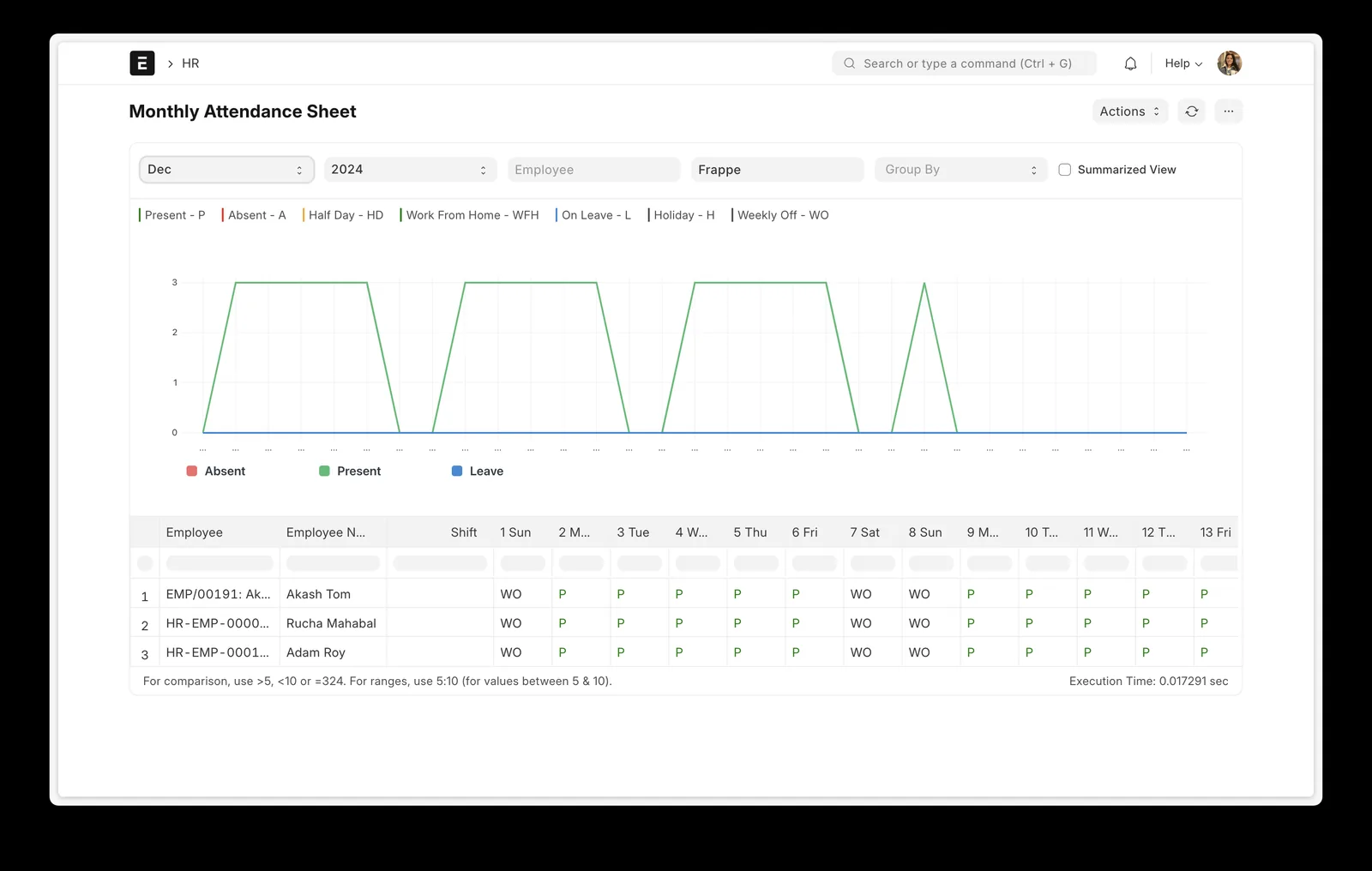
Once punches flow in, HR and site managers need one place to see presence, exceptions and device health.
Each platform can receive biometric data. The route depends on the device brand, its protocol and the edition you run.
| Zoho | Odoo | ERPNext | Dynamics 365 | |
|---|---|---|---|---|
| Target record | Zoho People attendance entries | Attendances app (check-in and check-out) | Employee Checkin, then auto attendance per Shift Type | Time and attendance in supported apps or a partner HR add-on |
| Common connection route | Zoho People biometric integration or its attendance API | Marketplace device connectors or a custom connector via API | Frappe biometric sync tool or a custom connector via REST API | Middleware or ISV time-attendance solution; Power Automate for simpler cases |
| Overnight and multi-punch handling | Shift settings and attendance rules | Usually handled in the connector or customization | Shift Type settings for pairing and grace periods | Depends on the add-on used |
| Cloud-push devices | Possible via API with middleware | Possible via custom endpoint | Possible via API endpoint | Possible via Azure or middleware endpoint |
| Overtime to payroll | Into Zoho Payroll or an external UAE payroll | Work entries into Odoo Payroll (Enterprise) | Overtime as salary components in Frappe HR payroll | Into the payroll solution in use |
| Effort level | Low to medium | Medium | Low to medium | Medium to high |
Device brands and firmware vary. We confirm protocol support on your actual terminals before committing to a design.
Most UAE sites use one or more of these alongside the ERP. Ask us about your specific models.
Biometric data is sensitive. These points should be settled before devices are connected to the ERP.
Federal Decree-Law No. 45 of 2021 (PDPL) treats biometric data as sensitive personal data, and DIFC and ADGM have their own data protection laws. Keep only the punch log in the ERP, not fingerprint templates, and document the purpose. See PDPL and ERP data protection.
UAE Labour Law sets normal working hours and overtime premiums, with higher rates for night work and rest days. Configure overtime rules to match the law and your contracts, and confirm with your legal advisor.
Overtime and deductions derived from attendance change the amounts in the Salary Information File. Approve attendance before the payroll cut-off so WPS submissions match payslips.
Keep raw punches unedited and record every regularization with who approved it and why. This supports labour inspections and internal audits.
General information, not tax or legal advice. Rules change; confirm current FTA, MOHRE and Ministry of Finance guidance with your advisor.
The value is in time saved and disputes avoided, not in the devices.
Punches arrive from every site without anyone downloading files.
Overtime is calculated by rule and approved by supervisors, not rebuilt in Excel every month.
Attendance is reviewed daily, so the month-end check is a confirmation rather than a project.
Unedited punches plus approved regularizations give a clear answer when an employee disputes a deduction.
Timelines depend on the number of devices, sites and brands. These are typical ranges.
Durations are typical ranges; your plan is agreed after discovery.
List terminals, models, firmware, network setup and how logs are retrieved today.
Clean device enrollment IDs and agree shift, grace, pairing and overtime rules.
Set up push or pull, test with one site, then add the rest.
Compare ERP attendance against the old process and fix rule gaps.
Turn on device health alerts and hand over the exception queue to supervisors.
We configure the system for the rules UAE businesses report against, and test it before go-live.
General information, not tax or legal advice. Confirm current requirements with the FTA, MOHRE or your advisor. See all UAE compliance guides.
On-site workshops in Dubai, Abu Dhabi and Sharjah, and remote or on-site delivery across the Northern Emirates and free zones.
Official sources and references
Facts on this page were checked against these sources in October 2026. Rules change, so confirm current requirements before acting.
Still have a question? Our consultants are happy to help.
Ask an ExpertUsually not. Most mainstream terminals can export logs through an SDK, a push protocol or the vendor's software. We test your models first; very old devices with no export route are the main exception.
Yes, if the device or a small local box has a mobile data connection. Devices store punches offline and send them when the connection returns, so short outages do not lose data.
No. Templates stay on the device. The ERP only receives the employee ID, timestamp, device and direction, which keeps sensitive data out of the business system.
They appear in an exception queue. The employee or supervisor submits a regularization with a reason, it is approved, and the original punch log is left untouched.
ERPNext and Zoho People often need the least work for common devices; Odoo is straightforward with a suitable connector. Talk to our ERP integration team about your device brand; we also cover Odoo integration and Zoho integration in detail.
Access control and attendance can share terminals, but they serve different purposes. We usually take only attendance punches into the ERP and leave door access rules in the security system.
Related Solutions
Related Industries
Related ERP Platforms
Send us your device models and sites, and we will outline the connection route and the attendance rules your ERP needs.
Dubai, United Arab Emirates










