
L
O
A
D
I
N
G


Zoho, Odoo, ERPNext, Dynamics 365 and custom ERP, delivered by one accountable team.

Hours are the biggest cost and often the biggest revenue line in a project business. Project timesheet software captures them once and sends them to costing, billing and utilization reports.
Project timesheet software records who worked on which project, task and activity, for how long, and whether the time is billable. UAE consultancies, IT firms, architects and engineers use it for labour cost per project, time-based invoicing and team utilization. Staff log time daily, project managers approve weekly, approved periods lock, and hours post at cost to projects and at bill rate to invoices.
Project timesheet software records who worked on which project, task and activity, for how long, and whether the time can be billed. For a UAE consultancy, IT services company, architecture practice or engineering firm, timesheets are the raw material for three things: labour cost per project, invoices for time-based contracts, and utilization of the team. When timesheets are filled on Thursday afternoon from memory, all three are wrong.
The goal is simple capture and reliable approval. Staff log time daily from a browser or mobile app, ideally with a timer or from their calendar. Each entry carries a project, task, activity type and a billable flag. The project manager approves the week, and once approved the hours are valued at cost for project costing and at the bill rate for project billing. Approved periods are locked so numbers cannot drift after invoicing.
Project timesheets are different from attendance. Attendance records when someone was present for payroll and overtime purposes; a project timesheet records what they worked on. Many UAE companies need both, and the ERP can link them so that project hours are checked against attended hours. For construction labour on sites, our construction timesheet software page covers gang and crew time in detail.

We see the same pattern across consulting, IT and design firms: timesheets exist, but nobody trusts them.
Staff fill the whole week, or the whole month, at once from memory. Hours are spread evenly across projects, which makes costing and billing unreliable.
Short calls, extra review rounds and weekend fixes are not logged, or are logged to an internal code. That time is never billed and the project looks cheaper than it was.
Managers approve dozens of timesheets in one click at month end without checking them against the plan. Errors are found by the client on the invoice.
The timesheet tool is separate from accounting, so labour cost is posted by a monthly journal or not at all, and time-based invoices are typed from an export.
Without consistent billable and non-billable codes, management cannot tell whether the team is overloaded, under-used or just not recording time.
This weekly cycle keeps hours accurate and makes them usable by finance within days, not weeks.
One shared database: every step updates stock, finance and reports in real time.
Timesheets are small documents with a large footprint. These modules give them meaning.
Grid, timer and mobile entry by project and task, with notes that can appear on the client invoice.
Only tasks the person is assigned to are offered, which stops time being logged to closed or wrong projects.
Cost rate and bill rate by activity, role or employee, so each hour has a cost value and a sales value.
Weekly submission, project manager approval and rejection with comments, with reminders for missing days.
Approved billable hours pulled into draft invoices for time-and-material contracts, with write-down if agreed.
Leave and public holidays pre-filled, and project hours compared with attendance for exceptions.
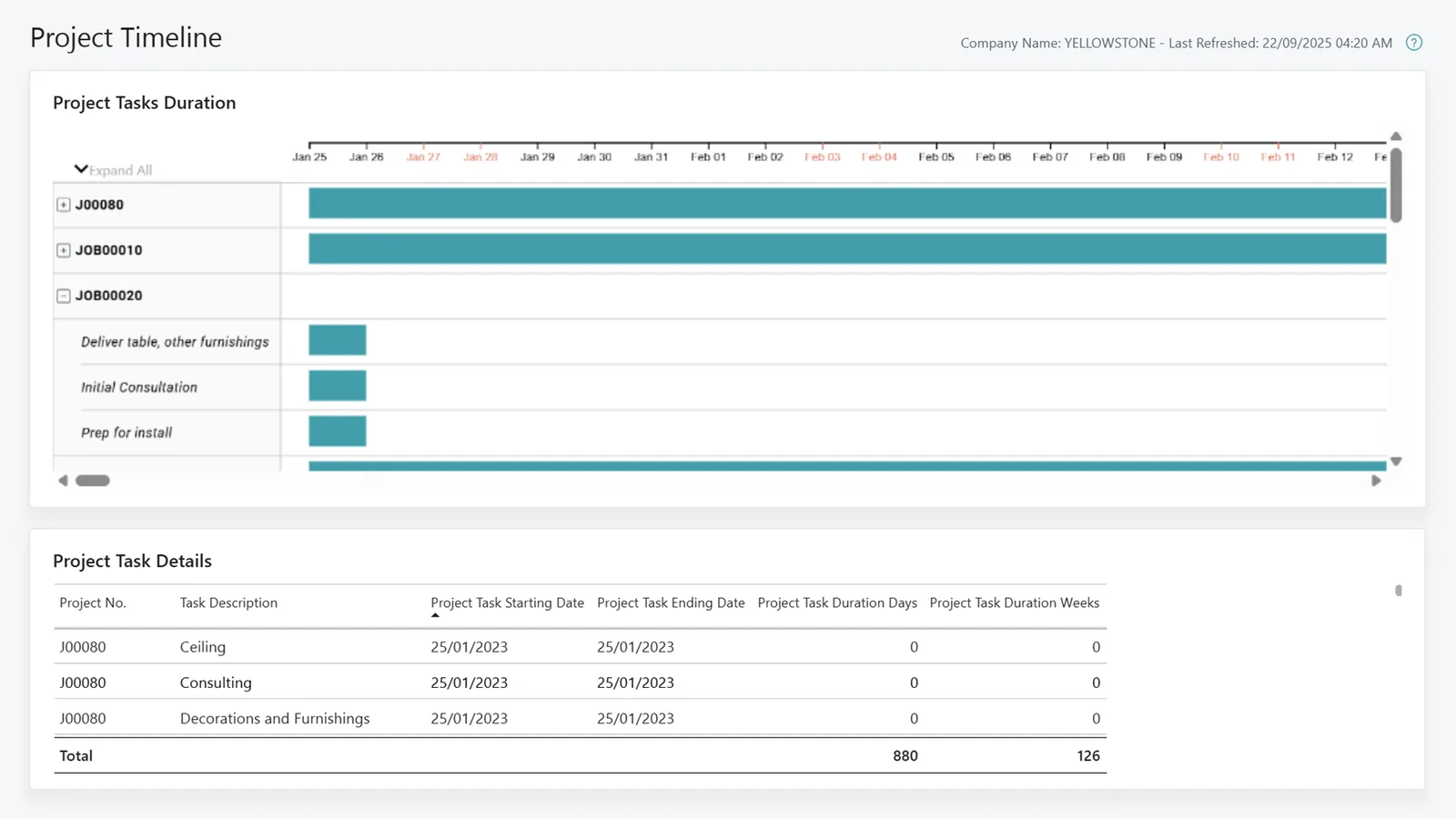
These reports are used weekly, so they need to be simple and current.
All four support project timesheets with approvals. Mobile experience, rate setup and billing links differ. Confirm for your edition.
| Zoho | Odoo | ERPNext | Dynamics 365 | |
|---|---|---|---|---|
| Time entry | Zoho Projects timesheets with timer and mobile app; time logging also in Zoho Books projects | Timesheets app with grid view, timer and mobile access | Timesheet doctype with time logs per activity and project | Time sheets in Business Central; time entry with calendar view in Project Operations |
| Approval | Timesheet approval by project or manager | Validation by timesheet approver (Enterprise) | Submit and approve workflow on timesheets | Approval by resource manager or project manager |
| Cost and bill rates | Billing rates by project, task or staff in Zoho Books; cost rates for budgeting in recent editions | Employee cost per hour; prices from the sales order line | Activity Cost per employee and activity type, with costing and billing rates | Resource and role-based cost and sales prices |
| Billing from hours | Invoices created from unbilled project hours in Zoho Books | Invoicing policy based on timesheets on service products | Sales Invoice created from timesheet billable hours | Invoice proposals from approved time in Project Operations; project invoices in Business Central |
| Utilization | Timesheet and resource utilization reports; Zoho Analytics for trends | Timesheet reporting and planning analysis | Timesheet reports and custom reports | Resource utilization reports |
Feature names and availability vary by plan and release.
The less people type, the more accurate the hours. These integrations remove friction.
Project timesheets are management records, but they sit close to labour law and tax. Confirm specifics with your HR and tax advisors.
UAE Labour Law sets limits on normal working hours and rules for overtime pay. Project timesheets should not replace attendance records, but comparing the two helps flag overtime that payroll must handle.
Salaries are paid through the Wage Protection System using a SIF file. Timesheets feed overtime and allowance inputs to payroll, so approved periods should close before the payroll cut-off.
Invoices raised from approved hours are tax invoices and need the supplier TRN, 5% VAT and the prescribed fields. From 2027, phased e-invoicing will apply to these invoices; check the latest MoF guidance.
Approved timesheets support billed amounts and labour cost claims. Keep them with accounting records for the statutory retention period.
General information, not tax or legal advice. Rules change; confirm current FTA, MOHRE and Ministry of Finance guidance with your advisor.
Outcomes firms typically see once timesheets are daily, approved and connected to finance.
Daily logging and mobile entry record the small tasks that used to be forgotten.
Approved hours become draft invoices directly, so billing does not wait for spreadsheets.
Hours valued at cost rates post to the project automatically, which feeds margin reporting.
Managers see who is overloaded and who has capacity, which helps staffing and hiring decisions.
Ranges assume a team of tens to a few hundred people; change management usually takes longer than configuration.
Durations are typical ranges; your plan is agreed after discovery.
Agree logging rules, activity types, billable definitions and approval deadlines.
Configure projects, tasks, rates, approvers and reminders; connect calendars or mobile apps.
Run one department on daily timesheets and refine the codes based on what people actually do.
Train all staff and managers, switch on period locks and connect approved hours to billing.
Track compliance and utilization weekly; adjust codes each quarter.
We configure the system for the rules UAE businesses report against, and test it before go-live.
General information, not tax or legal advice. Confirm current requirements with the FTA, MOHRE or your advisor. See all UAE compliance guides.
On-site workshops in Dubai, Abu Dhabi and Sharjah, and remote or on-site delivery across the Northern Emirates and free zones.
Official sources and references
Facts on this page were checked against these sources in October 2026. Rules change, so confirm current requirements before acting.
Still have a question? Our consultants are happy to help.
Ask an ExpertLog daily, submit weekly. Daily entry is far more accurate, while weekly submission keeps approval manageable for project managers.
Enough to separate billable from non-billable and to price future work, usually five to fifteen activity types. Too many codes lead to random choices.
Yes. All four platforms we implement offer mobile or browser access, and some support offline entry that syncs later.
Usually not. Attendance proves presence for labour law and payroll; project timesheets allocate that time to work. Linking them flags gaps. See timesheet approval automation for reminders and approval rules.
On time-based contracts, approved billable hours are pulled into a draft invoice at the agreed rates. Our time and material billing page explains that contract type.
It depends on your team. Zoho Projects and Odoo Timesheets are quick to adopt, ERPNext links tightly to costing and billing, and Dynamics 365 suits larger firms already using Microsoft 365.
Related Solutions
Related Industries
Related ERP Platforms
Related Guides
We design the codes, approvals and integrations that turn logged hours into accurate cost and invoices.
Dubai, United Arab Emirates










