L
O
A
D
I
N
G


Zoho, Odoo, ERPNext, Dynamics 365 and custom ERP, delivered by one accountable team.

Your ERP is only as current as the data flowing into it. We design, build and monitor Dynamics 365 integrations so orders, payments, stock and tax data move without re-keying.
Dynamics 365 integration in the UAE connects Business Central or Finance and Supply Chain Management to online stores, banks, warehouse systems and other apps so data stops being re-keyed. Business Central exposes REST APIs (API v2.0) and OData web services. Power Automate suits lower-volume flows, while high-volume order, stock or payment traffic usually runs on Azure Logic Apps or Functions.
Dynamics 365 integration in the UAE usually starts with one complaint: someone is copying data between two screens every day. A Shopify order is retyped into Business Central, a bank statement is downloaded as a CSV and matched by hand, or the warehouse team in Jebel Ali works from a separate WMS that only syncs at night. Each manual hop adds delay and a chance of error, and it gets worse as order volumes grow.
Microsoft gives us good building blocks. Business Central exposes standard REST APIs (API v2.0) and OData web services, Finance and Supply Chain Management offers data entities, OData and the Data Management Framework, and the Power Platform adds Power Automate, Dataverse and hundreds of connectors. For heavier traffic we use Azure Logic Apps, Azure Functions and Service Bus queues. The skill is in choosing the right tool for each flow, not in using all of them.
As a Microsoft Partner based in Dubai, we design each integration around a documented data contract: which system owns the record, what triggers the sync, how errors are reported and who fixes them. If you are still choosing a platform, start with our Microsoft Dynamics 365 UAE overview, or see the broader ERP API integration page.

Most UAE companies that contact us already have some connections in place. These are the patterns that cause the most pain.
An app from AppSource or a freelancer script was installed years ago and nobody knows how it works. When it fails silently, orders stop flowing and finance only notices at month-end.
When the online store, CRM and ERP can all create customers, the same buyer appears three times with different TRNs. Credit limits, statements and VAT reports then disagree.
Statements from UAE banks arrive in different formats, and payment references are often truncated. Without an import mapping and matching rules, reconciliation becomes a weekly manual task.
Nightly file drops between Dynamics 365 and a 3PL or WMS mean sales staff promise stock that has already shipped. Customers in a same-day delivery market notice quickly.
Business Central online applies rate limits to web service calls. Integrations that poll every few seconds or push records one at a time can hit those limits during peak periods.
The UAE's Peppol-based e-invoicing model requires invoices to be exchanged through an Accredited Service Provider. Many businesses have not yet planned how Dynamics 365 will send and receive those documents.
Every integration follows the same disciplined path, whether it is a single bank feed or a twelve-system landscape.
We list every system, the records it holds and which one is the master for customers, items, prices, stock and invoices. Conflicts are settled on paper before code is written.
Event-driven webhooks, scheduled API calls, file exchange over SFTP or Dual-write between Finance and Dataverse. We pick per flow based on volume, latency and cost.
Field mappings, transformations, VAT codes, currency handling and error codes are written down, so your team or another partner can maintain the integration later.
We test partial deliveries, credit notes, multi-currency payments, zero-rated exports and cancelled orders, not just the happy path.
Each flow gets logging, a failed-record queue and alerts to a named person. We then train your admin to reprocess failures without calling us.
Integration work is only finished when it can be run, monitored and changed by someone other than the original developer.
Durations vary with the number of systems and the quality of the third-party APIs. These are typical ranges, not commitments.
Durations are typical ranges; your plan is agreed after discovery.
Workshops with finance, sales and operations to agree ownership, triggers and the minimum fields each flow needs.
Pattern selection, security design in Microsoft Entra ID, and a written data contract for each flow.
Development of APIs, extensions, flows and transformations, often one integration at a time so value arrives early.
End-to-end tests in a sandbox environment with realistic volumes and edge cases.
Cutover, close monitoring of queues and quick fixes while users adapt.
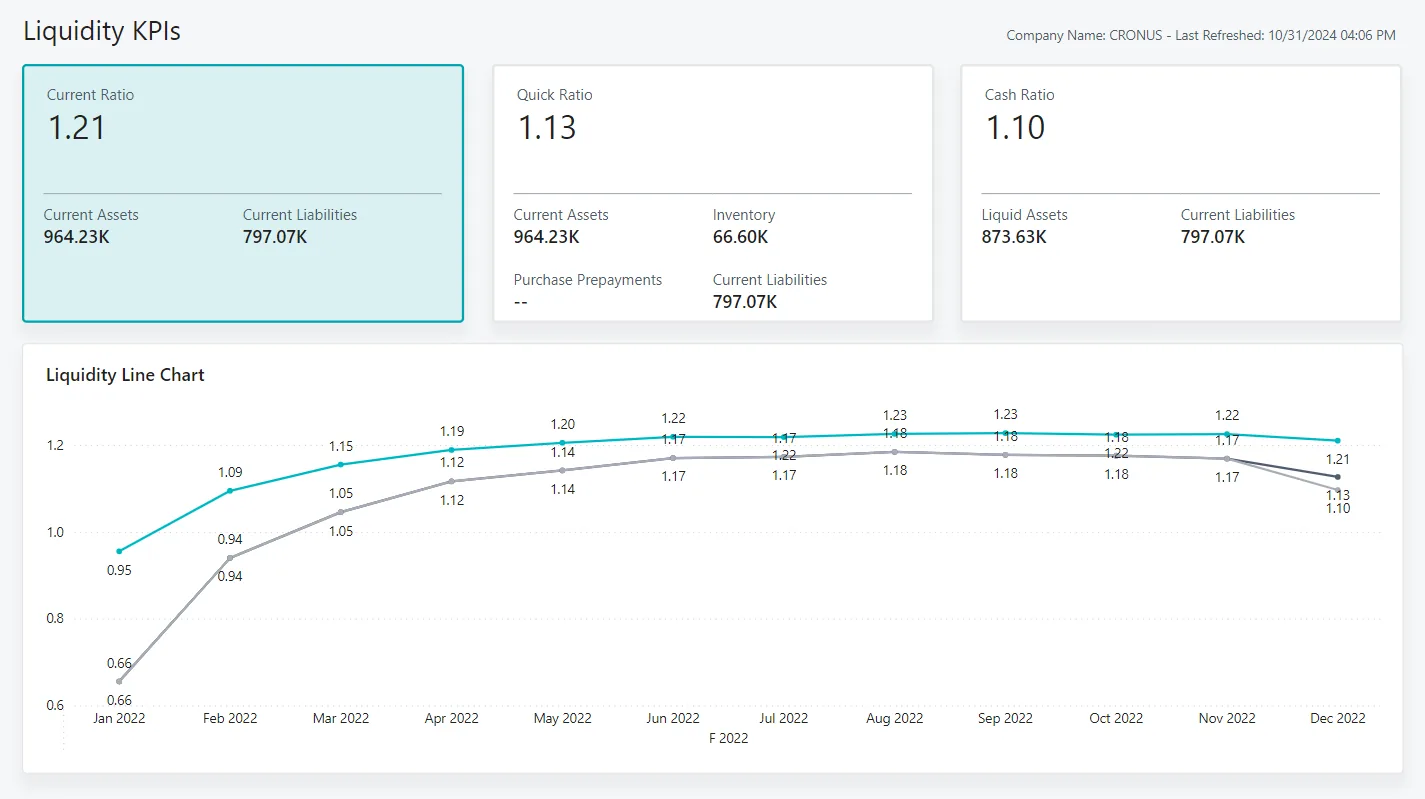
We give finance and IT a simple monitoring view so problems surface before customers notice them.
We do not promise percentages, but these are the outcomes UAE teams typically look for when they integrate Dynamics 365.
Orders, receipts and payments arrive in Dynamics 365 automatically, freeing staff for exceptions and customer work.
Bank lines import in a consistent format and match against open invoices using agreed rules.
Sales teams and online stores see availability that reflects the latest warehouse movements.
A tested route from posted sales invoices to your chosen Accredited Service Provider reduces last-minute risk.
Explore connected services and platform pages.
We configure the system for the rules UAE businesses report against, and test it before go-live.
General information, not tax or legal advice. Confirm current requirements with the FTA, MOHRE or your advisor. See all UAE compliance guides.
On-site workshops in Dubai, Abu Dhabi and Sharjah, and remote or on-site delivery across the Northern Emirates and free zones.
Official sources and references
Facts on this page were checked against these sources in October 2026. Rules change, so confirm current requirements before acting.
Still have a question? Our consultants are happy to help.
Ask an ExpertYes. Microsoft offers a Shopify connector for Business Central, and other platforms such as WooCommerce or Magento can be connected through the Business Central APIs or middleware. We decide which system owns prices, stock and customers before connecting them.
Power Automate suits low to moderate volumes and business-user-friendly flows such as approvals or notifications. High-volume order, stock or payment traffic usually belongs in Azure Logic Apps or Functions, where retries, queues and monitoring are stronger. Many projects use both.
We can set up bank statement imports using the formats your bank provides and, where the bank offers host-to-host or API services, automate the exchange. Payment file formats differ by bank, so we confirm specifications with your relationship manager early.
Under the UAE model, invoices are exchanged in the PINT AE format through an Accredited Service Provider. We map posted invoices from Dynamics 365 to the ASP's interface and handle acknowledgements. Timelines have changed before, so check the latest Ministry of Finance and FTA guidance.
Dual-write keeps Finance and Supply Chain Management records in near real time with Dataverse, which Dynamics 365 Sales and Power Apps use. It is useful if you run both the CRM apps and Finance and Supply Chain. Business Central customers usually use its own Dataverse integration instead.
No. We regularly take over and stabilize integrations built by other partners, after a short review of the code, credentials and documentation.
Related Solutions
Related Industries
Related ERP Platforms
Share your current systems and we will outline which flows to connect first and how to monitor them.
Dubai, United Arab Emirates