L
O
A
D
I
N
G


Zoho, Odoo, ERPNext, Dynamics 365 and custom ERP, delivered by one accountable team.

We adjust Zoho apps with custom modules, layouts, Blueprint processes, Deluge functions and document templates, using supported tools so your setup keeps working through Zoho updates.
Zoho customisation in the UAE uses Zoho's supported tools, including custom fields and modules, layouts, validation and workflow rules, Blueprint, Deluge functions and document templates, to fit Zoho CRM, Books and Inventory to your process. Typical requests are bilingual Arabic and English tax invoices, discount approval steps and tender reference fields. Supported customisations generally carry through Zoho updates.
Zoho customization in the UAE usually starts when a business has been using Zoho CRM or Zoho Books for a while and finds the standard setup almost right but not quite. Sales needs a field for tender reference numbers. Finance wants a bilingual tax invoice that matches the company letterhead. Operations wants a quotation that cannot be sent until a manager approves the discount.
Zoho provides a deep set of supported customization tools: custom fields and modules, page layouts, validation rules, workflow rules, Blueprint for guided processes, custom buttons, Deluge custom functions, client scripts and widgets in CRM, and custom templates in Books and Inventory. Used well, they let you shape the apps closely around your process. Used carelessly, they create clutter that slows users down.
We customize with a light touch: change what genuinely improves the process, document every change, and avoid workarounds that fight the product. Where a need goes beyond configuration, we may suggest a Zoho Creator app instead. For automation-heavy needs, our Zoho automation page explains workflow options in more depth.

The products we configure, integrate and support on projects like this one.






Product names and logos are trademarks of their respective owners and are shown only to identify the software we implement.
These are the requests we hear most often from UAE companies already on Zoho.
Key details such as project location, tender number or trade license expiry are typed into notes. Nobody can filter or report on them.
Steps like credit checks or technical review happen only if someone remembers. Deals and orders move forward without the required checks.
Default quotation and invoice templates lack Arabic text, bank details, stamp areas or the layout your customers expect in the UAE market.
One crowded layout serves sales, support and finance. Users scroll past dozens of irrelevant fields and data quality drops.
A previous consultant wrote scripts and workflows without documentation. Some fire twice, some fail silently, and the team is afraid to change anything.
We treat every change as part of a design, not a one-off tweak.
We review existing fields, layouts, workflows, scripts and integrations, and list what is used, what is unused and what is broken.
We write down each requested change, the reason for it, who benefits and how success will be checked, then prioritize together.
We choose the simplest supported option: a layout rule before a script, a Blueprint before a chain of workflows, a template before a custom widget.
Zoho CRM offers a sandbox on supported editions. We build and test there before deploying, so live users are not disrupted.
Every custom field, rule and function is listed with its purpose, and scripts carry comments your team or a future developer can follow.
The exact list depends on scope, but most engagements include these items.
Customization projects range from a few days of template work to several weeks of process redesign. These are typical ranges.
Durations are typical ranges; your plan is agreed after discovery.
Review of current setup and a prioritized list of changes.
Field lists, layout mockups, process diagrams and template drafts for approval.
Configuration, scripting and testing, ideally in a sandbox.
Release to live users with short sessions on what changed.
Monitoring for script errors and quick adjustments from user feedback.
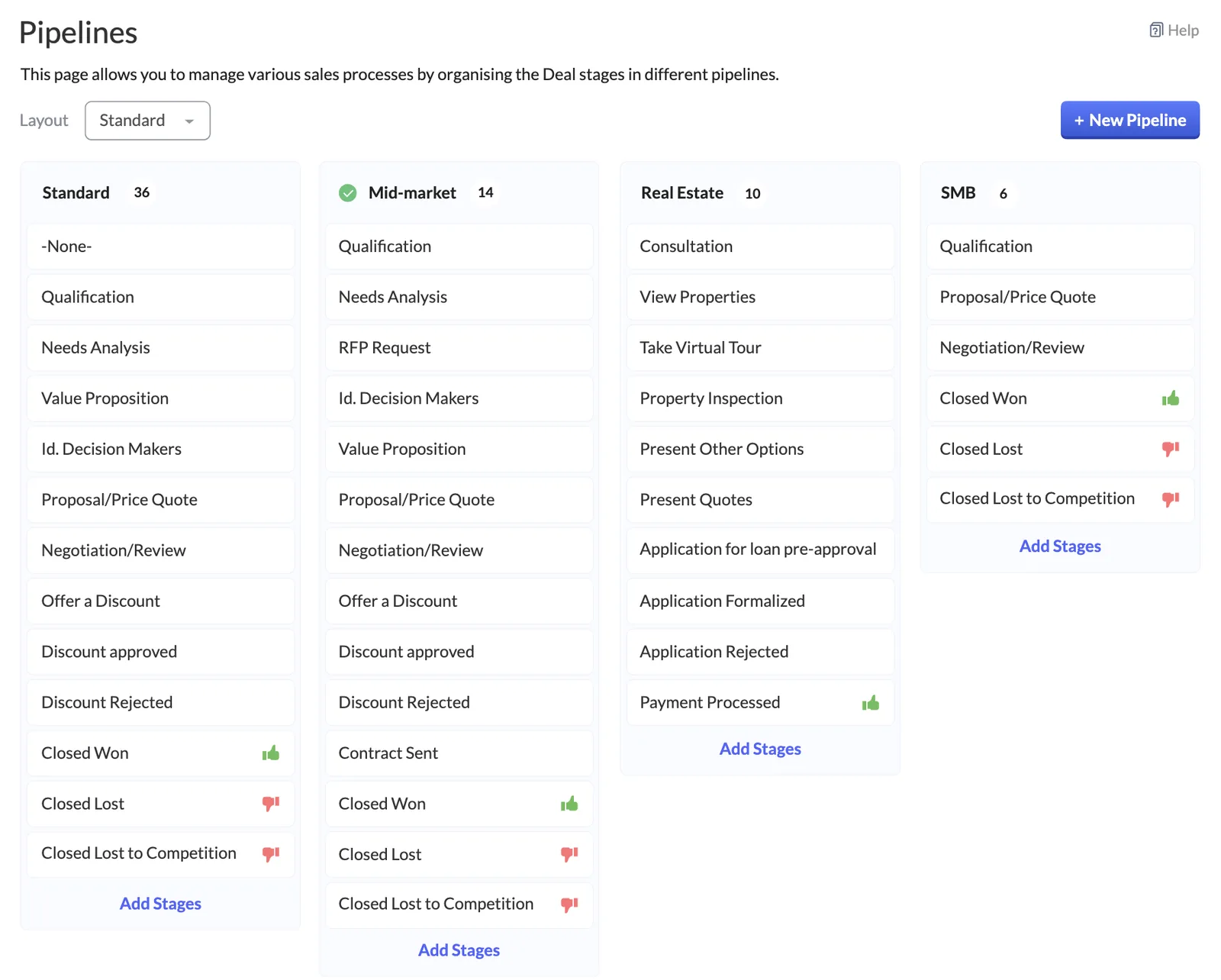
Customization shows up most clearly in the CRM screens your sales team uses every day.
Practical outcomes, described without invented figures.
Information moves out of notes into structured fields, so managers can filter, report and forecast on it.
Blueprint and validation rules make required steps happen every time rather than only when someone remembers.
Professional bilingual templates with correct VAT details reduce back-and-forth with customers and their accounts teams.
Documented changes mean your admin can adjust the system without fear of breaking hidden logic.
Explore related services and apps.
We configure the system for the rules UAE businesses report against, and test it before go-live.
General information, not tax or legal advice. Confirm current requirements with the FTA, MOHRE or your advisor. See all UAE compliance guides.
On-site workshops in Dubai, Abu Dhabi and Sharjah, and remote or on-site delivery across the Northern Emirates and free zones.
Official sources and references
Facts on this page were checked against these sources in October 2026. Rules change, so confirm current requirements before acting.
Still have a question? Our consultants are happy to help.
Ask an ExpertCustomizations built with Zoho's supported tools, such as fields, layouts, Blueprint and Deluge, generally carry through updates. Problems usually come from unsupported workarounds, which we avoid.
Yes. We design bilingual templates that show Arabic and English labels, your TRN, the customer TRN where applicable and VAT breakdowns. Confirm required wording with your tax advisor.
Limits on custom modules, fields, workflows and functions vary by edition. We check your current plan against the requirements and tell you if an upgrade is actually needed.
Yes. We audit existing scripts and workflows, remove what is unused, fix what is broken and document what remains.
If the process needs its own data structure, many forms and screens, or external portal users, Creator is often the better choice than stretching CRM or Books.
Both. Some clients need a single template or Blueprint, others need a full redesign. We scope each request separately.
Related Solutions
Related Industries
Related ERP Platforms
Send us your list of changes or your current pain points, and we will suggest the cleanest way to deliver them.
Dubai, United Arab Emirates