L
O
A
D
I
N
G


Zoho, Odoo, ERPNext, Dynamics 365 and custom ERP, delivered by one accountable team.

From the first WhatsApp enquiry to a VAT-correct quote and a synced invoice in Zoho Books, we set up Zoho CRM so your pipeline reflects reality.
Zoho CRM in the UAE should be configured around how your team actually sells: leads captured from WhatsApp, Instagram, web forms and DWTC exhibitions, deal stages that match your cycle, Blueprint rules that enforce each step, and quotes in AED with 5% VAT. Tax invoices are best issued from Zoho Books, which syncs with CRM so sales staff can see invoice status.
Zoho CRM UAE projects usually start with a familiar problem: leads arrive through WhatsApp, Instagram, website forms, exhibitions at DWTC and walk-ins, and nobody can say how many became customers. Salespeople keep their own Excel lists, quotes are made in Word, and managers learn about a lost deal weeks later. Zoho CRM gives that process a single home.
Out of the box, Zoho CRM handles leads, contacts, accounts, deals, activities and quotes. The real value comes from configuration: deal stages that match your sales cycle, Blueprint rules that stop a deal from moving forward without a signed quote, assignment rules for Arabic- and English-speaking reps, and a clean handover to Zoho Books so the quote you sent becomes the tax invoice you issue.
As a Zoho Premium Partner in Dubai, we configure Zoho CRM as part of a wider Zoho setup or on its own. If you want the full project view, see Zoho CRM implementation, or compare options on our CRM software UAE page.

The products we configure, integrate and support on projects like this one.






Product names and logos are trademarks of their respective owners and are shown only to identify the software we implement.
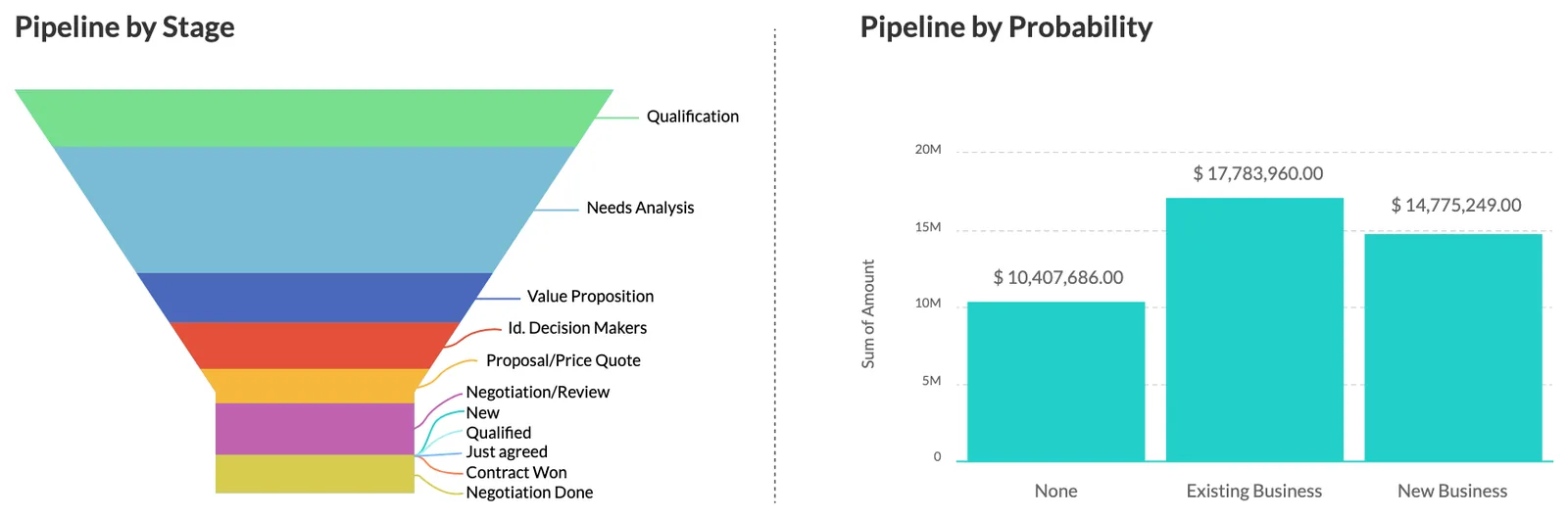
Managers get one screen for the pipeline, activity and forecast, filtered by team, emirate or product line.
We map your real sales steps into Zoho CRM stages and Blueprint transitions. A common B2B flow looks like this.
One shared database: every step updates stock, finance and reports in real time.
Zoho CRM has many features. These are the ones that matter most for UAE companies.
Web forms, import rules, duplicate checks and assignment by territory, language or product.
Separate pipelines for projects, retail, distribution or rentals, each with its own stages.
Enforced process steps with mandatory fields, so a deal cannot jump to Won without a quote and approval.
Quotes in AED or other currencies with VAT, discounts and approval limits, using price books per customer group.
Automated follow-ups, reminders and custom functions for rules standard settings cannot handle.
Data visibility by emirate, branch or team, so reps see only their accounts.
Built-in reports, dashboards and forecast targets per rep or team.
Check-ins, call logs and quote approvals from the phone app for field sales.
Most integrations use native Zoho connectors; others use Zoho Flow or the API.
CRM is not where VAT returns are prepared, but it is where many tax-relevant details start. Confirm tax treatments with your tax advisor.
Quotes show the 5% VAT amount and the correct tax treatment, so the figures match the tax invoice later raised in Zoho Books.
We make the customer TRN and emirate fields part of account creation, because tax invoices to VAT-registered customers need them.
UAE e-invoicing under the PINT AE specification needs accurate buyer details. Clean CRM account data reduces rejected invoices later. Check the latest Ministry of Finance / FTA guidance on fields and dates.
UAE federal data protection law sets rules on personal data. We configure roles, field permissions and consent fields so you can apply your own policy.
General information, not tax or legal advice. Rules change; confirm current FTA, MOHRE and Ministry of Finance guidance with your advisor.
These are the lessons that save the most rework.
More on Zoho CRM services and alternatives.
We configure the system for the rules UAE businesses report against, and test it before go-live.
General information, not tax or legal advice. Confirm current requirements with the FTA, MOHRE or your advisor. See all UAE compliance guides.
On-site workshops in Dubai, Abu Dhabi and Sharjah, and remote or on-site delivery across the Northern Emirates and free zones.
Official sources and references
Facts on this page were checked against these sources in October 2026. Rules change, so confirm current requirements before acting.
Still have a question? Our consultants are happy to help.
Ask an ExpertZoho CRM supports Arabic in its interface and can store Arabic text in records. Quote and email templates can be designed with Arabic content. We test templates with your actual customer names and addresses before go-live.
Zoho CRM creates quotes and can hold invoice records, but for UAE VAT we recommend issuing tax invoices from Zoho Books, which has the UAE VAT setup and return reporting. CRM and Books sync so sales see invoice status.
Yes, through WhatsApp Business integrations available for Zoho CRM. Conversations can be logged against leads and contacts. The exact setup depends on your WhatsApp Business account and the connector chosen.
Yes. A company selling both projects and retail products can run separate pipelines with their own stages, required fields and reports. Managers can still see a combined forecast. We usually recommend no more pipelines than you have genuinely different sales processes.
We collect contacts and accounts from Excel, Outlook, phones and old systems, remove duplicates, standardize emirate and phone formats and import them with owners assigned. Open deals are brought in at their current stage so the pipeline is accurate from day one.
A standard sales pipeline with Books integration is often live in 3-6 weeks. Multiple pipelines, custom modules and integrations extend that, depending on data quality and decision speed.
Related Solutions
Related Industries
Related ERP Platforms
Share how your team sells today, and we will show you how it would look in Zoho CRM.
Dubai, United Arab Emirates