L
O
A
D
I
N
G


Zoho, Odoo, ERPNext, Dynamics 365 and custom ERP, delivered by one accountable team.

Once ERPNext is live, someone has to answer user questions, fix errors, apply updates and watch the server. We provide that support from Dubai under a clear monthly agreement.
ERPNext support in the UAE covers functional help, such as why an invoice will not submit or a report does not tie out, and technical work including error investigation, scheduler monitoring, backups and tested updates. UAE ERP Experts supports sites it implemented and sites built by others, starting inherited systems with a health check, on Frappe Cloud or self-hosted servers.
ERPNext support in the UAE is rarely about one dramatic outage. It is the steady stream of small things: a sales invoice that will not submit because of a validation rule, a stock balance that looks wrong after a backdated entry, a background job that stopped sending emails, a VAT report that does not match the ledger. Left alone, these pile up until users start keeping side spreadsheets again.
Our support desk handles both functional and technical requests. Functional support covers how to do something in ERPNext and why a document behaved the way it did. Technical support covers errors, scheduler and worker health, backups, updates and the server or Frappe Cloud site underneath.
We support ERPNext sites we implemented and sites built by other vendors or in-house teams. For inherited systems we start with a health check, because it is hard to promise response times on a site nobody has documented. If you need bigger changes, our ERPNext customization team picks those up as separate pieces of work.

The products we configure, integrate and support on projects like this one.
 ERPNext
 Frappe Helpdesk
 Frappe HR
 Frappe Framework
Product names and logos are trademarks of their respective owners and are shown only to identify the software we implement.
These requests make up most of the tickets we see from UAE businesses running ERPNext.
Negative stock settings, closed accounting periods, missing exchange rates or custom validation scripts can block a submit. Users see a red message and stop working until someone explains it.
Accounts receivable, stock value and the general ledger can disagree after backdated entries or cancelled documents. We trace the difference to the specific vouchers and correct the process.
Emails, auto-repeat invoices and scheduled reports depend on background workers and the scheduler. When they stop, nothing visibly breaks at first, which is why monitoring matters.
Minor updates include fixes, but applying them on a customized site without testing is risky. Many companies simply stop updating, and problems accumulate.
Often a single internal admin knows how ERPNext is configured. When that person leaves or goes on leave, the company needs outside cover quickly.
A predictable process matters more than heroics. This is how a request moves from report to resolution.
We review versions, apps, custom code, error logs, backups and user roles. You get a short list of risks to fix before regular support starts.
Users raise tickets by email or through a helpdesk portal with the document name and a screenshot. Each ticket gets a priority based on how many people are blocked.
Functional questions are answered with steps or a short screen recording. Technical issues are reproduced on a test copy where possible before any fix touches live data.
Minor updates are tested on staging and applied in an agreed window, so fixes reach you without surprise changes in the middle of a busy week.
We share ticket trends, recurring causes and suggested fixes, such as a training session for one team or a validation rule that stops the same mistake.
Exact scope is agreed per client, but most plans include these items.
For most sites the move into regular support takes a few weeks. Sites with heavy undocumented customization take longer to onboard.
Durations are typical ranges; your plan is agreed after discovery.
Access set up, site reviewed, risks and quick fixes listed.
Backups fixed, failed jobs cleared and urgent errors resolved before routine support begins.
Key configuration, custom code and integrations written down so any of our consultants can pick up a ticket.
Tickets, scheduled updates and a monthly review against the agreed plan.
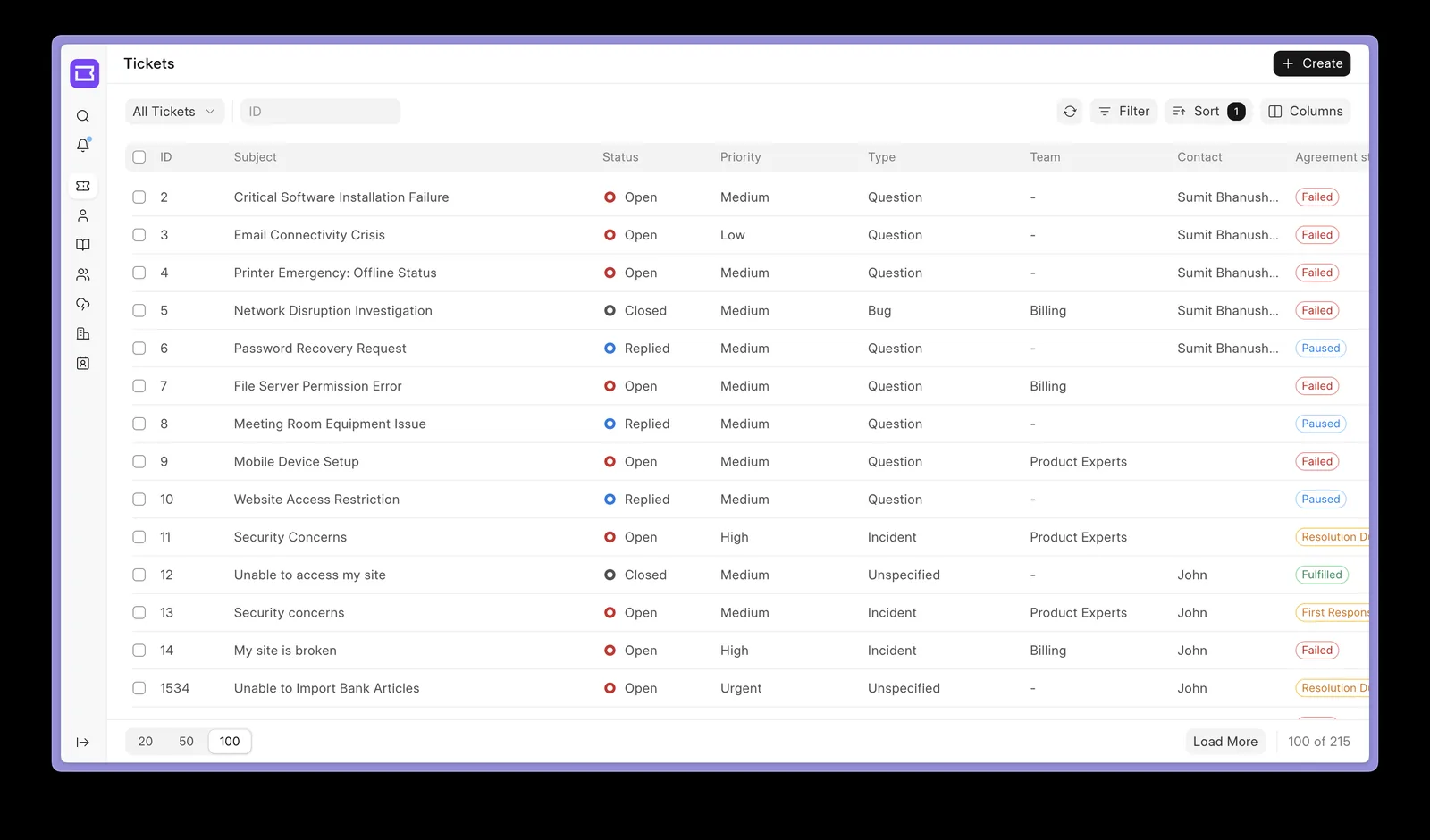
Clients can see their tickets, status and response times rather than chasing updates by phone.
Good support shows up as fewer interruptions rather than in a headline number.
When questions get answered quickly, people keep transactions in ERPNext instead of side sheets.
Monthly reviews turn recurring tickets into fixes, training or validation rules.
Testing on staging first means fixes arrive without breaking custom work.
Documented configuration means your system no longer depends on one internal admin.
Support works best alongside training, upgrades and well-built customizations.
We configure the system for the rules UAE businesses report against, and test it before go-live.
General information, not tax or legal advice. Confirm current requirements with the FTA, MOHRE or your advisor. See all UAE compliance guides.
On-site workshops in Dubai, Abu Dhabi and Sharjah, and remote or on-site delivery across the Northern Emirates and free zones.
Official sources and references
Facts on this page were checked against these sources in October 2026. Rules change, so confirm current requirements before acting.
Yes. We start with a health check so we understand the custom code, integrations and server setup. After that, inherited sites are supported the same way as our own.
Yes. On Frappe Cloud we work within the platform's site management tools. On self-hosted servers we also look after the operating system, database, backups and bench updates if that is in scope.
Small items such as a print format change, a new custom field or a report filter can usually be done within plan hours. Larger changes like new workflows or integrations are quoted separately.
We help finance teams check that the VAT 201 report, tax templates and ledger agree before they file through EmaraTax. We do not give tax advice, so treatment questions should go to your tax advisor.
Standard cover follows UAE working hours from our Dubai team. Extended cover for critical periods such as year-end or a stock count can be arranged in advance.
Related Solutions
Related Industries
Related ERP Platforms
Tell us how your ERPNext site is hosted and who uses it, and we will propose a health check and a support plan.
Dubai, United Arab Emirates