
L
O
A
D
I
N
G


Zoho, Odoo, ERPNext, Dynamics 365 and custom ERP, delivered by one accountable team.

Long credit terms and post-dated cheques are normal in the UAE. An ERP gives your credit controller the data to collect on time without upsetting good customers.
An ERP improves UAE receivables by blocking orders for customers over their credit limit or overdue, tracking post-dated cheques in a PDC register until they clear, allocating lump-sum receipts to invoices, and sending scheduled reminders and statements. This gives credit controllers accurate ageing and a realistic weekly cash view despite the 60 to 120 day terms common in the UAE.
An ERP for accounts receivable in the UAE has to cope with a credit culture where 60 to 120 day terms are common, many customers still pay by post-dated cheque, and a single distributor account can carry dozens of open invoices, credit notes and on-account receipts at once. A plain invoicing tool tells you what was billed. It does not tell you what is genuinely collectable this month.
The credit controller's week usually runs on an ageing report exported to Excel, a PDC folder in the safe, WhatsApp messages from salespeople promising that a customer will pay next week, and phone calls to customers who say they never received the invoice. Sales keeps delivering to accounts that are already over limit because nobody stops the order.
This page covers the receivable side: credit limits, invoicing, collections, PDCs, ageing and disputes. For the supplier side see ERP for accounts payable, and for matching receipts to invoices in detail see payment reconciliation.

These problems show up in almost every trading, distribution and services business that runs AR on spreadsheets.
Sales orders are released without checking the customer's balance or overdue invoices. The exposure grows until someone in finance notices at month end.
Post-dated cheques are logged in a notebook or Excel. When a cheque is returned, the invoice already looks paid and the follow-up starts weeks late.
Customers pay lump sums by bank transfer without quoting invoice numbers. The money sits on account, so ageing overstates what is overdue and reminders go to customers who have paid.
A missing delivery note, a price difference or a damaged item holds up an entire invoice. Without a dispute flag, the controller keeps chasing the wrong thing.
Contractors and project businesses carry retention receivables for months. If retention is mixed into normal ageing, it looks overdue when it is not yet due.
Owners ask, 'How much will we collect this month?' and the answer depends on who prepared which spreadsheet.
A controlled order-to-cash process puts the credit check before delivery and the follow-up on a schedule, not on memory.
One shared database: every step updates stock, finance and reports in real time.
Receivables quality depends on clean data from sales and delivery as much as on the finance module itself.
Credit limits, payment terms and blocking rules per customer. Our credit limit control page explains the rules in detail.
Sales orders and signed delivery notes, so invoices are backed by proof of delivery.
Tax invoices with TRN, VAT per line, and tax credit notes for returns and price corrections.
Cash, card, transfer and cheque receipts, with a PDC register tracking deposit and clearance.
Reminder levels, call notes, promised payment dates and escalation to sales managers.
Statements of account by email or portal, showing invoices, credit notes, receipts and PDCs in hand.
Salespeople see overdue balances in the CRM before they promise the next order.
Online payment links on invoices and reminders for card or wallet payment.
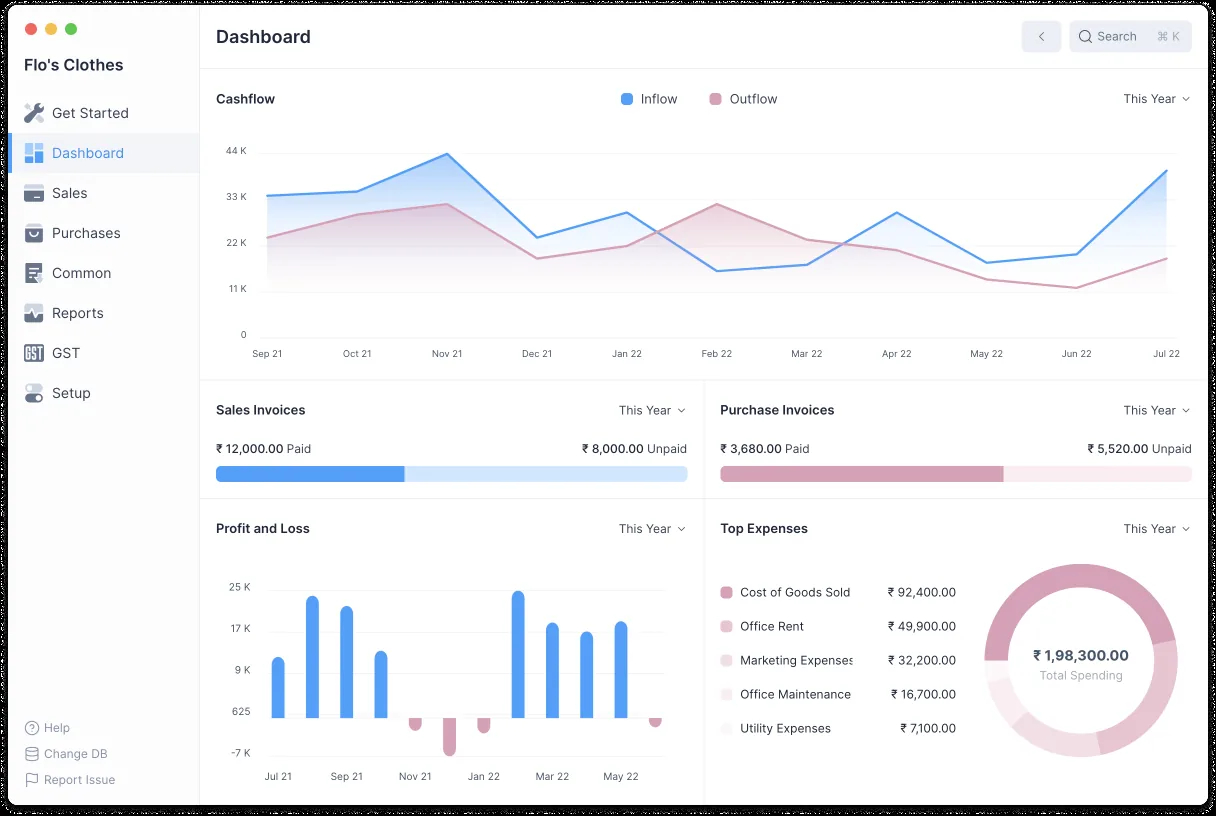
The AR dashboard should answer two questions every morning: who owes us money that is due, and what will come in this week.
The core features are similar. The differences are in credit control rules, follow-up automation and how PDCs are modeled. Confirm for your edition.
| Zoho | Odoo | ERPNext | Dynamics 365 | |
|---|---|---|---|---|
| Credit limits | Credit limit per customer in Zoho Books and Zoho Inventory | Credit limit warnings on customers (setting in Accounting) | Credit limit per customer and company; can block sales orders | Credit limit warnings on sales documents in Business Central |
| Payment reminders | Automated reminders before and after due date | Follow-up levels with email, letter and actions | Dunning and scheduled Process Statement of Accounts | Reminder terms and levels; finance charge memos |
| PDC tracking | Usually configured with custom fields or a separate PDC account | Often handled through a localization module or configuration | Reference date and clearance date on Payment Entry | Journal setup or extension, depending on the partner design |
| Customer portal | Client portal to view and pay invoices | Customer portal with invoices and online payment | Web portal for invoices and orders | Usually via Power Pages or a third-party portal |
| Ageing reports | AR ageing summary and details | Aged Receivable report | Accounts Receivable and Summary reports | Aged Accounts Receivable report |
| Online payments | Payment gateway integrations available | Payment providers built in | Payment Request with gateway integrations | Typically through an extension or gateway app |
Feature names and availability vary by plan and version.
These connections help receipts arrive faster and get matched without manual work.
Receivables touch VAT and e-invoicing directly. Confirm specific treatments with your tax advisor.
Invoices to VAT-registered customers need the prescribed tax invoice fields, and returns or price changes need tax credit notes. See ERP for VAT compliance for setup.
UAE VAT allows output tax relief on bad debts only when specific conditions are met, including written-off debts and notice to the customer. The ERP should keep the write-off evidence; confirm conditions with your tax advisor.
Under the planned PINT AE model, B2B invoices will be exchanged through Accredited Service Providers, with phased dates from 2027. Check the latest MoF and FTA guidance for your phase.
Invoices, credit notes and receipts generally must be kept for at least 5 years. Keeping signed delivery notes attached to invoices also helps in disputes.
General information, not tax or legal advice. Rules change; confirm current FTA, MOHRE and Ministry of Finance guidance with your advisor.
These are the outcomes a disciplined AR process aims for.
Orders stop when limits or overdue days are exceeded, so risk does not grow quietly.
Receipts are allocated to invoices, so the overdue list shows real overdue amounts.
Scheduled reminders and statements mean nobody is forgotten. See payment reminder automation.
PDCs and promised dates give finance a realistic view of what will come in each week.
Most of the effort goes into cleaning customer data and open items. Durations are typical, not fixed.
Durations are typical ranges; your plan is agreed after discovery.
Agree credit limits, terms, blocking rules and reminder levels with sales and finance.
Remove duplicate customers, confirm TRNs and load open invoices, PDCs and unapplied receipts.
Set up credit checks, reminder templates, statement layouts and payment links, then test with real cases.
Coach the credit controller and sales team through the first month-end collection cycle.
We configure the system for the rules UAE businesses report against, and test it before go-live.
General information, not tax or legal advice. Confirm current requirements with the FTA, MOHRE or your advisor. See all UAE compliance guides.
On-site workshops in Dubai, Abu Dhabi and Sharjah, and remote or on-site delivery across the Northern Emirates and free zones.
Official sources and references
Facts on this page were checked against these sources in October 2026. Rules change, so confirm current requirements before acting.
Still have a question? Our consultants are happy to help.
Ask an ExpertThe cheque is recorded on receipt with its date, bank and number. It stays in a PDC account until the deposit date, then moves to the bank when cleared. Returned cheques reopen the invoice automatically, so follow-up starts the same day.
Yes. All four platforms we implement can warn or block when a customer exceeds a credit limit, and most can be configured to check overdue days too. A manager override with a reason keeps the rule practical.
Yes, through the WhatsApp Business Platform via an approved provider, using pre-approved templates and only to customers who have opted in. Email remains the default for statements.
AR is the whole process of credit, invoicing and collection. A statement is one output of it. Our customer statement page covers layouts and scheduling.
Retention is booked to a separate receivable with its own due date, usually tied to completion or the end of the defects liability period. It then shows separately in ageing instead of inflating overdue balances.
Related Solutions
Related Industries
Related ERP Platforms
Tell us how you invoice and collect today and we will show you a receivables setup that fits your customers.
Dubai, United Arab Emirates










