
L
O
A
D
I
N
G


Zoho, Odoo, ERPNext, Dynamics 365 and custom ERP, delivered by one accountable team.

Buyers in the UAE spend much of their day typing POs from emails and chasing suppliers for delivery dates. Let the ERP create, route and follow up purchase orders by rule.
Purchase order automation lets the ERP create draft POs from reorder rules, approved requisitions or back-to-back sales orders, using the preferred supplier, agreed price and lead time. Drafts merge by supplier, pass through an approval matrix with budget checks, go to suppliers by email or portal, and trigger alerts when confirmations or GRNs are missing. UAE buyers then focus on negotiation.
Purchase order automation UAE procurement teams adopt usually starts with a simple observation: most POs are predictable. The same consumables, spare parts and trading lines are bought from the same suppliers every few weeks. Yet buyers still build each PO by hand from a storekeeper's email, an Excel reorder sheet or a site engineer's phone call, then print it for a signature and email the PDF to the supplier.
An automated flow lets the ERP do the predictable part. Reorder rules and approved purchase requisitions create draft POs with the preferred supplier, last agreed price and lead time. Drafts are grouped by supplier, routed through the approval matrix, sent to the supplier by email or portal, and then tracked: if the supplier does not confirm, or the expected date passes without a goods received note (GRN), the buyer is alerted.
The buyer's job shifts from typing to negotiating and handling exceptions. This page covers the automation layer; the wider document lifecycle is on our purchase order management page, and the approval policy itself on purchase approval in ERP.

Problems we hear from procurement managers, storekeepers and finance controllers.
The reorder sheet is updated weekly, so a fast-moving item runs out midweek. A rush order follows, often at a higher price or with air freight.
A buyer uses an old supplier or ignores the price agreed in the annual contract. The variance only appears when the invoice arrives.
POs wait for the general manager, who is travelling. Suppliers will not release goods without a signed PO, and the site waits.
POs are emailed and forgotten. Nobody notices the supplier never confirmed the date until the goods are late.
Project and department POs are not checked against budget at creation, so overspends surface at month end.
Approval remains a human decision for anything outside agreed rules.
One shared database: every step updates stock, finance and reports in real time.
A starting set we tailor with your procurement manager. Limits are your policy, not ours.
| Trigger | Condition | Action | Who is notified |
|---|---|---|---|
| Stock falls below reorder level | Item has a preferred supplier | Create draft PO for reorder quantity | Buyer |
| Purchase requisition approved | Item or category under a supplier agreement | Convert to PO at agreed price | Buyer |
| Several drafts for the same supplier | Same delivery warehouse | Merge into one PO | Buyer |
| Sales order confirmed | Item set to back-to-back or drop-ship | Create linked PO | Buyer and salesperson |
| PO submitted | Amount within buyer's limit and on budget | Approve automatically | None (logged) |
| PO submitted | Amount above limit, new supplier, or budget exceeded | Route to procurement manager, then finance or GM | Approvers |
| PO approved | Supplier has email or portal access | Send PO and request acknowledgment | Supplier |
| PO sent | No supplier confirmation within the agreed days | Reminder to supplier; alert buyer | Buyer |
| Expected delivery date passed | No GRN posted | Flag as late; update projected stock | Buyer and storekeeper |
Available in different forms across Zoho, Odoo, ERPNext and Dynamics 365.
Minimum and maximum levels or forecast-based rules create draft POs per warehouse. Our page on automatic reordering explains how to set them.
Blanket orders, price agreements and vendor price lists make sure drafts use the negotiated price and lead time.
Approvals depend on amount, category, project and whether the supplier is new. Delegation rules cover absences.
PO lines check against department or project budgets and either warn or block, depending on your policy.
POs go out automatically by email or portal, with reminders for missing acknowledgments and delivery dates.
GRNs are posted against the PO so partial deliveries, backorders and later invoice matching are handled correctly.
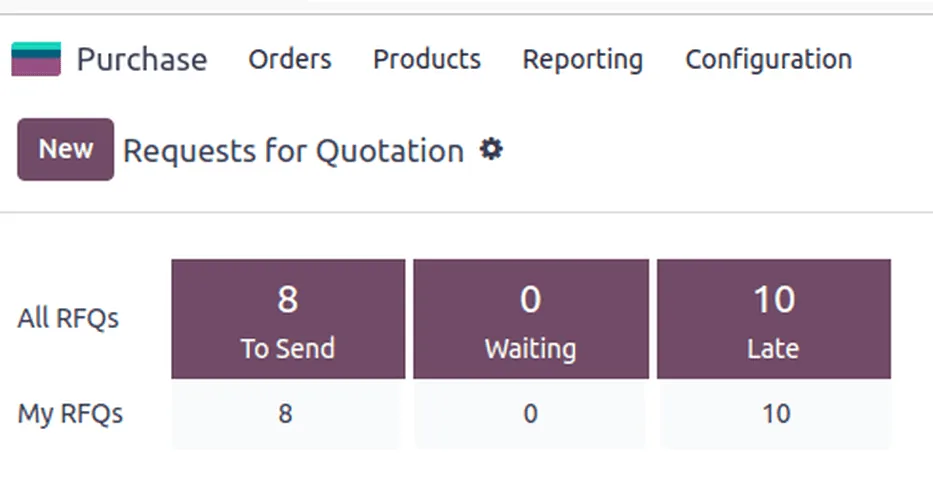
The buyer starts the day with what needs attention.
Summaries for configuration; confirm tax treatment with your tax advisor.
POs should carry the right tax code: standard 5% local supplies, reverse charge on imports of goods and services where applicable, and designated-zone transactions where special rules may apply. Correct codes on the PO flow into the bill.
Import POs often need customs duty, freight and clearing charges added as landed costs at receipt so stock value is right.
Supplier TRN, trade license and bank details should be verified before the first automated PO; vendor onboarding automation handles that step.
Keep PO, approval, supplier confirmation and GRN together. Tax records generally must be kept for at least 5 years, and auditors will test approval limits.
General information, not tax or legal advice. Rules change; confirm current FTA, MOHRE and Ministry of Finance guidance with your advisor.
Outcomes depend on how complete your item, supplier and budget data is.
Reorders are created when stock crosses the level, not when someone next opens the spreadsheet.
POs pull prices from supplier agreements, so variances are exceptions rather than routine.
Routine POs are approved by rule and the rest reach approvers on mobile with full context.
Accurate POs and GRNs make later invoice matching straightforward for accounts payable.
We configure the system for the rules UAE businesses report against, and test it before go-live.
General information, not tax or legal advice. Confirm current requirements with the FTA, MOHRE or your advisor. See all UAE compliance guides.
On-site workshops in Dubai, Abu Dhabi and Sharjah, and remote or on-site delivery across the Northern Emirates and free zones.
Official sources and references
Facts on this page were checked against these sources in October 2026. Rules change, so confirm current requirements before acting.
Still have a question? Our consultants are happy to help.
Ask an ExpertIt can create drafts, and for low-value repeat items within agreed prices it can approve and send them. Most UAE companies keep a buyer review on new suppliers, imports and capital purchases.
The PO and GRN are what supplier invoices are matched against. Once they are reliable, invoice approval automation can auto-approve matched bills.
Odoo's purchase app with replenishment rules is strong for traders and manufacturers (see Odoo Purchase). ERPNext offers material requests and auto-reorder, Zoho Inventory supports reorder alerts and PO approvals, and Dynamics 365 suits complex multi-entity procurement. We implement all four.
Forecast-based reorder suggestions and supplier scoring are available on some platforms or through add-ons. We treat them as suggestions a buyer accepts; see AI purchase automation.
Site material requests become requisitions linked to the project and BOQ line, then POs once approved, with budget checks against the project cost code.
A focused rollout often takes 4-8 weeks, depending on how many reorder rules and supplier agreements need to be set up and tested.
Related Solutions
Related Industries
Related ERP Platforms
Tell us how POs are created and approved today, and we will map the rules your ERP can run.
Dubai, United Arab Emirates










