
L
O
A
D
I
N
G


Zoho, Odoo, ERPNext, Dynamics 365 and custom ERP, delivered by one accountable team.

Give storekeepers, site engineers and department heads one place to request what they need, and give buyers a clean queue to turn requests into POs.
An ERP for purchase requisition in the UAE replaces paper PR books, WhatsApp messages and Excel attachments with one request form. The requester picks items from the master list, the system checks stock and budget, the department head approves, and buyers convert approved lines into RFQs or purchase orders. Odoo, ERPNext and Dynamics 365 support requisitions natively; Zoho often uses a Zoho Creator app.
A purchase requisition (PR) is the internal request that starts a purchase: a site engineer needs rebar, a storekeeper sees cable below reorder level, the IT lead needs five laptops. An ERP for purchase requisition in the UAE replaces the paper PR book, the WhatsApp message to the buyer and the email with an Excel attachment with one digital form that carries item, quantity, required date, cost center and reason.
The requisition stage is where most purchasing delays start. Buyers receive requests in different formats, with vague descriptions like 'pipes for villa 12', and spend time clarifying instead of sourcing. Requesters have no idea whether their PR was approved, ordered or forgotten, so they chase by phone or buy locally with petty cash.
This page focuses on capturing, checking, consolidating and converting requisitions. Approval rules on the PO itself are covered in ERP for purchase approval, and the PO lifecycle after conversion in purchase order management.

Each of these adds days to the purchase cycle or money to the bill.
Buyers receive PRs on WhatsApp, email, phone and paper. Some get lost, and there is no single list of what is pending.
Free-text requests like 'paint for office' force the buyer to call back for brand, size and quantity. The item master is not used, so purchase history per item is useless.
Requesters do not see stock in other warehouses or sites. The company buys new material while the same item sits in the Al Quoz store or another project's container.
Five departments raise separate requests for stationery or consumables in the same week. Each becomes its own PO, with separate delivery charges and more bills to process.
When requisitions do not carry a project or department, purchases cannot be charged correctly and budget reports are wrong.
Nobody can see whether a PR is waiting for approval, sourcing or delivery. Urgent requests are escalated by phone and normal ones wait too long.
The requester raises the PR, the system checks stock and budget, the department head approves, and the buyer converts approved lines into RFQs or POs.
One shared database: every step updates stock, finance and reports in real time.
Requisitions sit between inventory, purchasing and budgets, so they need all three.
Item from the master list, quantity, unit, required date, delivery location, cost center and reason, with attachments for specs or drawings.
Standard item codes and descriptions so requests are unambiguous and purchase history builds up per item.
Stock on hand across warehouses, plus reorder levels that create requisitions automatically for stock items.
Department or project manager approval on the PR, separate from PO approval by value.
Buyer workspace to merge PR lines into RFQs or POs by preferred supplier; see purchase management software.
Remaining budget by cost center or project shown on the PR before approval.
Site engineers and supervisors raise and approve requests from a phone without office access.
Email or in-app alerts at approval, PO creation and goods receipt, so requesters stop chasing.
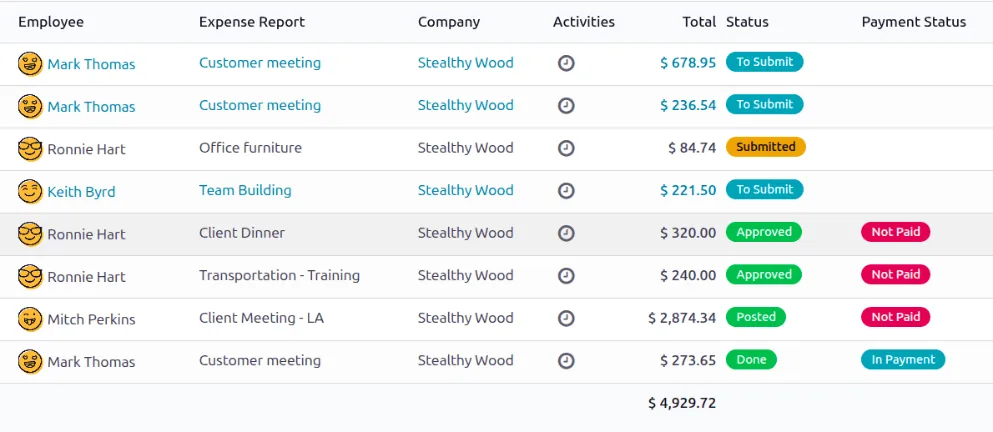
A requisition queue is only useful if you can see its age and status at a glance.
Requisition support varies more than most purchasing features. Confirm the details for your edition before deciding.
| Zoho | Odoo | ERPNext | Dynamics 365 | |
|---|---|---|---|---|
| Native requisition document | No dedicated PR in Zoho Books or Inventory for most plans; usually draft POs with approval or a Zoho Creator PR app | Purchase requests via the Approvals app (Enterprise); purchase agreements for tenders | Material Request (type Purchase) is a core document | Purchase requisitions in Finance and SCM; Business Central uses requisition worksheets and custom request flows |
| Auto requests from reorder levels | Reorder alerts in Zoho Inventory; PO creation from them | Replenishment rules create RFQs automatically | Auto Material Request from reorder level per warehouse | Planning and requisition worksheets suggest purchases |
| Approval of requests | Approval on draft POs or Creator workflow | Approvals app with approver rules | Workflow on Material Request with roles and conditions | Approval workflows on requisitions or purchase documents |
| Convert request to RFQ/PO | Manual or scripted creation of POs from Creator records | Approved request generates RFQ or PO lines | Create RFQ, Supplier Quotation or PO directly from Material Request | Carry out action messages to create POs from worksheets |
| Consolidation by supplier | Done by the buyer when creating POs | RFQs grouped by vendor from replenishment | Multiple Material Requests pulled into one PO | Worksheet lines grouped by vendor |
| Mobile requests | Zoho Creator mobile app | Odoo mobile app and web | Frappe mobile web and app | Business Central mobile apps or Power Apps |
For construction sites, also see construction purchase requisition for BOQ-linked requests.
Requests often originate outside the ERP, so it helps to bring them in rather than retyping.
Requisitions are internal documents, but they support several compliance needs. Confirm specifics with your tax advisor.
The PR shows who needed the item and why. Keeping it linked to the PO, GRN and bill gives auditors a complete trail, kept for at least five years with the related records.
Capturing the item, cost center and whether the purchase is for business use helps the bill post with the right tax code and supports input VAT recovery decisions.
Cost center and project tags on requisitions flow to the ledger, which makes expense allocation and any non-deductible items easier to identify at year end.
General information, not tax or legal advice. Rules change; confirm current FTA, MOHRE and Ministry of Finance guidance with your advisor.
Most of the value appears in the first few months after go-live.
Buyers work from a single approved queue with clear item codes, instead of clarifying requests by phone. Repetitive steps can be automated further with purchase order automation.
Stock checks and inter-warehouse transfers fill requests before money is spent.
Consolidating requests by supplier reduces delivery charges, PO count and bills to process.
Status is visible, so site and department teams stop chasing buyers and stop buying around the system.
Requisitions are often the first purchasing process to go live because they are simple for users. Ranges are typical, not fixed.
Durations are typical ranges; your plan is agreed after discovery.
List who requests what, from where, and how approvals happen today.
Standardize item codes and descriptions for the most-requested items.
Set required fields, approvers by department or project, and notifications.
Short sessions for requesters on mobile, deeper training for buyers on consolidation and conversion.
Monitor aged PRs and adjust approvers and reorder levels.
We configure the system for the rules UAE businesses report against, and test it before go-live.
General information, not tax or legal advice. Confirm current requirements with the FTA, MOHRE or your advisor. See all UAE compliance guides.
On-site workshops in Dubai, Abu Dhabi and Sharjah, and remote or on-site delivery across the Northern Emirates and free zones.
Official sources and references
Facts on this page were checked against these sources in October 2026. Rules change, so confirm current requirements before acting.
Still have a question? Our consultants are happy to help.
Ask an ExpertNo. A PR is an internal request and has no legal effect with the supplier. A PO is the commitment sent to the supplier. Keeping them separate lets you check stock and budget before committing.
If one or two people do all the buying, a PR step may add little. Once several departments, sites or warehouses request items, requisitions save time and stop duplicate purchases.
Yes, for stock items. Reorder levels per warehouse can generate requests or RFQs automatically. Non-stock and project items still need a person to request them. Some companies add document reading and suggestions, covered in AI purchase automation.
Add a priority field and a required date. Urgent PRs can route to a shorter approval path, and the buyer queue can be sorted by required date so they are not missed.
ERPNext treats the Material Request as a core document, and Dynamics 365 Finance and SCM has full requisitions. Odoo handles it through the Approvals app and replenishment, see Odoo Purchase. Zoho usually needs a small Creator app. We implement all four and recommend by fit.
Yes, on all four platforms through mobile apps or mobile web. We keep the mobile form short: item, quantity, required date, location and a photo if useful.
Related Solutions
Related Industries
Related ERP Platforms
Tell us how requests reach your buyers today and we will outline a requisition workflow that fits your team.
Dubai, United Arab Emirates










