
L
O
A
D
I
N
G


Zoho, Odoo, ERPNext, Dynamics 365 and custom ERP, delivered by one accountable team.

Automatic reordering lets the ERP raise draft RFQs and purchase orders when stock hits a trigger, using the right vendor, pack size and lead time, with a buyer approving before anything is sent.
Automatic reordering in an ERP works through a scheduler that checks forecast stock, usually overnight, and creates draft RFQs or purchase orders when items hit a reorder point. It rounds quantities to the supplier's MOQ or pack size, picks the preferred vendor, price and lead time, and groups lines by supplier. Buyers in UAE companies then review drafts, and orders above a value limit go for approval.
ERP for automatic reordering UAE replaces the morning routine many buyers know well: export the stock report, filter items below level, check open orders, look up the last supplier price, then type purchase orders one by one. With automatic reordering, a scheduler inside the ERP does this every night and leaves draft RFQs or purchase orders waiting for review.
The automation has four moving parts. A trigger (reorder point or minimum quantity) decides when to order. A quantity rule (up to maximum, fixed quantity, or multiple of the pack size) decides how much. A vendor rule picks the supplier, price and lead time. A grouping rule combines lines for the same supplier into one document so you do not send twelve POs to the same distributor in Ras Al Khor. Setting the trigger values themselves is a separate discipline covered under minimum stock levels.
Done well, buyers stop building orders and start reviewing them. Done badly, the system floods the inbox with tiny POs or orders items that should have been discontinued. This page focuses on the automation rules and the controls around them; the wider planning view is on inventory replenishment.

Manual reordering works with a hundred items and one buyer. It breaks as the catalog and the team grow.
Hours go into compiling the reorder list each week. Little time is left for negotiating prices, chasing late shipments or finding alternative sources.
When the buyer is on annual leave or travels during Eid, reordering pauses. Stockouts appear two or three weeks later and are hard to trace back.
An order for 37 units goes out when the supplier only sells cartons of 24 or has a minimum order value. The PO comes back, gets corrected and loses days.
Because open POs are not netted off, a second order is raised for goods already confirmed. Excess stock arrives with the next container.
The PO uses whichever vendor was last selected, not the one with the current price agreement, and the difference only appears at invoice matching.
Automation drafts; people approve. The approval gate is what makes automatic reordering safe.
One shared database: every step updates stock, finance and reports in real time.
These components need to be set up correctly before switching automation on.
Trigger and target quantities per item and warehouse, plus the quantity method and rounding.
Runs the reorder calculation on a set frequency, typically overnight, and logs what it created.
Supplier, price, currency, MOQ and lead time per item so the right vendor is chosen automatically.
Draft documents that buyers edit, merge, approve and send by email or supplier portal.
Value and category limits so a draft above a threshold goes to the procurement manager or finance.
Email or in-app alerts for new drafts, items with no vendor, and orders overdue against lead time.
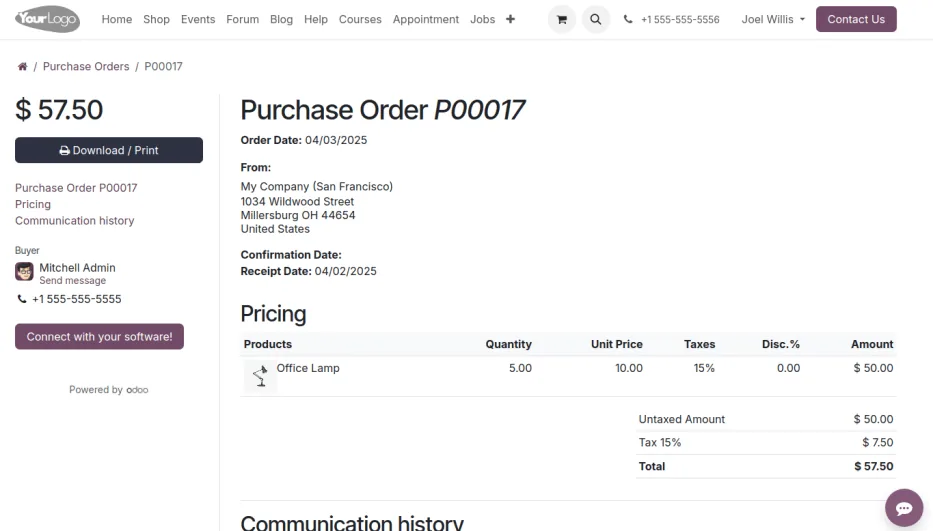
Buyers need a screen that shows what the system created overnight and what needs attention. Management-level spend and supplier KPIs belong on a separate procurement dashboard, and the broader approval logic is covered under purchase order automation.
The platforms differ most in what the trigger produces and how much is native. Check your edition and version.
| Zoho | Odoo | ERPNext | Dynamics 365 | |
|---|---|---|---|---|
| Native output | Reorder notifications in Zoho Inventory | RFQs created by the scheduler from reordering rules | Material requests raised automatically when enabled in stock settings | Planning or requisition worksheet suggestions (Business Central) |
| Draft PO creation | Typically via Deluge custom functions or Zoho Flow | Native, grouped per vendor | PO created from the material request, manually or by script | Carry out action messages to create POs |
| Vendor selection | Preferred vendor on item | Vendor pricelist with sequence, MOQ and lead time | Default supplier on item, supplier quotations | Vendor on item or SKU, purchase prices |
| Quantity rounding | Manual or custom logic | Multiple quantity on the rule and vendor minimums | Reorder quantity and MOQ on item | Order multiple, minimum and maximum order quantity |
| Frequency | As configured in custom automation | Scheduler, usually daily, or manual run | Daily scheduled job | When the planner runs the worksheet, or scheduled via job queue |
| Approval | Purchase order approvals | PO approval by amount | Workflow on material request and PO | Approval workflows on purchase documents |
Capabilities change between releases. We verify them in a demo with your item data.
Better inputs mean fewer exceptions for the buyer to clear.
Automated purchasing needs the same controls as manual purchasing, and an audit trail of what the system created.
The person who maintains reorder rules and vendor prices should not be the only approver of the POs they produce. Approval logs show who released each order.
Auto-generated POs should carry the correct tax code so that supplier bills match and input VAT is claimed only against valid tax invoices with the supplier's TRN. Confirm treatment with your tax advisor.
Orders to overseas suppliers in USD, EUR or CNY need exchange rates and landed cost handling so stock is valued correctly in AED.
From 2027, supplier invoices in scope will arrive as structured e-invoices via accredited service providers. Consistent PO numbers on automated orders help matching; check the latest MoF/FTA guidance.
General information, not tax or legal advice. Rules change; confirm current FTA, MOHRE and Ministry of Finance guidance with your advisor.
Results depend on clean data and agreed rules, but the direction is consistent.
Buyers review drafts instead of compiling lists from exports.
The scheduler keeps running when a buyer is away, with approvals delegated.
Pack sizes, MOQs and current prices are applied before the PO is sent.
Every auto-generated document shows the rule, quantity logic and approver.
We usually start in suggestion mode and move to automatic drafts once buyers trust the output. A focused project often takes 4-8 weeks.
Durations are typical ranges; your plan is agreed after discovery.
Preferred vendors, price lists, MOQs, pack sizes and realistic lead times per item.
Reorder rules for the first item group and warehouse, plus approval limits.
System proposes, buyers compare with their own lists and we tune rules.
Scheduler creates drafts nightly; exceptions routed to buyers.
We configure the system for the rules UAE businesses report against, and test it before go-live.
General information, not tax or legal advice. Confirm current requirements with the FTA, MOHRE or your advisor. See all UAE compliance guides.
On-site workshops in Dubai, Abu Dhabi and Sharjah, and remote or on-site delivery across the Northern Emirates and free zones.
Official sources and references
Facts on this page were checked against these sources in October 2026. Rules change, so confirm current requirements before acting.
Still have a question? Our consultants are happy to help.
Ask an ExpertOnly if you configure it that way. We normally recommend draft POs or RFQs that a buyer reviews and an approver releases, at least for orders above a value limit.
Reorder logic should use forecast stock: on hand plus confirmed incoming, minus reserved for sales orders. Open POs are netted off, so a new draft is only created for the gap.
Yes. Most platforms support order multiples or minimum quantities on the vendor or item. Minimum order value per supplier sometimes needs a small customization.
Vendor price lists can rank suppliers by priority, price or lead time. Many companies keep the cheaper overseas vendor as primary and a local distributor as backup for urgent orders.
Zoho Inventory gives reorder alerts natively; turning those into draft POs is usually done with custom functions or Zoho Flow. Odoo and ERPNext generate documents natively from their rules.
Automatic reordering is the mechanism that raises orders. Safety stock is the buffer built into the trigger level so you do not run out while the order is in transit.
Related Solutions
Related Industries
Related ERP Platforms
Tell us how your buyers order today and we will map rules, approvals and exceptions for your ERP.
Dubai, United Arab Emirates










