
L
O
A
D
I
N
G


Zoho, Odoo, ERPNext, Dynamics 365 and custom ERP, delivered by one accountable team.

Import the priced BOQ once, map every line to a cost code, and let budget, purchasing, measured progress and variations all refer to the same item.
Construction BOQ software in an ERP imports the priced bill of quantities once, keeping its bill, section and item structure, and maps each line to an internal cost code with a selling rate and a budget rate. UAE contractors then drive procurement, monthly measured progress, interim payment claims and variations from the same BOQ lines through to the final account.
In UAE construction the bill of quantities is the contract's commercial backbone. The consultant issues it at tender, the estimator prices it, and after award it becomes the basis for every interim payment certificate and every variation. Yet in most contractors it stays as an Excel workbook that the QS copies, edits and re-sends, while the ERP knows only the contract sum. That gap is one of the main reasons contractors move to a full ERP for construction companies.
Construction BOQ software in an ERP keeps that structure: bills, sections, item references, descriptions, units, quantities and rates, exactly as they appear in the contract. Each line is mapped to an internal cost code, so the same item can carry a selling rate for billing and a budget rate for cost. When the site measures 1,200 square meters of blockwork, that quantity drives the billing claim and is compared with the cost booked against blockwork.
This page is about the BOQ itself and how it connects downstream. Pricing the tender is a separate estimating task, and the cost ledger behind it on construction project costing software.

Most of these come from the BOQ being re-keyed rather than referenced.
The tender BOQ, the awarded BOQ and the QS working copy drift apart. Nobody is sure which rates were agreed in the final negotiation.
Costs are booked to broad project codes while the BOQ has hundreds of items. You can see total margin but not that the waterproofing items are losing money.
Each month the QS copies previous cumulative quantities, adds this month's measurement and recalculates in a new sheet. Formula errors reach the consultant and delay certification.
Instructed changes are tracked in emails and a separate VO log. Quantities are revised in one place but not the other, so the final account takes months.
Provisional and prime cost sums are billed or budgeted as if they were firm work, distorting margin until they are expended or omitted.
The BOQ is created once and every later document refers back to its line references.
One shared database: every step updates stock, finance and reports in real time.
These capabilities usually combine standard modules with some configuration specific to construction.
Bills, sections, item references, units, quantities and rates imported from the consultant's Excel template with validation.
Each BOQ item linked to one or more cost codes, with material, labor, plant and subcontract split for budgeting.
Budget rates times quantities give the control budget per cost code, separate from selling value.
Material quantities derived from BOQ items feed material requests and package buying.
Cumulative measured quantity per BOQ line, with percentage complete and supporting measurement sheets attached.
Interim payment applications built from measured quantities, with retention and advance recovery.
Each variation order linked to new or revised BOQ lines with status: instructed, submitted, approved.
Contract value, certified value, cost and margin per BOQ section and item.
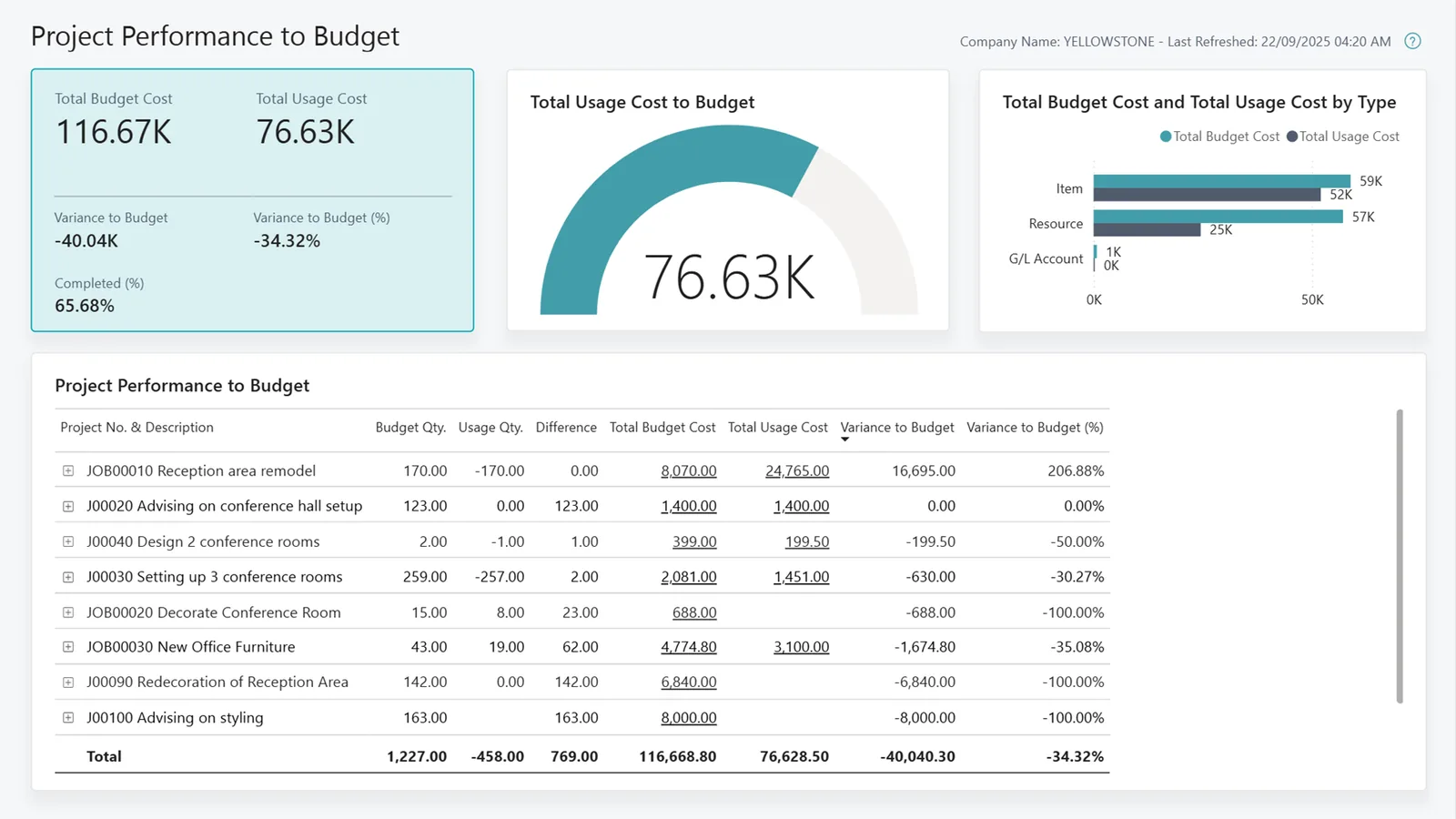
One screen shows how far each bill has been measured, billed and costed.
None of the four ships a full UAE-style BOQ module in its core edition, so the question is how naturally each one extends. Confirm specifics for your edition.
| Zoho | Odoo | ERPNext | Dynamics 365 | |
|---|---|---|---|---|
| Where the BOQ lives | Custom BOQ app in Zoho Creator linked to Zoho Books or Projects | Third-party construction apps or a Studio/custom module on Project | Custom doctype in Frappe linked to Project and Item | Business Central project tasks and planning lines, or partner construction extensions |
| Excel import | Creator import with field mapping | Standard import plus custom validation | Data Import tool and custom scripts | Configuration packages or Excel import to planning lines |
| Link to cost codes | Custom lookup to project cost codes | Analytic accounts per BOQ line or section | Accounting dimensions or task link | Project task numbers act as cost codes |
| Progress billing | Custom claim generated into Zoho Books invoices | Milestone or custom measurement-based invoicing | Custom claim doctype creating Sales Invoice | Billable planning lines and progress invoicing |
| Variations | Creator workflow adding lines | Custom VO model or app | Amended BOQ doctype with versioning | Additional planning lines with change tracking via extension |
| Fit | Smaller contractors with simple BOQs | Mid-size contractors wanting app ecosystem | Teams comfortable with Frappe development | Larger contractors with complex projects |
Detail varies by version and installed apps. Platform pages: Odoo for construction, ERPNext for construction, Dynamics 365 for construction.
Most BOQs start outside the ERP, so import and export routes matter.
BOQ structure affects how you invoice and recognize revenue. Confirm tax treatment with your tax advisor.
Each certified claim usually becomes a tax invoice at 5% with your TRN and the client's details. Timing rules for certified payments and retention need careful setup, so agree them with your advisor.
When e-invoicing becomes mandatory (phased from 1 January 2027 for businesses with revenue of AED 50 million or more), progress invoices will be sent as PINT AE data through an Accredited Service Provider. Clean BOQ references help the line detail. Check the latest MoF and FTA guidance.
Measured value per BOQ line supports output-based progress measurement under IFRS 15, which feeds the accounting profit used for corporate tax.
Keep measurement sheets, certificates and VO approvals for at least five years, attached to the BOQ lines they support.
General information, not tax or legal advice. Rules change; confirm current FTA, MOHRE and Ministry of Finance guidance with your advisor.
What contractors typically aim for, without invented figures.
Claims are produced from cumulative measured quantities instead of rebuilt sheets.
You can see which items and sections lose money and price the next tender accordingly.
Every variation is a BOQ line with its approval, so the final account is a report, not a project.
Buyers work from BOQ-derived quantities, reducing over-ordering, and site teams can reconcile issues against them through construction material management.
Typical ranges; complexity of your BOQ formats drives the effort.
Durations are typical ranges; your plan is agreed after discovery.
Collect consultant templates and agree the standard structure and cost code mapping.
BOQ model, import routine, budget generation and claim template.
Run one live project's claim from the ERP alongside the old sheet.
Load remaining live BOQs with cumulative quantities to date and train QS staff.
We configure the system for the rules UAE businesses report against, and test it before go-live.
General information, not tax or legal advice. Confirm current requirements with the FTA, MOHRE or your advisor. See all UAE compliance guides.
On-site workshops in Dubai, Abu Dhabi and Sharjah, and remote or on-site delivery across the Northern Emirates and free zones.
Official sources and references
Facts on this page were checked against these sources in October 2026. Rules change, so confirm current requirements before acting.
Still have a question? Our consultants are happy to help.
Ask an ExpertUsually yes, after a light clean-up of merged cells and headings. We build an import template that keeps bill, section and item references so claims match the consultant's format.
No. Several BOQ items usually map to one cost code, for example all blockwork items to a masonry code. That keeps cost booking practical on site while billing stays at item level.
A variation adds new BOQ lines or revises quantities on existing ones, with a link to the instruction and its status. The detail of instruction, pricing and approval is covered on variation order software.
Material quantities from BOQ items create the planned quantities that buyers draw against. Requests above the remaining BOQ quantity can be flagged; see construction procurement software.
It is one method of progress billing, based on measured quantities. Some contracts use milestones or percentage of activity instead. Claim preparation is covered on construction billing software.
Yes. A subcontract can carry its own BOQ, often a subset of the main one, so you can compare what you bill the client with what subcontractors bill you.
Related Solutions
Related Industries
Related ERP Platforms
Send us a sample BOQ and a recent claim, and we will show how they would run in your preferred ERP.
Dubai, United Arab Emirates










