
L
O
A
D
I
N
G


Zoho, Odoo, ERPNext, Dynamics 365 and custom ERP, delivered by one accountable team.

Record every customer deposit against its order or contract, account for VAT when the money arrives, and apply it automatically when you invoice.
In a UAE ERP, a customer advance is recorded against its sales order or contract, held as a liability rather than revenue, and deducted automatically from the final invoice. Where receipt of payment creates a VAT tax point, the ERP accounts for VAT when the money arrives. Zoho uses retainer invoices, Odoo down payments, ERPNext payment requests and Dynamics 365 prepayment invoices.
ERP for customer advance management UAE deals with money received before you deliver. It is everywhere in the UAE: furniture and joinery firms take a deposit before production, contractors receive mobilization advances against an advance payment guarantee, real estate and fit-out firms collect booking amounts, event companies take 50% on confirmation, and trading companies ask new customers for cash before releasing stock.
The money is a liability until it is earned, and it often carries VAT from the day it is received. In practice, many companies post the receipt straight to sales, or leave it as an unidentified credit on the customer account. Months later the customer statement shows an unexplained credit, the final invoice is issued for the full amount, and the customer disputes the balance. Sales staff cannot answer the simple question: how much has this customer already paid on this order?
In an ERP, an advance is linked to a sales order, quotation or contract from the start. The receipt creates a liability, the VAT on the advance is accounted for, and the advance is deducted on the final invoice or progress bill. It sits inside your accounts receivable process but needs its own rules, which is what this page covers.

Most issues come from treating an advance as either a sale or an anonymous receipt.
Booking the deposit as a sale overstates revenue in the month received. It also makes it hard to see the true order book and creates corporate tax timing questions.
Where the advance triggers a tax point, the VAT is due in the period the money arrives. Firms that only account for VAT on the final invoice can under-declare in one period and over-declare in another.
The deposit sits as a credit on the customer ledger with no link to an order. Customer statements show balances that neither side can explain.
The final invoice is raised for the full value and the advance is forgotten, or the deduction is entered manually with the wrong VAT amount.
When an order is cancelled or a project stalls, finance does not know which advances may need refunding or can be retained under the contract.
This flow keeps the advance tied to its order from receipt to final settlement.
One shared database: every step updates stock, finance and reports in real time.
Customer advances connect sales, receivables and tax.
The anchor document: every advance is requested and received against a specific order, booking or contract.
Issue an advance or down-payment invoice where needed, with the correct tax treatment.
Record the payment as an advance, not general income, and link it to the order and customer.
Allocation of the advance to final or progress invoices, and ageing that shows net exposure.
VAT on advances, reversals on cancellation and correct reporting in the VAT return boxes.
Structured handling of cancelled orders, refunds and amounts retained under contract terms.
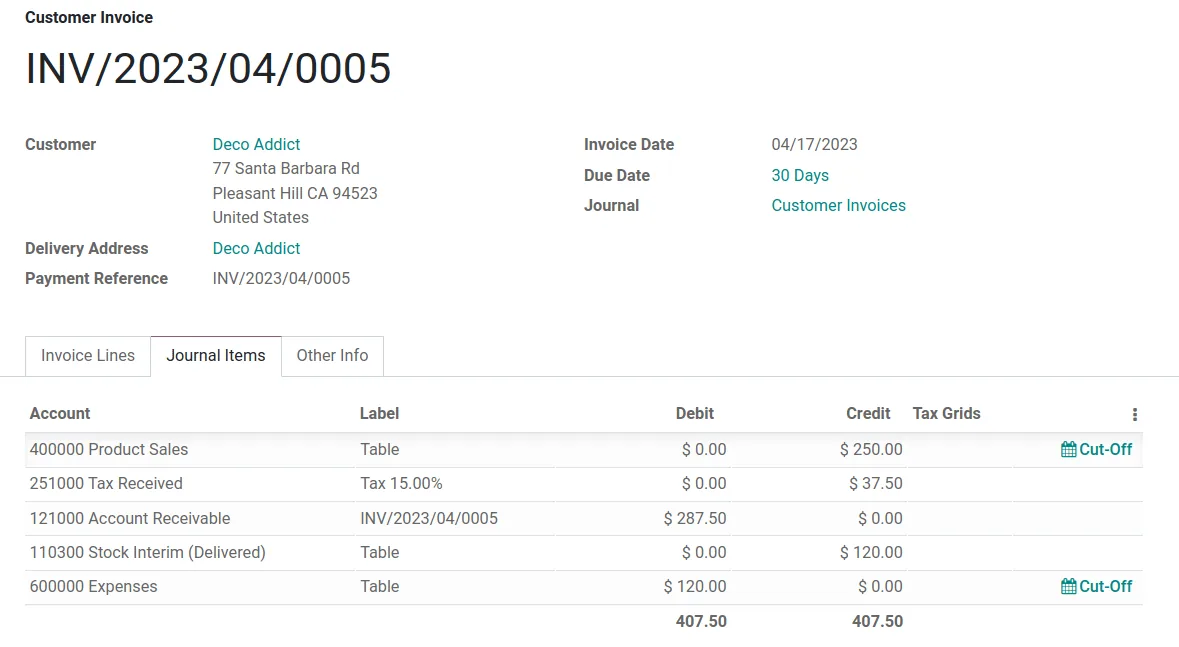
Finance and sales share one view of money received but not yet earned.
All four handle advances; the mechanism differs. Behavior varies by version and localization, so confirm in a demo.
| Zoho | Odoo | ERPNext | Dynamics 365 | |
|---|---|---|---|---|
| Requesting the advance | Retainer invoice in Zoho Books | Down payment invoice from the sales order (fixed or percentage) | Payment Request against Sales Order | Prepayment invoice from the sales order (Business Central) |
| Recording the receipt | Customer payment held as advance or retainer | Payment registered against the down payment invoice | Payment Entry against the Sales Order (advance) | Prepayment posted to a prepayment account |
| VAT on advance | Advance tax option available in UAE edition; confirm setup | Tax computed on the down payment invoice | Tax on advance configurable; check version and settings | VAT on prepayment invoices via posting setup |
| Deduction on final invoice | Retainer applied to the invoice | Down payment line deducted automatically | Get Advances Received on Sales Invoice | Prepayments deducted on final invoice |
| Reporting | Retainer and unused credit reports | Aged receivable with down payments | Advance balance per customer and order | Prepayment and customer ledger reports |
| Refunds | Refund from retainer or credit | Credit note on down payment invoice | Payment Entry refund with reversal | Prepayment credit memo |
Advances arrive through many payment channels.
Advances raise VAT timing and revenue questions that the ERP must be set up to answer. This is general information, not tax advice; confirm the treatment with your tax advisor.
Under UAE VAT law, receipt of payment can be one of the events that fixes the date of supply. Configure the ERP so that advances which create a tax point are reported in the period received, and check how recent amendments apply to your supplies.
A tax invoice for an advance must carry the prescribed fields, including your TRN. The final invoice should show the advance deduction and VAT correctly so the customer can reconcile.
Advances are generally not revenue until the performance obligation is met. Correct deferral supports accurate taxable income under the corporate tax regime.
Under the PINT AE e-invoicing model, advance and final invoices will be exchanged through Accredited Service Providers, so deduction lines must be structured correctly. Check the latest Ministry of Finance / FTA guidance.
General information, not tax or legal advice. Rules change; confirm current FTA, MOHRE and Ministry of Finance guidance with your advisor.
Clear advance handling helps finance, sales and the customer.
Each advance is shown against its order, so statements reconcile without email back and forth.
VAT on advances is reported in the right period, reducing voluntary disclosure risk.
Deposits stay on the balance sheet until earned, so monthly revenue reflects actual deliveries.
Finance sees advances at risk early and can apply contract terms on refund or retention.
Often delivered within a finance or sales rollout; typical ranges only.
Durations are typical ranges; your plan is agreed after discovery.
Identify open deposits and unapplied credits and link each to an order or contract.
Agree advance documents, accounts, VAT treatment and deduction rules with your tax advisor.
Set up advance invoices, receipt types, tax codes and test full cycles including refunds.
Load open advances as opening balances against the right orders and train sales and finance.
We configure the system for the rules UAE businesses report against, and test it before go-live.
General information, not tax or legal advice. Confirm current requirements with the FTA, MOHRE or your advisor. See all UAE compliance guides.
On-site workshops in Dubai, Abu Dhabi and Sharjah, and remote or on-site delivery across the Northern Emirates and free zones.
Official sources and references
Facts on this page were checked against these sources in October 2026. Rules change, so confirm current requirements before acting.
No. An advance is money received for a specific future supply. An unused credit can come from overpayments or credit notes. Keeping them separate makes your customer statements much easier to read.
In many cases the advance creates a tax point and a tax invoice is required, but it depends on the supply. Ask your tax advisor and configure the ERP to match. Related rules are covered on ERP for VAT compliance.
An advance reduces the customer's net exposure, so credit checks should look at receivables minus unapplied advances. See customer credit management for how credit checks are set up.
Record the advance against the contract and recover it as a percentage deduction on each progress invoice, as the contract states. This interacts with revenue recognition on long contracts.
Yes. Advance requests can trigger reminders by email, and by WhatsApp through an approved Business Platform provider for customers who have opted in. See customer follow-up automation.
The logic mirrors it on the purchase side, but the tax and control points differ. Read ERP for supplier advance management for that process.
Related Solutions
Related Industries
Related ERP Platforms
We review your open customer advances and show how your ERP should request, record and apply them.
Dubai, United Arab Emirates










