
L
O
A
D
I
N
G


Zoho, Odoo, ERPNext, Dynamics 365 and custom ERP, delivered by one accountable team.

Owners and boards need a short pack that explains the month, not three hundred lines of trial balance. We design ERP so the management pack comes out of the system with the same numbers every time.
An ERP produces the monthly MIS pack by tagging transactions with dimensions such as division, branch, brand, project or salesperson, then running fixed report layouts after the period is locked. The pack typically covers a summary, segment P&L, budget variance, cash and working capital, receivables ageing, operational KPIs and commentary, so UAE owners see the same numbers every month without Excel mapping.
An ERP for management reporting UAE owners and finance teams use should produce the monthly MIS pack: a short set of reports that tells management how each business line performed, where cash went, which customers owe money and what needs a decision. Unlike statutory statements, management reports follow your structure: divisions, branches, brands, projects or salespeople, with KPIs that matter to your trade.
In many family-owned and founder-led UAE groups, the MIS pack is built by one finance person in Excel over a week. Trial balances are exported from two or three entities, mapped by formula, adjusted for items 'everyone knows about', and pasted into a deck. When that person is on leave, the pack does not happen. When a partner asks why gross margin fell in the Abu Dhabi branch, nobody can drill down.
Management reporting draws on the P&L and balance sheet, plus operational data such as orders, backlog and headcount. This page is about the pack and how it is produced; for the platforms and BI tools we use, see ERP reporting solutions.

We hear these issues from owners, CFOs and boards across the UAE.
Exports, lookups and pasted values take days, and one broken formula changes the result. The pack depends on a single person.
Management adjustments are made in Excel and never posted, so the MIS profit does not match the ledger or the audited figures.
Branches, divisions or brands are not tagged on transactions, so allocations are guessed at month end.
The pack shows accounting lines but not operational drivers such as order intake, backlog, occupancy or utilization, so the numbers cannot be explained.
Variances are explained verbally in meetings and lost. Next month the same question is asked again.
Mainland, free zone and offshore companies run separate books, sometimes on different software, making a group view slow.
From closed books to a pack that management actually reads.
One shared database: every step updates stock, finance and reports in real time.
A good MIS pack combines finance data with operational modules.
Branch, division, brand, project and salesperson tags on every transaction, defined once in the ledger.
Management P&L layouts that differ from statutory format, with contribution margin and allocated overheads.
Budget versions loaded by month and segment so every report can show plan and variance.
Order intake, pipeline and top customers, giving a forward view alongside actual results.
Stock days, slow movers and fulfilment metrics that explain margin and cash.
Headcount, cost per employee and overtime by department.
Group entities in one database or connected ledgers, with intercompany elimination for a group view.
Power BI, Zoho Analytics or native dashboards for drill-down and mobile access.
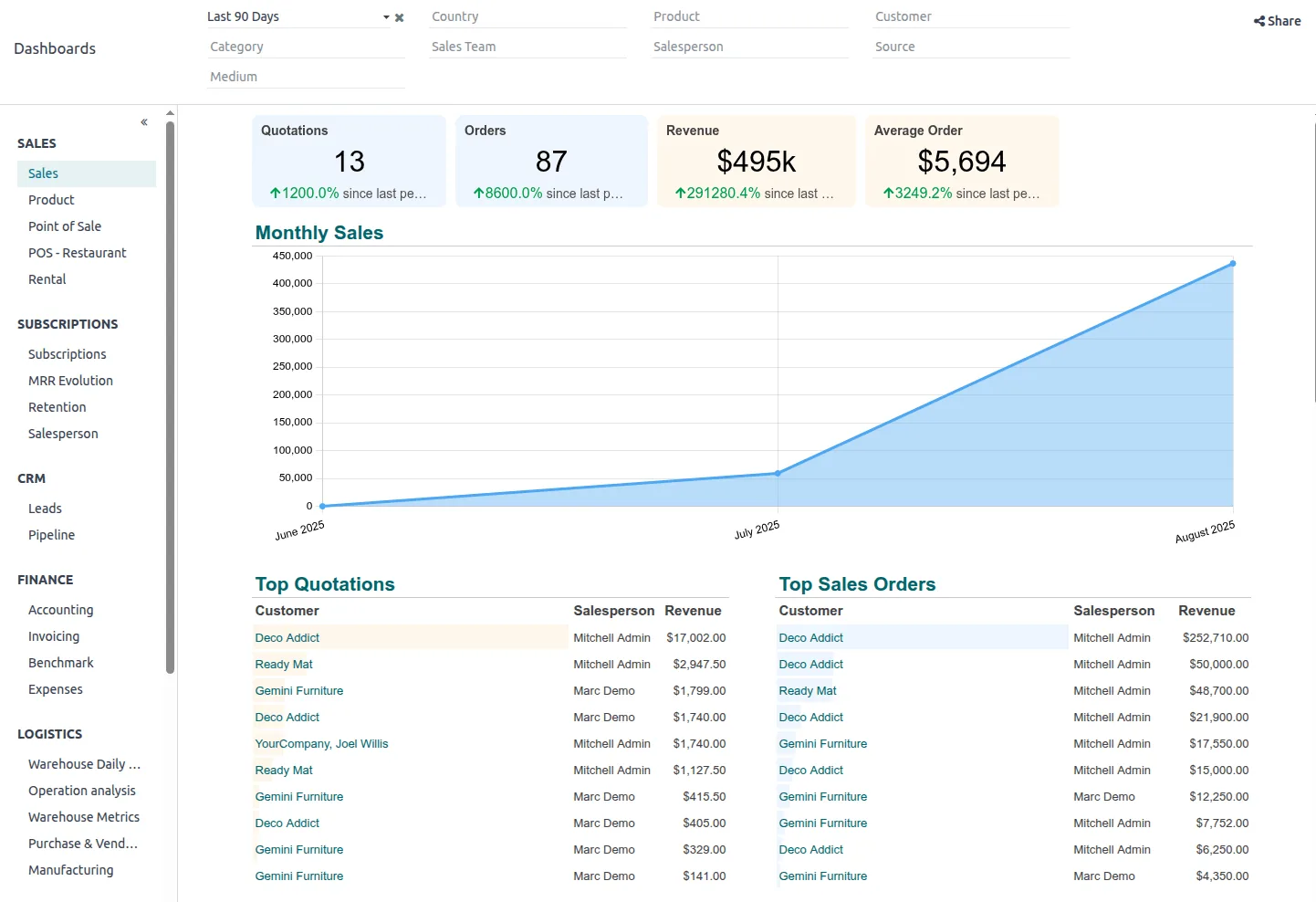
The live version of the MIS pack, used by owners between monthly meetings.
Native reports cover most single-company needs; groups often add a BI layer. Confirm features for your edition.
| Zoho | Odoo | ERPNext | Dynamics 365 | |
|---|---|---|---|---|
| Segment tagging | Reporting tags, locations and projects | Analytic accounts and analytic plans | Cost centers and custom accounting dimensions | Global and shortcut dimensions |
| Management layouts | Custom reports; Zoho Analytics for packs | Configurable financial reports in Enterprise; spreadsheet reporting in recent versions | Report builder, custom reports, Insights app | Financial Reports with row and column definitions |
| Operational KPIs | Zoho CRM, Inventory and People data via Zoho Analytics | Data from all installed Odoo apps | Data from all modules; number cards and dashboards | Business Central data plus Power BI apps |
| Group view | Separate organizations combined in Zoho Analytics | Multi-company with consolidation options | Multi-company with consolidated financial statement report | Consolidation features across companies |
| Commentary | Usually captured in Analytics or the pack document | Notes on spreadsheets or documents | Comments on reports or a custom doctype | Comments in Power BI or Excel add-in |
| BI connection | Zoho Analytics native; Power BI via connectors | Power BI via connectors or database access | Power BI via database or API | Power BI native connectors |
We often keep the pack inside the ERP for smaller companies and add Power BI for multi-entity groups.
Management reports become useful when finance and operations data sit together.
Management reports are internal, but they should reconcile to records with legal weight. Confirm specifics with your advisors.
Management adjustments should be posted or clearly bridged to the ledger, so management profit can be reconciled to the audited IFRS figures.
Showing an estimated corporate tax charge in the pack, at 9% above the AED 375,000 threshold, avoids surprises. Free zone groups may need to separate qualifying and non-qualifying income; confirm with your tax advisor.
Groups with related-party transactions need arm's length pricing. Master and local file documentation applies at revenue of AED 200 million or group revenue of AED 3.15 billion, so larger groups should report related-party flows.
Payroll and owner-level data in the pack should be restricted by role in the ERP and BI tool.
General information, not tax or legal advice. Rules change; confirm current FTA, MOHRE and Ministry of Finance guidance with your advisor.
These outcomes depend on clean dimensions and a disciplined close.
The pack refreshes from locked data instead of being rebuilt.
Management, bank and audit figures reconcile.
Owners drill from a segment result to transactions themselves.
The pack does not depend on one spreadsheet owner.
Hedged ranges for a mid-sized company; groups take longer.
Durations are typical ranges; your plan is agreed after discovery.
Agree pages, KPIs, segments and publishing date with owners.
Set up dimensions, mapping and allocation rules.
Configure layouts, dashboards and BI models.
Produce both packs and reconcile until owners accept the new one.
We configure the system for the rules UAE businesses report against, and test it before go-live.
General information, not tax or legal advice. Confirm current requirements with the FTA, MOHRE or your advisor. See all UAE compliance guides.
On-site workshops in Dubai, Abu Dhabi and Sharjah, and remote or on-site delivery across the Northern Emirates and free zones.
Official sources and references
Facts on this page were checked against these sources in October 2026. Rules change, so confirm current requirements before acting.
Still have a question? Our consultants are happy to help.
Ask an ExpertUsually a one-page summary, segment P&L, budget variance, cash and working capital, receivables ageing, operational KPIs and short commentary. Keep it to what owners act on.
Define allocation rules (revenue share, headcount, floor space) in the ERP and run them as journals each month. Our branch accounting page goes into more detail.
Yes, if budgets are loaded at the same segment level. See budget vs actual for how to set budget versions and variance thresholds.
Not always. Single-company businesses often manage with native reports. Groups with several entities or systems benefit from a BI layer; see ERP Power BI integration.
The dashboard is the live view; the pack is the monthly, approved snapshot with commentary. Our CFO dashboard page shows the live view.
That depends on how fast you close. Many companies aim for a pack within the first one to two weeks after month end once the ERP process is stable.
Related Solutions
Related Industries
Related ERP Platforms
Share your current management pack and we will show how it could be produced from your ERP.
Dubai, United Arab Emirates










