
L
O
A
D
I
N
G


Zoho, Odoo, ERPNext, Dynamics 365 and custom ERP, delivered by one accountable team.

We implement Zoho Books for UAE companies with a tested chart of accounts, correct VAT setup, verified opening balances and a finance team that knows how to use it.
A proper Zoho Books implementation in the UAE involves designing a chart of accounts for VAT and corporate tax reporting, configuring VAT treatments, TRN and tax invoice templates, loading opening balances that agree with your last accounts, and setting up bank feeds and user roles. For a single company with clean data, a focused rollout often takes four to eight weeks.
Zoho Books implementation UAE work looks simple from the outside. You can sign up in minutes, pick the UAE edition and start raising invoices. The trouble shows up three months later, when the VAT return does not tie to the ledger, opening balances are off by an amount nobody can explain, and the bank reconciliation has hundreds of unmatched lines.
A proper implementation prevents that. It means designing a chart of accounts that serves both management reporting and tax, setting up VAT treatments that match how you actually sell and buy, loading opening balances that agree with your last audited or management accounts, and training the people who will post transactions every day. This page covers the service; for what the product does, see our Zoho Books UAE page.
We are a Zoho Premium Partner based in Dubai, serving clients across all seven emirates on-site and remotely. Most of our Zoho Books projects come from companies moving off Tally, QuickBooks, Sage or spreadsheets, and from businesses that set up Books themselves and now need it fixed. If you are coming from Tally, our Tally to Zoho migration page covers the data side in more detail.

The products we configure, integrate and support on projects like this one.






Product names and logos are trademarks of their respective owners and are shown only to identify the software we implement.
These issues come up again and again when we review accounts that were set up without a plan.
Items and contacts carry the wrong tax treatment, so the VAT summary and the general ledger disagree. Fixing it after several quarters means reviewing hundreds of transactions.
Old account codes are imported as-is, including duplicates and unused accounts. Reports become hard to read and corporate tax adjustments are harder to isolate.
Customer and supplier balances were entered as totals rather than open documents. Ageing reports are wrong and payments cannot be matched to invoices.
Imported services and goods through customs need specific VAT handling. Without it, input and output VAT on imports are either missing or double counted.
All users share full access, so there is no approval step for bills or payments and no clear audit trail of who changed what.
Bank feeds were never connected or rules never set, so reconciliation is done in a rush at month-end or not at all.
A structured sequence keeps the finance team involved and avoids surprises at go-live.
We review your current books, trial balance, VAT returns, invoice formats, bank accounts and approval habits, and agree the go-live date, often at a month or quarter start.
We design the chart of accounts, tax rates and treatments, branches or locations, currencies, invoice and credit note templates with Arabic and English labels, and user roles.
We load customers, suppliers, items, open invoices and bills, and opening balances from your trial balance, then reconcile them to your source figures.
We connect bank feeds, payment gateways and, where relevant, Zoho CRM or Zoho Inventory, and add approval workflows and reminders.
Your team runs real scenarios: sales, purchases, imports, credit notes, expenses and a VAT summary. We train users by role, from sales staff raising invoices to the finance manager closing the month.
We support the first weeks of live use and the first month-end close, then review the first VAT period with your accountant.
Deliverables are agreed at the start so you know exactly what a complete implementation looks like.
Durations below are typical ranges for a single-entity company. Data quality, number of branches and integrations change the picture.
Durations are typical ranges; your plan is agreed after discovery.
Review current books, VAT position, documents and users. Agree scope and go-live date.
Accounts, tax, templates, roles and approvals set up in Zoho Books.
Masters, open items and opening balances loaded and reconciled with the finance team.
Real transactions tested end to end, followed by training by role.
Live use with close support through the first month-end close.
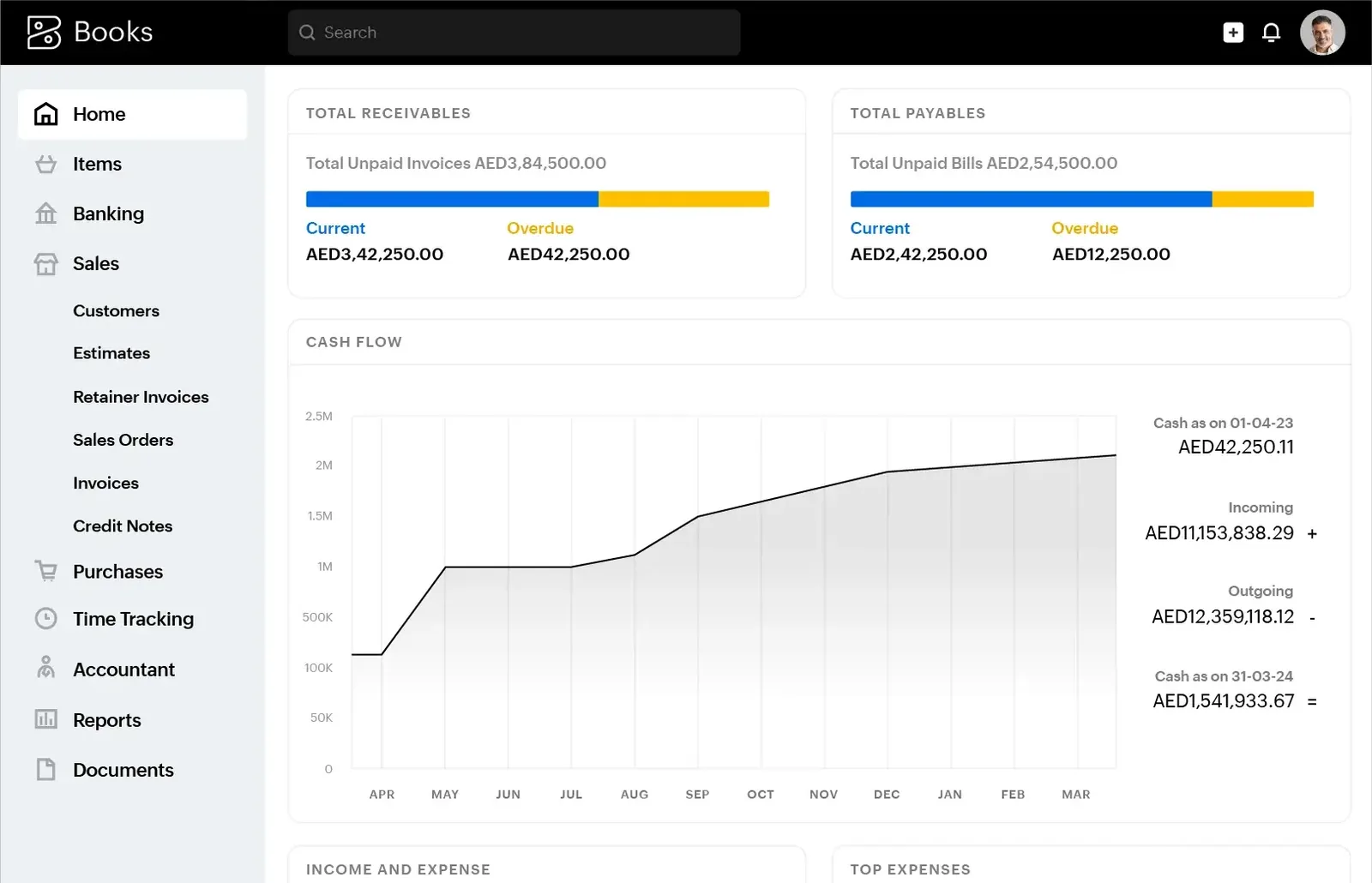
After go-live, the finance manager has a clear picture of cash, receivables, payables and the VAT position for the current period.
Benefits depend on your starting point, but these are the improvements finance teams usually notice first.
With bank rules, approvals and clean opening balances, closing the month becomes a checklist rather than an investigation.
Correct tax treatments mean the VAT summary in Zoho Books agrees with the ledger, which shortens your accountant's review.
Accurate ageing and automated payment reminders help the team chase overdue invoices earlier.
Approval steps on bills and payments give managers sight of commitments before money leaves the account.
Explore the product, the migration routes and the compliance topics around Zoho Books.
We configure the system for the rules UAE businesses report against, and test it before go-live.
General information, not tax or legal advice. Confirm current requirements with the FTA, MOHRE or your advisor. See all UAE compliance guides.
On-site workshops in Dubai, Abu Dhabi and Sharjah, and remote or on-site delivery across the Northern Emirates and free zones.
Official sources and references
Facts on this page were checked against these sources in October 2026. Rules change, so confirm current requirements before acting.
Still have a question? Our consultants are happy to help.
Ask an ExpertFor a single company with reasonably clean data, a focused rollout often takes four to eight weeks from discovery to go-live. Multiple branches, inventory, heavy data clean-up or integrations can extend that.
Zoho Books produces a VAT summary in the format of the UAE return, based on the tax treatments on your transactions. Your finance team or tax advisor still reviews it and files through EmaraTax. Confirm treatments for unusual transactions with your tax advisor.
E-invoicing becomes mandatory in phases from 1 January 2027 for businesses with revenue of AED 50 million or more, and from 1 July 2027 for others, through Accredited Service Providers. We track Zoho's announcements on PINT AE support and help you plan your ASP setup. Check the latest Ministry of Finance and FTA guidance.
Yes. We migrate masters, open invoices and bills, and opening balances from Tally, QuickBooks, Sage and spreadsheets. We usually bring across closing balances rather than full transaction history, and keep the old system available for reference.
Zoho Books provides the ledger and reports your accountant uses for corporate tax. We structure the chart of accounts so items such as non-deductible expenses are easy to identify. The tax computation and filing remain with your tax advisor.
Yes. We start with a review of tax treatments, opening balances and reconciliations, then agree whether to correct the existing organization or start a clean one from a fixed date.
Related Solutions
Related Industries
Related ERP Platforms
Book a call with our Dubai team to plan a Zoho Books implementation UAE project with clean data and VAT settings you can rely on.
Dubai, United Arab Emirates











