
L
O
A
D
I
N
G


Zoho, Odoo, ERPNext, Dynamics 365 and custom ERP, delivered by one accountable team.

If your bank balance and your books disagree, every other report is in doubt. An ERP imports statements, matches most lines by rule and leaves only real exceptions for your accountant.
ERP software reconciles UAE bank accounts by importing or syncing bank statements, auto-matching most lines to book entries by rule, suggesting matches for review and leaving only real exceptions for the accountant. It handles local habits such as post-dated cheques, bank charges with VAT, unreferenced cash deposits, net card settlements and foreign currency transfers, then lets finance approve the reconciliation and lock the period.
An ERP for bank reconciliation in the UAE compares what your books say happened in each bank account with what the bank statement says, line by line, and explains every difference. It sounds routine, yet in many SMEs the reconciliation for the main current account is two or three months behind, and the USD and savings accounts have not been reconciled since the last audit.
Local banking habits make the task harder. Post-dated cheques clear on dates that differ from booking dates, bank charges and VAT on charges appear as small unbooked lines, customers deposit cash directly at branches without a reference, card settlements arrive net of fees, and foreign currency transfers carry intermediary charges.
This page covers matching the bank statement to the ledger. Allocating customer and supplier payments to individual invoices is a separate step covered in payment reconciliation, and automating the statement feed itself is covered in ERP bank integration.

Bank reconciliation is often the first task dropped when the finance team is busy, and the backlog grows quickly.
The accountant downloads the statement, pastes it next to the ledger and ticks matches by eye. A busy account with hundreds of lines a month takes days.
Cheques issued and received are booked on one date and clear on another. Without clear status tracking, unpresented and uncleared items pile up and nobody trusts the list.
Cash deposits and transfers without an invoice reference cannot be matched. They are parked in suspense and the customer's account still shows overdue.
Monthly fees, transfer charges, cheque book fees and the VAT on them are left unbooked until year end, when the auditor raises them.
Groups hold accounts in AED, USD and EUR across several banks. Each has its own statement layout, so there is no single routine.
A daily or weekly routine keeps reconciliation small. Month end then becomes a review, not a rebuild.
One shared database: every step updates stock, finance and reports in real time.
These features turn reconciliation into an exception review instead of a manual exercise.
Import files from UAE bank portals in CSV, Excel or standard formats, with saved column mappings per bank.
Where the platform and bank support it, statements arrive automatically through a feed or connector.
Rules that match on reference, amount, date range or partner, and create entries for recurring charges.
Status for each cheque: issued, presented, cleared, returned. Uncleared cheques show on the reconciliation report.
Unidentified receipts go to a suspense or unallocated account with a follow-up task, not into the wrong customer.
Foreign currency accounts reconciled in their own currency with exchange differences posted separately.
A bank reconciliation statement for each account and date, ready for auditors.
Reconciled periods are locked so entries cannot be changed after the fact.
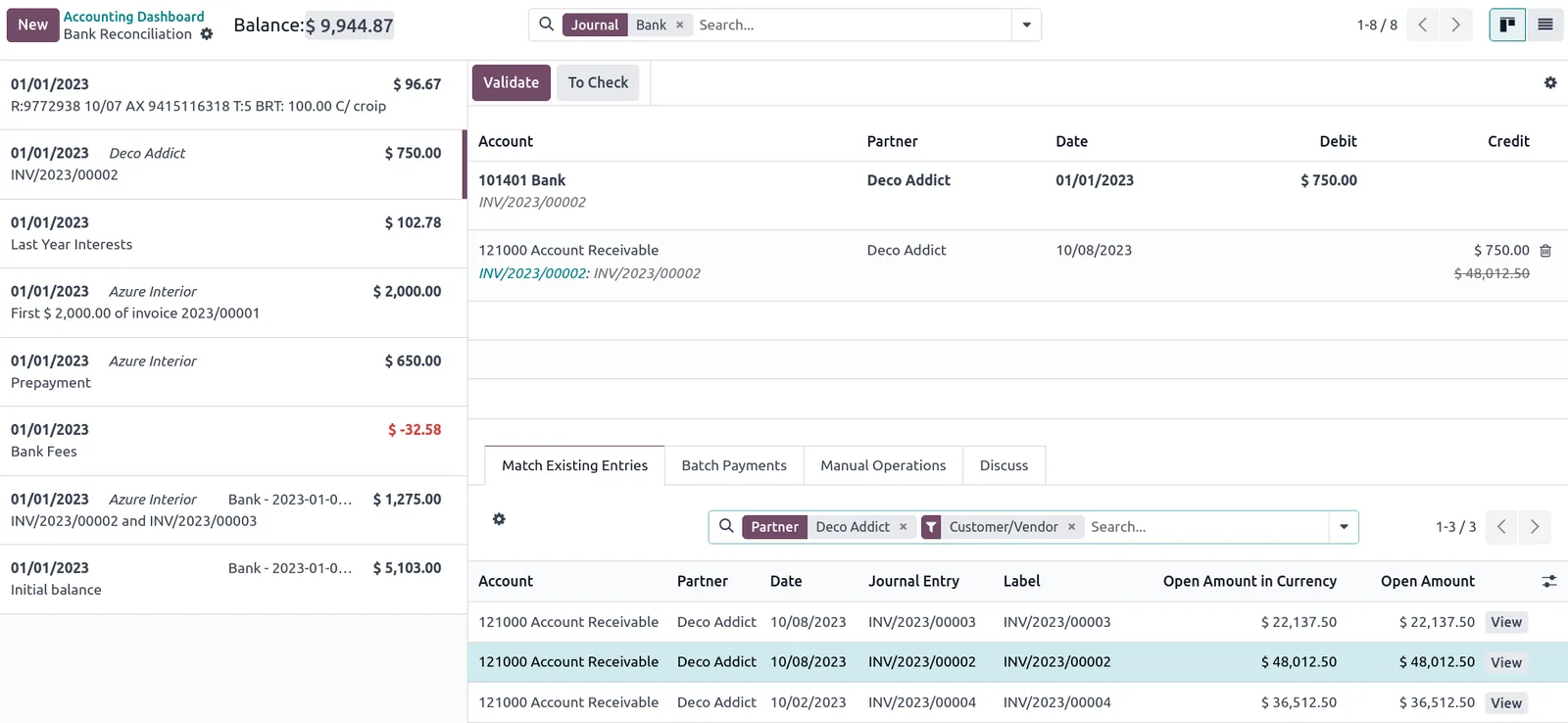
The finance manager should see which accounts are up to date and where the exceptions are.
All four platforms reconcile statements against the ledger. The difference is in feeds, rule depth and the reconciliation screen. Confirm for your edition.
| Zoho | Odoo | ERPNext | Dynamics 365 | |
|---|---|---|---|---|
| Statement input | Bank feeds for supported banks, or statement import | Statement import (CSV, Excel, OFX, CAMT, MT940 depending on modules); online sync coverage varies by bank | Bank Statement Import tool | Bank statement import formats in Business Central; electronic banking in Finance |
| Auto-matching | Bank rules and auto-match suggestions | Reconciliation models with matching and write-off rules | Bank Reconciliation Tool with matching on amount and reference | Automatic matching in bank account reconciliation |
| Charges and recurring lines | Rules can categorize charges | Reconciliation models create write-off entries | Created as journal entries during reconciliation | Text-to-account mapping for recurring lines |
| Reconciliation report | Reconciliation history per account | Bank reconciliation report | Bank Reconciliation Statement report | Bank account reconciliation report |
| AI assistance | Check current Zia features | Matching suggestions; check current version | Usually via custom logic | Copilot-assisted reconciliation in recent Business Central releases |
Direct feeds for UAE banks depend on the bank and platform. File import works with every bank.
These data sources reduce the number of lines that need manual review.
Reconciliation is not a tax filing, but it supports several obligations. Confirm specifics with your auditor and tax advisor.
Banks charge VAT on many fees. Posting charges by rule with the correct input VAT code helps recover the tax and keeps the VAT return accurate.
Bank statements and reconciliations form part of the accounting records that generally must be kept for at least 5 years. See our page on tax record retention.
Auditors and the FTA expect reconciled bank balances. A locked reconciliation per period supports an ERP set up for VAT compliance and smoother audits.
General information, not tax or legal advice. Rules change; confirm current FTA, MOHRE and Ministry of Finance guidance with your advisor.
These outcomes come from a regular routine, not from the tool alone.
Reconciled accounts mean cash reports and forecasts start from real numbers.
Matching most lines by rule leaves only exceptions, so reconciliation stops delaying the close.
Charges, interest and exchange differences are booked as they happen.
Like stock reconciliation, regular bank reconciliation catches errors while they are still small.
The work depends on how many accounts you hold and how far behind they are. Durations are typical ranges.
Durations are typical ranges; your plan is agreed after discovery.
List every bank account, currency, statement format and the last reconciled date.
Bring backlogged accounts up to date and clear old suspense items before go-live.
Set up import mappings per bank and matching rules for charges, transfers and common references.
Weekly reconciliation by the accountant and monthly sign-off by the finance manager.
We configure the system for the rules UAE businesses report against, and test it before go-live.
General information, not tax or legal advice. Confirm current requirements with the FTA, MOHRE or your advisor. See all UAE compliance guides.
On-site workshops in Dubai, Abu Dhabi and Sharjah, and remote or on-site delivery across the Northern Emirates and free zones.
Official sources and references
Facts on this page were checked against these sources in October 2026. Rules change, so confirm current requirements before acting.
Still have a question? Our consultants are happy to help.
Ask an ExpertSome platforms offer feeds that cover certain UAE banks, and some banks offer host-to-host connections. Coverage changes, so we check your banks. File import always works. See Odoo bank integration for one example.
Weekly for main operating accounts and monthly at minimum for the rest. Short intervals keep exceptions small and recent enough to investigate.
The returned cheque is matched to the debit on the statement, the original payment is reversed, and the customer invoice reopens. Bank charges for the return are posted at the same time.
Bank reconciliation agrees the bank account to the ledger. Payment reconciliation allocates receipts and payments to the right invoices and bills. You need both for clean ledgers.
Yes, but we usually recommend a catch-up project before go-live so the ERP starts with reconciled opening balances.
Related Solutions
Related Industries
Related ERP Platforms
We will review your bank accounts and statement formats and set up a reconciliation routine your team can keep.
Dubai, United Arab Emirates










