
L
O
A
D
I
N
G


Zoho, Odoo, ERPNext, Dynamics 365 and custom ERP, delivered by one accountable team.

A working dashboard for the finance manager, accountants and AP and AR clerks: what is unreconciled, what is due, what is waiting for approval and how far the month-end close has progressed.
A finance dashboard for a UAE accounts team should work as a live to-do list built from ledger data: bank reconciliation status by account and entity, payables due and supplier invoices on hold for three-way matching, the collections queue, post-dated cheques due, cleared or bounced, VAT period totals with missing input tax, and month-end close checklist progress. Each queue shows a count and value.
A finance dashboard UAE accounts teams open every morning is different from an executive report. The finance manager does not need a margin trend; they need to know that 37 bank lines are still unmatched, that 12 supplier invoices are waiting for a three-way match, that a customer's PDC bounced yesterday, and that the VAT period closes in nine days with input tax still missing on several bills. It is a to-do list built from live ledger data.
In many UAE SMEs these tasks are tracked in email and personal spreadsheets. The AP clerk keeps a list of invoices on hold, the AR accountant keeps a collection tracker, and the chief accountant keeps a month-end checklist in Excel. Nobody sees the whole picture until the close slips into the second week of the following month, and the auditors or the VAT return expose the gaps.
An ERP-based finance dashboard shows each queue with a count and a value, links each count to the documents behind it, and tracks close tasks by owner. It feeds the strategic numbers on the CFO dashboard but is designed for daily operations. For the software side, see our finance ERP software overview and ERP finance and accounting modules.

Illustrative figures for a UAE company with one finance manager, two accountants and an AP and AR clerk.
Unreconciled lines by bank
Payables due by week
Close tasks by area
Open month-end close tasks
| Task | Owner | Due | Status |
|---|---|---|---|
| Accrue utilities and rent | Accountant 1 | Day 3 | In progress |
| Depreciation run | Accountant 2 | Day 3 | Not started |
| Reconcile Mashreq USD | AR clerk | Day 4 | In progress |
| Review reverse charge imports | Finance manager | Day 5 | Not started |
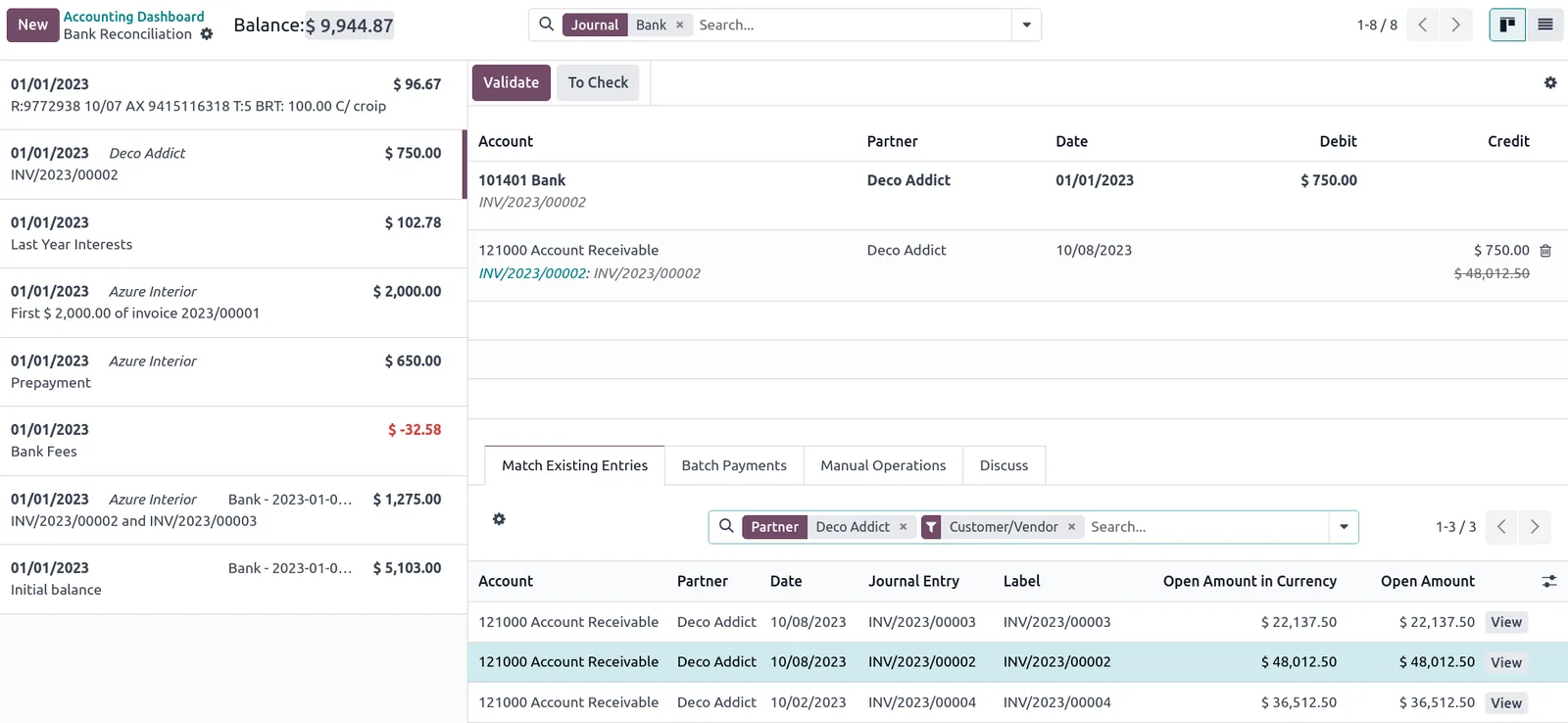
Every platform we implement offers a finance home screen or workspace that can be configured into this view, with tiles opening filtered lists of documents.
These are operational KPIs: each one should lead to a list of documents someone can action today.
| KPI | What it shows | Source data | Review frequency |
|---|---|---|---|
| Unreconciled bank lines | Statement lines not yet matched to ERP payments or receipts | Bank statement import, reconciliation module | Daily |
| Bills awaiting approval | Supplier invoices pending approval under the authority matrix | AP bills, approval workflow | Daily |
| Bills on hold | Invoices blocked by price or quantity mismatch with PO or GRN | Bills, purchase orders, goods receipts | Daily |
| Payables due | Approved bills by due date for payment runs | Supplier ledger, payment terms | Twice weekly |
| Collections due | Customer invoices and PDCs falling due | Customer ledger, PDC register | Daily |
| Bounced cheques | Returned cheques awaiting re-presentation or legal follow-up | PDC register, bank returns | Weekly |
| Unapplied receipts | Customer payments not yet allocated to invoices | Receipts, customer ledger | Daily |
| VAT period totals | Output and input tax by tax code for the open period | Tax lines on invoices, bills and journals | Weekly and before filing |
| Close progress | Completed versus planned close tasks by day | Close checklist or task list | Daily during close |
| Journals awaiting review | Manual journals posted but not yet reviewed | Journal entries with review status | Daily during close |
The dashboard reflects the team's working rhythm. When these steps run daily, month-end becomes a review rather than a rebuild.
One shared database: every step updates stock, finance and reports in real time.
We build it with the finance manager, not for them.
Typically bank reconciliation, AP approval, AP holds, collections, PDCs, unapplied cash and journals. Each queue becomes a tile.
Tiles only work if documents carry clear statuses. We configure approval states, hold reasons and PDC stages so each item sits in exactly one queue. Automating the AP side is covered under ERP for accounts payable.
Month-end tasks become a recurring task list in the ERP or project tool, with owners and due days, so progress shows on the dashboard.
We map tax codes to VAT return boxes so the period totals on the dashboard reconcile to the return draft. See ERP for VAT compliance for the full setup.
After the first two closes we remove noise and add the checks the team still does manually.
Most of the data is native to the ERP; bank and payroll data are the usual external sources. Bank matching rules are explained in ERP for bank reconciliation.
We configure the system for the rules UAE businesses report against, and test it before go-live.
General information, not tax or legal advice. Confirm current requirements with the FTA, MOHRE or your advisor. See all UAE compliance guides.
On-site workshops in Dubai, Abu Dhabi and Sharjah, and remote or on-site delivery across the Northern Emirates and free zones.
Official sources and references
Facts on this page were checked against these sources in October 2026. Rules change, so confirm current requirements before acting.
Still have a question? Our consultants are happy to help.
Ask an ExpertThe finance manager or chief accountant, accountants, and AP and AR clerks. Each can have a filtered version showing only their queues, while the manager sees everything.
Yes, if PDCs are recorded in the ERP when received or issued. The dashboard can then show cheques due for deposit, cleared, bounced and replaced, which is a daily task in many UAE companies.
It shows output and input VAT totals by period and highlights lines with missing or unusual tax codes, so the review happens before the deadline rather than on it. Filing itself is done through EmaraTax; confirm treatment of complex items with your tax advisor.
This view is about getting today's work done accurately. The CFO view summarizes liquidity, working capital and forecasts for decisions. Both draw on the same ledger.
Yes. Most platforms support recurring task lists or activities. We set up the close checklist with owners and target days, and the dashboard shows completion by area.
Yes. Tiles can be filtered by entity, and a group finance manager can see all entities at once. Intercompany reconciliation can be added as its own queue.
Related Solutions
Related Industries
Related ERP Platforms
Related Guides
Show us how your team tracks reconciliations and the close today, and we will design a finance dashboard around it.
Dubai, United Arab Emirates










