
L
O
A
D
I
N
G


Zoho, Odoo, ERPNext, Dynamics 365 and custom ERP, delivered by one accountable team.

Stop paying from email threads and spreadsheets. An ERP links every supplier bill to its PO and GRN, checks the VAT, routes approval and pays on the right date.
An ERP manages accounts payable in the UAE by linking each supplier bill to its purchase order and goods receipt note, checking the supplier TRN and VAT code before posting, routing approval by amount or cost center, and proposing payment runs by due date. It also tracks post-dated cheques and duplicate invoice numbers, so input VAT at 5% is claimed only on valid tax invoices.
An ERP for accounts payable in the UAE has one job: make sure every dirham you pay a supplier is for goods or services you actually received, at the price you agreed, with a tax invoice that lets you recover the input VAT. In most SMEs we visit, that job is split across a buyer's inbox, a storekeeper's GRN book, an AP clerk's Excel register and a finance manager who signs cheques on Thursday afternoon.
The typical pain is not one big failure. It is many small leaks: a bill entered twice because it arrived by email and by courier, a supplier paid before the delivery note was checked, a tax invoice without the supplier's TRN so the 5% cannot be claimed, or a post-dated cheque issued and forgotten until it clears and the account goes short.
This page covers the payable side only: bill capture, matching, approval, payment and supplier ageing. For collections and customer ageing see our ERP for accounts receivable page, and for the wider ledger setup see ERP finance and accounting in the UAE.

These are the problems AP clerks and finance managers describe most often when they still run payables outside an ERP.
The clerk sees a supplier invoice but cannot tell whether the goods were received in full or whether the price matches the PO. Over-billing and short deliveries get paid without anyone noticing.
The same invoice arrives as a PDF, a scanned copy and a paper original. Without a check on supplier invoice number, it is entered twice, while other bills sit unposted past the month-end cut-off.
Bills without a valid TRN, wrong VAT amounts or imports of services that need reverse charge are booked as normal expenses. Input tax is either lost or claimed incorrectly on the VAT return.
A manager approves a bill by replying to an email or initialing a printout. There is no record of who approved what, and urgent supplier payments wait for one person who is travelling.
Many UAE suppliers still accept PDCs. If they live in a cheque book stub instead of the system, cash flow forecasts miss them and the bank balance surprises the team.
When the supplier sends a statement of account, the balances differ because of unposted credit notes, advances and on-account payments. Reconciling takes days every quarter.
A controlled AP process in the ERP follows the procure-to-pay chain and keeps each document linked to the previous one.
One shared database: every step updates stock, finance and reports in real time.
AP is not a standalone screen. These modules work together so the bill reflects what really happened in purchasing and the warehouse.
POs with agreed prices and terms, so the bill has something to match against. See purchase order management.
Goods receipt notes record what arrived, in what quantity and condition, before finance sees the bill.
Bill entry with supplier invoice number, TRN, VAT code per line and duplicate-number warnings.
Rules route bills to the budget owner or finance manager by amount, cost center or variance from the PO.
Payment proposals by due date, cheque and PDC registers, and bank transfer files for upload to the bank portal.
Input VAT, reverse charge and blocked-input codes mapped to the VAT return boxes.
The PDF or e-invoice is attached to the bill, so auditors can trace any payment to its source.
Suppliers can see PO status, bill status and payments made, which cuts down phone calls to the AP team.
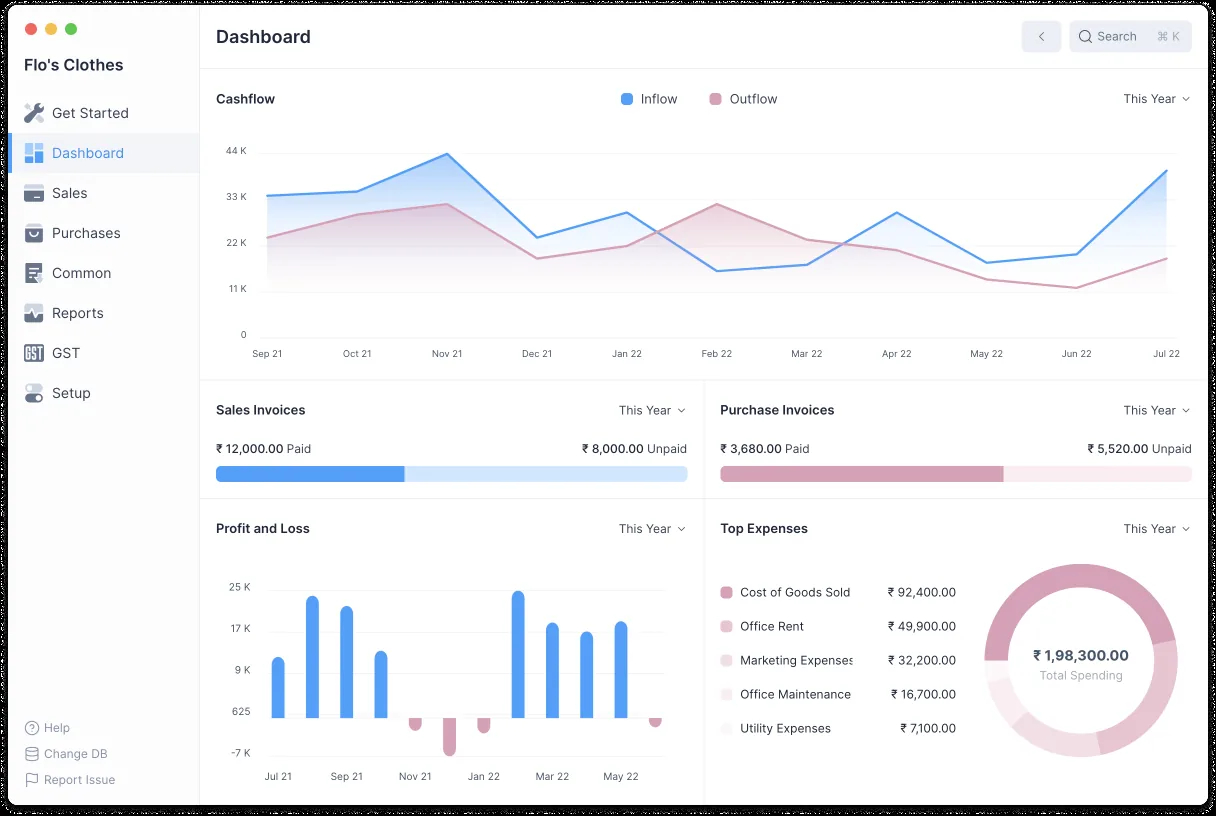
Finance managers usually want one screen that shows what is owed, what is due this week and what is stuck.
All four platforms we implement cover the core AP cycle. The difference is in matching depth, approval flexibility and payment automation. Confirm details for your edition.
| Zoho | Odoo | ERPNext | Dynamics 365 | |
|---|---|---|---|---|
| Bill entry and attachments | Bills in Zoho Books with attachments and autoscan of uploaded documents | Vendor bills with document upload; bill digitization available as a paid service | Purchase Invoice linked to Purchase Receipt, with attachments | Purchase invoices in Business Central; incoming document handling |
| PO and receipt matching | Bills created from POs; matching is simpler than in larger ERPs | Bill control on ordered or received quantities in Purchase settings | Purchase Invoice created from Purchase Receipt; over-billing tolerances | Receipt lines fetched into invoices; tolerances configurable |
| Approval rules | Multi-level approvals for bills in higher plans | Approvals via the Approvals app or Studio rules | Workflow doctype with role-based states | Approval workflows with amount limits |
| Payment runs | Bulk vendor payments; bank file depends on the bank integration | Batch payments and payment registration from bills | Payment Entry and Payment Order; bank file formats often customized | Suggest Vendor Payments in the payment journal |
| PDC handling | Usually handled by configuration or custom fields | Often configured with outstanding accounts or a localization module | Post-dated cheques handled with a clearance date on Payment Entry | Typically via journal setup or an extension |
| Supplier ageing | Payables ageing reports | Aged Payable report | Accounts Payable report with ageing | Aged Accounts Payable report |
Capabilities change between releases. We check the exact edition and version during discovery.
Accounts payable touches several outside systems. These are the connections we most often set up.
These are the rules that most affect how AP is configured. Confirm the treatment of specific transactions with your tax advisor.
Input VAT at the 5% standard rate can generally be recovered only with a valid tax invoice showing the supplier's TRN and the prescribed fields. The ERP should flag bills missing a TRN before posting.
Imported services and certain imported goods are accounted for under reverse charge by a VAT-registered recipient. AP needs tax codes that post both output and input VAT and land in the right return boxes.
Under the planned PINT AE model, supplier invoices will reach you through your Accredited Service Provider. The ERP should be ready to receive structured invoices; see ERP for UAE e-invoicing and check the latest MoF and FTA guidance for your phase.
Tax records, including supplier invoices and payment evidence, must generally be kept for at least 5 years (longer for real estate). Attaching the source document to each bill makes this practical.
General information, not tax or legal advice. Rules change; confirm current FTA, MOHRE and Ministry of Finance guidance with your advisor.
These are the outcomes finance teams aim for. Actual results depend on your volumes and discipline.
Bills that do not match the PO or GRN are held automatically instead of being paid and chased back later.
VAT codes and TRN checks at entry mean the VAT return is built from correct data, not corrected at quarter end.
Weekly or fortnightly runs based on due dates give suppliers certainty and give finance control of cash.
One supplier ledger with bills, credit notes and advances makes supplier statement reconciliation a short task.
If purchasing and inventory are already in the ERP, an AP rollout is usually a few weeks. Starting from scratch takes longer.
Durations are typical ranges; your plan is agreed after discovery.
Map how bills arrive, who approves and how payments are released today, including PDCs and advances.
Set up supplier master data, payment terms, VAT codes, matching tolerances and approval limits.
Load open bills, unpresented cheques and supplier advances, then agree totals to the old system.
Run one or two payment cycles in the ERP with checks against the old register before switching off Excel.
We configure the system for the rules UAE businesses report against, and test it before go-live.
General information, not tax or legal advice. Confirm current requirements with the FTA, MOHRE or your advisor. See all UAE compliance guides.
On-site workshops in Dubai, Abu Dhabi and Sharjah, and remote or on-site delivery across the Northern Emirates and free zones.
Official sources and references
Facts on this page were checked against these sources in October 2026. Rules change, so confirm current requirements before acting.
Still have a question? Our consultants are happy to help.
Ask an ExpertThree-way matching compares the supplier bill with the purchase order and the goods receipt note before payment. It matters most for trading, manufacturing and construction companies buying stock or materials. Service companies often use two-way matching (PO and bill) instead.
Yes, most platforms offer document scanning or OCR, either built in or through an add-on. It speeds up data entry but still needs a human check. See AI invoice processing for how this works in practice.
The advance is recorded as a prepayment against the supplier and then allocated to the bill when it arrives. Our page on supplier advance management covers this in detail, including VAT on advances.
Most UAE banks accept bulk payment uploads in their own CSV or text layouts. The ERP can usually export these formats, sometimes with a small customization. Direct API connections depend on the bank and the platform.
Approved bills with due dates and scheduled PDCs feed the cash forecast. Our cash flow management page explains how AP and AR data become a weekly forecast.
Related Solutions
Related Industries
Related ERP Platforms
We will review your current AP process and show how bills, approvals and payment runs would work in the right ERP.
Dubai, United Arab Emirates










