L
O
A
D
I
N
G


Zoho, Odoo, ERPNext, Dynamics 365 and custom ERP, delivered by one accountable team.

Most companies do not need new apps. They need Odoo's quotation, invoice, purchase and stock screens to match their documents and approval habits. That is customization, and it should be done with restraint.
Odoo customisation in the UAE should use the lightest tool first: settings and configuration, then Odoo Studio in Enterprise for fields, views and report edits, and only then small custom modules inheriting standard apps. Typical changes include bilingual tax invoices showing TRN and VAT in AED, discount approval limits and extra fields, each documented so future Odoo upgrades stay manageable.
Odoo customization UAE requests usually sound small: add the customer's TRN and an Arabic title to the tax invoice, require a manager's approval on discounts above a set limit, show the container number on receipts, or add a project code to every vendor bill. Each change is minor. Together they decide whether users feel that Odoo is their system or a tool imposed on them.
We customize in layers, choosing the lightest tool that does the job. Settings and configuration come first. Then Odoo Studio, available in Enterprise, for fields, views, simple automations and report edits. Only when Studio is not enough do we write a small custom module that inherits the standard app. Building entirely new apps is a different service, described on Odoo development.
The goal is a system that fits your team and still upgrades cleanly. Every customization is recorded, justified and tested, so when Odoo releases a new version you know exactly what needs checking.

The products we configure, integrate and support on projects like this one.
 Odoo Invoicing / Accounting
 Odoo Sales
 Odoo CRM
 Odoo Inventory
 Odoo Purchase
 Odoo Manufacturing
Product names and logos are trademarks of their respective owners and are shown only to identify the software we implement.
Customization is where Odoo projects most often go off course, usually through too much of it rather than too little.
The tax invoice was redesigned for branding but lost the words 'Tax Invoice', the supplier TRN or the VAT amount in AED. The accountant spots it only when preparing the VAT return.
Dozens of Studio fields were added during the project and half are never filled in. Forms get longer, users skip fields, and reports become unreliable.
Every purchase order needs two approvals regardless of value, so urgent site orders wait and buyers find workarounds outside Odoo.
A custom field for 'payment terms' was added next to Odoo's own payment terms. Two sources of truth appear, and they soon disagree.
Emails, field updates and server actions were set up to fire on record changes. Nobody remembers why a customer suddenly receives three messages.
We treat every request as a business question first, then pick the simplest way to answer it in Odoo.
We gather change requests from each department and group them by document or process, such as the quotation, the delivery note or vendor bill approval.
For each one we ask what decision or document it supports and whether a standard Odoo setting already covers it. Many requests disappear at this stage.
Remaining items are assigned to configuration, Studio or a small inherited module, with the reason recorded in a customization register.
Changes are made on a duplicate database, tested by the requesting user, and checked against VAT and reporting needs.
Approved changes go live in planned batches with a short note to users, rather than one by one throughout the week.
These are typical items on UAE customization projects. Each is scoped individually.
Customization is often delivered as a short project after go-live, or as part of an implementation. The ranges below are common for a batch of requests; small single changes can be faster.
Durations are typical ranges; your plan is agreed after discovery.
Collect, group and challenge requests with department heads.
Agree layouts, rules and field definitions, with sample documents signed off.
Configuration, Studio work and small modules built on a test copy and checked by users.
Go live, monitor usage and remove anything that is not being used after the first month.
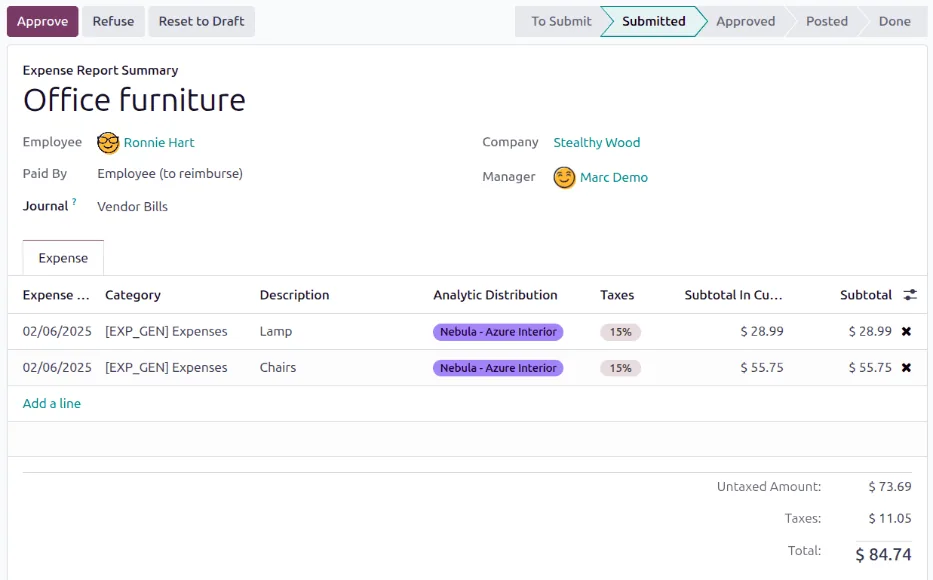
Approval rules are one of the most requested customizations. Done well, managers see one clear queue instead of chasing emails.
Benefits described in plain terms rather than invented figures.
Invoices, quotations and delivery notes carry the fields UAE customers and auditors expect.
Approval limits match real authority levels, so control does not slow down routine work.
Removing unused fields makes data entry quicker and reports more reliable.
A customization register shows exactly what to test when moving to a new Odoo version.
More on tailoring and extending Odoo.
We configure the system for the rules UAE businesses report against, and test it before go-live.
General information, not tax or legal advice. Confirm current requirements with the FTA, MOHRE or your advisor. See all UAE compliance guides.
On-site workshops in Dubai, Abu Dhabi and Sharjah, and remote or on-site delivery across the Northern Emirates and free zones.
Official sources and references
Facts on this page were checked against these sources in October 2026. Rules change, so confirm current requirements before acting.
Still have a question? Our consultants are happy to help.
Ask an ExpertStudio, the no-code customization tool, is part of Enterprise. On Community, customizations are made through configuration or small custom modules. Both work; Studio is quicker for simple changes.
We design invoice layouts that include the fields required for UAE tax invoices, such as supplier and customer TRN, VAT amount and totals in AED. Confirm the final template with your tax advisor.
Configuration and well-built inherited modules usually upgrade with limited effort. Studio changes and modules generally need testing and sometimes adjustment. Our customization register tells you what to check.
There is no fixed number. The test is whether each one is used and supports a real decision. We review usage a month after release and remove what nobody touches.
Yes. Odoo supports Arabic with right-to-left layout. We translate custom field labels and design bilingual print documents where needed.
Related Solutions
Related Industries
Related ERP Platforms
Share the changes your teams are asking for and we will sort them into configuration, Studio and code, with a scoped estimate.
Dubai, United Arab Emirates