L
O
A
D
I
N
G


Zoho, Odoo, ERPNext, Dynamics 365 and custom ERP, delivered by one accountable team.

Run receipts, transfers, deliveries and stock valuation in Odoo Inventory, with barcode scanning, import landed costs and reorder rules tuned to UAE supply chains.
Odoo Inventory suits UAE traders, distributors and retailers holding stock in several places, such as Jebel Ali, Al Quoz, Deira or a free zone. It uses a double-entry stock model, so every movement runs from one location to another. Its landed costs feature adds freight, customs duty, clearing and handling to item cost, and barcode scanning and reorder rules keep stock accurate.
Odoo Inventory UAE implementations are most common in trading companies, distributors and retailers that hold stock in more than one place: a warehouse in Al Quoz or Jebel Ali, a showroom in Deira, a store in Sharjah, or goods in a free zone. Odoo uses a double-entry stock model, so every movement goes from one location to another, and you can always see where an item came from and where it went.
Most UAE businesses import a large share of their stock, so purchase prices alone do not tell the true cost. Odoo's landed costs feature adds freight, customs duty, clearing and handling charges to the value of received goods, which matters for margin reports and for the inventory figure in your balance sheet. Valuation can run on FIFO or average cost, posting entries to accounting automatically in Enterprise when automated valuation is enabled.
We design warehouse routes, configure barcode workflows and set reordering rules so the stock figures in Odoo match the shelf. For larger operations with racks, zones and pick waves, see our dedicated Odoo warehouse management page.

The products we configure, integrate and support on projects like this one.
 Odoo Inventory
 Odoo Invoicing / Accounting
 Odoo Sales
 Odoo CRM
 Odoo Purchase
 Odoo Manufacturing
Product names and logos are trademarks of their respective owners and are shown only to identify the software we implement.
Storekeepers and managers start from an overview of operation types, each showing what is ready, waiting or late.
A common pattern for UAE traders bringing goods from overseas suppliers into a local warehouse.
One shared database: every step updates stock, finance and reports in real time.
The parts of Odoo Inventory we configure most often for UAE clients.
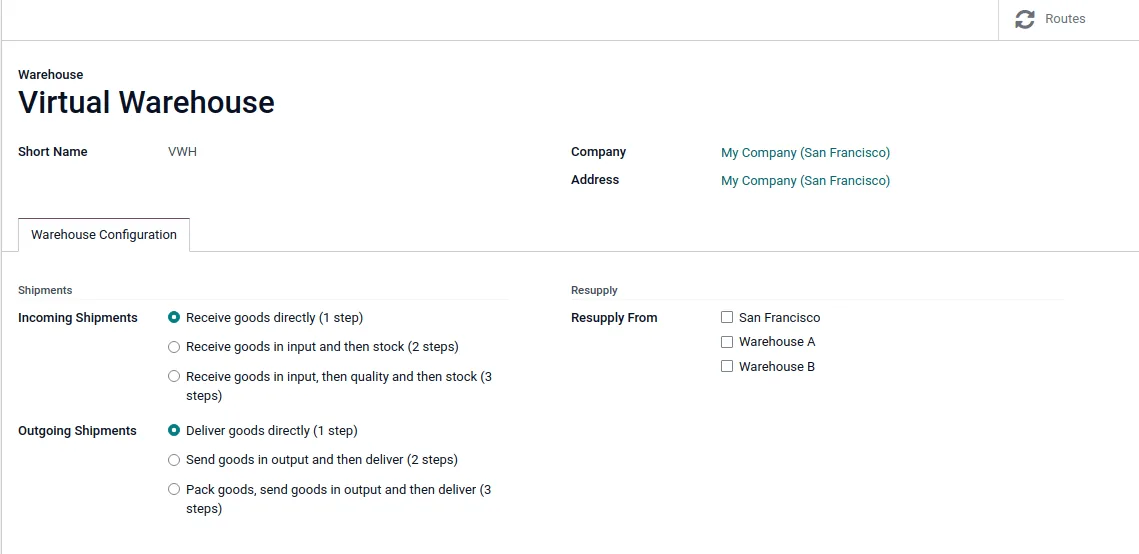
Separate warehouses with one, two or three-step receipt and delivery routes, plus resupply between warehouses and branches.
Scan products, lots and locations on mobile devices or handheld scanners to validate transfers and counts without paper.
Track batches and serial numbers end to end, with expiry and removal dates for food, cosmetics and medical products.
Split freight, duty and clearing charges across received items by quantity, weight, volume or value.
Minimum and maximum levels that create draft purchase orders or transfers when forecasted stock falls too low.
FIFO or average cost valuation with automatic journal entries, so stock in accounting matches stock in the warehouse.
Buy in cartons, store in pieces and sell in packs, with automatic conversion between units.
Scheduled counts by location or product with approval of differences before they post.
Inventory sits between purchasing, sales channels and logistics partners.
Inventory records support tax, customs and audit requirements. Confirm treatments with your tax advisor and customs broker.
Deliveries and receipts drive the invoices and bills that carry 5% VAT. Correct product tax settings in Odoo mean the VAT return reflects what was actually sold and bought.
Goods moved between designated zones, the mainland and abroad may have different VAT treatment. We set up separate locations and fiscal positions so these movements can be reported correctly.
Recording HS codes, country of origin and weights on products helps your broker prepare declarations and supports landed cost calculations.
Auditors check that inventory in the balance sheet matches physical stock. Odoo's valuation layers and count history provide that trail.
General information, not tax or legal advice. Rules change; confirm current FTA, MOHRE and Ministry of Finance guidance with your advisor.
Practical advice from UAE warehouse rollouts.
Explore related Odoo apps and inventory guides for UAE businesses.
We configure the system for the rules UAE businesses report against, and test it before go-live.
General information, not tax or legal advice. Confirm current requirements with the FTA, MOHRE or your advisor. See all UAE compliance guides.
On-site workshops in Dubai, Abu Dhabi and Sharjah, and remote or on-site delivery across the Northern Emirates and free zones.
Official sources and references
Facts on this page were checked against these sources in October 2026. Rules change, so confirm current requirements before acting.
Still have a question? Our consultants are happy to help.
Ask an ExpertYes, core Inventory is in Community. The Barcode app, quality checks and some advanced features are Enterprise only, and automated stock valuation is far easier to manage in Enterprise accounting.
Yes. You can set up separate warehouses or companies for each, with transfers or intercompany sales between them, depending on how your entities are licensed.
Yes. With lots and expiration dates enabled, Odoo records best-before, removal and expiry dates and can pick stock using first-expiry-first-out removal strategy.
Most USB and Bluetooth scanners work as keyboard input. Rugged Android handhelds can run the Odoo Barcode app in a browser, which we test during setup.
Odoo handles many mid-size warehouse needs well. Very high-volume 3PL operations with complex billing may need extra modules or a dedicated WMS, and we will tell you honestly if that applies.
When the freight forwarder's and customs broker's invoices arrive, you record them as vendor bills and link them to the receipt in a landed cost record. Odoo spreads the charges across the received items by the method you choose and updates their stock value, so margins on later sales reflect the true cost of the goods.
Related Solutions
Related Industries
Related ERP Platforms
Talk to us about your warehouses and products, and we will outline an Odoo Inventory setup for your business.
Dubai, United Arab Emirates