
L
O
A
D
I
N
G


Zoho, Odoo, ERPNext, Dynamics 365 and custom ERP, delivered by one accountable team.

Stop retyping quotes in Excel. Price from the right list, route discounts for approval, send a VAT-clear quotation and turn the accepted version into a sales order without rekeying a single line.
Quotation management software covers everything from enquiry to confirmed order: selecting items, applying the right customer price list, checking margin and stock, routing discounts for approval, sending a PDF or portal quote with VAT shown separately, tracking revisions and converting the accepted version into a sales order without retyping. It replaces Excel quotes that drift from official prices and lose revision history.
Quotation management software UAE companies use covers everything between a customer's enquiry and a confirmed order: picking items and services, applying the right customer price list, checking margin, getting a discount approved, sending a clean PDF with VAT shown separately, chasing the customer and recording which revision was finally accepted. In most Dubai and Sharjah trading, contracting and service companies this still happens in an Excel template saved as "Quote_ABC_rev3_final.xlsx" and emailed from a salesperson's inbox.
The cost of that habit is quiet but real. Prices drift from the official list, a 15% discount goes out without the sales manager seeing it, nobody can tell which quotes are expiring this week, and the accounts team retypes the accepted quote into the invoicing system with a different item code. When a customer disputes an invoice, the only evidence of what was agreed is an email thread.
A proper quotation module sits inside your CRM or ERP, so every quote is linked to the opportunity, the customer record, live stock and the price rules your finance team controls. The accepted revision converts into a sales order and later an invoice, which is where sales order management takes over. This page focuses on the quote itself: building it, approving it, revising it and measuring it.

These are the problems we see most often when we review quoting in UAE SMEs and mid-size distributors.
Salespeople copy last month's quote as a starting point, so old prices and discontinued items keep reappearing. Margin erodes before anyone in finance sees the order.
Discounts are agreed on the phone and typed straight into the PDF. The sales manager only finds out when the invoice is raised and the gross margin report looks wrong.
A project quote can go through five or six revisions as quantities and specifications change. Without version control, the warehouse ships against rev 2 while the customer signed rev 4.
Quotes have a validity date, but nobody gets reminded when it expires. Good deals go cold because there is no list of open quotes by salesperson and age.
The accepted Excel quote is retyped into the accounting system as a sales order or invoice, introducing errors in item codes, units and VAT treatment.
Sales commits to a two-day delivery on items that are actually on a supplier's backorder. The result is a promise the warehouse cannot keep.
The flow below is what we typically configure. Each step leaves a record, so management can see where quotes stall and why.
One shared database: every step updates stock, finance and reports in real time.
Quoting touches more of the system than most people expect. These are the modules that need to be set up and connected.
Numbered quotes with line items, validity, payment terms and revision tracking linked to the opportunity.
Item master with codes, units of measure, descriptions and images so every line uses a controlled product.
Customer-group prices, quantity breaks, currency lists in AED and USD, and promotional rules maintained by finance.
Rules that route quotes above a discount or value threshold to the sales manager or GM before sending.
Live on-hand and incoming quantities shown on the quote line so delivery promises are realistic.
Branded, bilingual-ready PDF layouts with TRN, VAT breakdown, terms and conditions and bank details.
Customers view, accept or sign quotes online, which timestamps acceptance and removes scanning.
Accepted quotes convert into orders and invoices with the same lines, prices and tax codes.
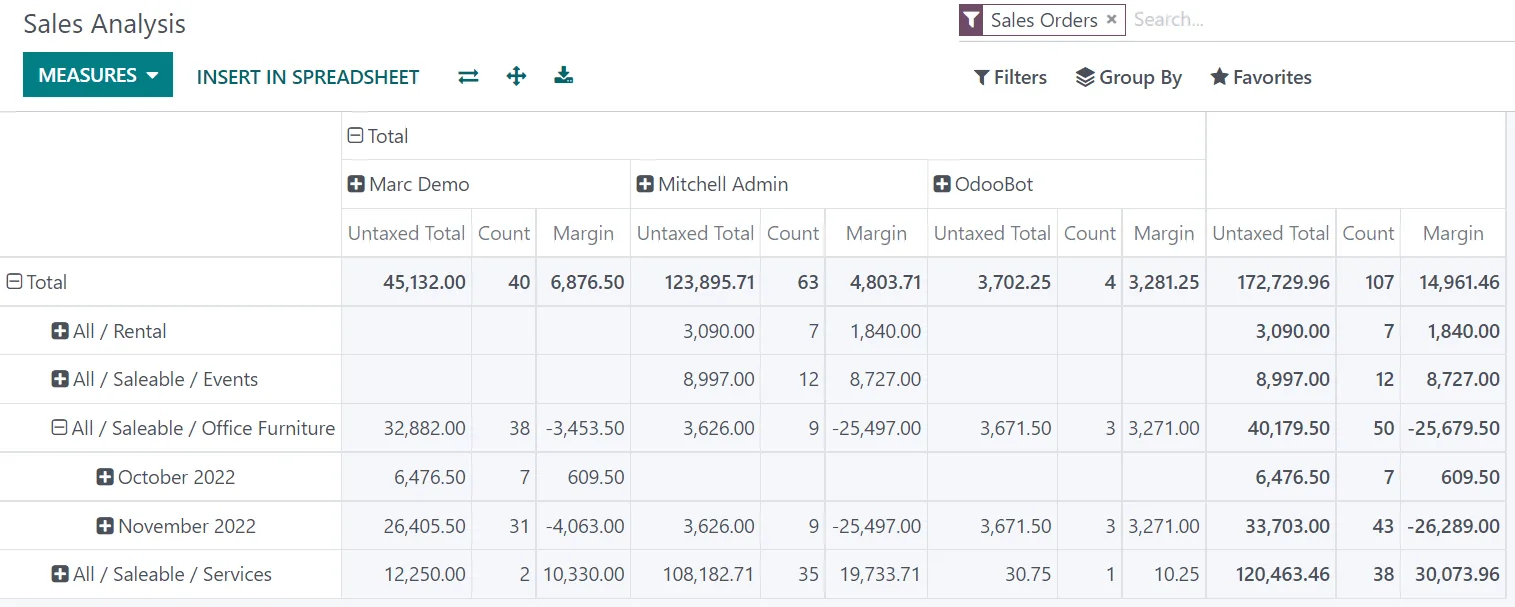
Once quotes live in the system, the pipeline of open offers becomes a report rather than a guess.
We implement all four platforms below and choose by fit. Capabilities differ by edition, so confirm details against your licence.
| Zoho | Odoo | ERPNext | Dynamics 365 | |
|---|---|---|---|---|
| Where quotes live | Quotes module in Zoho CRM; Estimates in Zoho Books / Inventory | Sales app quotations, linked to CRM opportunities | Quotation doctype linked to Lead or Opportunity | Quotes in Dynamics 365 Sales; sales quotes in Business Central |
| Pricing | Price Books per customer group; pricing rules in Books | Pricelists with rules by customer, quantity, date and currency | Price Lists plus Pricing Rules (discount, quantity, customer) | Price lists and discounts lists; trade agreements in Finance and Operations apps |
| Discount approval | Approval Processes and Blueprint (edition dependent) | Typically via Studio approval rules or a small customization | Workflow doctype with states and role-based approvals | Power Automate approvals or business process flows |
| Revisions | Clone or edit with timeline history | Edit with chatter log; revision numbering often added | Amend creates a linked revision (e.g. -1, -2) | Quote revisions supported natively in Sales |
| Customer acceptance | Zoho Sign integration; portal options | Online quote with signature and optional payment | Web portal and print formats; e-sign via integration | Word templates; e-signature via partner apps |
| Convert to order | Quote to Sales Order to Invoice (CRM or Books) | Confirm turns quotation into sales order | Make Sales Order from Quotation | Win quote creates order; syncs to ERP |
| Best fit | SMEs already on Zoho One or Zoho Books | Trading and distribution needing stock-aware quotes | Cost-conscious firms wanting open-source control | Larger teams on Microsoft 365 and Teams |
Hedged summary based on recent editions. Feature names and availability change; we confirm against your edition during discovery.
Quotes rarely live alone. These connections remove the most retyping in UAE sales teams.
A quotation is not a tax invoice, but what you put on it flows into documents that are regulated. Confirm specific treatment with your tax advisor.
Show prices excluding VAT, the 5% VAT amount and the total, and apply zero-rated or exempt codes only where the supply qualifies. Customers in the UAE expect this on every offer, and it prevents disputes when the tax invoice is issued.
Record the customer's TRN, legal name and address at quote stage so the tax invoice generated from the order is complete. See ERP for VAT compliance for the invoice side.
Under the UAE e-invoicing rules (PINT AE through Accredited Service Providers, phased from 2027), invoice data must be structured. Clean item codes, units and tax categories on quotes make that easier; check the latest MoF and FTA guidance on dates.
Accepted quotes and their revisions support the sales contract. Keeping them in the ERP with timestamps helps meet the general requirement to retain tax records for at least five years.
General information, not tax or legal advice. Rules change; confirm current FTA, MOHRE and Ministry of Finance guidance with your advisor.
Benefits depend on discipline and data quality, but these are the improvements teams typically notice first.
Salespeople pick items from the catalog with the right price already applied, so a quote that took an hour in Excel is built in minutes.
Discount limits and approvals stop unplanned price cuts, and managers see margin on every quote before it leaves.
Orders and invoices are created from the accepted quote, so item codes, quantities and VAT match what the customer signed.
Open and expiring quotes become a daily list, which feeds pipeline reviews and sales forecasting.
For a focused quoting rollout on an existing CRM or ERP, these ranges are common. Larger catalogs or CPQ logic take longer.
Durations are typical ranges; your plan is agreed after discovery.
Review current quote templates, price lists, discount habits and the hand-off to accounts.
Clean the item master, load price lists and define discount bands and approval thresholds.
Build PDF layouts, approval rules, reminders and the quote-to-order conversion.
Run live quotes with one sales team, fix gaps, then train the wider team.
Track conversion and discount reports in the first months and tune rules.
We configure the system for the rules UAE businesses report against, and test it before go-live.
General information, not tax or legal advice. Confirm current requirements with the FTA, MOHRE or your advisor. See all UAE compliance guides.
On-site workshops in Dubai, Abu Dhabi and Sharjah, and remote or on-site delivery across the Northern Emirates and free zones.
Official sources and references
Facts on this page were checked against these sources in October 2026. Rules change, so confirm current requirements before acting.
Still have a question? Our consultants are happy to help.
Ask an ExpertNot quite. Every CRM or ERP handles basic quotes; CPQ (configure, price, quote) adds rules for configurable products, such as valid option combinations and bundle pricing. Most UAE traders need solid price lists and approvals rather than full CPQ.
A quotation is a priced list of items or services with terms. A proposal is a longer document with scope, methodology and team, often in answer to an RFP. We cover that on our proposal management software page.
Yes. We usually rebuild your existing layout as a system template, adding the TRN, VAT breakdown and validity fields. Arabic text can be added where your platform's templates support it.
Yes. All four platforms can route or hold a quote above a set discount or value until a manager approves. The detailed setup is covered on ERP discount approval.
Odoo has online acceptance with signature built in, and Zoho, ERPNext and Dynamics 365 support it through e-sign tools or portals. Acceptance is timestamped against the exact revision.
Not always. Small teams often start with CRM quotes linked to their accounting system. If stock checks and order conversion matter, quoting inside the ERP usually works better.
Related Solutions
Related Industries
Related ERP Platforms
We will review your current quote templates, price lists and approval habits and show the workflow on the platform that fits.
Dubai, United Arab Emirates










