
L
O
A
D
I
N
G


Zoho, Odoo, ERPNext, Dynamics 365 and custom ERP, delivered by one accountable team.

A budget that lives in a spreadsheet cannot stop a purchase order. Project budget management in an ERP checks every commitment against the approved budget before it is raised.
An ERP enforces project budgets by loading the approved estimate as a baseline split by phase, task or cost code, then checking every purchase requisition, purchase order and expense claim against the remaining budget. It warns or blocks over-budget documents until a budget owner approves, and records client variations and internal changes as versioned revisions with reason and approver.
Project budget management is the discipline of setting a baseline budget for each project, approving changes to it in a controlled way, and making sure spending cannot quietly exceed it. In many UAE companies the budget exists only as the costing sheet attached to the quotation. Once the project is won, it is filed away, and nobody checks a purchase request or subcontract against it until the overrun has already happened.
An ERP changes that by turning the budget into a live control. The approved estimate becomes the baseline, split by phase or cost code. Every purchase requisition, purchase order and expense claim is checked against the remaining budget, and the system either warns the requester or blocks the document until a budget owner approves an exception. Variations from the client and internal change requests create formal budget revisions, so the history of every change is kept.
This page is about setting and controlling the budget. Measuring what was actually spent is covered under project costing and margin analysis under project profitability. If your budgets are mainly departmental rather than project-based, our page on budget vs actual reporting is a better starting point.

The budget figure is rarely the problem. The problems are in how it is approved, changed and enforced.
The estimate is a spreadsheet and the ERP has no budget at all. Reports can only show actuals, so variance has to be calculated by hand each month.
A single budget figure per project hides the fact that procurement is already over while labour is under. By the time the total is exceeded, it is too late to correct.
Buyers raise POs without seeing remaining budget. Approvers sign based on the supplier quote, not on whether the project can afford it.
The project manager edits the budget sheet when a variation is agreed, and the original baseline is lost. Nobody can later explain why the budget grew.
Extra budget for a client-approved variation, which brings revenue, is treated the same as extra budget to cover an internal mistake. The margin story becomes impossible to read.
This is how we set up budget control so it supports project managers rather than slowing them down.
One shared database: every step updates stock, finance and reports in real time.
Budget control sits across planning, purchasing and finance. These are the parts we configure.
Budget lines per project and cost code or account, with amounts by period if the project spans several months.
The costed quotation or estimate that becomes the baseline when the project is won, keeping the link to the sales side.
Requests checked against remaining budget at the point a site engineer or consultant asks for something.
POs that reserve budget when approved and show as committed spend, so two buyers cannot spend the same headroom.
Rules that warn, stop or escalate when a document would take a cost code over budget.
Change requests and client variations that create a new budget version with a reason, value and approver.
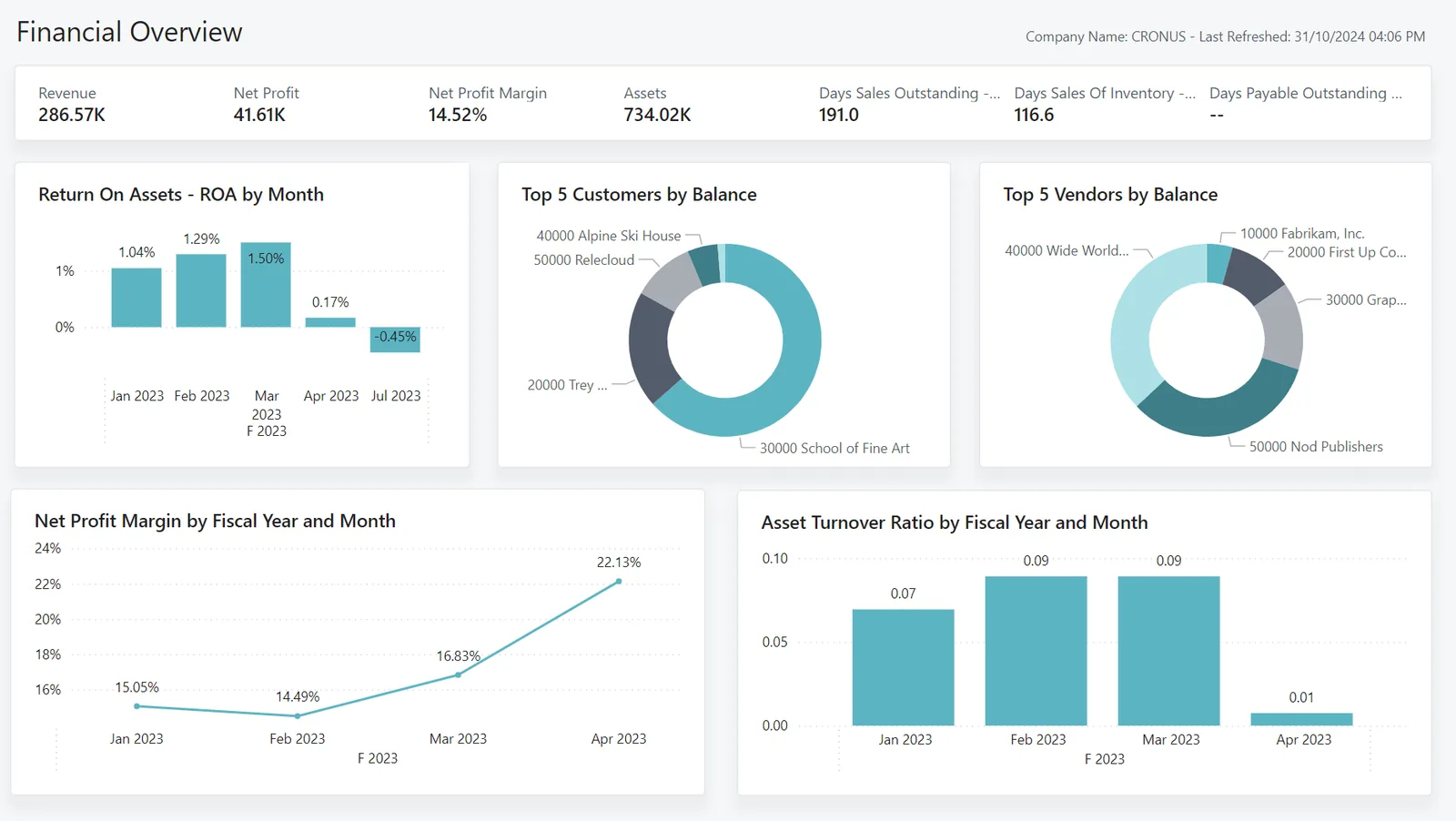
These views answer two questions: how much budget is left, and why has it changed?
All four can hold project budgets; the strength of the automatic checks varies. Confirm details for your edition and version.
| Zoho | Odoo | ERPNext | Dynamics 365 | |
|---|---|---|---|---|
| Project budget | Budgets in Zoho Projects (by project, task or user, on paid plans); account budgets in Zoho Books | Budgets on analytic accounts in Odoo Accounting (Enterprise) | Budget doctype against a project or cost center, by account | Project planning lines (budget and billable) in Business Central; estimates in Project Operations |
| Check on purchases | Usually through approval rules or custom functions | Budget warnings depend on version; often custom approval rules | Configurable actions on material request, PO and actual expense: stop, warn or ignore | Approval workflows; commitment checks depend on product and configuration |
| Budget by period | Monthly budgets in Zoho Books | Budget periods on budget lines | Monthly distribution on the budget | Budget by period on G/L budgets; time-phased planning lines |
| Revisions and versions | Edit with audit history; versioning often manual | New budget lines or versions, approval via workflow | Budget amendments with document history | Versioned estimates in Project Operations; planning line history |
| Budget vs actual report | Project budget reports and Books budget vs actual | Budget analysis report by analytic account | Budget Variance Report by project or cost center | Project statistics and budget vs actual analysis |
Behavior of automatic budget checks is the area where editions differ most.
Budgets are only enforced if every spending channel passes through the check.
Budgets are internal controls, but they connect to tax and audit records. Confirm specifics with your advisor.
Budgets should be set on amounts excluding recoverable VAT at 5%, so a purchase with input VAT does not appear to consume more budget than its real cost.
Exception approvals and budget revisions should keep the user, date and reason. Auditors and tax reviewers increasingly expect to see this control evidence.
Public sector clients in the UAE often require formal variation approvals before extra work is paid. Linking budget revisions to signed variations protects your claim.
Accurate project budgets help forecast taxable income for the year, which matters for cash planning around the 9% rate above the AED 375,000 threshold.
General information, not tax or legal advice. Rules change; confirm current FTA, MOHRE and Ministry of Finance guidance with your advisor.
Typical outcomes, described without numbers because every starting point is different.
Spending above budget needs a named approver, so overruns become decisions rather than discoveries.
Every revision has a reason, so management can separate paid client variations from internal mistakes.
Approvers see remaining budget on the document itself and stop asking finance for a figure.
Comparing baseline to final budget by cost code shows where estimates are consistently low.
Indicative durations for a company with tens of live projects; the cost code design and data quality drive the range.
Durations are typical ranges; your plan is agreed after discovery.
Agree budget structure, owners, tolerance levels and which documents are checked.
Set up budgets, approval rules and revision workflow; link estimates to project budgets.
Load current budgets and open commitments for projects already in progress.
Run checks in warning mode so teams adjust before hard stops are switched on.
Switch on stop rules for agreed cost codes and review exceptions monthly.
We configure the system for the rules UAE businesses report against, and test it before go-live.
General information, not tax or legal advice. Confirm current requirements with the FTA, MOHRE or your advisor. See all UAE compliance guides.
On-site workshops in Dubai, Abu Dhabi and Sharjah, and remote or on-site delivery across the Northern Emirates and free zones.
Official sources and references
Facts on this page were checked against these sources in October 2026. Rules change, so confirm current requirements before acting.
Still have a question? Our consultants are happy to help.
Ask an ExpertFor most companies a warning plus escalation works better than a hard stop at first. Once budgets are reliable, hard stops on selected cost codes such as subcontracts or capital items are common.
Record the variation as a change request with its revenue and cost, and approve a budget revision linked to it. Keep internal overruns as separate revisions so the two are never mixed.
Yes. Remaining budget should equal budget minus actual minus open commitments. Otherwise two POs can be approved against the same headroom. See project procurement software for the purchasing side.
Most ERPs support time-phased budgets. That helps cash planning on long projects, although many firms control against the total and only report by month.
The project manager usually owns the budget, finance owns the controls, and a director approves revisions above a set value. Our ERP for project managers page shows how the PM view works.
ERPNext has configurable stop and warn actions built in, Dynamics 365 offers deep planning and approval options, and Zoho and Odoo often use approval rules. See Odoo project management and Zoho Projects for platform detail.
Related Solutions
Related Industries
Related ERP Platforms
We design budget structures and approval rules that stop overruns without slowing your project teams.
Dubai, United Arab Emirates










