L
O
A
D
I
N
G


Zoho, Odoo, ERPNext, Dynamics 365 and custom ERP, delivered by one accountable team.

Business Central is sold and supported through partners. Here is what that relationship looks like with us, from choosing Essentials or Premium to keeping your extensions working after each update.
A Business Central partner in the UAE licenses, configures and supports Microsoft Dynamics 365 Business Central, which Microsoft sells through partners. UAE ERP Experts, a Microsoft Partner with a Dubai office, advises on Essentials, Premium and Team Members licences, sets up UAE VAT posting and tax invoice layouts, checks AppSource apps for compatibility and handles Microsoft escalations.
If you are searching for a Business Central Partner in UAE, you are most likely a growing company that has outgrown QuickBooks, Tally or Sage and wants Microsoft's ERP for small and mid-sized businesses. Dynamics 365 Business Central covers finance, sales, purchasing, inventory, warehousing, projects and basic manufacturing in one cloud product. Microsoft designs it to be sold, localized and supported through partners, so the partner you pick shapes your experience as much as the software does.
UAE ERP Experts is a Microsoft Partner with a Dubai office and clients across the emirates. For Business Central, our partner status means we can advise on and arrange your subscriptions through Microsoft's partner channels, set up UAE-specific requirements such as VAT posting and Arabic-English invoice layouts, recommend and vet AppSource apps, and raise product issues with Microsoft when something is beyond configuration.
This page is about that ongoing relationship. For the product overview, visit our Business Central UAE page. For a new rollout, see Business Central implementation.
Business Central is approachable enough that some companies start on their own or with a freelancer. These are the problems that tend to follow.
Premium adds manufacturing and service management. Companies without those needs sometimes pay for it across every user, while others buy Essentials and later discover they need production orders.
Business Central handles tax through business and product posting groups combined in a VAT posting setup. When those combinations are wrong, the VAT report and the ledger disagree.
Several AppSource apps were installed during a trial and never removed. Some overlap, some add per-user fees, and nobody knows which ones are actually used.
Business Central receives regular updates from Microsoft. An unmaintained custom extension can block an update or fail after it, often discovered by users first.
The original partner is overseas or no longer responsive, so simple questions about posting, permissions or reports wait days.
A straightforward process whether you are new to Business Central or moving from another partner.
We learn your company size, entities, inventory and project needs, then confirm Business Central is a good fit or suggest an alternative.
We map each user to Essentials, Premium or Team Members based on what they do, and explain the reasoning.
For existing tenants, you grant us delegated admin access through Microsoft's partner tools. You keep ownership of the tenant and data.
We check VAT posting setup, number series, dimensions, permissions, installed apps and extensions, and document what we find.
We agree how you raise requests, expected response times and how update testing is handled.
Practical deliverables you can expect from us.
Typical ranges for an existing Business Central customer. New customers follow the implementation plan.
Durations are typical ranges; your plan is agreed after discovery.
Access, contacts and open issue list agreed.
VAT, posting groups, apps, extensions and permissions reviewed.
Priority fixes applied in a sandbox first, then in production.
Changes timed with your subscription cycle.
Requests, update testing and periodic reviews.
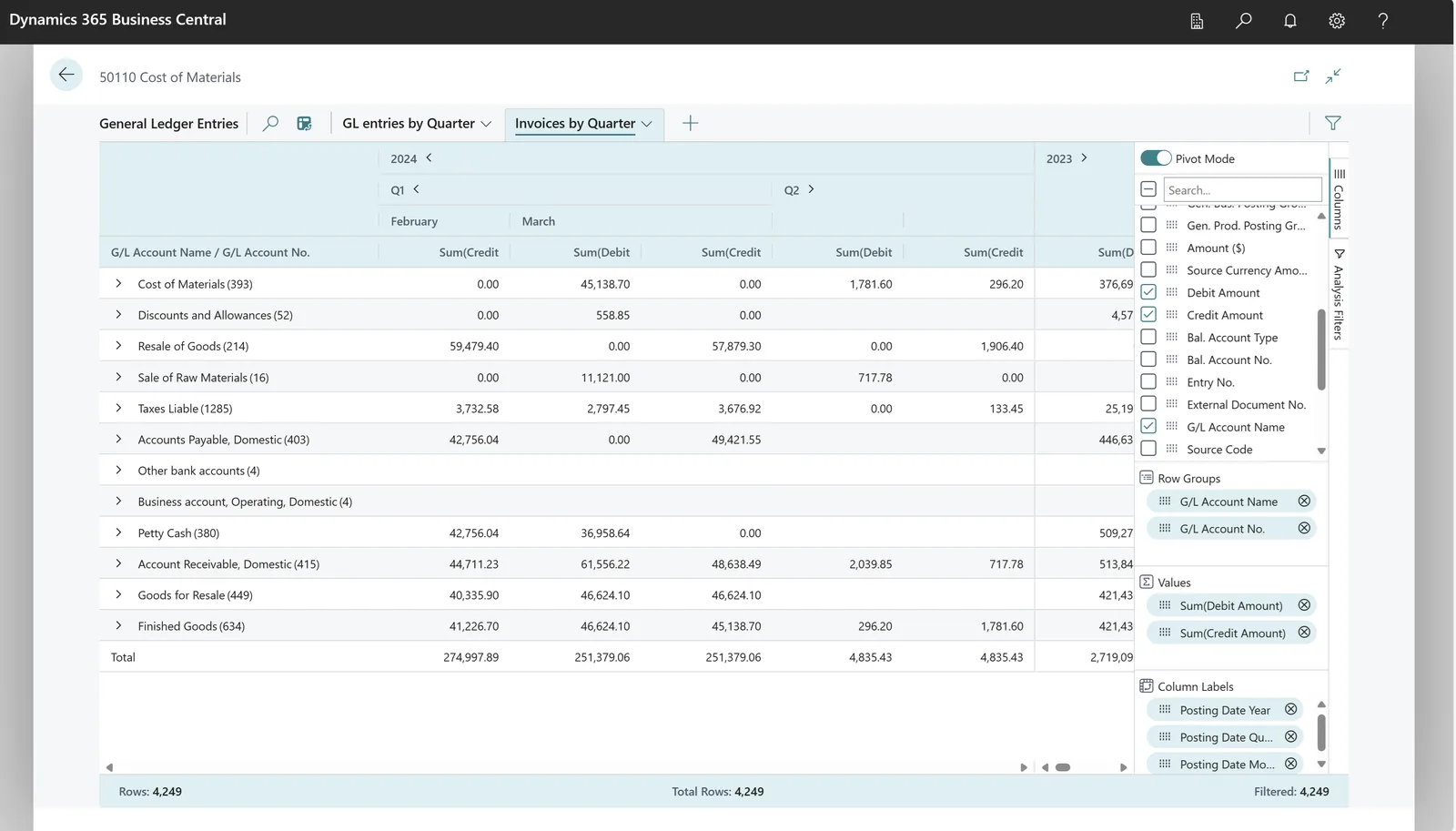
Because UAE VAT errors are costly to correct after filing, tax setup is one of the first areas we review in any Business Central tenant.
Outcomes our clients describe. We do not publish invented figures.
Each user has the license their role needs, reviewed before renewal.
Correct posting setup means the VAT return and ledger tell the same story.
Extensions are tested ahead of major releases, so users are not the first to find problems.
A local team that knows your setup responds to questions in your time zone.
Explore Business Central and related Microsoft services.
We configure the system for the rules UAE businesses report against, and test it before go-live.
General information, not tax or legal advice. Confirm current requirements with the FTA, MOHRE or your advisor. See all UAE compliance guides.
On-site workshops in Dubai, Abu Dhabi and Sharjah, and remote or on-site delivery across the Northern Emirates and free zones.
Official sources and references
Facts on this page were checked against these sources in October 2026. Rules change, so confirm current requirements before acting.
Still have a question? Our consultants are happy to help.
Ask an ExpertEssentials covers finance, sales, purchasing, inventory, warehousing and projects. Premium adds manufacturing and service management. Team Members licenses suit people who mainly view data and do light tasks. Microsoft updates license terms from time to time, so we confirm current details when we plan your licenses.
UAE requirements such as 5% VAT, reverse charge, TRN on tax invoices and VAT return reporting are handled through Business Central's VAT setup, report layouts and, where useful, localization apps. We configure these with your tax advisor's input. Check the FTA's current Tax Accounting Software Register if accreditation of a specific product matters to you.
Yes. Changing partner is a standard process. Your tenant and data stay yours; we are added as the partner and start with a setup review.
Yes, when standard features and existing AppSource apps do not cover a requirement. We keep extensions small, documented and tested against Microsoft updates.
UAE e-invoicing uses the PINT AE specification exchanged through Accredited Service Providers. Business Central can be connected to an ASP, and we plan the data fields and integration with you. Check the latest Ministry of Finance and FTA guidance for current dates.
No. Our office is in Dubai, and we support Business Central clients in Abu Dhabi, Sharjah, Ajman, Ras Al Khaimah, Fujairah and Umm Al Quwain on-site and remotely.
Related Solutions
Related Industries
Related ERP Platforms
Tell us how you use Business Central today and we will suggest where a partner review should start.
Dubai, United Arab Emirates