L
O
A
D
I
N
G


Zoho, Odoo, ERPNext, Dynamics 365 and custom ERP, delivered by one accountable team.

We implement Dynamics 365 Business Central for UAE SMEs with a tight scope: correct posting setup, UAE VAT, clean data and users who know their screens on day one.
A Dynamics 365 Business Central implementation in the UAE for a single company with standard trading or services processes often takes 8-14 weeks; more entities, manufacturing or integrations extend it. Success depends on early foundations: chart of accounts, general and VAT posting groups, inventory posting setup and dimensions, followed by clean data migration and role-based user training.
A Business Central implementation in UAE usually replaces a mix of entry-level accounting software, spreadsheets and separate inventory tools. The goal is one system where a sales order reserves stock, the shipment updates inventory, the invoice posts revenue and output VAT, and the payment clears the customer balance, all without re-keying. Getting there depends on a few foundation decisions made early and made well.
Those foundations are specific to Business Central: the chart of accounts, general and VAT posting groups, inventory posting setup, dimensions for branches or departments, number series, locations and approval workflows. If they are right, reports and VAT returns come out clean. If they are rushed, the finance team spends months correcting entries. As a Microsoft Partner in Dubai, we spend real time on these choices before any data is loaded.
This page covers Business Central only. For larger groups considering Finance and Supply Chain Management or several Dynamics apps together, see Dynamics 365 implementation. If you are moving off QuickBooks, our QuickBooks to Dynamics 365 migration page explains the data side in detail.
Business Central is quick to switch on, which tempts teams to skip design. These are the issues that follow.
The demo company's groups are built for a different market. Revenue, cost of sales and VAT post to accounts that make no sense for a UAE trading or service company.
Management later wants profit by branch, salesperson or project. Without dimensions from the start, historical data cannot be analyzed that way.
FIFO, average or standard cost affects margins and valuation. Changing it after transactions exist is difficult, so it must be decided with finance up front.
Duplicate customers, inactive items and vendors without TRNs move straight across, so the new system inherits the old mess.
Purchase orders and payments are still approved by email, so the audit trail sits outside the ERP.
Sized for SMEs, with decisions recorded at each step.
We walk through order-to-cash, procure-to-pay, inventory and month-end with your team, and look at the quality of the data you will bring over.
Chart of accounts, posting groups, VAT posting setup, dimensions, costing method, locations and number series are agreed in a short design document.
We configure Business Central using configuration packages, set up approval workflows and report layouts, and demo each area to key users.
Masters, open invoices, open orders, stock on hand and opening balances are loaded in trial runs and reconciled. Users test real scenarios, including a sample VAT return.
Role-based training for accountants, buyers, sales and storekeepers, then cutover and close support through your first month-end.
Deliverables from a typical Business Central project.
Ranges are typical for SMEs and depend on entities, inventory complexity, integrations and data quality. They are not guarantees.
Durations are typical ranges; your plan is agreed after discovery.
Process walkthroughs and data assessment.
Foundation design agreed with finance and operations.
Sandbox setup, workflows, layouts and any extensions or integrations.
Trial loads, reconciliation and user acceptance testing.
Cutover, first transactions and first month-end close.
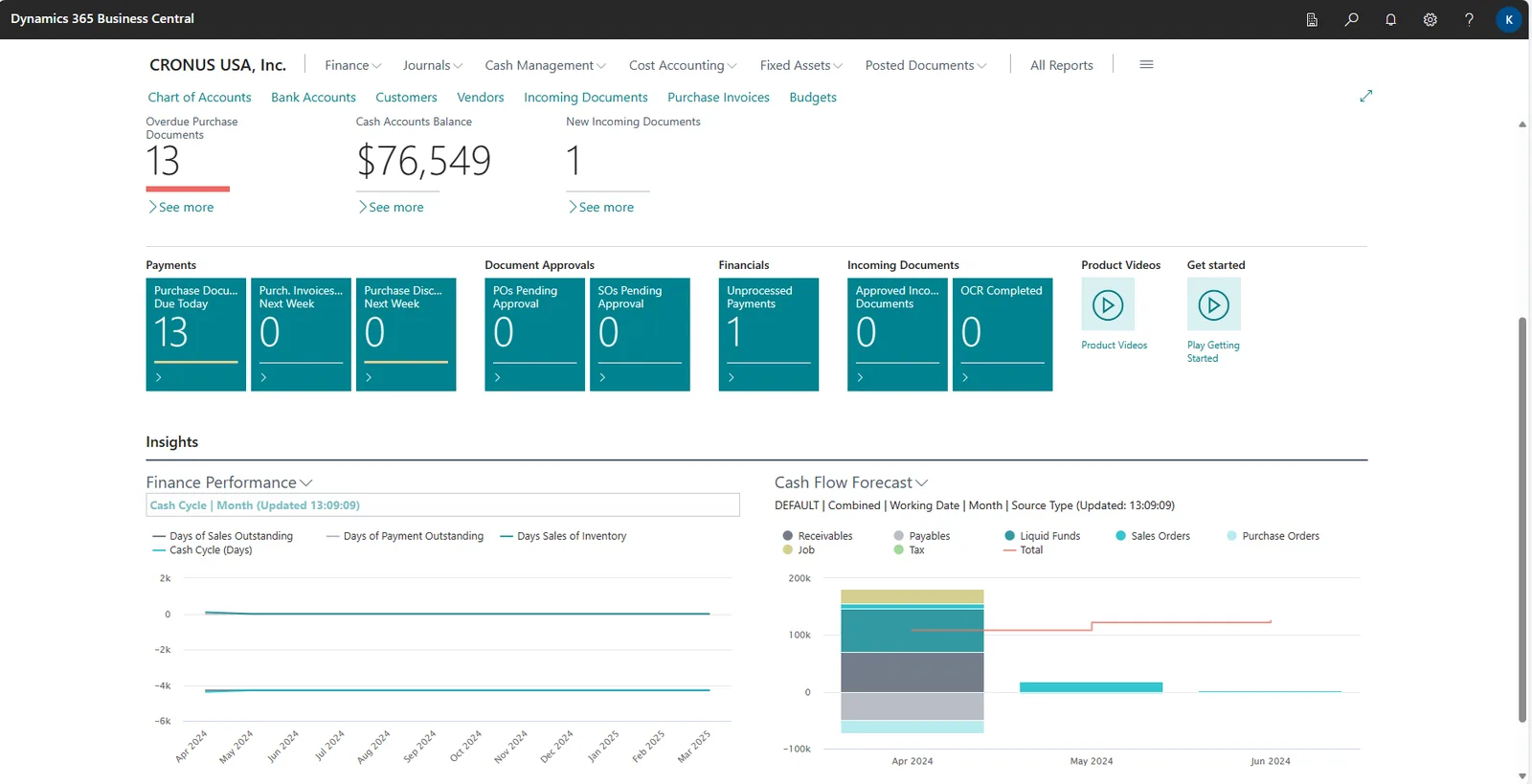
Business Central role centers give each user a home page. For finance, we set up the cues and charts that matter in the first months.
Benefits clients see after the first few months. We do not quote invented numbers.
Each transaction updates the ledger, VAT and inventory at once, so reports agree with each other.
Locations and costing set up correctly mean the valuation report matches the balance sheet.
Approvals, changes and postings are recorded in Business Central instead of scattered in email.
Dimensions, extra companies and apps can be added without redesigning the foundation.
More on Business Central and the services around it.
We configure the system for the rules UAE businesses report against, and test it before go-live.
General information, not tax or legal advice. Confirm current requirements with the FTA, MOHRE or your advisor. See all UAE compliance guides.
On-site workshops in Dubai, Abu Dhabi and Sharjah, and remote or on-site delivery across the Northern Emirates and free zones.
Official sources and references
Facts on this page were checked against these sources in October 2026. Rules change, so confirm current requirements before acting.
Still have a question? Our consultants are happy to help.
Ask an ExpertFor a single company with standard trading or services processes, projects are often 8-14 weeks. More entities, manufacturing, warehouse complexity or integrations extend that. We give a dated plan after the review phase.
Yes. We typically migrate customers, vendors, items, open invoices, open orders, stock on hand and opening balances, then reconcile them against your old system. Full transaction history usually stays archived in the old system for reference.
Yes, through VAT posting groups and VAT posting setup, which handle standard-rated, zero-rated, exempt and reverse charge transactions. We configure it with your tax advisor's input and prepare reports that support the quarterly return filed through EmaraTax.
Essentials suits most trading, distribution and services companies. Premium is needed if you use manufacturing or service management features. We recommend per user once the process review is done.
Yes. Each legal entity is set up as a separate company in the same environment, with intercompany postings where needed. Tax treatment for free zone activities should be confirmed with your tax advisor.
We support the first weeks closely, including the first month-end. After that, you can move to a support plan with us for questions, changes and update testing.
Related Solutions
Related Industries
Related ERP Platforms
Book a review call and we will outline the foundation decisions and a realistic timeline for your company.
Dubai, United Arab Emirates