L
O
A
D
I
N
G


Zoho, Odoo, ERPNext, Dynamics 365 and custom ERP, delivered by one accountable team.

Sell at the counter, print a VAT receipt, take card or cash, and have the day's sales, tender and stock land in your ERP without anyone re-keying a Z-report.
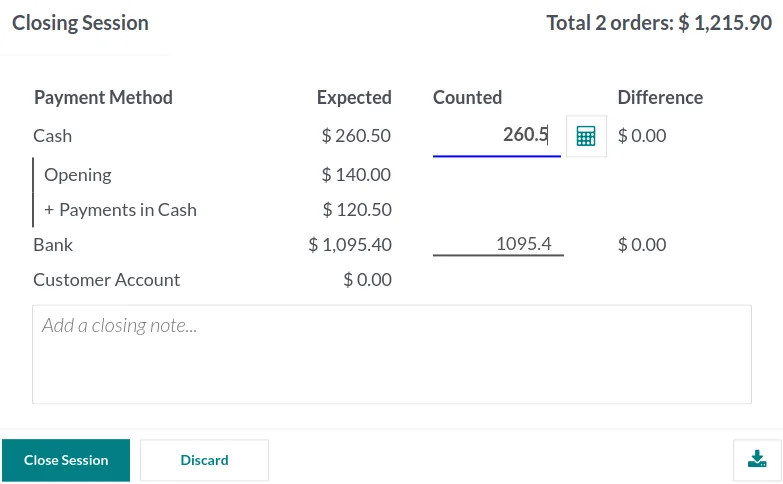
POS software in the UAE works best as part of an ERP, so products, prices and promotions come from one item master, each sale reduces branch stock, and session closing posts sales, VAT, cash and card tenders to the ledger automatically. This removes manual Z-report entry, records cashier differences and lets card terminal settlements be matched against expected amounts.
POS software in the UAE is easy to buy and hard to connect. Many businesses run a standalone till from one vendor, accounting in another system and stock in a spreadsheet. Every evening someone copies the Z-report into the books, card settlements from the bank arrive three days later with commissions deducted, and the stock figure is only right after a full count.
A point of sale that is part of the ERP removes that gap. Products, prices and promotions come from one item master. Each sale reduces stock in the right branch. At closing, the session posts sales, VAT, cash and card tenders to the ledger, and the cashier's cash difference is recorded instead of argued about. Card terminal settlements can then be matched against the expected amounts.
This page covers POS across business types: shops, pharmacies, salons, showrooms, trade counters and service desks. For store-specific needs such as size and color variants or promotions, see our retail POS software page, and for tables and kitchens see restaurant POS software.

Owners and area managers check the same numbers the accountant posts, updated as sessions close.
The same cycle runs in every branch; head office sees each step as it happens.
One shared database: every step updates stock, finance and reports in real time.
These are the points we test before any POS goes live, regardless of the platform.
Receipts show your TRN, VAT amount and the fields your tax advisor confirms you need. Bilingual Arabic and English layouts are available on most platforms.
If the internet drops in a mall unit or a remote branch, the till keeps selling and syncs orders later, so queues do not build up.
Cash, cards, Apple Pay and Google Pay through the terminal, gift vouchers, customer credit and split payments on one receipt.
Prices, taxes and promotions are set centrally and pushed to every branch, with branch-level overrides only where you allow them.
Look up customers by mobile number, record purchases against them and send e-receipts by email or WhatsApp where configured.
Discounts above a limit, refunds and price overrides need a manager PIN. Every action is logged against the cashier and session.
All four can support a counter, but the approach to POS varies a lot.
| Zoho | Odoo | ERPNext | Dynamics 365 | |
|---|---|---|---|---|
| POS offering | Zoho POS and Zoho Inventory integrations; check regional availability | Native Point of Sale app with retail and restaurant modes | Built-in POS with POS Profiles and closing entries | Dynamics 365 Commerce for retail chains; partner POS apps for Business Central |
| Offline selling | Depends on the app and device | Supported in the browser session | Supported with limits; community apps add more | Store Commerce app supports offline in Commerce |
| Hardware | Common printers and scanners | IoT Box or direct drivers for printers, scales, drawers | Browser printing and standard scanners | Wide peripheral support via hardware station |
| Posting to ledger | Syncs to Zoho Books | Session closing posts journal entries | POS Closing Entry consolidates invoices | Statement posting per store and shift |
| Best fit | Small shops already on Zoho | SMEs wanting POS, stock and accounts in one app | Budget-focused multi-counter setups | Larger chains with complex store operations |
POS features change between versions. We test your exact scenarios, including refunds and offline sales, before recommending a platform.
A POS is only as reliable as the hardware and payment links around it.
Configuration supports compliance, but rules on receipts and invoices should always be confirmed with your tax advisor.
VAT at 5% is applied per item and shown on the receipt with your TRN. UAE rules allow simplified tax invoices in certain cases, such as lower-value supplies; your advisor can confirm which format each sale needs.
Business customers often need a full tax invoice with their own TRN. The POS can capture the customer and print or email a full invoice from the same sale.
Session postings carry tax codes, so POS sales flow into the right boxes of the VAT return filed on EmaraTax with no separate summary sheet.
The UAE e-invoicing program under Ministerial Decisions 243 and 244 of 2025 is phased from 2027, with the initial focus on business-to-business and business-to-government invoices. Check the latest Ministry of Finance and FTA guidance on how counter sales to businesses are treated.
General information, not tax or legal advice. Rules change; confirm current FTA, MOHRE and Ministry of Finance guidance with your advisor.
Go deeper into a specific POS setup or platform.
We configure the system for the rules UAE businesses report against, and test it before go-live.
General information, not tax or legal advice. Confirm current requirements with the FTA, MOHRE or your advisor. See all UAE compliance guides.
On-site workshops in Dubai, Abu Dhabi and Sharjah, and remote or on-site delivery across the Northern Emirates and free zones.
Official sources and references
Facts on this page were checked against these sources in October 2026. Rules change, so confirm current requirements before acting.
Still have a question? Our consultants are happy to help.
Ask an ExpertUsually yes. Many setups run the terminal standalone and record the tender in the POS, while some platforms support direct terminal integration. We check what your acquirer and terminal model support before deciding.
Most modern POS apps continue selling offline and sync once the connection is back. We test the offline limits, such as new customers or gift card checks, during setup so cashiers know what to expect.
Not individually in most setups. The session or shift is summarized into journal entries for sales, VAT and tenders, while the detailed receipts stay available for audit and returns.
Yes. Products reduce stock while service items such as fittings, repairs or treatments do not. Salons, opticians and repair shops commonly mix both on one receipt.
Many browser-based POS apps run on tablets with Bluetooth or network printers. We confirm the hardware list against the platform before you buy devices.
A single branch with a clean item list can often go live in 3-6 weeks, including hardware testing and cashier training. Multi-branch rollouts usually go branch by branch after a pilot.
Related Solutions
Related Industries
Related ERP Platforms
Tell us how many counters and branches you run and we will suggest a POS setup that fits your ERP.
Dubai, United Arab Emirates