L
O
A
D
I
N
G


Zoho, Odoo, ERPNext, Dynamics 365 and custom ERP, delivered by one accountable team.

We set up Odoo POS for UAE retailers, cafes and multi-branch chains so every till, every cash drawer and every return lands in the same Odoo database as your stock and accounts.
Odoo POS is a browser-based point of sale that suits UAE retailers, cafés and multi-branch chains because every till shares one database with Odoo Inventory, Accounting and CRM. It supports VAT-inclusive pricing, cash sessions with opening float and counted close, and offline selling that syncs later. Posting a session creates accounting entries and reduces stock at that branch automatically.
Odoo POS UAE projects usually begin when a business outgrows a standalone till. The shop in Al Barsha sells an item the warehouse in Al Quoz thinks is still in stock, the accountant re-keys daily Z reports into the books, and nobody trusts the branch stock count. Odoo Point of Sale removes that gap because the till is part of the same Odoo database as Inventory, Accounting and CRM.
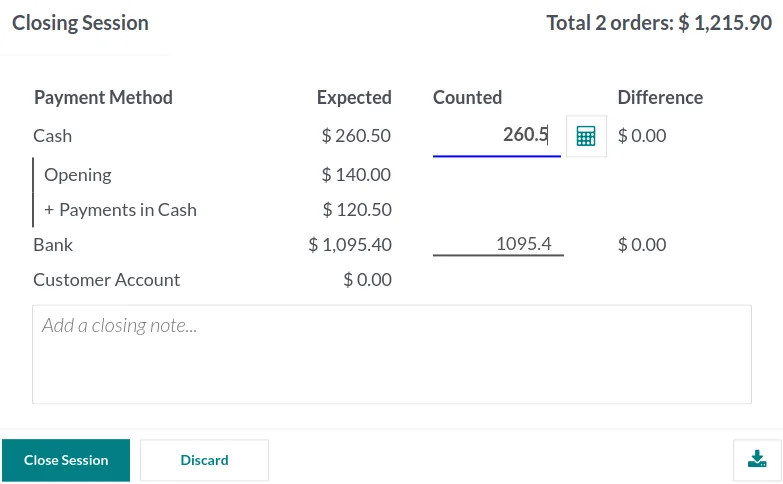
Odoo POS runs in a web browser on a touchscreen, tablet or laptop, and it keeps selling if the internet drops for a while, then syncs orders when the connection returns. Each cashier opens a session with an opening float, sells, takes returns and closes with a cash count. When the session is posted, Odoo creates the accounting entries and reduces stock at that branch location automatically.
As an Odoo Official Partner in Dubai, we configure Odoo POS for fashion stores, electronics shops, pharmacies-adjacent retail, cafes and quick-service restaurants. If you are still choosing a system, our POS software UAE guide compares options, and Odoo for retail covers the wider retail setup.

The products we configure, integrate and support on projects like this one.
 Odoo Point of Sale
 Odoo Invoicing / Accounting
 Odoo Sales
 Odoo CRM
 Odoo Inventory
 Odoo Purchase
Product names and logos are trademarks of their respective owners and are shown only to identify the software we implement.
Owners and area managers see live takings per branch without waiting for end-of-day emails from shop staff.
This is the session cycle we configure for most UAE stores. Restaurants add table and kitchen steps between order and payment.
One shared database: every step updates stock, finance and reports in real time.
Odoo POS has a long feature list. These are the parts that make the biggest difference for shops and food outlets here.
Each branch gets its own POS configuration, stock location and journal, so Dubai Mall and Sharjah branch figures never mix.
Scan product barcodes and, with the right hardware, read weighed items for groceries, dates, nuts and spices.
Cash, card, bank transfer and gift card methods each post to their own journal for easy reconciliation against settlement reports.
Points programs, buy-X-get-Y promotions and gift cards that work both in store and, if you use it, on the Odoo website.
Floor plans, table management, split bills, tips and order tickets sent to kitchen or bar printers.
Capture phone numbers at the till, look up purchase history and issue a full tax invoice for B2B buyers who need one.
Limit who can give discounts, change prices, reopen orders or process refunds, with manager PIN approval where needed.
Z reports, payment summaries and cash variance by cashier, available the moment a session is closed.
Inside Odoo, POS shares data with other apps without middleware. Outside Odoo, we connect the hardware and services UAE stores usually rely on. Card terminal integration depends on your acquiring bank and terminal model, so we confirm it during discovery.
A till produces tax documents every minute, so the tax setup has to be right before the first sale. Confirm the specifics with your tax advisor.
UAE shelf prices are normally shown inclusive of 5% VAT. We set POS taxes as price-included so the receipt shows the VAT amount correctly and the books split net sales and output VAT.
Receipts are configured with your TRN, legal name and address. For customers who ask for a full tax invoice, the cashier can link the order to a customer and generate one from the session.
Refunds made at the till reference the original order so output VAT is reversed properly and stock is returned to the right location.
The UAE e-invoicing program uses the PINT AE format through Accredited Service Providers, with phased dates from 1 January 2027 for larger businesses. How retail B2C receipts are treated should be checked against the latest Ministry of Finance and FTA guidance; B2B invoices raised from POS will need to follow the new flow.
General information, not tax or legal advice. Rules change; confirm current FTA, MOHRE and Ministry of Finance guidance with your advisor.
Most POS problems after go-live trace back to data and hardware choices made in the first weeks.
More on Odoo apps and point of sale choices for UAE businesses.
We configure the system for the rules UAE businesses report against, and test it before go-live.
General information, not tax or legal advice. Confirm current requirements with the FTA, MOHRE or your advisor. See all UAE compliance guides.
On-site workshops in Dubai, Abu Dhabi and Sharjah, and remote or on-site delivery across the Northern Emirates and free zones.
Official sources and references
Facts on this page were checked against these sources in October 2026. Rules change, so confirm current requirements before acting.
Still have a question? Our consultants are happy to help.
Ask an ExpertYes, for a while. Odoo POS keeps taking orders in the browser when the connection drops and sends them to the server once it is back. Features that need the server live, such as looking up a customer created at another branch a minute ago, wait until the connection returns.
Odoo supports Arabic, and receipts can be configured to show Arabic and English text. The exact layout depends on your printer and version, so we test sample receipts on your actual hardware before go-live.
Yes. Restaurant features include floor plans, table service, bill splitting and kitchen ticket printing. For larger kitchens we look at preparation display screens and how delivery platform orders will reach the till.
It depends on the terminal and acquirer. Odoo has integrations with certain payment terminal providers, but many UAE banks issue terminals that work standalone. In that case cashiers record the card amount in Odoo and we reconcile against the bank settlement report.
A single store with clean product data is often live in 3 to 6 weeks. Multi-branch chains with loyalty programs, several price lists and stock transfers usually need longer, often 8 to 12 weeks including a pilot branch.
You can run POS on its own, but most of the value comes from linking it to Inventory and Accounting so stock and VAT update without manual entry. That is the setup we recommend for UAE retailers.
Related Solutions
Related Industries
Related ERP Platforms
Tell us how many branches and tills you run, and we will map out an Odoo POS setup that fits your stores.
Dubai, United Arab Emirates