
L
O
A
D
I
N
G


Zoho, Odoo, ERPNext, Dynamics 365 and custom ERP, delivered by one accountable team.

Excel is a good analysis tool and a poor system of record. When stock, prices, orders and approvals live in dozens of workbooks, an ERP gives each of them one home, with Excel still there for analysis on top.
UAE businesses replace Excel by moving transactions and master data, such as price lists, stock registers, order trackers and invoice templates, into an ERP where data is entered once, validated and shared. Excel stays for analysis on top. The usual order is to inventory every workbook, retire the riskiest first, clean master data, rebuild reports as live dashboards and archive old files.
Looking for an ERP to replace Excel in the UAE usually starts with a bad week: a price list emailed with an old version, a stock sheet that said 200 units when the warehouse had 20, or a sales report that took two people three days to assemble. Nobody planned to run the company on spreadsheets. Each workbook was a quick fix that became permanent.
In a typical Dubai trading or contracting SME we find 20 to 60 active workbooks: a master price list, a stock register per warehouse, an order tracker, a job costing sheet per project, a commission calculator, a collections list, a leave tracker and a management pack that pulls numbers from all of them by copy and paste. Each has an owner, its own formulas and a file name ending in "final_v3".
Replacing Excel does not mean banning it. The goal is to move transactions and master data into an ERP, where they are entered once, validated and shared, and to use Excel or BI tools only for analysis on top of that data. Our ERP vs Excel comparison explains the difference in detail; this page is about how to make the move.
These risks are rarely visible until something goes wrong with a customer, an auditor or the bank.
Copies of the same file circulate on email and WhatsApp. Sales quotes from one version while purchasing orders from another.
One inserted row or a changed sheet name breaks a VLOOKUP, and totals are wrong for weeks before anyone notices.
Anyone with the file can change a price, a credit limit or a stock figure. There is no record of who changed what or why.
An order is typed into the order tracker, again into the invoice template, again into the stock sheet and again into the accounts. Each copy drifts.
The monthly management pack is assembled by hand, so it arrives late and is out of date when it does.
When an employee leaves, their personal workbooks and macros often go with them, along with the knowledge of how they worked.
We treat this as a series of workbook retirements rather than one big switch.
One shared database: every step updates stock, finance and reports in real time.
These steps are where most Excel-to-ERP projects succeed or stall.
Ask each department which files they open every week, who updates them and who relies on them. A short register of 20-60 files is normal for an SME.
Stock registers, price lists, customer credit lists and order trackers usually carry the most risk because errors reach customers. Personal analysis sheets can wait.
Duplicate customers, items with three spellings and mixed units of measure must be cleaned. Our Excel to ERP migration service covers templates, de-duplication and validation.
Every regular workbook report should have an ERP or BI equivalent before the file is archived, otherwise people will quietly return to Excel.
Most workbooks map to a standard ERP module.
Replaces the master price sheet with controlled price lists, customer-specific pricing and effective dates.
Replaces stock registers with live balances per warehouse, driven by receipts and deliveries.
Replaces the order tracker and quote templates with numbered documents and statuses.
Replaces the PO log with approvals, supplier history and expected delivery dates.
Replaces per-job sheets with budgets, actual costs and margins tracked automatically.
Replaces the invoice register and collections list with receivables, payables and VAT.
Replaces leave and document expiry trackers with employee records and alerts.
Replaces the copy-paste management pack with scheduled reports and dashboards.
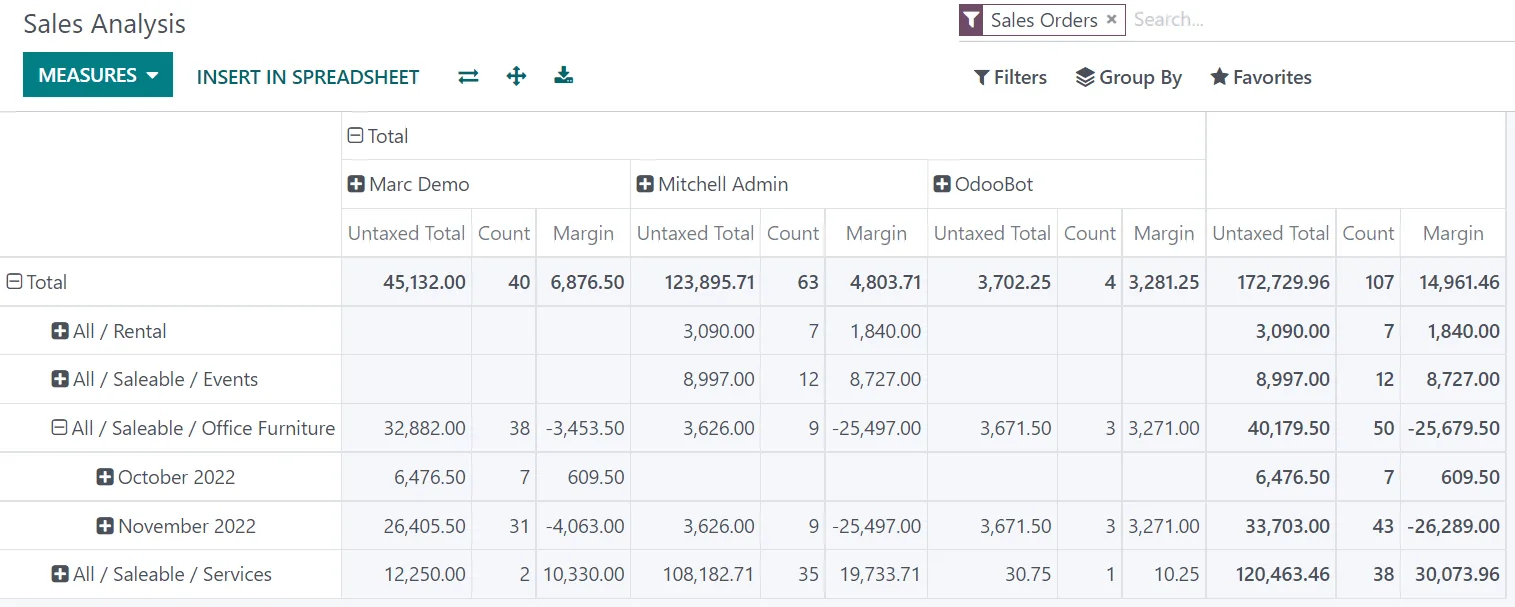
Instead of a monthly workbook, managers open a dashboard that updates as transactions are posted.
All four import from Excel and export to it. The differences are in import tools, reporting and how Excel stays connected. Confirm details for your edition.
| Zoho | Odoo | ERPNext | Dynamics 365 | |
|---|---|---|---|---|
| Data import | CSV/XLS import for most modules with field mapping | Import tool with field mapping and test mode | Data Import tool with templates | Configuration packages and Excel import in Business Central |
| Reporting replacement | Standard reports plus Zoho Analytics | Pivot, graph and spreadsheet views (spreadsheets in Enterprise) | Report builder, query reports and dashboards | Standard reports, Power BI integration |
| Working with Excel | Export to XLS/CSV | Export and spreadsheet-style views | Export to Excel/CSV | Edit in Excel and Open in Excel for many lists |
| Custom forms for odd workbooks | Zoho Creator for bespoke apps | Odoo Studio for custom fields and models | Custom DocTypes in Frappe | Power Apps |
| Typical fit | SMEs wanting fast, low-maintenance adoption | Companies replacing many sheets with one database | Teams comfortable with configuration | Excel-heavy finance teams on Microsoft 365 |
Hedged summary as of October 2026.
Moving off Excel works best when the remaining tools read from the ERP rather than from files.
Spreadsheets can be used for tax workings, but an ERP makes the evidence easier to produce. Confirm requirements with your tax advisor.
Invoices raised from an Excel template are easy to get wrong. ERP invoices carry TRN, sequential numbers and the correct VAT treatment by line.
The FTA and auditors expect to see who recorded and changed a transaction. ERPs log this automatically; spreadsheets do not.
UAE e-invoicing will require structured invoice data sent through an Accredited Service Provider. That is very difficult from Excel templates. Check the latest MoF/FTA guidance on dates.
Tax records must be retained for at least five years. A system with backups and access control is safer than files on personal laptops.
General information, not tax or legal advice. Rules change; confirm current FTA, MOHRE and Ministry of Finance guidance with your advisor.
The improvements are about trust in the numbers and time saved.
Everyone sees the same stock, prices and balances, so arguments about whose sheet is right disappear.
Reports that were assembled by hand are produced by the system.
Prices, credit limits and stock adjustments go through permissions and approvals.
New staff, branches and product lines are added to the system, not to a new workbook.
Ranges for an SME with several departments; durations depend on data quality.
Durations are typical ranges; your plan is agreed after discovery.
List, classify and prioritise spreadsheets with their owners.
Design processes in the ERP and clean master data from the workbooks.
Configure modules, import data and rebuild key reports.
Switch processes over, archive the old files as read-only and support users.
We configure the system for the rules UAE businesses report against, and test it before go-live.
General information, not tax or legal advice. Confirm current requirements with the FTA, MOHRE or your advisor. See all UAE compliance guides.
On-site workshops in Dubai, Abu Dhabi and Sharjah, and remote or on-site delivery across the Northern Emirates and free zones.
Official sources and references
Facts on this page were checked against these sources in October 2026. Rules change, so confirm current requirements before acting.
Still have a question? Our consultants are happy to help.
Ask an ExpertYes. You will export data for analysis or, on some platforms, work with ERP data in Excel directly. What changes is that Excel is no longer where transactions are recorded.
Those where an error reaches a customer, a supplier or the tax authority: stock registers, price lists, order trackers and invoice templates. Analysis sheets can wait.
Involve each workbook owner in designing its replacement and rebuild the reports they rely on before archiving the file. People resist losing a report more than losing a spreadsheet.
Usually we import masters, open balances and open transactions, plus summarized history if you need comparisons. The data migration checklist lists what to prepare.
If the workbooks are mostly in one department, a focused app may be enough. When stock, sales, purchasing and accounts all share data, an ERP removes the copying between them. Related problems are covered on our manual processes and manual accounting replacement pages.
Low-code tools such as Zoho Creator, Odoo Studio, Frappe or Power Apps can turn them into small apps connected to the ERP.
Related Solutions
Related Industries
Related ERP Platforms
We review your workbooks and give you a prioritised plan for moving them into an ERP.
Dubai, United Arab Emirates










