
L
O
A
D
I
N
G


Zoho, Odoo, ERPNext, Dynamics 365 and custom ERP, delivered by one accountable team.

The maintenance work order is the document every other report depends on. Get its fields, statuses and closing rules right and SLA, cost and asset history follow.
Maintenance work order software for UAE teams should replace paper job cards with a structured digital work order that moves through defined statuses: requested, approved and prioritized, scheduled, in progress, parts and time booked, completed with sign-off, costed and closed or invoiced. Key fields include location, priority and target times, checklists and readings, labour, parts, photo evidence and customer signature. Incomplete orders cannot be closed.
In most UAE maintenance teams the work order is still a paper job card or a WhatsApp message. The supervisor writes "AC not cooling, Unit 1204" on a pad, a technician goes to site, and the card comes back two days later with a scribbled "gas topped up" and no parts, times or signature. Maintenance work order software replaces that card with a structured digital record that moves through defined statuses and cannot be closed until it is complete.
This page is about the work order document itself: the fields it needs, the statuses it moves through, who can approve what, and how it is costed and closed. The general business process for work orders across sales and service is covered in work order management; here we focus on maintenance jobs in buildings, plants and service contracts.
Two kinds of maintenance work orders flow through the same system. Planned ones are generated from preventive maintenance schedules; unplanned ones come from fault reports and are handled by corrective maintenance rules. Both need the same disciplined record so that cost, time and asset history are comparable.

Problems we hear from maintenance managers in Dubai, Abu Dhabi and Sharjah before they move to digital work orders.
Job cards come back without arrival time, finish time, root cause or parts used. Nobody can reconstruct what was done when the same fault returns.
Requests sent to a supervisor's phone are forgotten when he goes on leave. The client chases, and the team has no list of what is open.
The storekeeper hands out a compressor capacitor because the technician asked. Stock drops, but the cost never reaches a job, asset or contract.
Jobs above the AMC limit or needing a contractor go ahead without a quote approval, then turn into billing disputes.
Chargeable jobs can only be billed once the signed card reaches the office, so invoices go out weeks late and some never do.
Each status has an owner and an exit rule. The work order cannot skip a status or close with missing data.
One shared database: every step updates stock, finance and reports in real time.
The fields and functions we configure on every maintenance work order, whatever the platform.
Work order number, type (planned, corrective, chargeable), building, unit and asset, requester and contact details.
Priority from an agreed matrix, with target response and completion times calculated from it.
Trade, team or named technician, with planned date and time slot from the dispatch board.
Task list for the job type, readings such as supply and return temperatures, pass or fail items.
Travel, start and finish times per technician, captured on mobile, with overtime flags.
Parts reserved, issued and returned from store or van stock, plus direct purchases for the job.
Before and after photos, technician notes, cause and remedy, and customer signature or OTP.
Labour, parts and subcontract cost; chargeable jobs flow to a quotation or invoice.
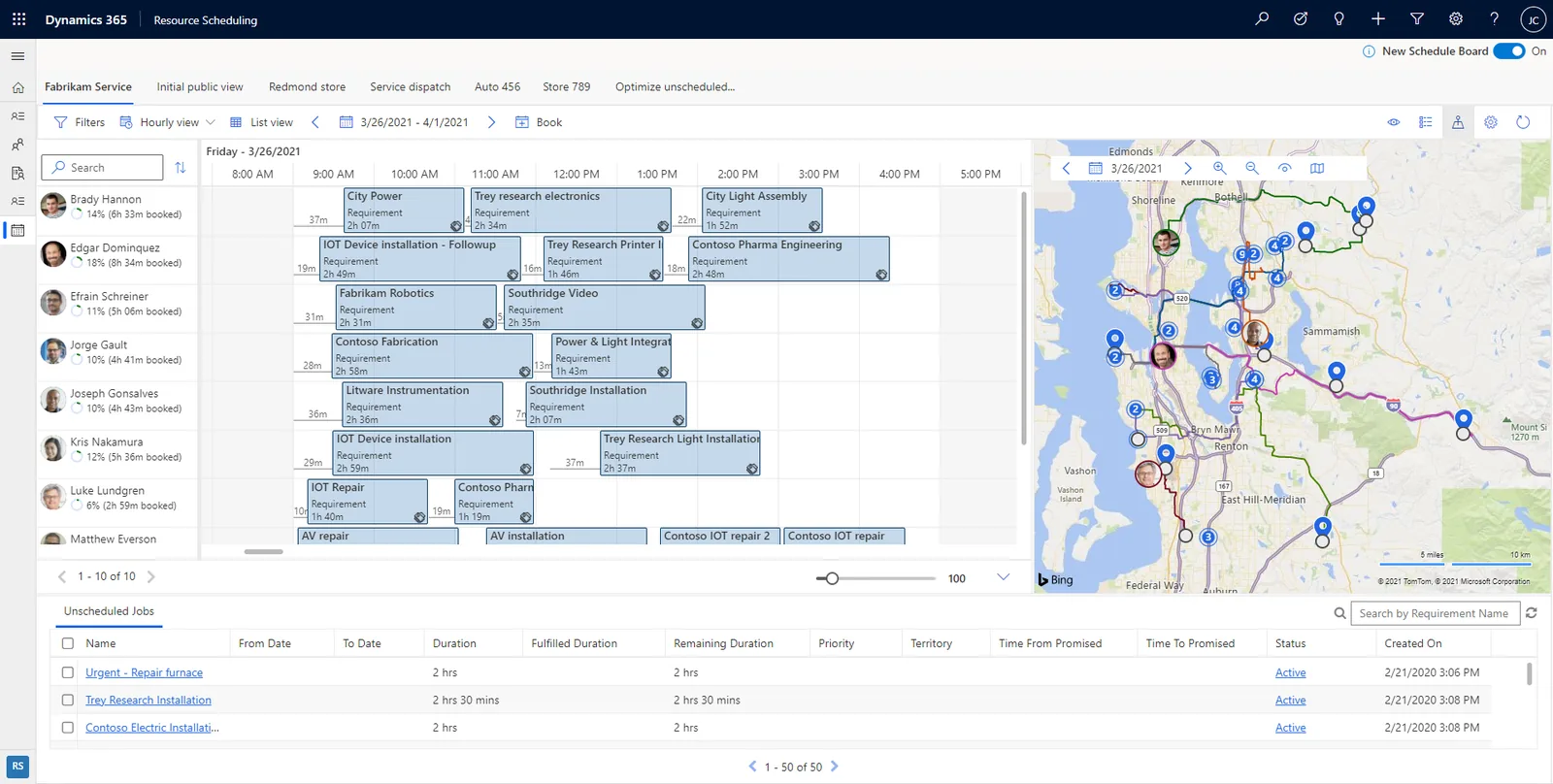
The maintenance coordinator's daily screen: what is open, what is late and what is waiting for something.
A hedged summary; confirm the details for your edition and version.
| Zoho | Odoo | ERPNext | Dynamics 365 | |
|---|---|---|---|---|
| Work order record | Requests and work orders with service appointments in Zoho FSM | Maintenance requests in the Odoo Maintenance app; Field Service tasks for customer sites | Asset Repair, Asset Maintenance Log or Maintenance Visit, depending on internal or customer work | Work orders in Field Service; maintenance work orders in Asset Management |
| Statuses and stages | Configurable statuses | Configurable kanban stages | Workflow states via the Workflow doctype | System and sub-statuses, configurable |
| Checklists | Service tasks and checklists | Worksheets (Field Service) or instructions on maintenance requests | Checklist child tables or custom fields | Service tasks and inspections |
| Mobile completion | Zoho FSM mobile app | Mobile browser and app for Field Service (Enterprise) | Mobile web or a custom app | Field Service mobile app |
| Parts on the job | Parts from Zoho Inventory or FSM parts list | Products consumed through Inventory; configure for maintenance requests | Stock consumed via Stock Entry | Products on the work order from inventory |
| Approval for extra work | Estimates sent from FSM | Quotation from Sales before the job proceeds | Quotation and approval workflow | Quotes and approval processes via Power Automate |
| Billing | Invoice through Zoho Books | Invoice from the task or sales order | Sales Invoice from the job | Invoice from work order via finance |
These connections let work orders be created, completed and billed without retyping.
Work orders feed invoices and cost records, so a few UAE rules apply. Confirm details with your tax advisor.
Chargeable work orders become tax invoices with 5% VAT, your TRN and the customer's TRN where they are registered. The work order number on the invoice helps both sides reconcile.
From 2027, B2B invoices generated from work orders will need to be issued in PINT AE format through an Accredited Service Provider. Clean customer master data now avoids rejections later; check the latest MoF and FTA guidance.
When part of a job is subcontracted, the purchase order and supplier invoice should reference the work order so input VAT and cost are both traceable.
Work orders that support invoices and costs are part of your accounting records, kept for at least five years under Cabinet Decision 74 of 2023.
General information, not tax or legal advice. Rules change; confirm current FTA, MOHRE and Ministry of Finance guidance with your advisor.
What maintenance teams usually gain when every job runs through one record.
Every request has a number and a status, so nothing disappears when a supervisor is off shift.
Signed, costed work orders reach accounts the same day, and chargeable jobs are invoiced while the client still remembers them.
Labour and parts are booked against each job, showing which buildings, assets and job types cost the most.
Cause, remedy and photos stay with the asset, so recurring faults are diagnosed faster.
Indicative timings for a team of 15 to 60 technicians.
Durations are typical ranges; your plan is agreed after discovery.
Agree work order types, mandatory fields, priority matrix, statuses and approval limits.
Configure the work order form, checklists, mobile app, store link and invoice flow.
Run one team or building fully digital; fix what slows technicians down.
Extend to all teams, retire paper cards and switch reporting to the system.
We configure the system for the rules UAE businesses report against, and test it before go-live.
General information, not tax or legal advice. Confirm current requirements with the FTA, MOHRE or your advisor. See all UAE compliance guides.
On-site workshops in Dubai, Abu Dhabi and Sharjah, and remote or on-site delivery across the Northern Emirates and free zones.
Official sources and references
Facts on this page were checked against these sources in October 2026. Rules change, so confirm current requirements before acting.
Still have a question? Our consultants are happy to help.
Ask an ExpertAt minimum: actual start and finish times, technician, cause and remedy, parts used (or none), photos for key job types and a customer sign-off where the contract requires one. Making these mandatory on close is the single biggest improvement in record quality.
Yes. The field technician mobile app shows the job, captures checklists, photos, parts and signature, and works offline in basements and plant rooms with poor signal, syncing when back online. Check offline support for your chosen app.
Use a matrix of impact and urgency, for example P1 for life safety or total loss of cooling, P2 for partial loss, P3 for routine and P4 for planned improvements. Each priority sets target response and completion times on the work order.
Routine jobs inside contract scope need no approval. Jobs above a value limit, needing a subcontractor or outside the AMC should go through a quote and client or manager approval before work starts.
By trade, location, availability and skills. Our technician scheduling guide covers dispatch boards and routing.
Yes. Each work order carries the building, owner and contract, so costs and invoices are split correctly. See ERP for property maintenance companies for the full company setup.
Related Solutions
Related Industries
Related ERP Platforms
We will review a sample of your job cards and turn them into a digital work order with the right fields, statuses and approvals.
Dubai, United Arab Emirates










