
L
O
A
D
I
N
G


Zoho, Odoo, ERPNext, Dynamics 365 and custom ERP, delivered by one accountable team.

Replace the whiteboard and the WhatsApp group with a dispatch board that matches each job to the right technician by skill, zone, SLA and travel time, and adjusts the plan when emergencies land.
Technician scheduling software pools planned PPM visits, reactive calls, follow-ups and installations, then matches each job to a technician by skill, zone, SLA deadline, van stock and travel time. Dispatchers review and lock the plan, jobs go to a mobile app, and live tracking allows rescheduling. UAE plans must handle cross-emirate traffic and the MOHRE midday outdoor work break in summer.
Technician scheduling software in the UAE solves a puzzle that dispatchers face every morning. Planned PPM visits for the week, reactive calls that arrived overnight, follow-up visits waiting for parts, and installation jobs all compete for the same technicians. Each job needs a particular skill, sits in a particular area, from Jebel Ali to Mirdif or from Al Nahda in Sharjah to Musaffah in Abu Dhabi, and carries an SLA. Each technician has a shift, a home base or labor accommodation, a van with certain stock, and a limit on how many hours they can work.
Traffic makes it harder. Crossing between Dubai and Sharjah at peak hours can take longer than the job itself, and tolls and parking add cost. During summer, outdoor work is restricted in the midday hours under the MOHRE break, so rooftop and outdoor jobs must be planned for early morning or late afternoon. A dispatcher with a whiteboard can handle twenty technicians; at fifty or more, jobs start to be missed, SLAs breach and technicians drive back and forth across the city.
This page covers the scheduling and dispatch step. The technician record, skills and documents behind it are covered in technician management software, and the app that receives the job in field technician mobile app. If you schedule machines and work centers rather than people in the field, see production scheduling software instead.

Patterns we see when scheduling depends on a whiteboard, a spreadsheet and phone calls.
Jobs are assigned in the order they arrive, so a technician goes from Dubai Marina to Deira and back to Al Barsha. Productive hours are lost in traffic and fuel costs rise.
Every emergency pulls technicians off planned maintenance. By month-end, PPM compliance on contracts is low and the client sees it in the SLA report.
A general technician is sent to a BMS fault or a specific chiller brand. The job is not fixed and a specialist must be sent later, doubling the cost.
The technician arrives without the needed part, drives to the store and returns. Scheduling ignored what each van was carrying.
The dispatcher calls technicians to ask where they are and when they will finish. Customers ask for arrival times that nobody can give with confidence.
Villas, hotels and offices allow work only in certain hours or need a permit to work. Jobs scheduled outside those windows end as 'no access' visits.
A typical daily and weekly scheduling flow in an ERP-based field service setup.
One shared database: every step updates stock, finance and reports in real time.
The scheduling board reads from several modules. These need to be set up correctly for the board to be useful.
Gantt or calendar view of technicians and jobs with drag-and-drop assignment and conflict warnings.
Unassigned work orders from PPM plans, help desk requests and follow-ups, each with duration and deadline.
Service areas such as Dubai South, Business Bay or Sharjah Industrial, used to cluster jobs per technician.
Skills, certifications, shifts, leave and overtime limits read from the technician record.
Jobs and technicians on a map, with sequencing suggestions to reduce travel.
Parts required by the job compared with the technician's van location before assignment.
Appointment confirmation and on-the-way messages by SMS, email or WhatsApp.
Optional automatic scheduling that proposes assignments based on rules; the dispatcher keeps the final say.
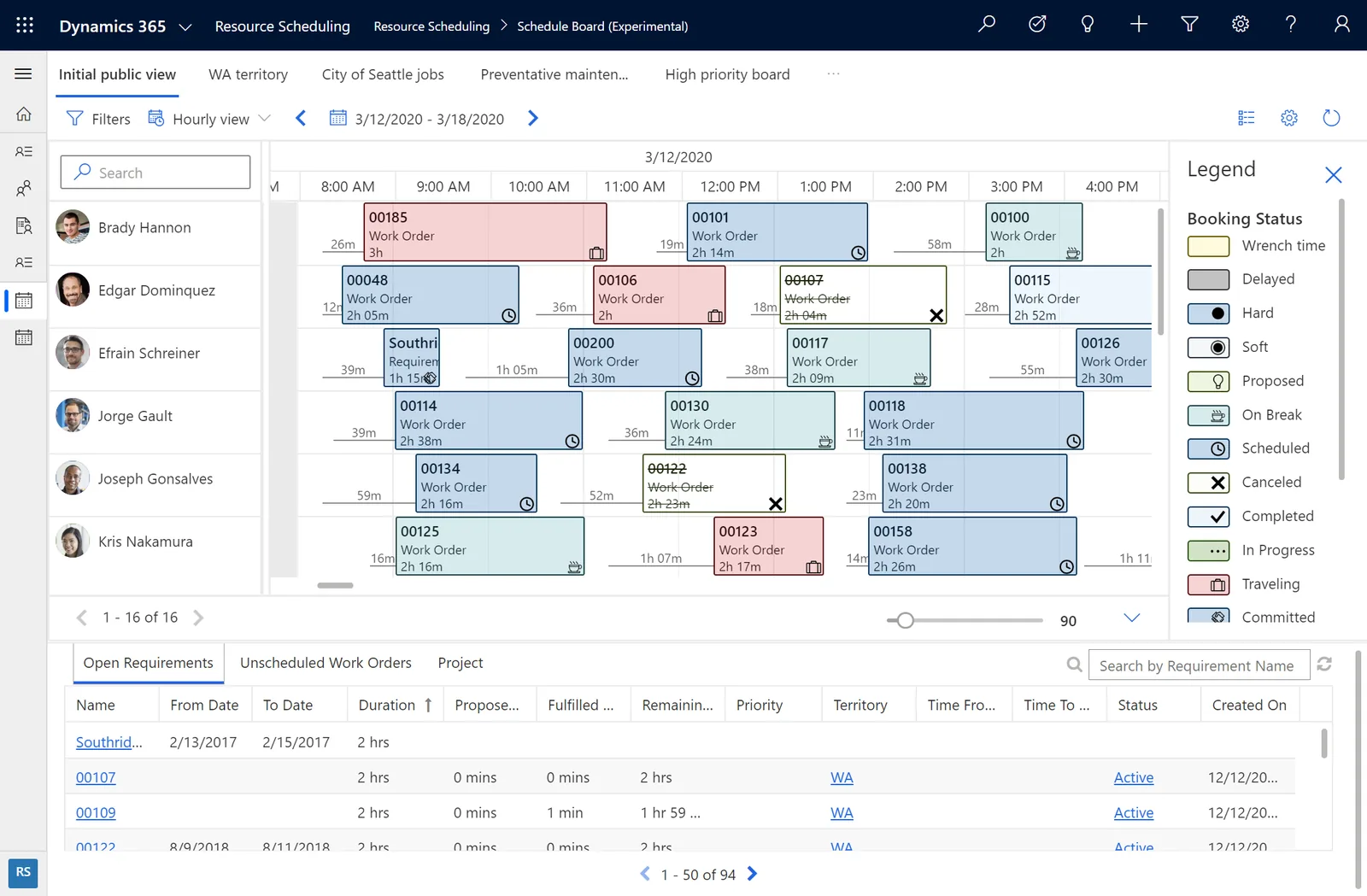
Dispatchers and operations managers watch the day unfold and plan tomorrow from the same board.
All four platforms we implement offer a scheduling view; depth and automation differ. Confirm against your edition and licenses.
| Zoho | Odoo | ERPNext | Dynamics 365 | |
|---|---|---|---|---|
| Dispatch view | Zoho FSM dispatch console with Gantt and map views | Field Service Gantt, calendar and map views | Calendar and Gantt views on Maintenance Visits or tasks; dispatch board often customized | Schedule Board in Field Service |
| Skill matching | Skills on field agents; confirm for your plan | Skills and planning roles in recent editions | Usually via custom filters | Characteristics and proficiency ratings in resource matching |
| Automatic scheduling | Auto-dispatch rules where available; confirm for your plan | Planning auto-assignment for shifts; job optimization usually via an app | Not standard; custom logic or external tool | Resource Scheduling Optimization add-on |
| Routing and travel | Map view and route display | Map view with itinerary for the day | Map integration via customization | Travel time calculated with Bing Maps; confirm current mapping service |
| Mobile push | Zoho FSM mobile app | Odoo mobile app and web | Frappe mobile/PWA access | Field Service mobile app |
| Customer notifications | Email and SMS notifications | Email and SMS; WhatsApp via app | Email; SMS and WhatsApp via integration | Notifications through Power Automate or Customer Voice |
Odoo Field Service and Planning are Enterprise apps. Dynamics 365 optimization requires additional licensing.
Better data in means better schedules out.
Scheduling rules should respect UAE labor and data rules. Confirm details with your HR advisor.
MOHRE announces a midday break for outdoor work during the summer months each year. Tag outdoor and rooftop job types so the board does not place them in the restricted hours.
UAE Labour Law (Federal Decree-Law 33 of 2021) limits daily hours and governs overtime and rest days. Schedules should warn when a technician would exceed the limits.
Reduced working hours during Ramadan change daily capacity. Shift calendars should switch automatically for the period.
GPS tracking of technicians is personal data. Inform staff, limit tracking to working hours and restrict access, in line with UAE data protection rules.
General information, not tax or legal advice. Rules change; confirm current FTA, MOHRE and Ministry of Finance guidance with your advisor.
Benefits teams typically aim for. Results depend on data quality and dispatcher adoption.
Zone-based clustering and sequencing reduce time spent driving between sites.
Planned visits keep reserved capacity instead of being pushed out by every emergency.
Skill and van stock checks send the right person with the right parts.
Customers receive appointment windows and on-the-way messages based on live progress.
Assumes work orders and technician data already exist in the system. Ranges are typical.
Durations are typical ranges; your plan is agreed after discovery.
Define zones, job durations, priorities, skills, access windows and capacity rules with dispatchers.
Configure the dispatch board, map, filters and notifications; connect van stock and leave data.
Run one trade or area on the new board and measure arrivals, utilization and carry-overs.
Extend to all teams and tune durations and zones based on real job data.
We configure the system for the rules UAE businesses report against, and test it before go-live.
General information, not tax or legal advice. Confirm current requirements with the FTA, MOHRE or your advisor. See all UAE compliance guides.
On-site workshops in Dubai, Abu Dhabi and Sharjah, and remote or on-site delivery across the Northern Emirates and free zones.
Official sources and references
Facts on this page were checked against these sources in October 2026. Rules change, so confirm current requirements before acting.
Still have a question? Our consultants are happy to help.
Ask an ExpertMost UAE teams start with a manual board that shows skills, zones and SLA deadlines, then add automatic suggestions once job durations are reliable. The dispatcher should always be able to override, because local knowledge of access and traffic matters.
Reserve a share of capacity for planned work per day or per team, and schedule PPM in fixed slots. Reactive jobs then fill the remaining capacity, and the board warns before PPM is displaced.
Yes. Unassigned jobs can be sorted by time remaining to breach, so the most urgent are placed first. SLA policies themselves are covered in SLA management software.
The assigned jobs appear in the mobile app with address, access notes, asset history and checklist. Changes made on the board are pushed to the app.
Not usually for small and mid-sized teams; the map views in field service modules are often enough. Large fleets with many jobs per day may benefit from an optimization add-on. Our field service management guide explains the wider options.
Smaller teams often do well with Zoho FSM or Odoo Field Service, while large multi-trade teams may need the scheduling depth of Dynamics 365 Field Service. We implement all four platforms and recommend by fit.
Related Solutions
Related Industries
Related ERP Platforms
Walk us through how you dispatch today and we will show a scheduling board set up for your zones, trades and SLAs.
Dubai, United Arab Emirates










