
L
O
A
D
I
N
G


Zoho, Odoo, ERPNext, Dynamics 365 and custom ERP, delivered by one accountable team.

Leads come from the website, conversations happen on phone and WhatsApp, invoices live in accounting. CRM integration links them so salespeople and finance see the same customer.
In a UAE business, a CRM should be integrated with the accounting or ERP system that issues invoices, email and calendar, telephony, WhatsApp, the website and lead portals, e-signature and reporting tools. Each data item is entered once with a clear owning system. Typical flows sync customers, products and prices, push won deals to ERP orders, and return invoice and payment status to sales.
CRM integration in the UAE is the work of connecting your CRM with the other systems that touch a customer: the accounting or ERP system that issues invoices, the email and calendar platform, the phone system, WhatsApp, the website, lead portals, e-signature and reporting tools. The goal is that each piece of data is entered once and appears wherever it is needed, with a clear rule about which system owns it.
Without integration, a typical UAE sales cycle involves a lot of copying. A lead arrives through a website form and is typed into the CRM. A quotation is approved in the CRM, then rebuilt in the accounting system as an invoice. Finance updates the customer's credit status, but the salesperson never sees it and promises another delivery. Each copy is a chance for a wrong TRN, a missed discount or a duplicate customer.
The most important link is usually CRM to ERP; our page on ERP and CRM integration covers that in depth. Channel-specific connections have their own guides, for example CRM WhatsApp integration. This page looks at the overall integration map and how to plan it.

These are the costs of a stand-alone CRM in a UAE business.
Won deals are re-keyed into accounting as sales orders or invoices. Typing errors in quantities, prices or TRN flow straight onto tax invoices.
The CRM does not show overdue invoices or credit holds. Salespeople keep selling to customers finance has already flagged.
Website and portal enquiries arrive by email and wait in an inbox. Response times stretch to days, and nobody can measure lead source performance.
Calls through the office phone system or mobiles leave no trace in the CRM, so managers cannot see activity and follow-ups are missed.
Integrations built quickly by different freelancers fail silently when a field changes. Nobody notices until the month-end reconciliation.
A typical flow for a UAE B2B or B2C business. Each arrow has a defined trigger and owner.
One shared database: every step updates stock, finance and reports in real time.
We combine these components depending on the platforms you run.
Accounts, contacts, TRN and addresses kept consistent between CRM and accounting.
Won quotations become sales orders in the ERP; invoice and payment status flow back.
Item codes, price lists and stock availability published from ERP to CRM.
Click-to-call, incoming call pop-ups and automatic call logs through a cloud PBX connector.
WhatsApp Business Platform via a provider, with opt-in and approved templates, plus email sync.
Website forms, social lead ads and portals posting straight into CRM with source tags.
REST APIs, webhooks and tools such as Zoho Flow, Make, n8n or Power Automate for orchestration.
A log of failed syncs with alerts, so someone fixes the record the same day.
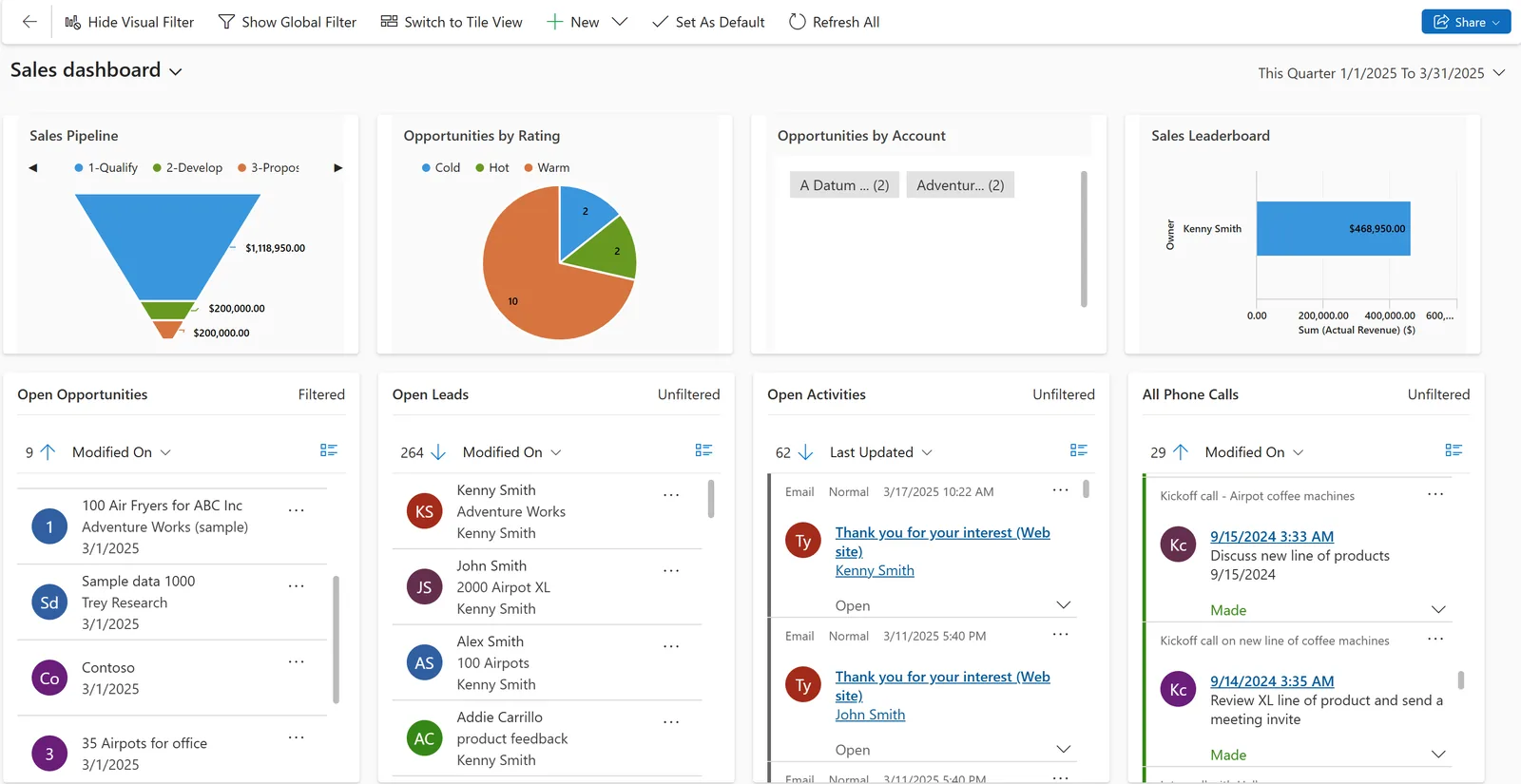
Integration turns the CRM dashboard from activity tracking into a view of revenue and cash.
Each platform has native links and open APIs. The right method depends on what you already run.
| Zoho | Odoo | ERPNext | Dynamics 365 | |
|---|---|---|---|---|
| CRM to accounting | Native sync between Zoho CRM and Zoho Books | Not needed: CRM, sales and accounting share one database | Not needed: CRM and accounts are native doctypes | Dynamics 365 Sales with Business Central or Finance via Dataverse |
| Email and calendar | Outlook and Google mailbox and calendar sync | Outlook and Gmail plugins and mail gateway | Email accounts and calendar sync | Native Outlook, Exchange and Teams integration |
| Telephony | PhoneBridge with many cloud PBX providers | VoIP app and third-party connectors | Telephony integrations via apps or API | Teams calling and partner connectors |
| Native channels or marketplace extensions via providers | WhatsApp app in recent Enterprise versions | Integrations through providers and API | Customer Service channels or partner apps | |
| APIs and webhooks | REST API, webhooks, Deluge functions | XML-RPC and JSON-RPC external API | REST API and webhooks | Dataverse Web API and Power Automate |
| Low-code middleware | Zoho Flow | Make, n8n or custom | n8n, Make or custom | Power Automate and Logic Apps |
Connector availability changes by edition and region; we confirm before design.
Selection depends on your stack; these are the most frequent in UAE projects.
Integration moves data that ends up on tax documents and in other jurisdictions. Confirm specifics with your tax and legal advisors.
Tax codes, 5% VAT and customer TRN must map correctly when CRM quotations become ERP invoices. We test zero-rated and exempt cases explicitly.
Under the UAE e-invoicing model, invoices are exchanged through Accredited Service Providers using PINT AE. The ERP, not the CRM, normally connects to the ASP, so the CRM must feed it clean buyer data. Check the latest MoF/FTA guidance.
Syncing contacts to middleware or overseas servers is processing under the UAE PDPL. We document data flows and hosting locations, and limit fields to what each system needs.
WhatsApp messages go through the WhatsApp Business Platform with opt-in and approved templates. Opt-out status should sync to every system that sends messages.
General information, not tax or legal advice. Rules change; confirm current FTA, MOHRE and Ministry of Finance guidance with your advisor.
Benefits show up in both sales and finance.
Orders reach the ERP exactly as quoted, with the right customer and VAT details.
Overdue balances and credit holds appear on the account, so follow-ups are informed.
Enquiries from every channel arrive in CRM with a source and owner within minutes.
Revenue figures in CRM dashboards reconcile with accounting because they come from the same records.
Ranges are typical for two to four integrations; complexity and API limits change them.
Durations are typical ranges; your plan is agreed after discovery.
List systems, data owners, directions, triggers and volumes.
Field mapping, matching keys, error handling and security.
Connectors configured or developed, tested with real UAE scenarios such as multi-currency and zero-rated sales.
Initial sync, reconciliation, alerting and handover of the error queue.
We configure the system for the rules UAE businesses report against, and test it before go-live.
General information, not tax or legal advice. Confirm current requirements with the FTA, MOHRE or your advisor. See all UAE compliance guides.
On-site workshops in Dubai, Abu Dhabi and Sharjah, and remote or on-site delivery across the Northern Emirates and free zones.
Official sources and references
Facts on this page were checked against these sources in October 2026. Rules change, so confirm current requirements before acting.
Still have a question? Our consultants are happy to help.
Ask an ExpertUsually CRM to accounting or ERP, because it removes double entry of orders and gives sales visibility of payments. Lead capture and telephony often follow. For Zoho users, see Zoho CRM and Zoho Books integration.
Often yes, through a native connector or the PBX provider's API. Our Zoho CRM telephony integration page shows how this works on Zoho.
Not always. Native connectors handle many common cases. Middleware such as Zoho Flow, Make, n8n or Power Automate helps when several systems are involved or logic is conditional.
We design an error queue with alerts and a named owner, so failures are fixed the same day rather than discovered at month-end.
Yes, all four platforms connect to Outlook and calendars, with Dynamics 365 the deepest. See Zoho CRM and Microsoft 365 for one example.
It can be. Core integrations are usually scoped in the implementation; later connections run as separate small projects.
Related Solutions
Related Industries
Related ERP Platforms
List the systems your sales and finance teams use, and we will design an integration plan with owners, directions and the right connectors.
Dubai, United Arab Emirates










