
L
O
A
D
I
N
G


Zoho, Odoo, ERPNext, Dynamics 365 and custom ERP, delivered by one accountable team.

Salespeople in many UAE companies spend a large part of their week on admin: chasing approvals, retyping orders and sending reminders. Sales automation hands that work to the system.
Sales automation uses rules in the CRM and ERP to trigger the next step when something happens: assigning new leads, sending follow-up sequences, generating quotes with current prices, VAT and TRN, routing discounts above limits for approval, converting accepted quotes into sales orders, and sending collection reminders. UAE salespeople keep the decisions and lose the admin, with every action recorded.
Sales automation UAE businesses ask about is rarely one tool. It is a set of rules inside the CRM and ERP that trigger the next step of the sales process when something happens: a lead arrives, a quote is approved, a deal is won, an invoice becomes overdue. Each rule removes a task a salesperson or coordinator used to do by hand, and each one leaves a record of what happened.
In a typical Dubai or Sharjah company the manual steps are easy to list. A coordinator copies enquiries into the CRM, a salesperson writes the same follow-up email twenty times a week, quotes wait for the manager to approve a discount by WhatsApp, and accounts retype won deals into the ERP. Automating these steps does not replace selling; it gives the team back the hours that admin used to take.
Good automation keeps people at the decision points. Discounts above a threshold, credit limit overrides and non-standard payment terms still go to a person, with the system routing the request and recording the answer. This page covers the automations we configure most often, how the main platforms support them, and what to automate first. For broader process automation across finance and operations see our ERP automation services.

These are the tasks we most often find being done by hand in UAE sales teams.
Salespeople keep reminders in their heads or phones. When the week gets busy, quotes go unanswered and prospects assume the supplier is not interested.
A salesperson messages the manager for approval and waits. The approval is not recorded on the quote, so finance later questions the margin.
Accounts receives a signed quote by email and creates the customer, items and sales order manually. Typing errors in prices, VAT and payment terms surface only at invoicing.
Every quotation is edited from an old Word file, with outdated prices, wrong terms or a missing TRN on the letterhead.
Customers call to ask whether goods have shipped because nobody sends confirmations. Salespeople act as a helpdesk.
Payment reminders are sent when someone remembers. Salespeople learn a customer is on credit hold only when the next order is blocked.
System steps run on triggers. Discount approval and any credit-limit override stay with a manager, who sees the request with margin and account history.
One shared database: every step updates stock, finance and reports in real time.
Most platforms provide these as standard; the work is in designing the rules and the exceptions.
If-then rules on record create or update: assign owner, set fields, create tasks, send emails or call webhooks.
Timed series of emails, calls and tasks that stop automatically when the prospect replies or books a meeting.
Branded quotations generated from the product catalog with current prices, VAT, TRN and standard terms.
Rules that route discounts, special prices or credit overrides to the right approver and record the outcome.
An accepted quote creates the customer and sales order in the ERP without retyping.
Order confirmation, dispatch and delivery messages by email or approved WhatsApp templates.
Scheduled statements and reminders before and after due date, visible to the account owner.
Zoho Flow, Power Automate, Make, n8n or direct APIs for steps that cross systems.
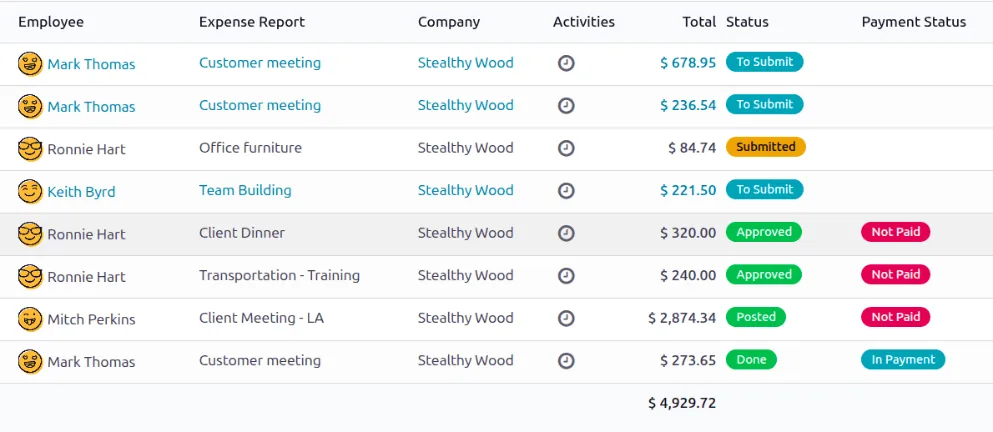
Automation needs oversight. These reports show whether rules fire correctly and where people still step in.
All four can automate the core sales flow. They differ in no-code tooling and how far automation reaches into finance. Check edition limits on the number of rules and actions.
| Zoho | Odoo | ERPNext | Dynamics 365 | |
|---|---|---|---|---|
| Workflow rules | Workflow rules, Blueprint and custom functions (Deluge) | Automation rules and server actions | Notifications, Assignment Rules and Server Scripts | Power Automate flows and classic workflows |
| Sequences | Cadences in Zoho CRM (edition dependent) | Marketing Automation app or activity plans | Limited native sequencing; often custom or external tool | Sequences in the Sales accelerator |
| Approvals | Approval processes on quotes and deals | Quotation approval settings and Approvals app | Workflow doctype with approval states | Approvals in Power Automate |
| Quote to order | Quote converts to Sales Order; Zoho Books or Inventory sync | Confirm quotation to create sales order in the same database | Quotation to Sales Order natively | Quote to order; finance via Business Central integration |
| Cross-system automation | Zoho Flow and APIs | APIs, webhooks, Make or n8n | REST API, webhooks, n8n | Power Automate connectors |
| AI assistance | Zia suggestions (edition dependent) | AI features in recent versions | External LLM via API | Copilot in Dynamics 365 Sales |
Hedged summary as of 2026; confirm for your edition and version.
Most time is saved where automation moves data between systems that used to be updated separately.
Automation should strengthen control, not bypass it. Confirm tax points with your advisor.
Log every automated action and approval with time and user. The person who requests a discount should not be able to approve it.
Quote and invoice templates must carry the TRN, 5% VAT and place-of-supply logic. Test zero-rated exports and free zone customers before switching automation on.
When UAE e-invoicing applies to you, automated invoices will need to pass through an Accredited Service Provider in PINT AE format. Design the order-to-invoice automation so the ERP remains the issuing system; check the latest MoF/FTA guidance.
Automated emails and WhatsApp messages need a lawful basis and opt-in under the UAE PDPL, with unsubscribe handling built into sequences.
General information, not tax or legal advice. Rules change; confirm current FTA, MOHRE and Ministry of Finance guidance with your advisor.
We avoid promising hours saved. These are the outcomes teams typically describe.
Admin tasks move to the system, so salespeople spend their day with customers instead of spreadsheets.
Every quote and lead gets the same timely follow-up, whoever owns it.
Discount requests reach the approver at once and the decision is stored on the quote.
Orders created from accepted quotes carry the agreed price, VAT and terms into the ERP.
Indicative ranges; we usually automate in waves so each rule is tested before the next.
Durations are typical ranges; your plan is agreed after discovery.
List manual steps, owners and time spent; pick the first automations by effort saved and risk.
Lead routing, reminders, sequences and quote templates.
Discount approvals, quote-to-order conversion and customer notifications.
Statements, reminders and credit-hold alerts linked to the ERP.
Review failed runs and exceptions monthly and retire rules nobody needs.
We configure the system for the rules UAE businesses report against, and test it before go-live.
General information, not tax or legal advice. Confirm current requirements with the FTA, MOHRE or your advisor. See all UAE compliance guides.
On-site workshops in Dubai, Abu Dhabi and Sharjah, and remote or on-site delivery across the Northern Emirates and free zones.
Official sources and references
Facts on this page were checked against these sources in October 2026. Rules change, so confirm current requirements before acting.
Still have a question? Our consultants are happy to help.
Ask an ExpertLead assignment, follow-up reminders and quote-to-order conversion usually save the most time with the least risk. Our page on lead assignment automation covers the first of these in detail.
Not if sequences are short, personalized with real fields and stop as soon as the customer replies. Use automation for reminders and confirmations; keep proposals and negotiation personal.
The quote is saved with the requested discount, a rule checks it against the limit for that salesperson or product, and anything above goes to the approver with the margin shown. See ERP for sales approval for approval matrix design.
Yes. When the customer accepts or e-signs, the system can create the sales order and customer in the ERP. Our sales order automation page covers the downstream steps such as stock reservation and delivery.
Only for steps that cross systems without a native link. Within one platform, built-in workflow rules are usually enough. Our Zoho automation page shows how this looks in the Zoho suite.
AI can draft follow-up emails, summarize calls and suggest next actions, with a person reviewing before anything is sent. See AI sales automation for realistic uses.
Related Solutions
Related Industries
Related ERP Platforms
We map your quote-to-cash steps, pick the automations worth doing first and configure them with the right approvals.
Dubai, United Arab Emirates










