
L
O
A
D
I
N
G


Zoho, Odoo, ERPNext, Dynamics 365 and custom ERP, delivered by one accountable team.

See the pipeline, this month's sales against target, which lead sources convert, how each salesperson is doing and why deals are lost, all from your CRM and ERP data.
A UAE sales dashboard should show total pipeline, opportunities by stage, monthly invoiced sales net of VAT and credit notes, bookings from confirmed orders, achievement against target, conversion by lead source including WhatsApp and exhibitions, salesperson performance and lost-deal reasons. Pipeline data comes from the CRM and invoiced sales from the ERP, so figures match finance.
A sales dashboard UAE sales managers rely on answers the questions asked in every Monday sales meeting: how big is the pipeline, are we on track for this month, where do our best leads come from, which deals are stuck, who is performing, and what will we close this quarter? When those answers come from the CRM and ERP rather than from each salesperson's spreadsheet, the meeting moves from arguing about numbers to deciding what to do.
UAE sales teams have their own patterns. Many leads arrive through WhatsApp, phone calls and exhibitions such as GITEX or The Big 5 rather than web forms. Quotations go through several revisions before a purchase order. Sales are often split by emirate or by sector, and B2B customers expect credit terms, so a "sale" can mean a won opportunity, a sales order or a posted tax invoice. The dashboard needs one definition per KPI and needs to show bookings and invoiced sales separately.
This page covers the sales performance view. Customer service and campaign metrics belong on the CRM dashboard, while the setup of pipeline stages is described in sales pipeline software.

Illustrative figures for a team of eight account managers selling to contractors and retailers across Dubai, Sharjah and Abu Dhabi.
Opportunities by stage (value)
Leads by source
Lost deals by reason
Salesperson performance (month to date)
| Salesperson | Sales | Target % | Win rate |
|---|---|---|---|
| Account manager A | AED 486K | 97% | 22% |
| Account manager B | AED 412K | 88% | 19% |
| Account manager C | AED 301K | 71% | 14% |
| Account manager D | AED 254K | 64% | 12% |
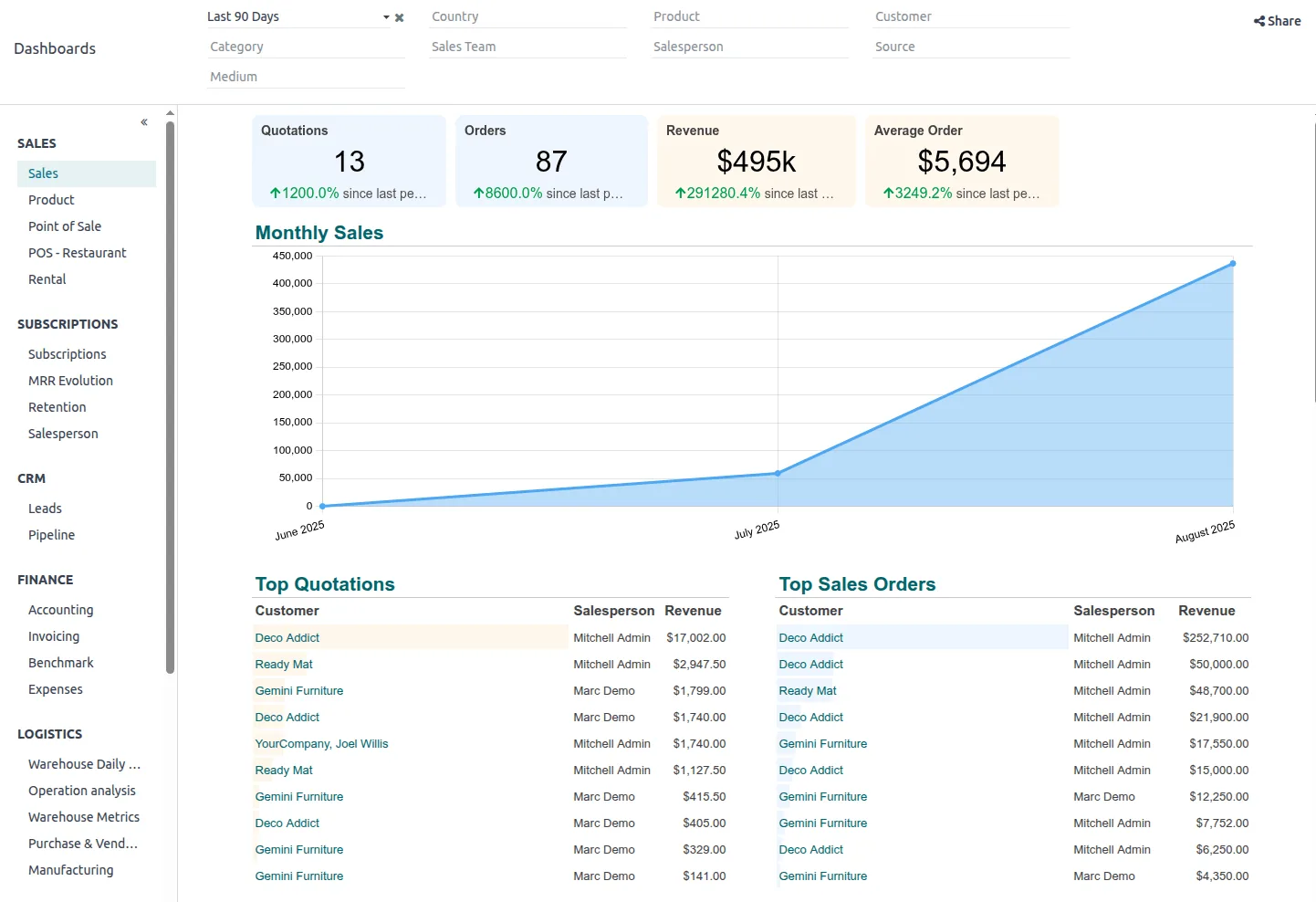
On most platforms the sales dashboard combines CRM pipeline data with sales orders and invoices from the ERP, so bookings and revenue sit on the same screen.
Write these definitions into the CRM configuration so that every salesperson's numbers are calculated the same way.
| KPI | What it shows | Source data | Review frequency |
|---|---|---|---|
| Total pipeline | Value of all open opportunities with an expected close date | CRM opportunities | Weekly |
| Opportunities by stage | Count and value at each stage, and days spent in stage | CRM stage history | Weekly |
| Monthly sales | Invoiced sales net of VAT and credit notes for the month | ERP sales invoices, credit notes | Daily |
| Bookings | Value of confirmed sales orders in the period | ERP sales orders | Daily |
| Target achievement | Monthly sales against the salesperson or team target | Invoices, sales targets | Weekly |
| Conversion rate | Won opportunities divided by leads created in the same period | CRM leads and opportunities | Monthly |
| Leads by source | New leads per channel and their conversion to won deals | CRM lead source field | Monthly |
| Salesperson performance | Sales, win rate, activities and average deal size per person | CRM, invoices, activity logs | Weekly |
| Sales forecast | Expected sales by period using stage probability or forecast category | CRM opportunities | Weekly |
| Lost deals | Count, value and reason of lost opportunities | CRM lost reason field | Monthly |
| Sales cycle length | Average days from lead creation to won | CRM dates | Monthly |
The dashboard depends on salespeople updating the CRM as they work. These are the touchpoints that keep it accurate.
One shared database: every step updates stock, finance and reports in real time.
Most sales dashboards fail because of data entry, not design. These steps address that.
Define four to six stages with clear exit criteria, such as a quotation sent or a site visit done, and a probability per stage.
Without them, the leads-by-source and lost-deal charts are empty. Use short pick lists rather than free text.
Targets per salesperson, team and product line let the dashboard show achievement. Target setting is covered in sales target management.
Invoiced sales should come from the ERP, not from won opportunities, so the number matches finance. Order handling is covered in sales order management.
Ask each salesperson to set a forecast category on deals closing this quarter. Over time, compare forecast to actual to calibrate. See sales forecasting software for methods.
Field teams selling from vehicles add delivery and collection data from van sales software.
We configure the system for the rules UAE businesses report against, and test it before go-live.
General information, not tax or legal advice. Confirm current requirements with the FTA, MOHRE or your advisor. See all UAE compliance guides.
On-site workshops in Dubai, Abu Dhabi and Sharjah, and remote or on-site delivery across the Northern Emirates and free zones.
Official sources and references
Facts on this page were checked against these sources in October 2026. Rules change, so confirm current requirements before acting.
Still have a question? Our consultants are happy to help.
Ask an ExpertShow both, clearly labelled. Bookings (confirmed orders) show sales effort; invoiced sales net of VAT match the finance figures and usually drive commission. Mixing them causes most disputes about targets.
A common definition is won opportunities divided by leads created in the same period, but some teams use qualified opportunities as the base. Pick one, write it down and keep it stable so trends mean something.
Yes, if WhatsApp conversations create leads in the CRM through the WhatsApp Business Platform and a provider, with the source tagged. Customers must have opted in to receive messages.
It is only as good as stage discipline and close dates. Start with stage-weighted forecasts, add salesperson forecast categories, and compare against actuals each quarter to see which method is closer for your team.
Yes. Role-based access lets a regional manager see their emirate or team while the sales director sees everything. Salespeople usually see their own pipeline and a team ranking.
Zoho CRM with Zoho Analytics, Odoo CRM and Sales, ERPNext CRM, and Dynamics 365 Sales with Power BI. The KPIs are the same; the configuration differs.
Related Solutions
Related Industries
Related ERP Platforms
Send us your current sales report and we will show how it looks as a live dashboard on your CRM and ERP.
Dubai, United Arab Emirates










