
L
O
A
D
I
N
G


Zoho, Odoo, ERPNext, Dynamics 365 and custom ERP, delivered by one accountable team.

A confirmed order is a promise: the right goods, at the agreed price, on the agreed date, to a customer who will pay. Sales order management makes sure each promise is checked before it is made and tracked until it is kept.
Sales order management in a UAE ERP controls an order after it is agreed: checking price, discount and credit limit, reserving stock, planning picking and delivery, tracking partial deliveries and backorders line by line, issuing the VAT tax invoice, and handling returns with credit notes. One record runs from quotation or customer LPO to delivery, invoice and payment allocation.
Sales order management in the UAE is the control of a customer order after it is agreed: checking the price and credit position, reserving stock, planning picking and delivery, handling partial deliveries and backorders, issuing the VAT tax invoice, and dealing with returns and credit notes. For distributors, wholesalers and B2B traders it is the core of daily operations, because most revenue arrives as orders rather than walk-in sales.
In many UAE companies orders arrive by WhatsApp, email, phone and LPO from the customer's procurement system. A sales coordinator retypes them into the system, often without checking stock or credit first. The storekeeper finds shortages when picking, the driver leaves with a partial load that nobody recorded as partial, and the invoice is raised for the full order. Finance then spends days on credit notes and customer disputes.
This page covers the order itself. Pipelines and forecasting before the order sit with sales management software, and rules that create or route orders automatically are covered by sales order automation. Route sales from a vehicle are handled differently, in van sales software.

These issues show up as late deliveries, disputed invoices and overdue receivables.
The coordinator accepts an order because the item exists in the system, not because it is free to sell. Another customer's order had already reserved it, and someone is disappointed.
Orders for customers already over limit or with invoices past 90 days are delivered because nobody checked. Credit control only finds out when the statement is sent.
Salespeople quote from old price lists or give extra discounts on the phone. The invoice goes out at a price the customer did not expect, or at a margin the company did not approve.
Half the order is delivered, the rest is forgotten. The customer chases the balance weeks later, or receives an invoice for goods they never got.
Large customers pay only when the invoice matches their LPO number, signed delivery note and GRN. Missing references put invoices on hold for months.
Damaged or wrong items come back with the driver, go to a corner of the warehouse, and the credit note is raised late or not at all.
Controls sit at the points where mistakes are cheapest to fix: before confirmation and before dispatch.
One shared database: every step updates stock, finance and reports in real time.
These modules share the same customer, item and price data so every department sees the same order.
Quotes with validity, price list, discounts and terms, converted to orders without retyping.
Order lines with customer LPO number, requested date, delivery address and salesperson.
Customer and group price lists with discount limits by role, linked to customer price lists.
Credit limits, overdue checks and holds with release by the credit controller.
Available-to-promise quantities by warehouse, including incoming stock.
Pick lists, delivery notes, driver assignment and proof of delivery.
VAT tax invoices from delivered quantities, with LPO and delivery note references printed.
Return authorizations, inspection and credit notes linked to the original invoice.
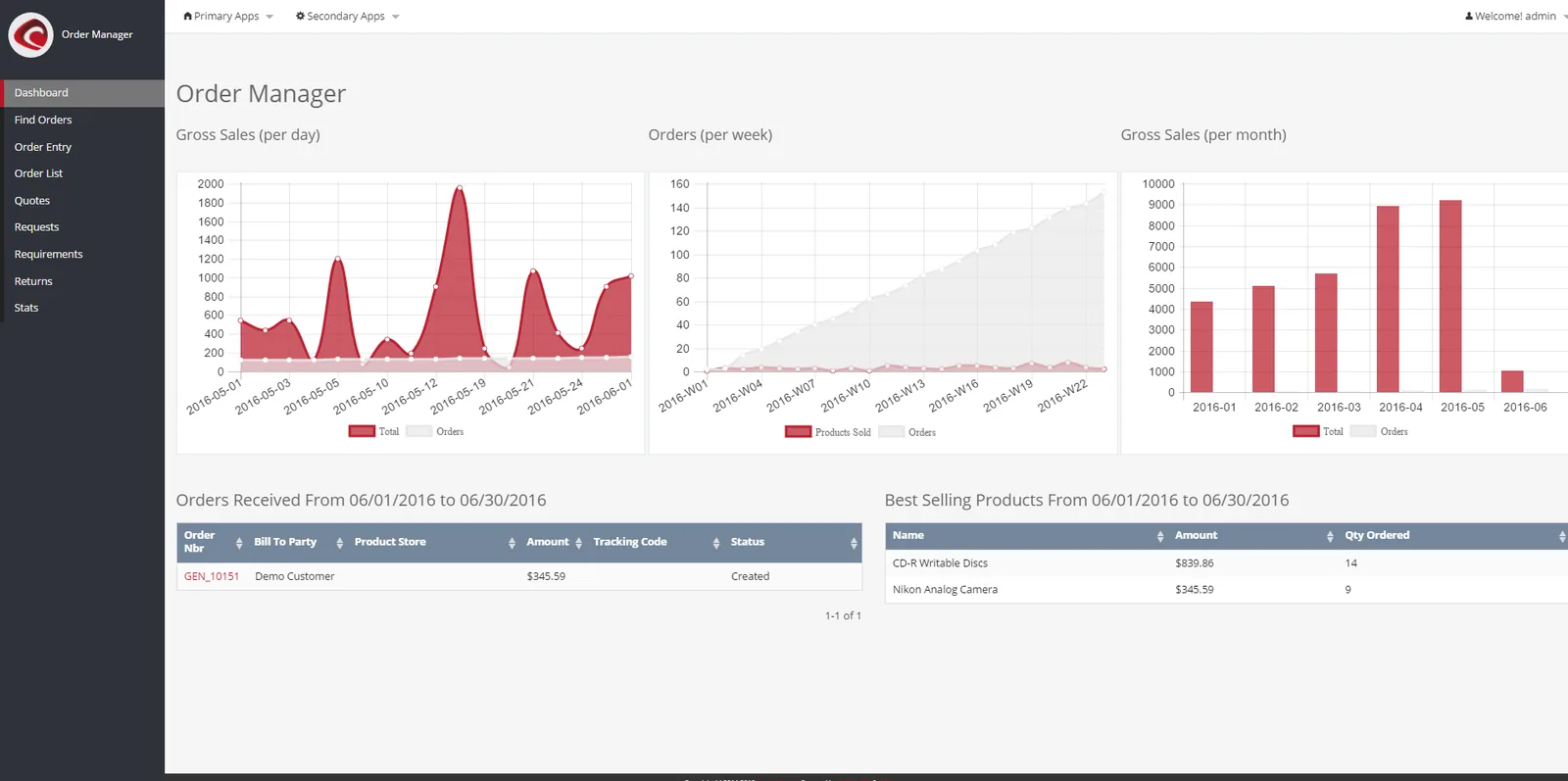
Sales coordinators, credit controllers and the sales manager use these reports every day.
All four handle the full order cycle. They differ in how credit, reservation and approvals are configured. Confirm for your edition.
| Zoho | Odoo | ERPNext | Dynamics 365 | |
|---|---|---|---|---|
| Quote to order | Estimates to sales orders in Zoho Books or Inventory | Quotations confirmed into sales orders in the Sales app | Quotation to Sales Order | Sales quotes to orders in Business Central |
| Credit limit control | Credit limit per customer with warning or block | Credit limit warning on customers; blocking usually configured | Credit limit per customer and company, with bypass role | Credit limit warnings; blocking via setup or approvals |
| Stock reservation | Committed stock on confirmed orders | Reservation on delivery orders by policy | Reserved quantity on Sales Order | Reservations and order promising |
| Partial delivery and backorders | Partial packages and shipments | Backorders created on partial delivery | Partial Delivery Notes against Sales Order | Partial shipments with outstanding quantities |
| Invoice on delivered quantity | Invoice from shipped quantities | Invoicing policy on ordered or delivered | Invoice from Delivery Note | Post shipment and invoice separately |
| Discount approvals | Approval workflows in Zoho Books | Sales approvals typically via Studio or apps | Workflow on Sales Order | Approval workflows in Business Central |
For Odoo specifics see Odoo Sales; settings vary by version.
Orders should enter once, from wherever the customer places them.
These apply at invoice and return stage. Confirm details with your tax advisor.
Tax invoices must carry the TRN and prescribed fields, and the tax point generally follows delivery or payment. Invoicing from delivered quantities keeps the invoice and the tax point aligned.
Returns and price corrections need tax credit notes referencing the original invoice, so output VAT is adjusted correctly in the return.
Domestic B2B invoices and credit notes will be exchanged in the PINT AE format through Accredited Service Providers, mandatory in phases from 2027. Clean customer TRNs and item data in the order process matter now. Check the latest guidance and our page on UAE e-invoicing.
Keep orders, delivery notes, PODs and invoices for at least five years; they are also your evidence in customer disputes.
General information, not tax or legal advice. Rules change; confirm current FTA, MOHRE and Ministry of Finance guidance with your advisor.
Benefits show in customer service and in cash collection.
Orders are confirmed against available stock and realistic dates, so customers get what they were told.
Orders for overdue or over-limit customers are held for a decision instead of slipping through.
Invoices match delivered quantities, LPO numbers and agreed prices, so fewer are disputed or held.
Managers see open, partial and backordered orders at any time, not at month-end.
For a distributor with standard processes, order management often goes live in 6-10 weeks as part of a sales and inventory rollout.
Durations are typical ranges; your plan is agreed after discovery.
Map order channels, pricing rules, credit policy, delivery process and invoice requirements of key customers.
Define order statuses, approval limits, reservation rules and document formats.
Set up price lists, credit controls, delivery and invoice flows, and the order dashboard.
Load customers, open orders and price lists; test real scenarios such as partial delivery and returns.
Run live orders with support and tune reports for the order desk and management.
We configure the system for the rules UAE businesses report against, and test it before go-live.
General information, not tax or legal advice. Confirm current requirements with the FTA, MOHRE or your advisor. See all UAE compliance guides.
On-site workshops in Dubai, Abu Dhabi and Sharjah, and remote or on-site delivery across the Northern Emirates and free zones.
Official sources and references
Facts on this page were checked against these sources in October 2026. Rules change, so confirm current requirements before acting.
Still have a question? Our consultants are happy to help.
Ask an ExpertMost UAE distributors invoice on delivered quantities, which avoids credit notes for short deliveries and aligns the invoice with the VAT tax point. Advance payment or project-type sales may invoice on order.
Set a credit limit per customer and configure the order to warn or block at confirmation, with release rights for the credit controller. Many companies also block orders when invoices are overdue beyond an agreed number of days.
Yes. Capture the LPO number on the sales order and print it on the delivery note and tax invoice. Large customers, including government entities and developers, often reject invoices without it.
When only part of an order can be delivered, the ERP keeps the remaining quantity open as a backorder and shows it against incoming stock. The customer can be informed of the balance date from the same record.
No. Order management is the process; dashboards report on it. For management reporting on revenue, targets and team performance, see sales dashboards.
Yes. Shortages on confirmed orders can raise purchase requests, and back-to-back orders can create a PO for a specific customer order. The buying side is covered in purchase order management.
Related Solutions
Related Industries
Related ERP Platforms
Walk us through how an order moves through your company today and we will show the controlled version in an ERP.
Dubai, United Arab Emirates










