L
O
A
D
I
N
G


Zoho, Odoo, ERPNext, Dynamics 365 and custom ERP, delivered by one accountable team.

Whatever you run today, from Tally to a homegrown system, we load your masters, open items and balances into Odoo in a way that can be repeated, checked and trusted.
Odoo migration services in the UAE move data from Tally, QuickBooks, Sage, Zoho Books, SAP Business One, Excel or custom databases into Odoo so the first month closes cleanly. The method is to profile the source, design the Odoo side, build import files, rehearse, reconcile and cut over, loading masters, open documents, opening balances and stock in the right sequence.
Our Odoo migration services in the UAE cover one specific job: taking data out of the system you use now and putting it into Odoo so your first month closes cleanly. The source could be accounting software, an older ERP, a set of Excel workbooks, or a mix of all three across different branches. The method stays the same: profile the source, design the Odoo side, build import files, rehearse, reconcile and cut over.
Odoo's built-in import tool accepts CSV and Excel files for almost any model, and that makes small jobs look easy. The trouble starts with relationships. A vendor bill needs a vendor, a product, a tax and an account that already exist; a stock lot needs a product and a location. We build import files with external IDs so every record has a stable key, can be reloaded without duplicates, and links correctly to the records around it. For larger volumes we script loads through Odoo's API.
This page is about moving into Odoo from elsewhere. If you already run Odoo and need to move to a newer version, change edition or change hosting, see our Odoo upgrade and version migration page. Source-specific guides exist for Tally Prime to Odoo, QuickBooks, Sage and SAP Business One.

The products we configure, integrate and support on projects like this one.
 Odoo Invoicing / Accounting
 Odoo Sales
 Odoo CRM
 Odoo Inventory
 Odoo Purchase
 Odoo Manufacturing
Product names and logos are trademarks of their respective owners and are shown only to identify the software we implement.
These are the problems we see when companies try Odoo imports themselves or with a rushed partner.
Importing invoices before products, taxes and partners exist produces errors or, worse, auto-created placeholder records. Odoo imports need a strict dependency order.
Stock quantities entered without the right cost and product category settings give an Odoo stock valuation that does not match the balance sheet. Fixing it after go-live means correcting journal entries by hand.
Some teams import years of paid invoices to see history in Odoo. It slows the project, clutters partner ledgers and rarely matches the old system to the fils.
Odoo's UAE localization provides taxes linked to tax report lines. Custom taxes created during import without those links leave gaps in the VAT report that someone finds at quarter-end.
Groups with mainland and free zone entities need records loaded into the right Odoo company with correct intercompany rules. A single shared import file causes cross-company errors.
Whatever the source, the target objects in Odoo are consistent. This is how we plan the load sequence.
| Source data | Odoo target | Load method | Load order |
|---|---|---|---|
| Chart of accounts | Accounting > Chart of Accounts | Map onto the UAE localization chart | 1 |
| Tax codes | Accounting > Taxes with tax report lines | Map to localization taxes, add only if needed | 1 |
| Customers and suppliers | Contacts (res.partner) | Import with external IDs and TRN | 2 |
| Products and services | Products with categories and UoM | Import with costing method per category | 2 |
| Warehouses and locations | Inventory > Warehouses and locations | Configure, then import sub-locations | 2 |
| Bills of materials | Manufacturing > Bills of Materials | Import after products | 3 |
| Open customer invoices | Customer invoices dated at original date | Import or API load against an opening account | 4 |
| Open vendor bills | Vendor bills with original references | Import or API load against an opening account | 4 |
| Stock on hand with lots | Inventory adjustments with lots and serials | Load quantities and costs at cut-off | 4 |
| Trial balance at cut-off | Opening journal entry | Single balanced entry, AR and AP cleared to open items | 5 |
Exact menus and models depend on your Odoo version and edition. We confirm against the database you will go live on.
A repeatable process, not a one-off upload.
We look at the source system's exports or database, count records, spot duplicates and decide what history to bring and what to archive.
Before building files we confirm the chart of accounts, taxes, product categories, costing methods, warehouses and companies in Odoo, because import files reference all of them.
Each object gets a template with external IDs and relational columns. Files are versioned so any load can be repeated after a correction.
We load into a copy database at least twice. Finance checks the trial balance, aged receivables, aged payables and stock valuation against the source system at the same date.
On cut-over we freeze the old system, run the final load, compare key totals again and keep the old system read-only for reference.
Outputs you keep and can reuse.
Migration runs alongside Odoo configuration. Durations below cover the data workstream and are typical ranges.
Durations are typical ranges; your plan is agreed after discovery.
Source reviewed, history scope agreed, risks noted.
Import files built, duplicates merged, mappings signed off.
Two or more rehearsals with reconciliation reviews.
Freeze, final extract, production load and checks.
Help through the first Odoo month-end and VAT period.
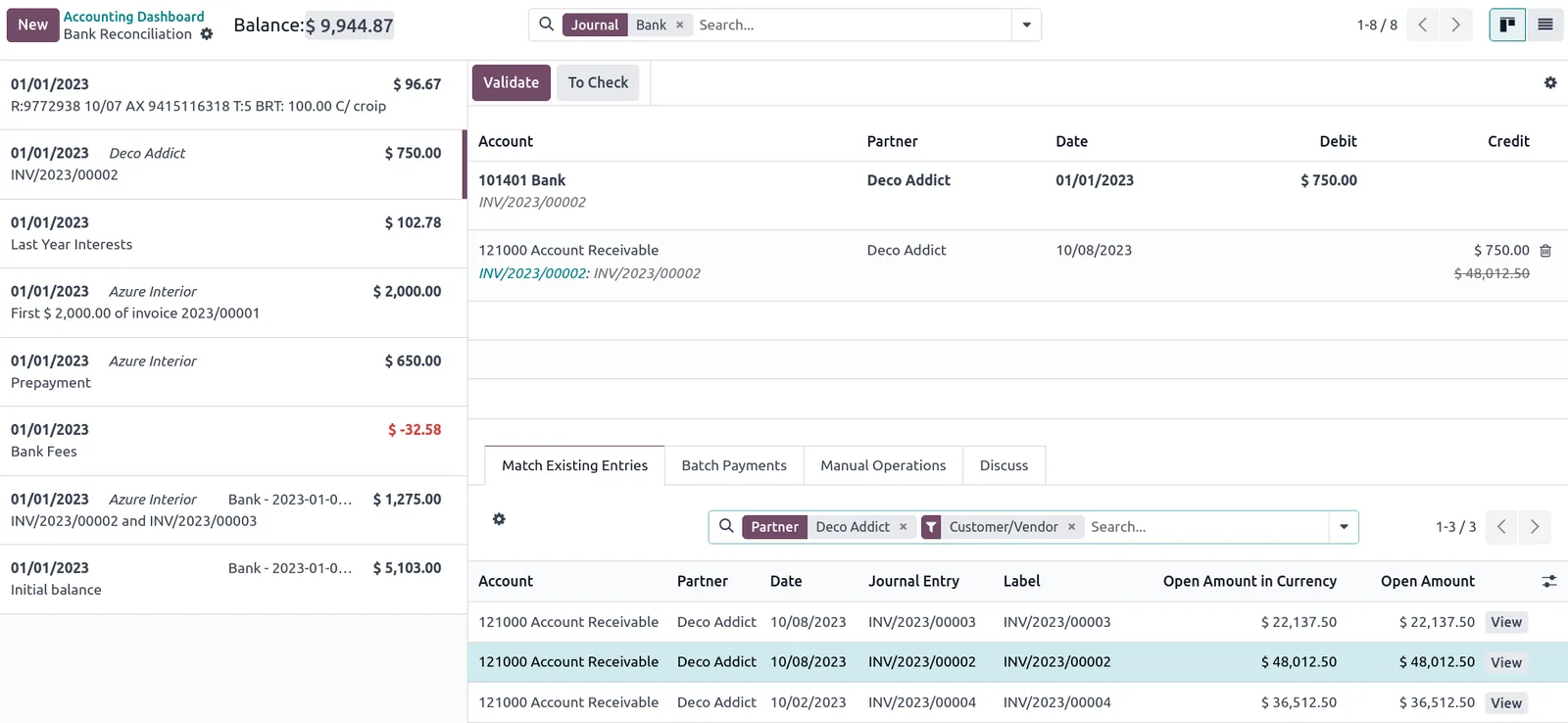
Each import is logged so you can see what has loaded and what still needs attention.
Source-specific routes and Odoo services.
We configure the system for the rules UAE businesses report against, and test it before go-live.
General information, not tax or legal advice. Confirm current requirements with the FTA, MOHRE or your advisor. See all UAE compliance guides.
On-site workshops in Dubai, Abu Dhabi and Sharjah, and remote or on-site delivery across the Northern Emirates and free zones.
Official sources and references
Facts on this page were checked against these sources in October 2026. Rules change, so confirm current requirements before acting.
Still have a question? Our consultants are happy to help.
Ask an ExpertFor small, simple lists, yes; Odoo's import tool is capable. Problems usually appear with open invoices, opening stock and taxes, where the order and settings matter. Many clients do simple masters themselves and leave balances and stock to us.
We regularly work with Tally, QuickBooks, Sage, Zoho Books, SAP Business One, Excel and custom databases. If the source can export data or give read access to its database, we can work with it.
We normally bring masters, open documents, opening balances and stock, and archive older history outside Odoo. If you need prior-year comparisons, we can load monthly summary journals. Records must remain retrievable for the period the FTA requires.
No. Upgrading an existing Odoo database to a new version is a different job with its own tools and risks. We cover that on our Odoo migration and upgrade page.
We compare trial balance, aged receivables and payables, and stock quantity and value between the source system and Odoo at the same cut-off date. Finance signs off each check before go-live.
For a single company the data workstream often takes around 6-10 weeks, running in parallel with configuration. More companies, branches or heavy history extend it.
Related Solutions
Related Industries
Related ERP Platforms
Call +971 55 145 3265 or email contact@uaeerpexperts.com and we will review your source data exports before quoting the migration.
Dubai, United Arab Emirates