L
O
A
D
I
N
G


Zoho, Odoo, ERPNext, Dynamics 365 and custom ERP, delivered by one accountable team.

We design dashboards inside your ERP so the managing director, the finance manager and the store keeper each open one screen that answers their daily questions.
ERP dashboard software in the UAE works when each role gets a short set of live KPIs on its home screen, such as pipeline for sales managers, pick backlog for warehouse supervisors, and cash, receivables and quarterly VAT for the CFO. Zoho, Odoo, ERPNext and Dynamics 365 Business Central all include native dashboards; Zoho Analytics or Power BI suit cross-system analysis.
Good ERP dashboard software UAE businesses actually use is not a wall of charts. It is a short set of numbers, built from live transactions, that tells a specific person whether today is on track. A sales manager in Deira wants pipeline value by salesperson and overdue quotations. A warehouse supervisor in Jebel Ali wants pick lists waiting, stock below reorder level and late inbound containers. A CFO wants cash, receivables ageing and the VAT position for the current quarter.
Most UAE companies we meet already have the data in their ERP. The problem is that nobody sees it without exporting to Excel, cleaning it and emailing a PDF that is out of date by lunchtime. Our work is to model the KPIs once, connect them to the ERP records that drive them, and place them where each role starts the day: the home screen of Zoho, Odoo, ERPNext or Dynamics 365 Business Central, or a mobile view for people who are rarely at a desk.
This page covers embedded, operational dashboards that live inside the ERP. If you need cross-system analytics, a data warehouse or group-level reporting across several applications, see our business intelligence software page, which goes deeper on that layer.

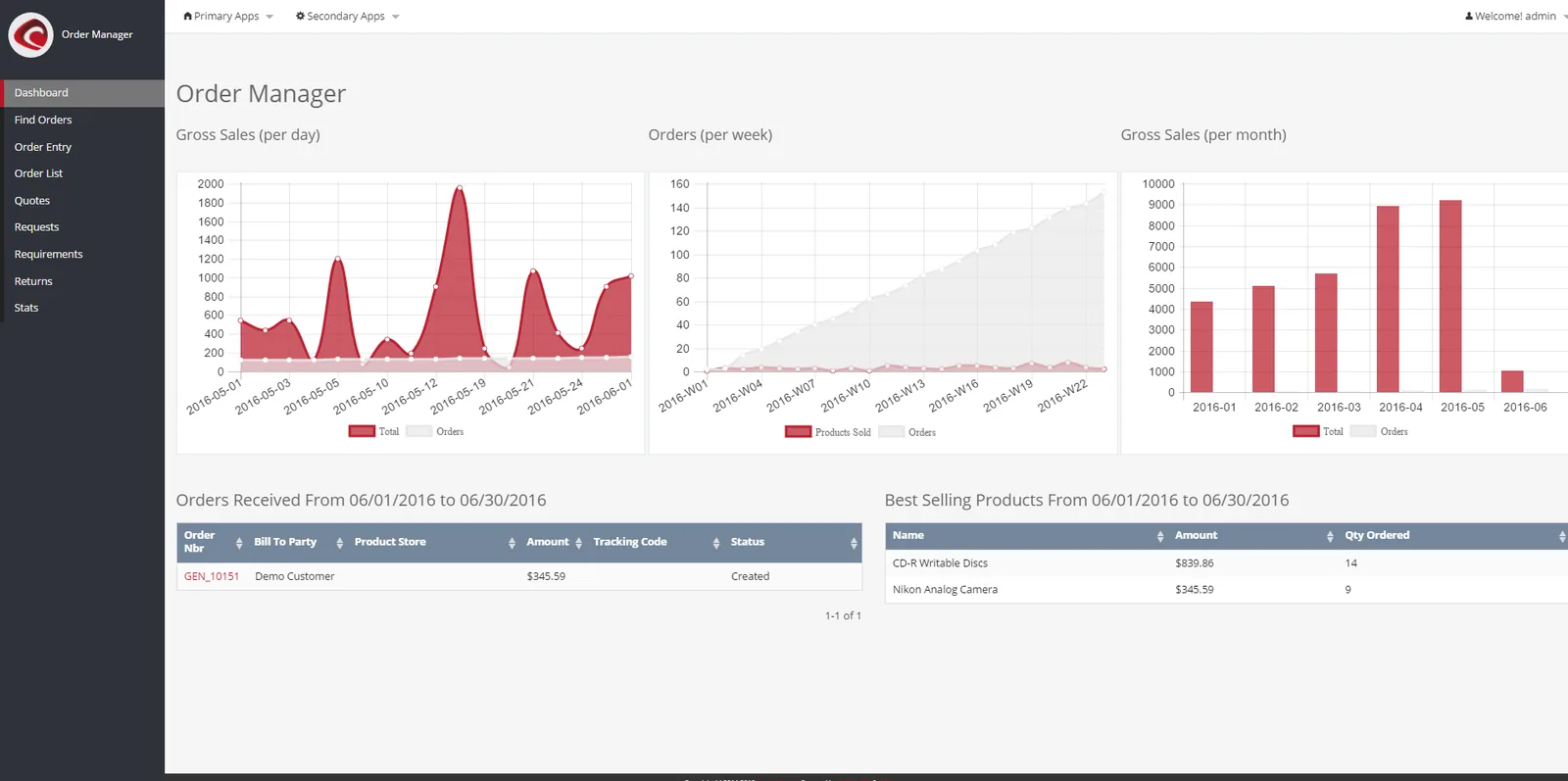
Below is the kind of home screen we configure for an owner-managed trading or services company. The exact tiles change by business; the principle of a few numbers with drill-down does not.
Dashboards fail when charts are built before anyone agrees what the numbers mean. Our sequence starts with definitions and ends with adoption checks a few weeks after go-live.
One shared database: every step updates stock, finance and reports in real time.
The features below are available, in different forms, across the platforms we implement. We choose the native option first and only add external tools when the native one cannot answer the question.
Each user group sees its own set of tiles when they log in. Access rules from the ERP still apply, so a branch manager cannot see another branch's margins.
Actuals are shown against budget or target with clear colour thresholds. Variance is calculated in the ERP so everyone sees the same figure.
Clicking a receivables tile opens the list of invoices behind it, and then the invoice itself. People trust numbers they can trace.
Simplified views for sales reps, drivers and site supervisors on phones. Fewer tiles, larger figures, quick filters by date.
A weekly PDF or email digest for board members who will not log in. The digest is generated from the same definitions as the live screen.
Tile titles and filters can be shown in Arabic or English where the platform supports it. Useful for mixed teams and government-facing units.
All four platforms can show useful dashboards. They differ in where the dashboard lives, how much you can configure without code, and when an external analytics tool becomes worth adding.
| Zoho | Odoo | ERPNext | Dynamics 365 Business Central | |
|---|---|---|---|---|
| Native dashboards | Home dashboards in Zoho Books, CRM and Inventory | Reporting views (graph, pivot) in each app; spreadsheet dashboards in Enterprise | Workspaces with number cards and dashboard charts | Role Centers with cues, KPIs and charts per role |
| Advanced analytics option | Zoho Analytics, with connectors to most Zoho apps | Spreadsheet dashboards or an external BI tool | Frappe Insights or an external BI tool | Power BI, with built-in reports and embedded parts |
| Configuration without code | Strong for standard KPIs | Good; filters, groupings and pivots can be saved and shared | Good; cards and charts are configured from the desk | Good for cues and KPIs; Power BI needs a skilled builder |
| Cross-application data | Best inside the Zoho suite | Best when most operations run in Odoo | Best when operations run in ERPNext | Strong across the Microsoft stack |
| Mobile access | Zoho mobile apps | Responsive web and mobile app | Responsive web and mobile app | Business Central mobile app and Power BI mobile |
| Typical fit | SMEs already on Zoho One | Companies running many processes in one database | Cost-conscious firms wanting open-source control | Mid-size firms standardised on Microsoft 365 |
Edition and licence affect what is available. We confirm features against your current plan before scoping.
A dashboard is only as complete as the data behind it. These are the sources UAE clients most often ask us to combine with ERP figures.
Dashboards do not file returns, but they can warn finance teams early. These are tiles we often add for UAE entities; confirm thresholds and treatment with your tax advisor.
Output VAT, recoverable input VAT and net payable for the open period, built from the same tax codes that feed the VAT return. Useful before the EmaraTax filing deadline.
Year-to-date accounting profit with flags for non-deductible expense accounts. Helps finance discuss the 9% bracket above AED 375,000 of taxable income with advisors early.
As e-invoicing phases in from 2027 under the PINT AE specification, a tile showing invoices rejected or pending at the Accredited Service Provider will matter. Check the latest Ministry of Finance and FTA guidance for dates.
Whether the Salary Information File for the month has been generated and paid through the bank or exchange house, so HR does not miss the MOHRE window.
General information, not tax or legal advice. Rules change; confirm current FTA, MOHRE and Ministry of Finance guidance with your advisor.
Explore how dashboards connect to reporting, BI and the platforms we implement.
We configure the system for the rules UAE businesses report against, and test it before go-live.
General information, not tax or legal advice. Confirm current requirements with the FTA, MOHRE or your advisor. See all UAE compliance guides.
On-site workshops in Dubai, Abu Dhabi and Sharjah, and remote or on-site delivery across the Northern Emirates and free zones.
Official sources and references
Facts on this page were checked against these sources in October 2026. Rules change, so confirm current requirements before acting.
Still have a question? Our consultants are happy to help.
Ask an ExpertUsually not for operational views. Zoho, Odoo, ERPNext and Business Central all include native dashboards that cover sales, stock, receivables and approvals. A separate tool such as Zoho Analytics or Power BI becomes useful when you combine several systems or need heavy historical analysis.
Start with three to five, one for each role that makes daily decisions. Adding tiles later is easy. Removing tiles people ignore is harder, because someone always says they might need it.
Most often because a KPI is defined differently in two places, for example revenue before or after credit notes. We write a short definition for every KPI and reconcile each tile against the general ledger before go-live.
Yes. Each platform has a mobile app or responsive web view. We design a reduced mobile layout because a twelve-tile desktop screen is unreadable on a phone.
For an existing, well-maintained ERP, a focused set of role dashboards often takes three to six weeks including testing. If the underlying data is incomplete, cleaning it at source comes first and adds time.
Yes, as long as you have administrator access. We review the data model first, because dashboards built on poorly configured records will show poor numbers.
Related Solutions
Related Industries
Related ERP Platforms
Tell us which roles you want to start with and we will propose KPI definitions and a first layout for your ERP.
Dubai, United Arab Emirates