L
O
A
D
I
N
G


Zoho, Odoo, ERPNext, Dynamics 365 and custom ERP, delivered by one accountable team.

For UAE retailers with several stores, an online shop or both, Odoo links the till to central buying, stock and accounts. We set it up for mall stores, high-street shops and kiosks across the emirates.
Odoo for retail in the UAE suits chains of two to a few dozen stores that want tills, warehouse, buying and accounts in one database. The Odoo Point of Sale app runs in a browser, keeps selling through short internet outages and posts revenue and VAT to accounting, while Inventory handles central receiving, inter-store transfers and replenishment, and eCommerce shares the same catalogue.
Odoo for retail in the UAE suits chains of two to a few dozen stores that want their tills, warehouse, buying team and accounts in one system. Typical clients run fashion boutiques in Dubai malls, electronics and mobile accessory shops in Bur Dubai and Sharjah, perfume and oud stores, home goods outlets or specialty food shops, often with a website or marketplace channel alongside.
The Point of Sale app runs in a browser on standard hardware, keeps selling during short internet outages and syncs when the connection returns. Each sale updates stock in that store's location, posts revenue and VAT to accounting and records the customer for loyalty. Head office sees sales by store, category and hour without waiting for end-of-day spreadsheets.
Behind the tills, Inventory handles central receiving, inter-store transfers and replenishment rules, while Purchase manages supplier orders for the whole chain. If you sell online as well, the Odoo eCommerce app shares the same product catalog and stock. Our page on Odoo POS covers the till itself in more depth; this page focuses on running a retail business around it.

The products we configure, integrate and support on projects like this one.
 Odoo Point of Sale
 Odoo Invoicing / Accounting
 Odoo Sales
 Odoo CRM
 Odoo Inventory
 Odoo Purchase
Product names and logos are trademarks of their respective owners and are shown only to identify the software we implement.
These problems are common in chains that grew store by store with separate tills and spreadsheets.
Standalone POS systems mean head office collects sales by email each night. Prices and promotions drift between branches.
Without a shared stock view, a best-seller runs out in Mall of the Emirates while the Sharjah branch has a full shelf. Transfers happen by phone and are not recorded.
Seasonal offers for Ramadan, Eid, Dubai Shopping Festival and back-to-school are set up manually on each till, and margins suffer when they are not switched off.
Store managers count cash and card slips at night and send totals by photo. Differences are found days later.
Repeat customers are not recognized across stores, so loyalty programs are run on paper cards or not at all.
This loop runs every day across the chain. We configure each step so stores and head office work from the same data.
One shared database: every step updates stock, finance and reports in real time.
Point of Sale and Inventory are the base for every retailer. The others depend on channels and how you engage customers.
Touchscreen tills with barcode scanning, multiple payment methods, cashier controls, offline mode and Arabic-English receipts.
A location per store, central warehouse transfers, replenishment rules and cycle counts by shelf or category.
Supplier orders for the chain, with deliveries split to the warehouse or straight to stores.
Points, coupons, buy-x-get-y offers, gift cards and eWallet balances valid in every store and online.
An online store that shares products, prices and stock with the tills, with click-and-collect options.
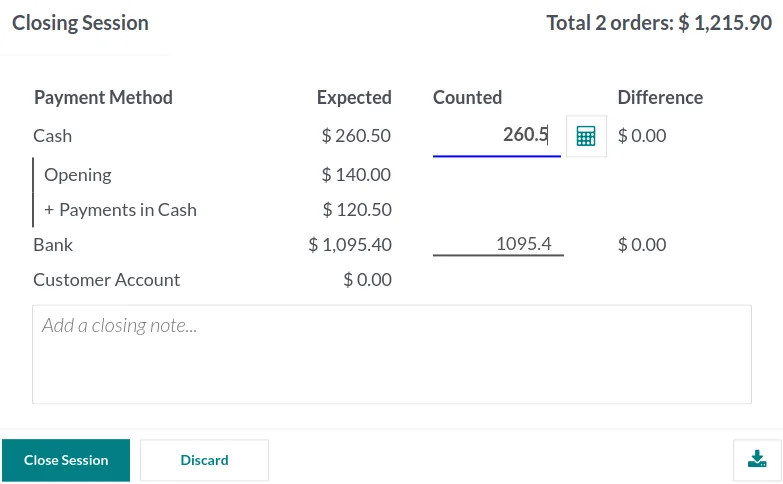
POS sessions post sales, VAT and payments per store, with card and cash differences visible at closing.
Area managers and owners compare stores daily. We build this view from Odoo POS and inventory data.
Retail VAT is simple in principle but high in volume. We configure Odoo to record the data correctly; confirm specific treatments with your tax advisor.
UAE retail prices are normally displayed inclusive of 5% VAT. Odoo POS can price tax-inclusive and print receipts with your TRN and the VAT amount, in Arabic and English.
Retailers registered in the Tax Refund for Tourists scheme issue tax-free tags through the scheme operator's system. Odoo does not issue these itself, but we can record the related sales so reconciliation is easier.
Discounts, free items and gift card redemptions affect VAT in different ways. We set up the loyalty and gift card accounting so your advisor can confirm the treatment.
UAE e-invoicing under PINT AE applies mainly to business transactions. Retailers that also sell to companies, or meet the AED 50 million revenue threshold, should plan for an Accredited Service Provider. Check the latest Ministry of Finance and FTA guidance on B2C scope and dates.
General information, not tax or legal advice. Rules change; confirm current FTA, MOHRE and Ministry of Finance guidance with your advisor.
Retail go-lives are often staged store by store. These ranges are typical and depend on product data quality and hardware readiness.
Durations are typical ranges; your plan is agreed after discovery.
Review of stores, tills, payment terminals, product catalog, pricing rules and promotions.
Products with variants and barcodes, price lists, POS settings, loyalty rules, receipt layouts and accounting.
Receipt printers, cash drawers, scanners and card terminal integration tested in a pilot store.
One store runs live while we fix issues and train its staff before wider rollout.
Remaining stores moved in waves, avoiding peak trading periods such as Ramadan and major sale events.
Read more about retail ERP and POS, compare platforms or look at Odoo's channel apps.
We configure the system for the rules UAE businesses report against, and test it before go-live.
General information, not tax or legal advice. Confirm current requirements with the FTA, MOHRE or your advisor. See all UAE compliance guides.
On-site workshops in Dubai, Abu Dhabi and Sharjah, and remote or on-site delivery across the Northern Emirates and free zones.
Official sources and references
Facts on this page were checked against these sources in October 2026. Rules change, so confirm current requirements before acting.
Yes. Once a session is open, Odoo POS can keep taking sales during an outage and sync orders when the connection returns. Some actions, such as looking up customers not yet loaded, need a connection.
Odoo has built-in integrations with several international terminal providers. Terminals supplied by UAE banks and acquirers often need a separate integration or are run standalone with the amount entered manually. We confirm options with your acquirer before go-live.
Yes. Each POS can use its own price list, and promotions can be limited to certain stores, dates or customer groups. Head office still controls the master catalog.
Yes. Loyalty programs, gift cards and eWallet balances are stored centrally, so a customer can earn in one store and redeem in another or online.
A store or head office creates a transfer from one location to another. The sending store confirms dispatch and the receiving store confirms receipt, so stock is always accounted for in transit.
It can be, but a single shop with no warehouse or online channel may find a simpler POS enough. Odoo's value grows with the number of stores, products and channels you manage.
Related Solutions
Related Industries
Related ERP Platforms
Tell us how many stores, tills and channels you run, and we will propose an Odoo setup and a store-by-store rollout plan.
Dubai, United Arab Emirates