
L
O
A
D
I
N
G


Zoho, Odoo, ERPNext, Dynamics 365 and custom ERP, delivered by one accountable team.

Selling to companies means several decision makers, formal RFQs, revised quotations, negotiated prices and credit terms. A B2B CRM keeps all of that on the account rather than in someone's inbox.
A B2B CRM for UAE companies should hold account hierarchies with branches and billing entities, contact roles for buyers, engineers and approvers, an RFQ register, and saved quotation revisions on each opportunity. Salespeople should also see contract price agreements and credit status before accepting orders, so pricing errors and deliveries to customers on credit hold are avoided.
B2B CRM in the UAE serves companies that sell to other businesses: distributors, trading houses, manufacturers, contractors, logistics providers and professional firms. The sale is rarely a single conversation. A procurement officer issues an RFQ, an engineer checks specifications, a finance manager asks for credit terms and a general manager signs off. Quotations go through two or three revisions, and the real value often comes from repeat orders over years rather than the first deal.
Generic CRMs designed around individual leads struggle here. B2B selling needs an account at the center, with branches and multiple billing entities, contacts with defined roles, a history of every RFQ and quotation revision, agreed price lists and the customer's credit position from finance. In the UAE that account record also carries TRN, mainland or free zone status, and sometimes a parent group across several emirates or GCC countries.
This page explains the B2B-specific process and how to set it up. If you sell mainly to traders, see CRM for trading companies; for project-based selling see CRM for professional services. The CRM side of a B2B setup is closely tied to the ERP, so ERP and CRM integration is usually part of the plan.

These issues appear when a B2B business runs on a lead-focused CRM or on email and spreadsheets.
Five people from the same client company are stored as separate leads. Nobody sees that procurement, engineering and the GM have all been contacted by different salespeople.
Revision three was sent from a laptop and never saved centrally. When the PO arrives at revision two pricing, the team cannot prove which version the client accepted.
Annual price agreements and project-specific rates live in a manager's folder. New salespeople quote list price to a customer with a contracted discount.
Sales does not see that an account is past its credit limit or has invoices overdue beyond 90 days. Orders are accepted and then stopped by finance, which damages the relationship.
Reorders arrive by email or phone and are processed without being linked to the account plan. Managers cannot see which key accounts are growing or slipping.
This is the core flow we set up for B2B sellers. Stage gates make sure the right information exists before moving on.
One shared database: every step updates stock, finance and reports in real time.
These go beyond standard lead and deal management.
Parent groups, subsidiaries, branches and billing entities, each with TRN and address.
Buyer, technical evaluator, approver and accounts payable contacts tagged on each account and deal.
Incoming RFQs logged with due date, reference number and required documents.
Each revision saved with its date, prices and terms, with the accepted version marked.
Contract prices, volume tiers and validity dates applied automatically on quotes.
Credit limit, outstanding balance and overdue invoices pulled from accounting.
Annual targets, share of wallet notes and review meetings for top customers.
Channel partners, their territories and deals registered through them.
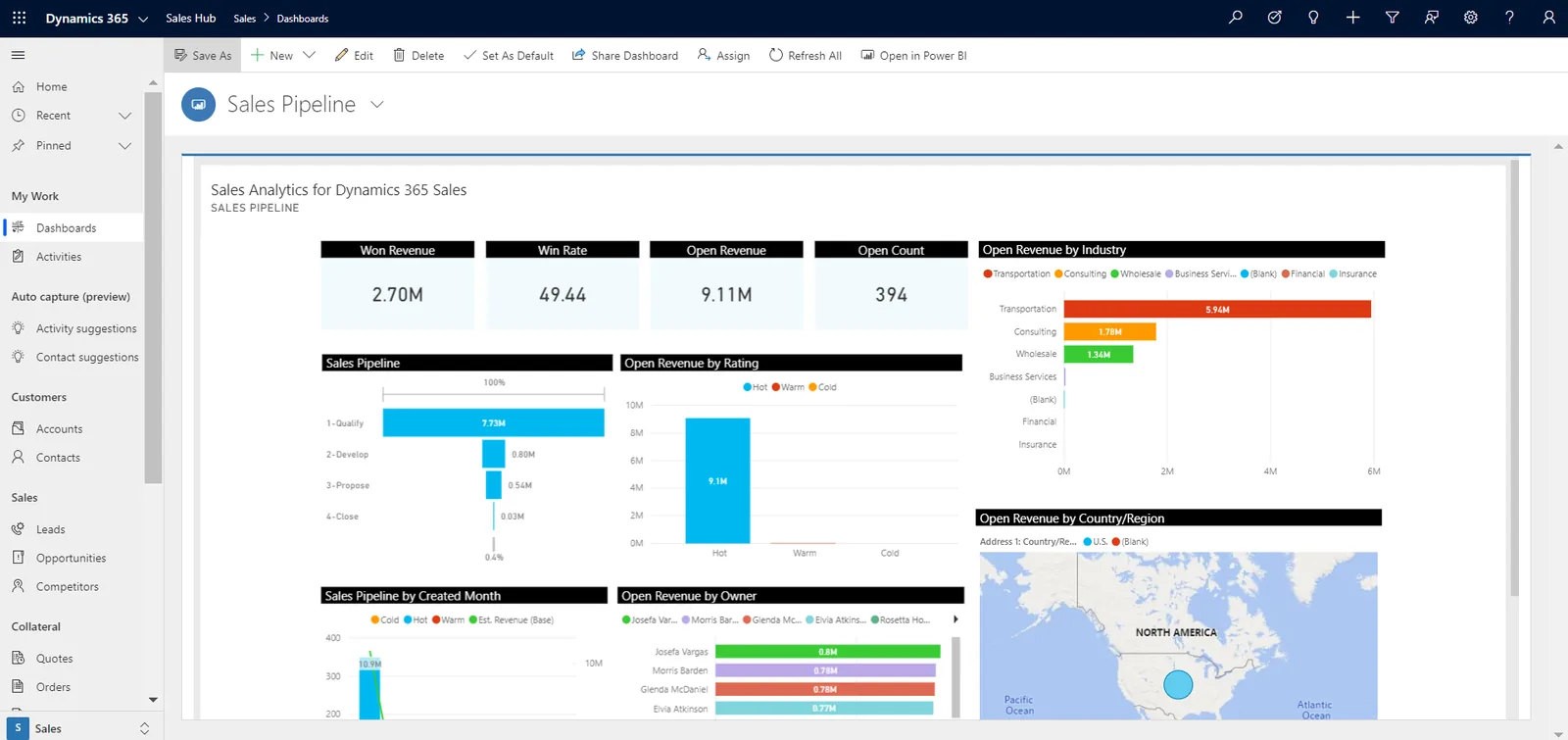
B2B managers review accounts as much as deals. This dashboard combines both.
All four handle B2B selling; their strength depends on how much ERP data you need inside the CRM.
| Zoho | Odoo | ERPNext | Dynamics 365 | |
|---|---|---|---|---|
| Account hierarchy | Parent accounts and custom relationships | Companies with child contacts and addresses | Customer groups, customers and multiple addresses | Account hierarchies and relationships on Dataverse |
| RFQ and quotation revisions | Quotes module; revisions via cloning or custom fields | Quotations with versions handled by duplication or modules | Quotation amendments create linked revisions | Quotes with revision handling in Sales |
| Customer price lists | Price books in CRM or price lists in Zoho Books/Inventory | Pricelists per customer with rules and validity | Pricing rules and customer-specific price lists | Price lists in Sales; ERP pricing in Business Central |
| Credit visibility | Via Zoho Books integration | Native credit and due amounts on the partner | Native credit limits and outstanding on customer | Via Business Central or Finance integration |
| Partner selling | Portals and custom modules | Partner and resellers apps available by edition | Sales partners with commission | Partner relationship options and Power Pages portals |
| Best fit | B2B teams wanting a strong CRM with ERP linked | Distributors wanting CRM and stock in one system | Manufacturers and traders on a budget | Large B2B organizations on Microsoft 365 |
Features vary by edition and version; confirm for your licence.
B2B teams depend on ERP data more than consumer sellers do.
B2B records feed tax invoices directly, so accuracy matters. Confirm details with your tax advisor.
B2B tax invoices need the buyer's TRN and correct legal name. We make these mandatory before an account can receive a sales order.
Sales to designated zone companies or GCC customers can have different VAT treatment. Tax categories on the account help ERP apply the right rule; confirm cases with your advisor.
UAE e-invoicing covers B2B transactions using PINT AE through Accredited Service Providers, mandatory from 2027 depending on revenue. Buyer data quality starts in the CRM; check the latest MoF/FTA guidance.
Even business contacts are personal data under the UAE PDPL. Role-based access and a lawful basis for marketing still apply.
General information, not tax or legal advice. Rules change; confirm current FTA, MOHRE and Ministry of Finance guidance with your advisor.
Results come from seeing the account as a whole.
Contract prices apply automatically, so customers are quoted what they agreed.
Every revision is saved, so disputes over accepted terms are settled quickly.
Salespeople see credit status before accepting orders, reducing blocked deliveries.
Account plans and contact gaps highlight where relationships need attention.
Ranges are typical; account volume and ERP integration drive the duration.
Durations are typical ranges; your plan is agreed after discovery.
Agree hierarchy, contact roles, RFQ fields and stage gates.
Build accounts, RFQ register, quotation versioning and price lists.
Connect receivables and orders; load accounts with TRN and contacts with roles.
Train sales, key account managers and finance; launch with weekly account reviews.
We configure the system for the rules UAE businesses report against, and test it before go-live.
General information, not tax or legal advice. Confirm current requirements with the FTA, MOHRE or your advisor. See all UAE compliance guides.
On-site workshops in Dubai, Abu Dhabi and Sharjah, and remote or on-site delivery across the Northern Emirates and free zones.
Official sources and references
Facts on this page were checked against these sources in October 2026. Rules change, so confirm current requirements before acting.
An account-centered model, multiple contacts with roles, quotation revisions, customer price lists and visibility of credit and orders. High-volume consumer features such as mass campaigns matter less.
Yes. Partners can be modelled as accounts with territories and registered deals, and some platforms offer partner portals. The approach depends on the platform you choose.
For distributors and manufacturers who quote from stock and price lists, a CRM inside or tightly linked to the ERP avoids errors. Compare options on our ERP vs CRM page.
Odoo and ERPNext keep CRM, quotations and production in one system, while Zoho and Dynamics 365 pair a strong CRM with an ERP. See CRM for manufacturing for detail.
Yes. We usually add an RFQ register or tender module with due dates, required documents and reminders linked to the opportunity.
Yes. We clean account hierarchies and contact roles during CRM migration so the new system starts with a reliable account structure.
Related Solutions
Related Industries
Related ERP Platforms
Walk us through how you handle RFQs, quotations and key accounts, and we will show how a B2B CRM would run it.
Dubai, United Arab Emirates










