
L
O
A
D
I
N
G


Zoho, Odoo, ERPNext, Dynamics 365 and custom ERP, delivered by one accountable team.

Supplier bills captured from the PO, bank lines matched automatically, VAT codes checked at entry, and records ready when the FTA or the auditor asks.
An ERP for accountants in the UAE removes repetitive keying: supplier bills are created from purchase orders and goods receipts or scanned invoices, TRN and VAT codes are checked at entry, bank lines are matched by rule, and supplier statements are agreed against the ledger. Accountants work from queues of exceptions, and records are ready when the FTA or auditors ask.
An ERP for accountants in the UAE should remove the repetitive keying that fills most of the working day. In a typical UAE SME the accountant, or a team of AP and AR accountants, receives supplier invoices as PDFs by email, types them into the system, checks the supplier TRN, picks a VAT code, matches them to purchase orders, prepares the payment list, downloads bank statements and ticks off each line. On the sales side they raise or check tax invoices, apply customer receipts and chase unapplied amounts.
Then come the jobs nobody enjoys: the supplier statement that does not match, petty cash vouchers from three sites, intercompany recharges, the import invoice where customs VAT was paid through the agent, and a request from the auditor for every entry above a threshold with backup documents. Each one is manageable alone; together they leave no time for review.
This page is about the transaction-level work. The close calendar and review sit with the finance manager. If you are still on spreadsheets or a basic package, see our guide to replacing manual accounting.

These are transaction-level problems, the ones that cause rework at month-end and findings at audit.
Every PDF invoice is typed line by line, then matched to a PO by memory. Typos in amounts or TRNs flow straight into the VAT return.
The supplier says one balance, the ledger says another. Finding the missing invoice, the unapplied advance or the duplicated payment takes an afternoon per supplier.
Standard-rated, zero-rated, exempt, out of scope and reverse charge look similar on a dropdown. A wrong choice on imports or designated zone supplies is easy to make and hard to spot later.
Card settlements, bank charges, cheque deposits and multi-invoice receipts are matched manually. Unidentified receipts sit in suspense for weeks.
Backup lives in email folders and shared drives. When the auditor or the FTA asks for support, someone spends days collecting it.
Receipts arrive in batches from sites and drivers, often without TRNs, and need coding to cost centers before they can be posted.
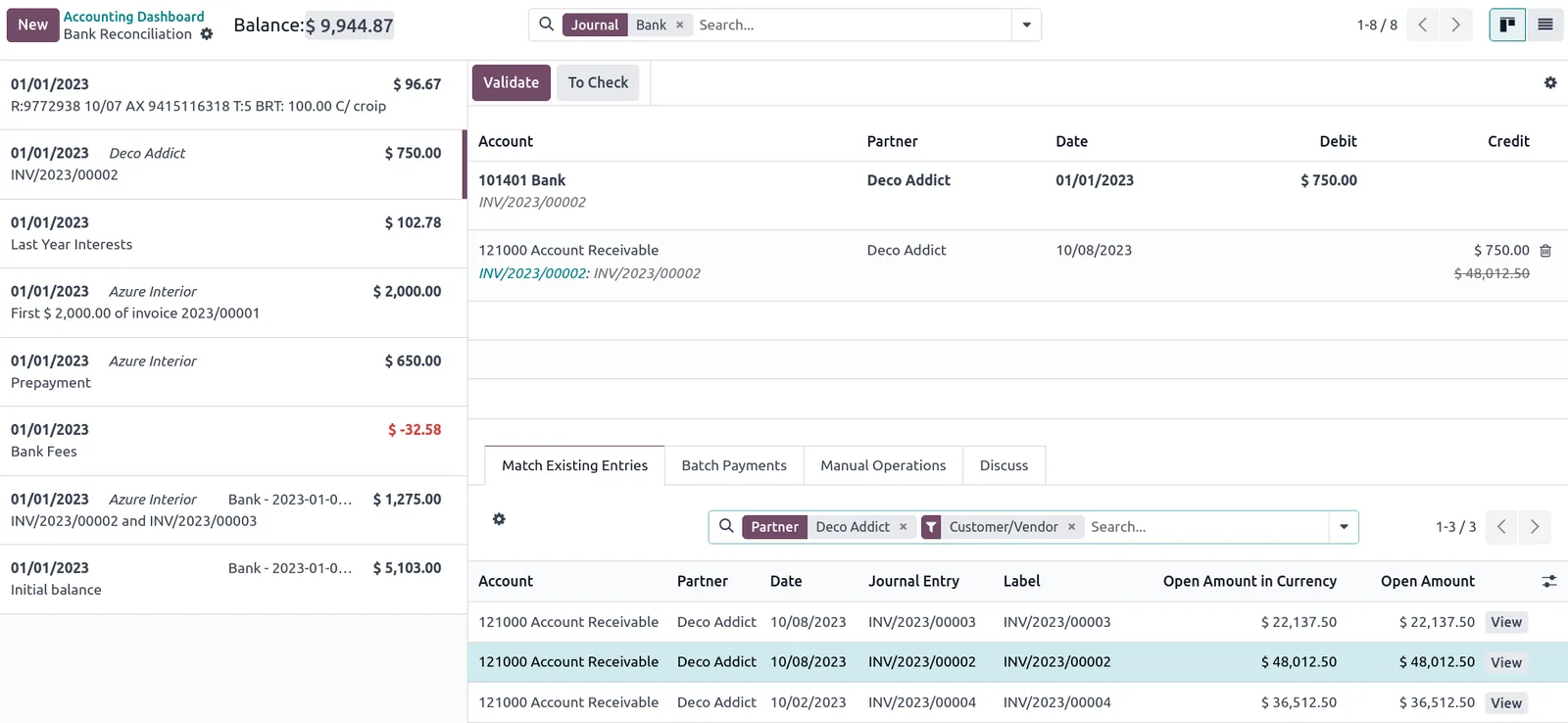
Accountants need queues more than charts: what is waiting, what failed matching, and what is due.
Each of these removes a manual step from the daily cycle.
Create the bill from the purchase order and GRN, or use invoice scanning where your edition supports it, then check rather than type. See AI accounting automation for what OCR can and cannot do.
Recurring lines such as bank charges and card settlements match automatically. Our page on bank reconciliation in ERP goes deeper.
Tax codes default from the product, supplier or customer profile, including reverse charge for imported services, with a warning when a TRN is missing.
Compare the supplier's statement to the ledger, find unmatched items and apply advances. More in supplier statement reconciliation.
The supplier PDF, delivery note and approval stay on the transaction, so audit requests become a report rather than a search.
Staff submit receipts from mobile with cost center and VAT details, the accountant reviews and posts, and the cash float reconciles.
This is the procure-to-pay tail end that most accountants run daily or weekly.
One shared database: every step updates stock, finance and reports in real time.
How each platform handles the daily accounting work. Features change with editions; confirm for your plan.
| Zoho | Odoo | ERPNext | Dynamics 365 | |
|---|---|---|---|---|
| Bill capture | Bills from POs; document scanning in Zoho Books depending on plan | Vendor bills from POs; invoice digitization in Enterprise using credits | Purchase invoice from PO or receipt; OCR via third-party apps | Purchase invoices from orders; document capture features in recent versions |
| Bank matching | Bank rules and feeds where supported | Reconciliation models | Bank Reconciliation Tool with rules | Bank reconciliation with auto-match |
| VAT coding | Tax rates by item and contact; UAE VAT return report | Fiscal positions map taxes by partner type | Item tax templates and tax categories; UAE VAT 201 report | VAT business and product posting groups |
| Supplier statements | Vendor statements and ageing | Partner ledger and follow-up reports | Accounts payable and general ledger by party | Vendor ledger entries and statements |
| Audit support | Audit trail and attachments | Chatter history and attachments | Version history on documents | Change log and attached documents |
| Learning curve for accountants | Gentle; familiar to users of simple accounting tools | Moderate; benefits from structured training | Moderate; clean but technical in places | Moderate to steep; very familiar to Microsoft users |
Indicative. We validate scanning, bank feeds and localization for your bank and edition before you commit.
We configure the system for the rules UAE businesses report against, and test it before go-live.
General information, not tax or legal advice. Confirm current requirements with the FTA, MOHRE or your advisor. See all UAE compliance guides.
On-site workshops in Dubai, Abu Dhabi and Sharjah, and remote or on-site delivery across the Northern Emirates and free zones.
Official sources and references
Facts on this page were checked against these sources in October 2026. Rules change, so confirm current requirements before acting.
Still have a question? Our consultants are happy to help.
Ask an ExpertNo. It removes typing and matching so accountants can spend more time on review, reconciliations and exceptions. Judgement on VAT treatment, accruals and supplier disputes still needs a person.
Most mainstream ERPs used in the UAE can produce an audit file or the transaction listings it needs, sometimes through localization or a report. Check the specific format requirement and your edition, and confirm with your tax advisor.
The tax code for the supplier or service triggers both output and input VAT entries and maps them to the correct return boxes. The treatment itself should be confirmed with your tax advisor for each case.
It saves typing but still needs a human check, especially for TRNs, VAT amounts and multi-line invoices. Treat it as a draft, not a final entry.
Tax records must generally be kept for at least five years, and seven for real estate, under Cabinet Decision 74 of 2023. The ERP keeps them searchable; see tax record retention for details.
Default tax codes on products and contacts, bank matching rules, approval routes for bills, and mandatory attachments. Those four settings decide how much manual work remains after go-live.
Related Solutions
Related Industries
Related ERP Platforms
Related Guides
Show us a week of your accounting workload and we will map which steps the ERP can automate.
Dubai, United Arab Emirates










