
L
O
A
D
I
N
G


Zoho, Odoo, ERPNext, Dynamics 365 and custom ERP, delivered by one accountable team.

Inside the warehouse, accuracy comes from process: where goods are put away, how pickers are routed and what gets scanned before a truck leaves. We configure those steps in your ERP.
Warehouse management software in the UAE goes below inventory control to tell staff exactly where stock sits, down to aisle, rack, level and bin, which picker should collect it and whether each pallet was scanned against the right order. Configured inside an ERP, it adds putaway rules, pick lists grouped by route, wave or batch, and scan-to-confirm at receiving, picking and loading.
Warehouse management software UAE operators use goes a level below inventory control. Inventory tells you there are 400 cartons of an item in the Jebel Ali warehouse. Warehouse management tells you they sit in aisle C, rack 4, level 2 and in two overflow bins, which picker should collect them, and whether the pallet that left this morning was scanned against the right order.
For a distribution center in Dubai Investment Park, a cold store in Al Quoz or a growing ecommerce fulfilment space in Dubai South, the pain points are physical: pickers walking the whole building for one order, goods put wherever there is space, and packing errors discovered when the customer calls. Summer heat and shift patterns make wasted walking expensive.
This page covers warehouse operations configured inside an ERP: bins, putaway, picking, packing and dispatch. For the higher-level question of whether you need a separate dedicated WMS product, see our page on WMS software. For stock levels and valuation, see inventory management software.
The products we configure, integrate and support on projects like this one.

 Odoo Inventory
 ERPNext
Product names and logos are trademarks of their respective owners and are shown only to identify the software we implement.
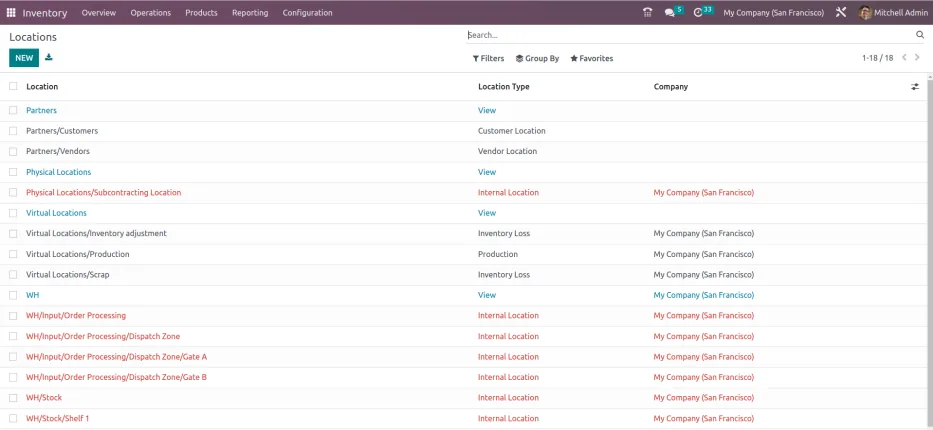
Supervisors need a shift-level view of what is waiting, what is in progress and what is late. This is the type of board we set up.
Depending on volume, we configure one, two or three steps for receiving and dispatch. Larger sites usually separate quality check and packing as their own steps.
One shared database: every step updates stock, finance and reports in real time.
These are the warehouse features we configure most often for UAE distributors, retailers and logistics providers.
Model the building as zones, aisles, racks and bins, including bulk, pick face, quarantine and returns areas.
Direct goods to a default location by product, category or storage type, so receivers do not decide where things go.
Single-order, batch or wave picking with lists sorted by bin sequence to shorten each picker's route.
Mobile barcode scanning to confirm item, lot and quantity at every step, reducing wrong picks and miscounts.
Pack stations that record cartons, weights and dimensions and print shipping labels for couriers.
Group orders by route or vehicle, confirm loading by scan, and generate delivery notes in English and Arabic.
Warehouse features vary more between platforms than basic inventory does. Here is how they compare for floor operations.
| Zoho Inventory | Odoo Inventory and Barcode | ERPNext Stock | Dynamics 365 | |
|---|---|---|---|---|
| Location detail | Warehouses with bin locations | Multi-level storage locations | Nested warehouse tree | Bins in Business Central; advanced warehousing in Supply Chain Management |
| Receiving steps | Purchase receive | One, two or three-step receipts | Purchase receipt with quality inspection | Warehouse receipts and put-away documents |
| Putaway | Manual bin selection | Putaway rules by product or category | Putaway rules | Put-away templates and worksheets |
| Picking | Pick lists | Wave and batch transfers | Pick lists | Warehouse picks and pick worksheets |
| Mobile scanning | Mobile app scanning | Barcode app on handhelds | Barcode scanning in forms and mobile | Mobile options and warehouse apps |
| Suits | Small warehouses and ecommerce | Busy distribution and fulfilment | Distributors on a budget | High-volume, multi-site operations |
Some features need specific editions or apps. We check against your warehouse layout and volumes before recommending.
Warehouse software only works when the devices and carriers around it are connected properly.
Warehouse records support customs, VAT and audit trails. Confirm specific treatments with your customs broker and tax advisor.
Goods held in a free zone or bonded store may be under duty suspension. The ERP should tag stock by status so movements to the mainland trigger the right customs and VAT paperwork.
Dispatch documents and the tax invoice should reference the same order so the time of supply for VAT is clear and traceable.
Food and pharmaceutical distributors often need lot-level traceability for recalls by local authorities. Scanning at receipt and dispatch makes this a report rather than an investigation.
Damages, losses and count differences should be recorded with reasons and approvals, as they affect both stock value and VAT records.
General information, not tax or legal advice. Rules change; confirm current FTA, MOHRE and Ministry of Finance guidance with your advisor.
Explore platforms, industries and scanning options.
We configure the system for the rules UAE businesses report against, and test it before go-live.
General information, not tax or legal advice. Confirm current requirements with the FTA, MOHRE or your advisor. See all UAE compliance guides.
On-site workshops in Dubai, Abu Dhabi and Sharjah, and remote or on-site delivery across the Northern Emirates and free zones.
Official sources and references
Facts on this page were checked against these sources in October 2026. Rules change, so confirm current requirements before acting.
Still have a question? Our consultants are happy to help.
Ask an ExpertNo. Inventory management tracks how much stock you hold and what it is worth. Warehouse management controls the physical tasks inside the building: where goods are stored, how they are picked and how dispatch is confirmed. Smaller operations can manage with inventory features; busy warehouses benefit from both.
Not always. Many clients start with rugged Android handhelds or even phones with a camera scanner for low volumes. For heavy use, we recommend industrial scanners with long battery life, and we test them with your chosen platform before rollout.
We walk the site with your supervisor, agree a naming scheme for zones, aisles, racks and levels, and print labels before go-live. Then stock is counted into its bins so the system starts with accurate addresses.
Yes. Temperature-controlled zones, quarantine and returns areas are set up as separate locations with rules that stop goods being picked until they are released.
For a single site with bins, putaway and scanning, plan for roughly six to twelve weeks including labeling, counts and training. Multi-site or multi-shift operations take longer and are usually phased.
Related Solutions
Related Industries
Related ERP Platforms
Send us your layout and order volumes and we will suggest a warehouse setup that fits.
Dubai, United Arab Emirates












