L
O
A
D
I
N
G


Zoho, Odoo, ERPNext, Dynamics 365 and custom ERP, delivered by one accountable team.

We configure Odoo for the physical side of your warehouse: where goods are put away, how pickers move, and how every pallet and bin stays accurate.
Yes. Odoo covers most warehouse management functions for small and mid-sized UAE warehouses: bin-level locations, putaway rules, one- to three-step receipt and delivery routes, FIFO or FEFO removal strategies, batch and wave picking, cycle counts and barcode scanning through the Barcode app. Very high-volume sites needing labour management or automation control may still need a dedicated WMS.
Odoo Warehouse Management UAE is about the floor, not just the stock figure. Many companies in Jebel Ali, Dubai Investment Park, Al Quoz and Sharjah's industrial areas already know their total quantity per product. What they lack is a reliable answer to where it sits, which pallet to pick first and why a picker walked the length of the building for one carton. Odoo handles these questions through locations, routes and the Barcode app.
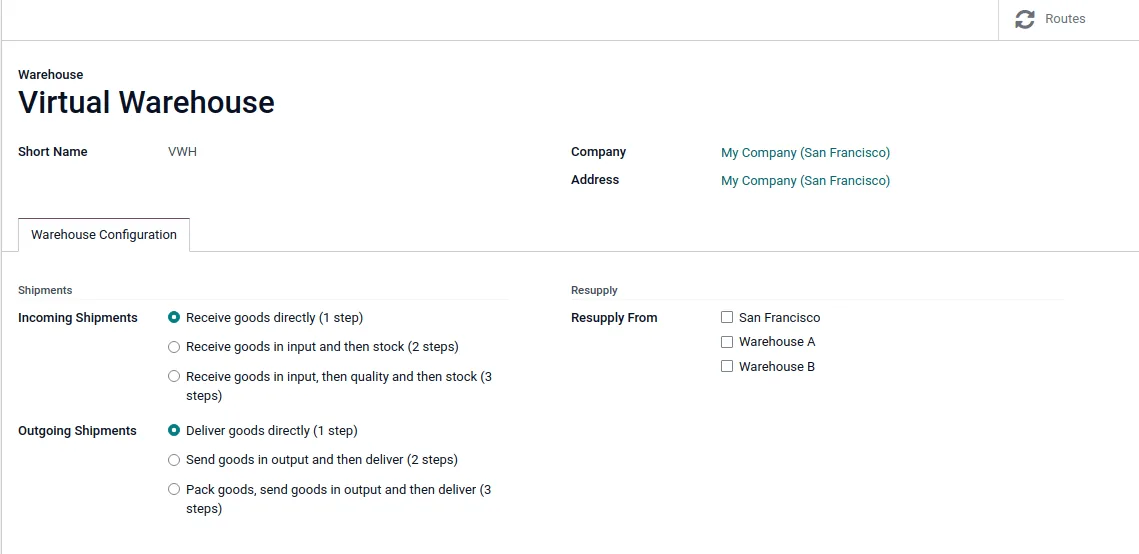
In Odoo each warehouse can be split into zones, aisles, racks and bins. Receipts can run in one, two or three steps (receive, quality check, store), and deliveries in one, two or three steps (pick, pack, ship). Putaway rules send incoming goods to the right bin automatically, and removal strategies such as FIFO, FEFO or closest location decide what gets picked. Batch and wave transfers let one picker collect for many orders in a single walk.
This page covers warehouse operations specifically. For product setup, valuation and replenishment logic, see Odoo Inventory UAE. If you are comparing dedicated systems, our WMS software UAE guide explains when a standalone WMS is still the better fit.
The products we configure, integrate and support on projects like this one.
 Odoo Inventory
 Odoo Invoicing / Accounting
 Odoo Sales
 Odoo CRM
 Odoo Purchase
 Odoo Manufacturing
Product names and logos are trademarks of their respective owners and are shown only to identify the software we implement.
Warehouse supervisors start the shift from one screen that shows the work queue, not just stock levels.
A three-step flow common in UAE distribution centers. Smaller stores often use one-step receipt and delivery.
One shared database: every step updates stock, finance and reports in real time.
Each of these is a setting or app in Odoo that we tune to your building, your products and your staff.
A location hierarchy that mirrors your racking, with barcodes printed for every bin so scanning confirms the right spot.
Rules by product, category or storage type send goods to a specific zone, such as chilled, hazardous or high-value cages.
Receipt and delivery routes in one to three steps, plus cross-dock and dropship routes where they apply.
Handheld or phone scanning for receiving, internal moves, picking, packing and counts, with errors flagged on the spot.
Group order lines by zone, carrier or time slot so pickers walk less and dispatch cut-off times are met.
Track food, cosmetics or pharma-adjacent items by lot and expiry date, and pick using first-expiry-first-out.
Record which items sit in which package or pallet, and move a full pallet in one scan.
Scheduled counts by location or product class instead of shutting the warehouse for an annual stock take.
Most of the warehouse value comes from links inside Odoo. External connections cover carriers, hardware and, where needed, customer systems for 3PL operators.
Warehouse records support tax and customs positions, so the data has to be complete. Confirm specific treatments with your tax advisor or customs broker.
Certain free zones are treated as designated zones for VAT, which affects how goods moving in and out are taxed. Odoo can keep separate warehouses and fiscal positions so movements are recorded with the right treatment; the rules themselves need professional advice.
For imports and re-exports through Jebel Ali or other ports, Odoo can hold HS codes, country of origin and declaration references on products and receipts, making customs paperwork easier to prepare.
Accurate counts and valuation support corporate tax filings, since closing stock affects taxable income. Corporate tax at 9% applies above AED 375,000 of taxable income.
Lot and expiry tracking supports recalls and inspections by municipal authorities for food and consumer goods, by showing exactly which customers received which batch.
General information, not tax or legal advice. Rules change; confirm current FTA, MOHRE and Ministry of Finance guidance with your advisor.
A warehouse rollout succeeds or fails on preparation in the building itself.
More on Odoo inventory, logistics and warehouse systems in the UAE.
We configure the system for the rules UAE businesses report against, and test it before go-live.
General information, not tax or legal advice. Confirm current requirements with the FTA, MOHRE or your advisor. See all UAE compliance guides.
On-site workshops in Dubai, Abu Dhabi and Sharjah, and remote or on-site delivery across the Northern Emirates and free zones.
Official sources and references
Facts on this page were checked against these sources in October 2026. Rules change, so confirm current requirements before acting.
Still have a question? Our consultants are happy to help.
Ask an ExpertOdoo covers most WMS functions for small and mid-sized warehouses: bins, putaway, routes, wave picking, barcode scanning and cycle counts. Very high-volume sites needing advanced labor management, slotting optimization or automation control may still need a dedicated WMS connected to Odoo.
It runs on Android handhelds with built-in scanners, on phones with the camera, or on PCs with USB scanners. For busy warehouses we recommend rugged handhelds, which we help you test before you buy.
Odoo can separate stock by owner and run per-client locations and reports. Billing 3PL clients for storage and handling usually needs some configuration or customization, which we scope during discovery.
Yes. Each site is its own warehouse in Odoo, often under separate companies if the licenses differ. Transfers between them can be recorded as intercompany sales or internal moves depending on your legal and tax setup.
A single warehouse with existing Odoo Inventory often moves to bin-level management in 4 to 8 weeks. A new multi-site setup with barcode scanning across all steps typically needs 8 to 14 weeks.
Yes. With expiry dates enabled on lots, the FEFO removal strategy suggests the earliest-expiring lot first, and alerts can warn about stock approaching its best-before or removal date.
Related Solutions
Related Industries
Related ERP Platforms
Send us your warehouse size, order volume and current pain points, and we will propose an Odoo warehouse design for your site.
Dubai, United Arab Emirates