L
O
A
D
I
N
G


Zoho, Odoo, ERPNext, Dynamics 365 and custom ERP, delivered by one accountable team.

If your business runs on an accounting package, spreadsheets and WhatsApp, this explains what an ERP system would change and how it fits together.
An ERP system is a single business application where sales, purchasing, stock, finance and HR record their work in one shared database, so an order confirmed by sales is instantly visible to the warehouse and finance. UAE companies usually adopt one when Tally or QuickBooks plus spreadsheets can no longer cope with a second warehouse, another emirate's branch or VAT complexity.
An ERP system (enterprise resource planning) is a single business application where sales, purchasing, stock, finance, HR and other departments record their work in one shared database. When a salesperson confirms an order, the warehouse sees it, stock is reserved, and finance knows an invoice is coming, without anyone retyping it.
Many UAE companies start with an accounting package such as Tally or QuickBooks, plus spreadsheets for stock and a CRM or WhatsApp for sales. That works until the business adds a second warehouse, a branch in another emirate, more staff or VAT complexity. Then the same numbers live in several places and nobody fully trusts any of them. An ERP system in the UAE is usually adopted at that point.
This page is written for businesses new to ERP. It covers how an ERP system is put together, the core modules, how one transaction moves across departments, and the signs that suggest it is time. For the wider market of products, see ERP software UAE.

None of these alone means you must buy ERP. Three or more together usually do.
The system says 40 units, the shelf has 25, and sales keep promising items you do not have. Physical counts turn into investigations every quarter.
Finance waits for sales reports, purchase bills and petty cash sheets from different people, then reconciles them by hand before the books can close.
Each quarter someone exports transactions, sorts them by tax treatment and rebuilds the return manually, hoping nothing was missed.
You know total profit but not which product lines, branches or customers make money, because costs and sales are recorded in different tools.
Every new branch or product range means hiring someone to move data between systems rather than to serve customers.
Most ERP systems share these building blocks. You do not have to use them all on day one.
General ledger, receivables, payables, bank reconciliation, VAT and financial statements. Every other module posts here.
Leads, quotations, sales orders, price lists and customer credit limits, with history for each customer.
Requests, approvals, purchase orders, supplier bills and landed costs for imported goods.
Items, warehouses, batches or serial numbers, transfers between locations and stock valuation.
Employee records, leave, attendance and salaries, with WPS file output and gratuity where payroll is included.
Dashboards and reports drawn from the same database, so sales, stock and finance figures agree.
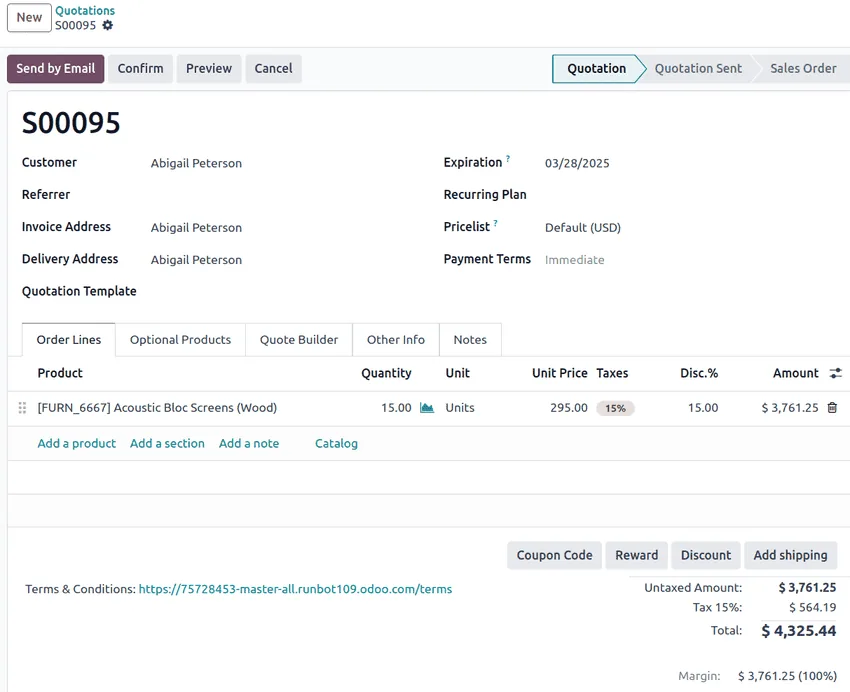
Following a single sale shows why a shared database matters.
This is what happens behind the scenes when a Dubai distributor sells 100 cartons to a customer in Abu Dhabi.
| Step | Who acts | What the ERP records | What updates automatically |
|---|---|---|---|
| Quotation | Salesperson | Items, prices, 5% VAT, validity date | Customer history and sales pipeline |
| Sales order | Salesperson or manager | Confirmed quantities and delivery date | Stock reserved; credit limit checked |
| Pick and deliver | Warehouse team | Delivery note against the order | On-hand stock reduced; cost of goods recorded |
| Invoice | Accounts | Tax invoice with TRN and required fields | Receivable, revenue and output VAT posted |
| Payment | Accounts | Bank receipt matched to invoice | Receivable cleared; bank balance updated |
| Reorder | Purchasing | Purchase order raised from reorder rules | Expected stock and payables forecast updated |
In separate tools, each of these steps is typed again. In an ERP system, each step builds on the last.
For a small or mid-size UAE company moving from accounting software and spreadsheets. Typical ranges, not guarantees.
Durations are typical ranges; your plan is agreed after discovery.
Map how you sell, buy, store and account today, and decide what must change.
Compare a few systems against your scenarios and budget, with a partner who explains trade-offs.
Configure modules, import customers, suppliers, items and opening balances, and test with real documents.
Train each role on its own tasks, then switch over at a period start, often the beginning of a VAT quarter or month.
Fix gaps found in daily use, add reports, and plan the next modules.
An ERP system helps by recording transactions consistently. It does not replace advice from your tax advisor.
Tax codes on every sale and purchase let the system summarize output and input VAT at 5% for each return filed through EmaraTax. Registration is mandatory above AED 375,000 of taxable supplies.
Clean books with clear account structures make it easier for your advisor to prepare corporate tax returns under Federal Decree-Law No. 47 of 2022.
Structured invoice data in an ERP is the starting point for the Peppol-based PINT AE e-invoicing model, mandatory from 2027 depending on revenue. Check the latest Ministry of Finance and FTA guidance.
If HR is included, the ERP can produce WPS salary files and track gratuity under UAE Labour Law.
General information, not tax or legal advice. Rules change; confirm current FTA, MOHRE and Ministry of Finance guidance with your advisor.
Every business is different, but these are the improvements first-time ERP users most often notice.
Orders, deliveries and invoices build on each other, cutting retyping and errors.
Movements post as they happen, so quantities match the shelf more closely.
Finance works from transactions already in the ledger instead of collecting reports.
Margins by product, customer and branch come from the same records as the accounts.
Next steps for businesses new to ERP.
We configure the system for the rules UAE businesses report against, and test it before go-live.
General information, not tax or legal advice. Confirm current requirements with the FTA, MOHRE or your advisor. See all UAE compliance guides.
On-site workshops in Dubai, Abu Dhabi and Sharjah, and remote or on-site delivery across the Northern Emirates and free zones.
Official sources and references
Facts on this page were checked against these sources in October 2026. Rules change, so confirm current requirements before acting.
Still have a question? Our consultants are happy to help.
Ask an ExpertNo. Cloud and open source platforms have made ERP practical for companies with a handful of users. The question is whether your processes span enough departments that a shared database saves real effort.
Accounting software records the financial result of transactions. An ERP system also manages the operational steps that create them, such as quotations, stock movements, purchase approvals and payroll, and posts the accounting automatically.
No. Many companies start with finance, sales, purchasing and inventory, then add HR, projects or manufacturing later. A phased approach keeps the first go-live manageable.
The platforms we implement support Arabic, and bilingual tax invoice layouts can be configured. Check how each product handles Arabic in reports and printouts during a demo.
For a focused first rollout, often 6-12 weeks from design to go-live. Multiple entities, heavy customization or poor source data extend that. We give a range only after discovery.
Related Solutions
Related Industries
Related ERP Platforms
Tell us how you work today and we will tell you honestly whether an ERP system makes sense yet.
Dubai, United Arab Emirates