
L
O
A
D
I
N
G


Zoho, Odoo, ERPNext, Dynamics 365 and custom ERP, delivered by one accountable team.

Taxis, site permits, client travel and small tools add up. Project expense management captures them with receipts, charges them to the right project and bills the client where the contract allows.
UAE companies track project expenses by having staff photograph receipts on mobile and tag each claim to a project, task and category. Policy and VAT checks run before project manager approval, finance posts and reimburses, and billable items are re-invoiced to the client at cost or with markup. Taxis, permits, travel and small tools then land on projects instead of overheads.
Project expense management covers the out-of-pocket and small direct costs that staff incur while delivering a project: taxi and fuel to client sites, parking and tolls, flights and hotels for work in other emirates or GCC countries, site permits, printing, sample costs and small purchases paid from petty cash. Individually they are small. Together they can be a meaningful share of project cost, and on many consulting and services contracts they are billable to the client.
In a typical UAE company these costs move through a mix of paper claims, photos of receipts on WhatsApp and a petty cash box at site. Finance reimburses the employee and books the total to a general travel or sundry expense account. The project never sees the cost, the client is never billed for it, and input VAT on valid tax invoices is often not recovered because the receipt was lost or does not show a TRN.
A good process captures the expense once, with the receipt, the project and a billable flag, at the moment it happens. This page covers that expense flow specifically. For company-wide claim policies beyond projects, see expense management software, and for how these costs roll into the full project cost, see project costing software.

These are the gaps we find most often when reviewing project expenses in UAE firms.
Claims are posted to a general expense account because the claim form has no project field. The project looks cheaper and the cost is never recovered from the client.
The contract allows the client to be charged for travel and accommodation, but nobody tells billing. These amounts are often only discovered at project close, when it is too late to bill.
Paper receipts fade or go missing, and many lack the supplier TRN. Without a valid tax invoice, input VAT cannot be recovered and the auditor questions the claim.
Site supervisors spend from a cash float and replenish it with a summary sheet. Finance cannot tell which project or cost code the money went to.
Claims wait weeks for signatures, employees chase finance, and policy questions about per diems or mileage are settled case by case.
This flow captures expenses at source and routes them to cost, reimbursement and client billing in one pass.
One shared database: every step updates stock, finance and reports in real time.
Expense management touches HR, finance and billing. These are the pieces we configure.
Mobile capture with receipt photo, project, category and billable flag, with OCR to read amount, date and supplier where available.
Limits by category and employee grade, per diem rules and mileage rates, with exceptions sent for extra approval.
Site floats and travel advances issued to employees, then settled against claims so balances are always known.
Card transactions imported and matched with receipts, so card spend is coded to projects like any claim.
Approved expenses posted to the project and cost code, net of recoverable VAT.
Billable expenses added to the client's next invoice at cost or with an agreed markup, with receipts attached if required.
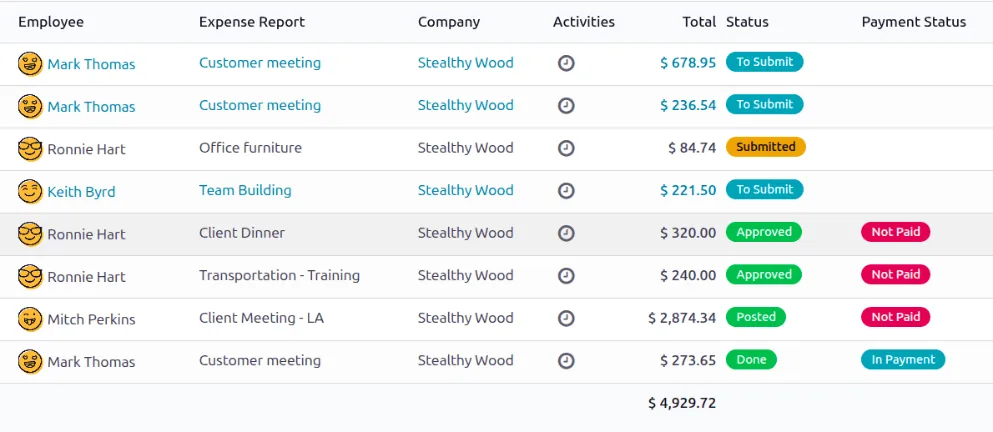
These views show where project expense money goes and how much is coming back from clients.
All four can charge expenses to projects and re-invoice them. Mobile capture and policy depth differ. Confirm features for your edition.
| Zoho | Odoo | ERPNext | Dynamics 365 | |
|---|---|---|---|---|
| Expense capture | Zoho Expense with mobile app and receipt autoscan | Expenses app with mobile capture and receipt digitization (Enterprise) | Expense Claim in Frappe HR with attachments; OCR via add-on or integration | Expense management in Finance and Project Operations; Business Central often uses an add-on or purchase invoices |
| Project tagging | Expenses linked to projects and customers, syncing to Zoho Books | Analytic distribution on each expense line | Project and cost center on each expense claim | Project and category on expense lines |
| Policies | Policies by category, limits and per diem | Expense categories with costs; approval rules | Expense claim types and approval workflow | Expense policies and approval workflow in Finance and Operations apps |
| Re-invoicing | Billable expenses added to customer invoices | Re-invoice at cost or at sales price via the linked sales order | Expenses tracked on project; billing usually by sales invoice item | Billable expenses flow to invoice proposals in Project Operations |
| Corporate cards | Card feeds supported for several banks | Card statements via bank sync and matching | Bank statement import and matching | Card import in Finance; varies in Business Central |
Mobile and OCR features evolve quickly; confirm current capability for your plan.
Each connection removes a manual step between spending money and seeing it on the project.
Expenses are where small VAT mistakes repeat hundreds of times. Confirm treatments with your tax advisor.
Input VAT at 5% is generally recoverable only with a valid tax invoice showing the supplier's TRN and the required details. Make the TRN and VAT amount fields mandatory when a claim includes VAT.
Some costs carry no VAT or have restricted recovery, such as certain entertainment. Use separate expense categories so the ERP applies the right tax code automatically.
When you recharge expenses to a client, the recharge is generally part of your supply and VAT applies to the invoice. Disbursements made strictly as the client's agent can be treated differently, so confirm with your advisor.
Receipts and claim approvals are tax records. Store digital copies with the expense entry for at least the statutory five-year period.
General information, not tax or legal advice. Rules change; confirm current FTA, MOHRE and Ministry of Finance guidance with your advisor.
The improvements firms usually notice, without invented percentages.
Billable expenses appear on the next invoice instead of being forgotten until project close.
Receipts are captured with TRN at source, so valid tax invoices are not lost.
Small direct costs land on the project, not in overheads, so margins reflect reality.
Mobile submission and clear approval routes cut the back-and-forth over claims.
Indicative ranges; the number of entities, card providers and policy rules drive the effort.
Durations are typical ranges; your plan is agreed after discovery.
Agree categories, limits, per diems, billable rules and VAT codes for each category.
Set up the expense app, approval routes, project tagging and accounting mappings.
Connect card feeds and reimbursement payment files where your banks support them.
Start with one project team, then roll out to all staff with a short mobile training.
Check unbilled expenses and missing receipts at each month end.
We configure the system for the rules UAE businesses report against, and test it before go-live.
General information, not tax or legal advice. Confirm current requirements with the FTA, MOHRE or your advisor. See all UAE compliance guides.
On-site workshops in Dubai, Abu Dhabi and Sharjah, and remote or on-site delivery across the Northern Emirates and free zones.
Official sources and references
Facts on this page were checked against these sources in October 2026. Rules change, so confirm current requirements before acting.
Still have a question? Our consultants are happy to help.
Ask an ExpertSet a billable flag on the expense and run a weekly report of approved billable expenses not yet invoiced. In most ERPs they can be pulled straight into the client's draft invoice. Our project billing software page explains that step.
That depends on the contract. Some clients accept a handling markup, many government and large corporate clients require cost only with receipts. Set the rule per project so billing applies it consistently.
Issue the float as an advance to a named employee, require claims with receipts tagged to project and cost code, and replenish only against approved claims. The ERP then shows each float's balance.
Yes, many UAE companies add approved claims to the monthly payroll run, which is paid through WPS. Others reimburse by separate bank transfer. Either way, the claim should be posted to the project first.
Zoho Expense syncs with Zoho Books, where projects and billable expenses are tracked, and projects can be shared with Zoho Projects. See Zoho Expense for details.
Approved claims consume the project's expense budget lines and reduce project margin. Checking claims against remaining budget is covered in project budget management.
Related Solutions
Related Industries
Related ERP Platforms
We set up expense capture, policies and re-invoicing so every claim lands on the right project.
Dubai, United Arab Emirates










