
L
O
A
D
I
N
G


Zoho, Odoo, ERPNext, Dynamics 365 and custom ERP, delivered by one accountable team.

Know what each project has earned, what you have invoiced, what is still unbilled and what remains in the backlog, without waiting for the month-end spreadsheet.
A project revenue dashboard shows UAE project businesses four figures for each project on any day: revenue earned, amount invoiced, unbilled work in progress and remaining backlog. It draws on contracts, timesheets, billing and revenue recognition in the ERP, so engineering consultancies, IT service firms and fit-out contractors stop waiting for the month-end spreadsheet to see their revenue position.
A project revenue dashboard UAE finance teams can trust answers four questions on any given day: how much revenue each project has earned, how much of it has been invoiced, how much is sitting as unbilled work in progress, and how much contract value is still to be delivered. In most engineering consultancies, IT service firms, fit-out contractors and MEP subcontractors in Dubai and Abu Dhabi, those answers live in four different places: the PM's tracker, the billing clerk's invoice register, the accountant's month-end journal and the sales team's contract list.
The result is a familiar argument at every monthly review. The project manager says the job is 70% complete, accounts says only 40% has been billed, and nobody can explain the gap without opening the timesheet export. A revenue dashboard built on the ERP removes that argument because the same transactions (approved timesheets, certified milestones, issued tax invoices, receipts and revenue recognition entries) feed every number.
This page focuses on the revenue view: billed versus earned, unbilled WIP, backlog, retention and collections. Margin analysis is covered on our project profitability software page, and the wider control framework sits under project financial management.

An example of how a mid-sized UAE consultancy with a mix of milestone, time-and-material and fixed-fee contracts might see its revenue position on a Monday morning.
Revenue by billing type
Unbilled WIP by age
Revenue by business unit
Projects with the largest unbilled WIP
| Project | Billing type | Unbilled WIP | Blocker |
|---|---|---|---|
| Villa cluster MEP design | Milestone | AED 312K | Stage 3 approval pending |
| Retail fit-out, Al Barsha | Fixed fee | AED 198K | Variation not signed |
| ERP support retainer | Time and material | AED 121K | Timesheets not approved |
| Hospital FM advisory | Milestone | AED 96K | Client PO expired |
These are the patterns we see when a project business still assembles its revenue picture by hand.
Invoices follow payment terms and client certification, not the work done. A dashboard that only shows the sales ledger overstates front-loaded projects and understates delayed ones.
Time-and-material hours sit unapproved for weeks, and milestone work waits for a consultant's sign-off. Nobody owns the list of earned-but-not-invoiced amounts, so some of it is never billed.
Retention of 5-10% held until handover and advance payments recovered against later invoices are often netted into one AR figure. Credit control chases the wrong amounts and the cash forecast is off.
Signed contract values and variation orders are not in the ERP, so finance cannot show how much revenue is secured for the next two quarters or which projects are about to run dry.
Percentage-of-completion figures are typed into a workbook by each PM, then turned into a journal. There is no audit trail from the recognized amount back to costs or progress.
Groups with a mainland LLC, a free zone entity and a KSA branch convert revenue to AED in Excel, with different rates per analyst and no consistent cut-off.
The dashboard is only as reliable as the process behind it. This is the flow we configure so every figure traces back to a transaction.
One shared database: every step updates stock, finance and reports in real time.
A revenue dashboard pulls from several parts of the ERP. Each one must tag transactions with the project (or analytic account) for the numbers to add up.
Holds contract value, billing type, payment terms, retention percentage and approved variations, which together give the backlog figure.
Links every cost and revenue line to a project, phase and business unit so revenue can be cut any way management asks.
Approved billable hours become T&M invoice lines and the base for realization and unbilled WIP. See project timesheet software for the approval setup.
Generates milestone, T&M and fixed-fee invoices with TRN, VAT and the project reference, and posts them to receivables.
Calculates earned revenue by percentage of completion, cost-to-cost or delivered milestones and posts WIP or deferred revenue entries.
Tracks receipts, retention due dates, advance recovery and aging by project and client.
Adds weighted pipeline next to secured backlog so the forecast shows both signed and likely work.
Turns the transactions into the tiles, charts and drill-downs management uses, with role-based views for PMs and directors.
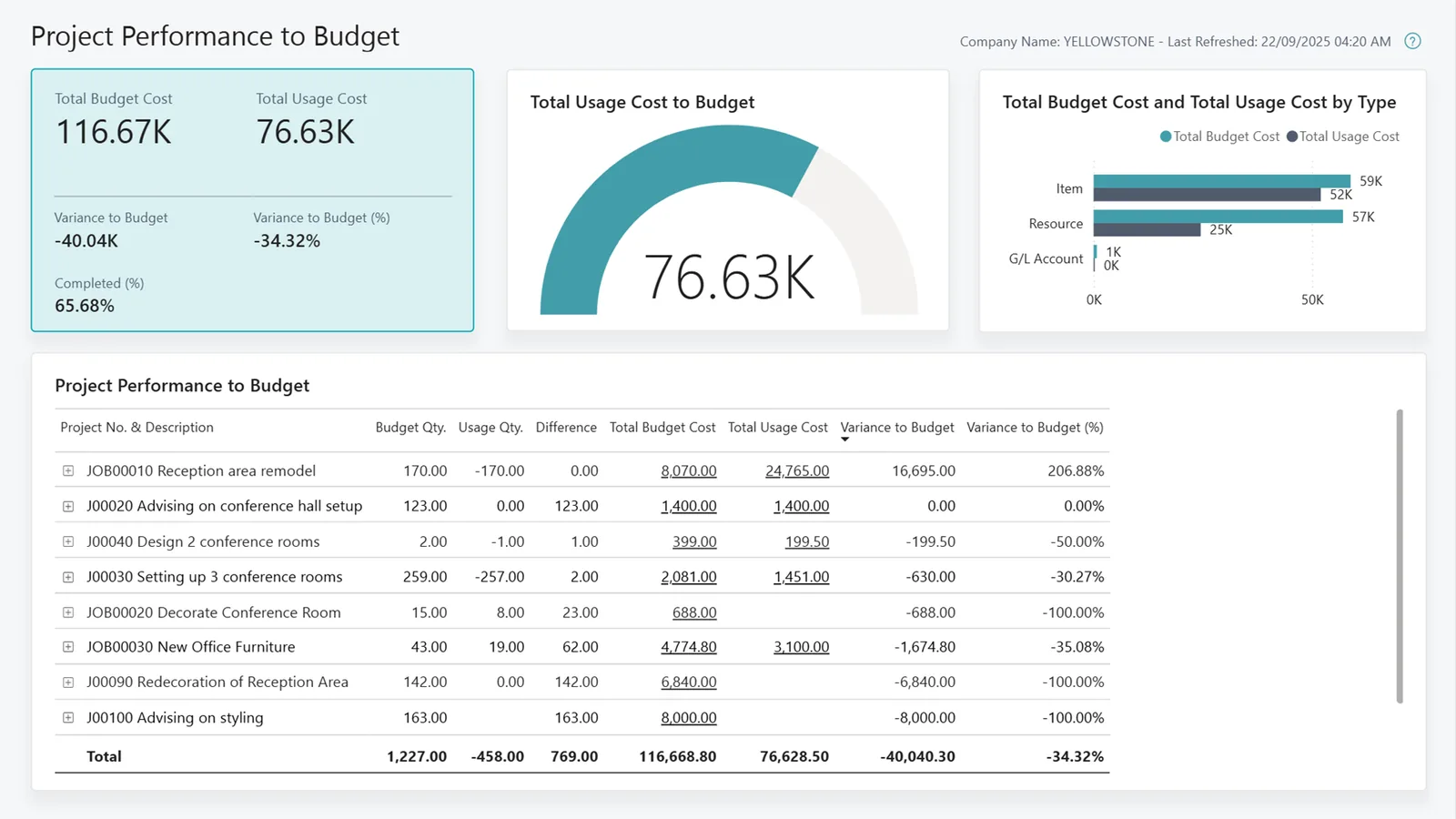
Directors want the portfolio total; project managers want their own jobs; credit control wants what is collectable. One data model serves all three.
All four platforms we implement can produce a project revenue dashboard. They differ in how much is native and how revenue recognition is handled. Capabilities vary by edition, so confirm for your version.
| Zoho | Odoo | ERPNext | Dynamics 365 | |
|---|---|---|---|---|
| Where project revenue lives | Zoho Books projects and invoices, with Zoho Projects for tasks and time | Project, Timesheets, Sales and Accounting linked by analytic accounts | Project doctype linked to Sales Orders, Sales Invoices and Timesheets | Business Central Projects (Jobs) or Project Operations for larger service firms |
| Billing types | Fixed cost or hourly billing methods on Zoho Books projects | Milestone, timesheet-based and fixed-price via sales order invoicing policies | Billing against timesheets, sales orders or payment schedules | Billing plans, T&M and fixed price; milestones in Project Operations |
| Revenue recognition / WIP | Usually via journals or custom functions; confirm needs early | Deferred revenue on invoice lines in recent Enterprise editions; POC usually via journals or customization | Deferred revenue on invoice items; POC typically customized | WIP methods built into Business Central Projects, including percentage of completion |
| Dashboard tool | Zoho Analytics across Books, Projects and CRM | Project updates, reporting views and spreadsheet dashboards (Enterprise) | Number cards, dashboard charts and the Insights app | Role Centers plus Power BI reports |
| Unbilled WIP visibility | Unbilled hours and expenses on each project | Timesheets not yet invoiced per sales order line | Billable vs billed amounts on the Project record | WIP and to-be-invoiced figures per project |
| Best fit | Small to mid-sized service firms already on Zoho | Firms wanting projects, sales and accounting in one app | Cost-conscious firms comfortable with configuration | Mid-sized to larger groups needing formal WIP and Power BI |
Hedged summary based on current public product documentation. Confirm features for your edition before deciding.
A revenue dashboard often needs data from outside the core ledger.
Revenue figures feed tax filings, so the setup has to respect UAE rules. Confirm the treatment for your contracts with your tax advisor.
Milestone invoices, advance payments and retention releases each create their own VAT date of supply. The billing module should apply 5% VAT and the client TRN on each tax invoice so VAT reported matches what was billed, not what was earned.
Taxable income under Federal Decree-Law No. 47 of 2022 is based on financial statements, so consistent revenue recognition and WIP entries matter at year end, not just for management reporting.
Project invoices will be exchanged in PINT AE format through an Accredited Service Provider under the phased timeline: from 1 January 2027 for businesses with revenue of AED 50 million or more and 1 July 2027 for others. Check the latest Ministry of Finance / FTA guidance and our UAE e-invoicing overview.
Contracts, progress certificates, invoices and recognition workings should be kept for at least 5 years (7 for real estate) under Cabinet Decision 74 of 2023, with the dashboard drilling back to them.
General information, not tax or legal advice. Rules change; confirm current FTA, MOHRE and Ministry of Finance guidance with your advisor.
Benefits depend on data discipline, but these are the improvements teams usually aim for.
Aged WIP with a named blocker gets chased, so fewer hours and milestones expire unbilled.
PMs and finance debate one set of numbers instead of reconciling three spreadsheets.
Backlog burn shows which business unit will run out of secured work before it happens.
Retention and advance balances shown separately make the collection forecast more realistic.
Timelines depend on whether project accounting already exists. If the ERP is in place, this is often a 5-10 week exercise.
Durations are typical ranges; your plan is agreed after discovery.
Agree what counts as earned, billed, unbilled, deferred and backlog for each billing type, and the recognition method per contract type.
Tag open contracts, invoices and timesheets to projects; load contract values and approved variations.
Set billing plans, recognition rules and project dimensions; build the dashboard and role views.
Run the dashboard alongside the old workbook for one close and explain every difference.
Weekly PM review of unbilled WIP and monthly director review of backlog and revenue vs budget.
We configure the system for the rules UAE businesses report against, and test it before go-live.
General information, not tax or legal advice. Confirm current requirements with the FTA, MOHRE or your advisor. See all UAE compliance guides.
On-site workshops in Dubai, Abu Dhabi and Sharjah, and remote or on-site delivery across the Northern Emirates and free zones.
Official sources and references
Facts on this page were checked against these sources in October 2026. Rules change, so confirm current requirements before acting.
Still have a question? Our consultants are happy to help.
Ask an ExpertBilled revenue is what you have invoiced. Earned revenue is the value of work actually delivered, measured by progress, hours or milestones. The gap between them is either unbilled WIP (earned, not invoiced) or deferred revenue (invoiced ahead of delivery), and the dashboard should show both.
Yes, provided each contract carries its billing type. The dashboard groups revenue by billing type because each behaves differently: see our pages on milestone billing and time-and-material billing for how the invoices are generated.
A general project dashboard tracks tasks, schedule and resource load. The revenue dashboard is a finance view: it reconciles to the general ledger and is used for month-end, forecasting and credit control.
Not always. Native ERP dashboards cover most single-entity needs. A BI tool helps when you consolidate several entities or currencies, combine CRM pipeline with backlog, or need board-level drill-downs.
Transactional tiles such as invoiced and collected can update in real time or daily. Earned revenue and WIP usually update at each period-end recognition run, with a weekly estimate for PM reviews.
Contractors add IPCs, variation orders and retention by certificate. We cover that view on the construction project dashboard page.
Related Solutions
Related Industries
Related ERP Platforms
Share your billing types and current reports, and we will show you a dashboard built around how your projects earn and invoice.
Dubai, United Arab Emirates










