
L
O
A
D
I
N
G


Zoho, Odoo, ERPNext, Dynamics 365 and custom ERP, delivered by one accountable team.

Give authorized dealers a portal to order, check stock and register warranties, while you control pricing tiers, credit, warranty claims and rebates from your ERP.
Dealer management software lets UAE importers and brand owners run an authorized dealer network from the ERP. Dealers use a self-service portal to order units and parts, check stock, view statements and register warranties by serial number. The importer controls tier pricing, credit limits, security cheques and bank guarantees, handles warranty claims with failed-part returns, and calculates quarterly rebates from posted sales.
Dealer management software is for importers and brand owners that sell durable products through a network of authorized dealers: air conditioning and generators, tires and batteries, power tools, sanitaryware, solar equipment, two-wheelers, marine engines, office equipment. The importer in Dubai or Sharjah holds the stock and the brand rights, and dealers across the emirates sell, install and service the product for end customers.
The relationship is long-running and two-way. Dealers order units and spare parts, ask about stock and lead times, register warranties, and submit warranty claims with failed parts. The importer sets dealer prices by tier, extends credit against security cheques or bank guarantees, pays rebates on quarterly targets and supports demo stock. When this runs on phone calls, email and Excel, the importer cannot tell which dealer sold which serial number, and warranty costs grow without control.
This page covers durable goods dealer networks. Vehicle showrooms have their own workflows, covered in ERP for car dealerships. FMCG brands tracking distributors' secondary sales should read the distributor management system page instead.

These are the issues importers raise most often when they ask us about dealer software.
Every stock check and price confirmation goes through the importer's sales coordinator by phone or WhatsApp. Coordinators become a bottleneck and dealers wait for answers they could look up themselves.
Units are sold without recording serial numbers by dealer. When a claim arrives, nobody can confirm who sold the unit, when the warranty started or whether it was already claimed.
Special prices given for one project become a dealer's expected price on every order. Tier discounts drift and margins erode without anyone approving it.
Dealer balances, security cheques and bank guarantee expiry dates are tracked in separate files. Orders keep shipping to dealers whose guarantees lapsed months ago.
Target rebates are calculated in Excel from incomplete data. Dealers dispute the figures and payouts are delayed, which damages the relationship.
Parts orders, warranty replacements and paid repairs mix in the same channel, so parts stock is wrong and dealers wait for fast-moving parts.
From appointment to rebate payout, each step is recorded once and visible to both sides where appropriate. Units carrying serial numbers make the warranty steps possible; see serial number tracking.
One shared database: every step updates stock, finance and reports in real time.
Most of these sit inside the importer's ERP and CRM, with the portal as the dealer-facing layer.
Trade license, TRN, tier, territory, authorized product lines, contacts and expiry dates for license and guarantees.
Orders, stock availability by line, account statement, invoices, price lists and marketing material.
Dealer price by tier, project pricing requests with approval, and minimum margin checks.
Credit limits, security cheques and bank guarantees with expiry alerts and order holds.
Serial capture on dispatch, warranty registration by dealer, claim workflow and failed-part returns.
Parts catalog by model, parts orders and warranty replacements tracked separately from unit sales.
Quarterly and annual targets, rebate slabs and accruals calculated from invoiced sales.
Visit logs, joint promotions, lead sharing from the brand website and dealer performance reviews.
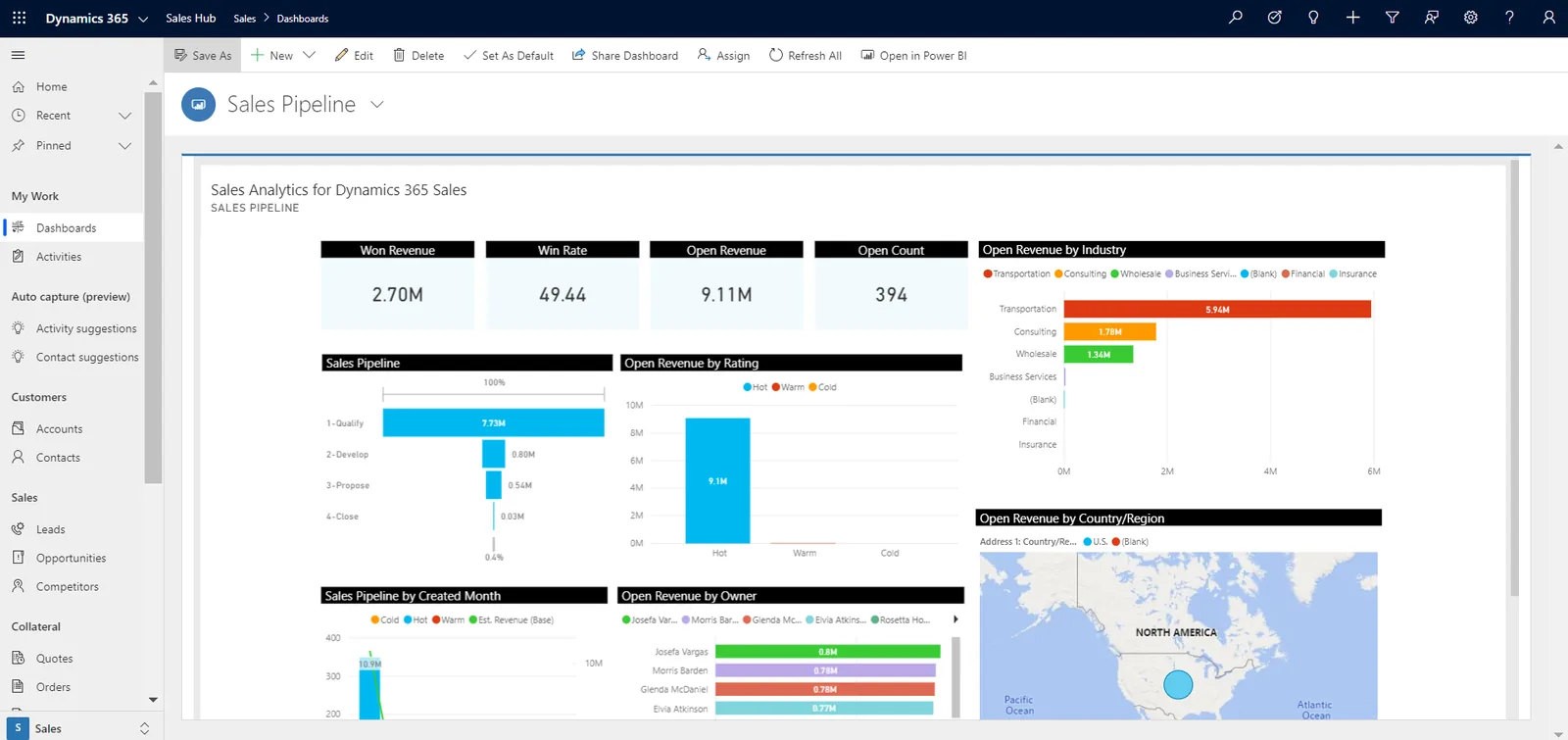
Channel managers see dealer performance, credit and warranty exposure together.
We implement all four; the right one depends on whether your network is CRM-led or ERP-led. Typical approaches below; confirm features for your edition.
| Zoho | Odoo | ERPNext | Dynamics 365 | |
|---|---|---|---|---|
| Dealer portal | Zoho CRM partner portal or a Zoho Creator portal | Customer portal with B2B shop and dealer pricelists | Customer portal with webshop and custom pages | Power Pages portal over Dataverse |
| Tier pricing | Price lists in Zoho Books or Inventory | Pricelists by customer category | Price lists and Pricing Rules by customer group | Price lists by customer price group |
| Serial tracking and warranty | Serial tracking in Zoho Inventory; claims in Zoho Desk or Creator | Serial numbers in Inventory; claims via Helpdesk or Repairs apps | Serial No. with Warranty Claim and Maintenance Visit | Item tracking in Business Central; claims via Field Service or Customer Service |
| Credit and guarantees | Credit limits; guarantee tracking via custom modules | Credit limits; guarantee tracking customized | Credit limits; guarantee records as custom DocType | Credit limits; guarantees via extension or customization |
| Rebates | Usually calculated in Zoho Analytics or Creator | Loyalty and rebate programs in recent versions, or customized | Pricing rules for discounts; rebates often customized | Rebate handling in Supply Chain; extensions for Business Central |
| Typical fit | Importers whose dealer relationship is CRM-led | Importers wanting portal, stock and service in one system | Importers needing warranty depth at a lower license cost | Larger importers with field service and Microsoft stack |
Dealers, end customers and the brand all touch the same records.
Not tax or legal advice; confirm specifics with your advisors.
Free warranty replacements, paid repairs, and rebates settled by credit note each have different VAT effects. Define the document type for each with your tax advisor so the ERP posts them consistently.
Keep each dealer's trade license, TRN certificate and agreement on file with expiry alerts, so invoices carry valid TRNs and you do not trade with an expired license.
Invoices and credit notes to dealers are B2B documents that will move to PINT AE through an ASP from 2027. Check the latest Ministry of Finance and FTA guidance.
Warranty claims, credit notes and rebate calculations support your VAT and corporate tax figures, so keep them with the invoices for at least 5 years.
General information, not tax or legal advice. Rules change; confirm current FTA, MOHRE and Ministry of Finance guidance with your advisor.
Benefits we design dealer projects around.
Dealers check stock, prices and statements in the portal themselves.
Every claim is checked against the serial, sale date and dealer before approval.
Orders stop automatically when limits are exceeded or guarantees expire.
Both sides see achievement from the same invoiced data throughout the quarter.
Often 10-16 weeks; the portal and warranty workflow usually take the most design time.
Durations are typical ranges; your plan is agreed after discovery.
Define tiers, pricing approvals, credit rules, warranty policy and rebate slabs.
Set up dealer masters, pricing, serial tracking, warranty and rebate calculations.
Build ordering, statements, warranty registration and document access for dealers.
Run a few dealers live through a full order and claim cycle.
Onboard remaining dealers with short training and support.
We configure the system for the rules UAE businesses report against, and test it before go-live.
General information, not tax or legal advice. Confirm current requirements with the FTA, MOHRE or your advisor. See all UAE compliance guides.
On-site workshops in Dubai, Abu Dhabi and Sharjah, and remote or on-site delivery across the Northern Emirates and free zones.
Official sources and references
Facts on this page were checked against these sources in October 2026. Rules change, so confirm current requirements before acting.
Still have a question? Our consultants are happy to help.
Ask an ExpertA dealer usually buys finished units and parts from you, sells to end customers and handles warranty and service locally. A distributor buys in bulk and resells to many retailers. Dealer software focuses on serials, warranty and parts; distributor software focuses on secondary sales and claims.
Yes. At the point of sale the dealer records the serial number and end customer in the portal, which starts the warranty clock and links any later claim to that sale.
Credit limits, overdue rules and guarantee expiry dates are checked when a portal order is submitted, and the order is held for approval if any rule fails. The customer credit management page explains the controls.
Yes. Parts are listed by model and ordered like units, while warranty replacements are linked to approved claims. See spare parts management for parts planning.
For larger networks, yes: visits, joint promotions and lead sharing sit better in a CRM. Our B2B CRM page covers this, and Dynamics 365 CRM is one option for Microsoft-based importers.
Rebate slabs are set per dealer or tier, and the system accrues the rebate from invoiced sales during the quarter. At period end the rebate is settled by credit note after approval.
Related Solutions
Related Industries
Related ERP Platforms
Tell us about your dealer network, products and warranty policy, and we will show how a dealer portal and ERP would run it.
Dubai, United Arab Emirates










