
L
O
A
D
I
N
G


Zoho, Odoo, ERPNext, Dynamics 365 and custom ERP, delivered by one accountable team.

Run each customer order as its own thread from quotation to delivery, with materials, work orders and costs pegged to it so you know where it stands and what it earned.
A make-to-order manufacturer in the UAE needs an ERP that pegs materials, purchases and work orders to each customer sales order, from costed quotation through delivery, then compares actual cost with the quoted price. Odoo's MTO route, ERPNext work orders created from sales orders and Business Central's make-to-order policy all support this for joinery, steel fabrication, switchgear, signage and packaging.
An ERP for make to order manufacturing in the UAE supports factories that start production only after a customer confirms an order: joinery for villa and hotel fit-outs, steel fabrication for contractors, switchgear panels, signage, packaging printed to a customer's artwork, uniforms and custom furniture. Each order may use standard components, but the final product is built for that customer, to that specification, by that date.
The core requirement is pegging. Materials bought for order SO-1042 must not be used for another job, the work order must show which sales order it serves, and the order's actual cost must be compared with the quoted price. In many UAE MTO shops this link lives in the production manager's head, with a printed job folder moving from desk to desk. When an urgent order jumps the queue, the folder trail breaks.
Make to order differs from engineering each order from scratch, which is covered in ERP for engineer to order, and from building to forecast, covered in ERP for make to stock manufacturing. Many plants run a mix, so the ERP must handle both policies item by item.
MTO plants rarely suffer from too much stock. They suffer from lost links between the order and everything done for it.
Estimators price from an old rate sheet because current material and labor costs are not in one place. Margins look good at quotation and disappear in production.
Steel sections or laminate sheets bought for one job are used for a more urgent one. The first job then waits for a re-order nobody raised.
Sales promises four weeks because that is the usual lead time, without checking supplier lead times or the current load. Late delivery triggers penalties on contractor orders.
Customers change dimensions, colors or quantities after the order is confirmed. Revisions are made on paper drawings while the work order still shows the old version.
Costs land in general production accounts, so management sees monthly profit but not which orders or customers lose money.
Contractor customers pay advances and retentions, and some orders are invoiced in stages. Tracking these against the order is often done in a separate spreadsheet.
Each document is created from the previous one, so the order number travels through purchasing, production and dispatch.
One shared database: every step updates stock, finance and reports in real time.
MTO touches almost every module, but the link between sales orders and work orders is the heart of it.
Quotes built from a template BOM with options for size, finish and accessories, priced from current costs.
Confirmed orders with delivery dates, revision history and advance payment terms; see sales order management.
A copy of the standard BOM adjusted for the order, so changes do not alter the master; see ERP for bill of materials.
Purchase orders for non-stock items created from the sales order and pegged to it; covered in purchase order management.
Production orders linked to the sales order, with operations, job cards and progress visible to sales.
Stock reserved or held in an order-specific location so it cannot be consumed by another job.
Material, labor, overhead and subcontract cost collected per order and compared with the quoted cost.
Advance invoices, stage invoices and retention tracked against the sales order.
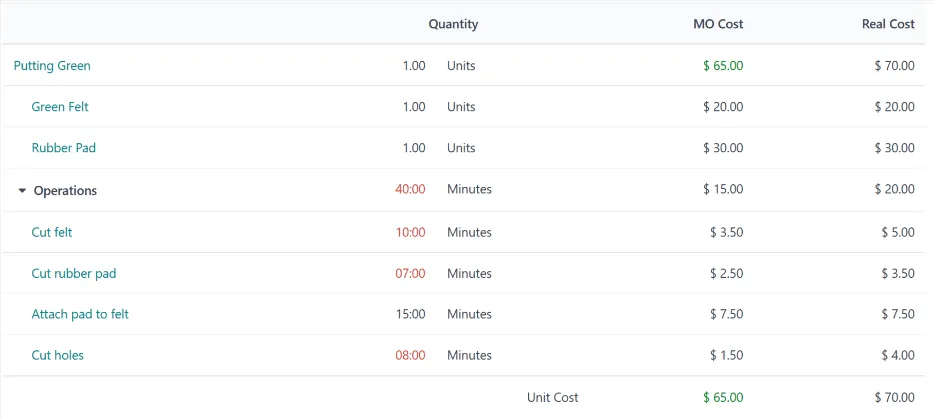
An order-level dashboard shows every open order with its status, risks and margin.
All four platforms we implement can run MTO, with different levels of built-in pegging. Confirm features for your edition.
| Zoho | Odoo | ERPNext | Dynamics 365 | |
|---|---|---|---|---|
| MTO trigger | Zoho Inventory assemblies are built manually; order-driven production typically via Zoho Creator or an integrated MRP | Replenish on Order (MTO) route with Manufacture route on the product | Production Plan or Work Order created from the Sales Order | Manufacturing Policy set to Make-to-Order on the item in Business Central |
| Pegging to the order | Custom fields and Creator logic | Manufacturing and purchase orders linked to the sales order origin | Sales Order reference carried on Work Order and Material Request | Order tracking links production and purchase to the sales line |
| Order-specific BOM | Custom | BOM variants and configurable product attributes | BOM per item or variant; project-linked BOMs by customization | Production BOM versions; product configurators via partner apps |
| Order costing | Through Zoho Books projects or analytics | Cost analysis on manufacturing orders; analytic accounts per order | Project or cost center per order; work order costing | Production order statistics; job-based costing via Jobs |
| Progress billing | Zoho Books retainer and progress invoices | Down payments on sales orders | Payment terms and advance entries | Prepayments on sales orders |
| Typical fit | Simple assembly to order | SME fabricators and furniture makers; see Odoo for manufacturing companies | Cost-conscious job shops | Multi-site or high-volume MTO operations |
Most MTO plants also stock some standard components, so the item policy must be set item by item.
MTO depends on fast, accurate information moving from the customer to the shop floor.
Order-driven sales raise specific VAT and reporting questions. Confirm with your tax advisor.
Under UAE VAT, receiving an advance payment can create a tax point before goods are delivered. The ERP should issue tax invoices for advances when required and offset them on the final invoice.
Under Ministerial Decisions 243 and 244 of 2025, B2B invoices will move to the PINT AE format through Accredited Service Providers, with mandatory phases from 2027. Advance, stage and credit invoices on orders must all be issued correctly; check the latest MoF and FTA guidance.
Longer orders invoiced in stages may raise revenue recognition questions for financial statements and corporate tax. Order-level records of cost and progress support whatever method your auditor agrees.
Suppliers to government and major entities may need an ICV certificate. Order-level cost and local sourcing data can help prepare supporting figures; confirm requirements with your certifying body.
General information, not tax or legal advice. Rules change; confirm current FTA, MOHRE and Ministry of Finance guidance with your advisor.
The gains come from never losing the thread between the customer and the work.
Estimators price from current material and routing costs, so margins hold through production.
Promises account for supplier lead times and plant load, reducing penalties and disputes.
Pegging stops urgent jobs from silently consuming another order's materials.
Management sees which orders, products and customers make money and adjusts pricing accordingly.
An MTO rollout often takes 10-16 weeks for an SME plant, depending on BOM complexity and integrations.
Durations are typical ranges; your plan is agreed after discovery.
Trace three recent orders from enquiry to invoice and agree item policies, numbering and approvals.
Build template BOMs, routings and cost rates, and classify items as stocked or ordered.
Set up quotations, MTO routes, pegging, progress billing and order costing reports.
Run live orders through the system with the paper folder in parallel and fix gaps.
Switch fully, start weekly order reviews and compare first completed orders with quotes.
We configure the system for the rules UAE businesses report against, and test it before go-live.
General information, not tax or legal advice. Confirm current requirements with the FTA, MOHRE or your advisor. See all UAE compliance guides.
On-site workshops in Dubai, Abu Dhabi and Sharjah, and remote or on-site delivery across the Northern Emirates and free zones.
Official sources and references
Facts on this page were checked against these sources in October 2026. Rules change, so confirm current requirements before acting.
Still have a question? Our consultants are happy to help.
Ask an ExpertYes. All four platforms set the policy per item, so standard components can be stocked while finished products are built to order. The planning engine then treats each item according to its policy.
Revise the sales order and the order-specific BOM with a revision number, and push changes to open work orders and purchase orders. The ERP keeps the history, which helps when you need to charge for the change.
Pegging links supply such as a purchase or work order to the demand it serves. In MTO it shows which order is affected when a supplier is late and stops materials from drifting to other jobs.
Collect actual material, labor, overhead and subcontract costs per order and compare them with the quoted cost. See ERP for production costing for how costs are captured.
Yes. Fabricators typically combine MTO with cut lists, heat numbers and galvanizing subcontract steps; our page on ERP for steel manufacturing covers those details.
Work orders are created from the confirmed sales order once materials are available, then tracked operation by operation; see work order management.
Related Solutions
Related Industries
Related ERP Platforms
Walk us through one recent customer order and we will show how it would run, step by step, in an MTO-ready ERP.
Dubai, United Arab Emirates










