
L
O
A
D
I
N
G


Zoho, Odoo, ERPNext, Dynamics 365 and custom ERP, delivered by one accountable team.

Replace the spreadsheet BOM that three departments edit separately with a versioned, approved bill of materials that drives material issue, planning and product cost.
An ERP replaces spreadsheet BOMs with one versioned, approved bill of materials listing components, quantities, units of measure, sub-assemblies, operations and expected yield. That single record drives material requirements planning, work order material issue and product cost roll-up. UAE manufacturers typically use Odoo, ERPNext or Dynamics 365 for multi-level BOMs, while Zoho Inventory suits simple one-level kits.
ERP for bill of materials UAE projects start with a simple test: ask engineering, the store and accounts for the components of your best-selling product and see if the three answers match. In many Sharjah, Ajman and Dubai Industrial City plants they do not. The production supervisor has a printed sheet from two revisions ago, the buyer works from an Excel file with old pack sizes, and the accountant costs the product from a template built when the factory opened.
The bill of materials (BOM) is the recipe for every item you make: components, quantities, units of measure, sub-assemblies, operations and the expected yield. Everything downstream reads it. Material requirements planning explodes it to find shortages, the work order uses it to reserve and issue stock, and the costing engine rolls it up to a standard cost. If the BOM is wrong, every one of those numbers is wrong too, and nobody notices until the stock count or the gross margin report.
This page covers how to structure, control and maintain BOMs in an ERP for UAE manufacturers: food and beverage, plastics and packaging, furniture and joinery, steel fabrication, chemicals and cosmetics. For the wider picture of how the BOM connects to planning, shop floor and costing, start at our manufacturing ERP processes hub.
These are the BOM problems we see most often when reviewing UAE factories before an ERP rollout.
Engineering updates a drawing, but the change reaches the store weeks later by WhatsApp. Production keeps issuing the old component and the new one sits unused in the warehouse.
Resin is bought in 25 kg bags, issued in kilograms and consumed in grams per piece. Sheet steel is bought by tonne and cut by sheet. Without defined conversions, stock goes negative or drifts away from reality.
The BOM says 1.00 kg of material per unit, but trimming, purging and start-up losses mean the line really consumes more. Planned cost looks healthy while actual consumption quietly eats the margin.
A wardrobe, a switchgear panel or a gift pack has sub-assemblies that are built, stocked and sometimes sold separately. A flat list hides them, so you cannot plan or cost the intermediate stage.
Private-label packaging, Arabic and English labels, or a different carton count for a GCC distributor each create a variant. Copying and editing BOMs by hand multiplies errors.
Component prices change with every import shipment and currency move, but the product cost was set once. Quotations and transfer prices are based on numbers nobody has checked in a year.
A controlled BOM moves through clear states, and only an approved, active version can be used by planning and work orders.
One shared database: every step updates stock, finance and reports in real time.
The BOM is a master record, but several modules depend on it. Configure them together so a change in one place flows to all.
Component codes, stock units, purchase units and conversion factors, plus attributes for size, color or grade so variants stay manageable.
Multi-level structures, phantom or kit BOMs, alternative components, by-products and co-products, with quantity per batch or per unit.
Operations linked to the BOM, each with setup and run time on a machine or labor center, so labor and overhead enter the product cost.
Change requests, approval by engineering and quality, and effective dates so old stock can be consumed before the new version takes over.
Standard or planned cost rolled up from component prices, scrap allowance and routing rates, with a comparison against actual work order cost.
Exploded component demand feeds stock reservations and purchase suggestions, linked to raw material management for lots and expiry.
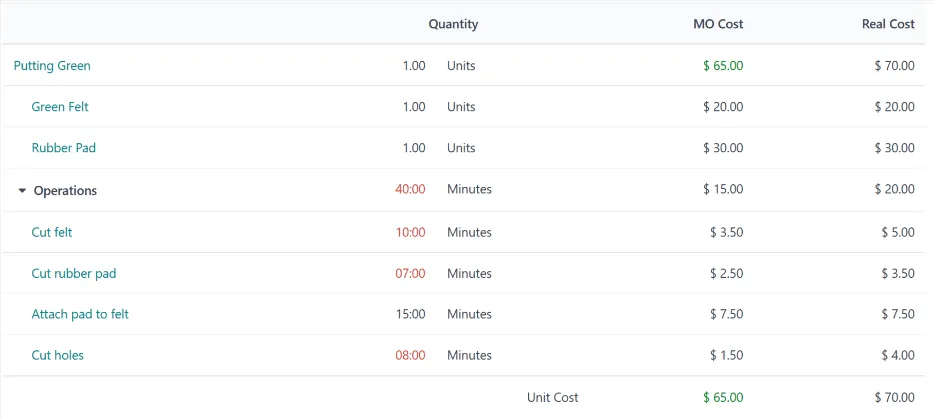
A BOM is only as good as its maintenance. These views show where structures are incomplete, outdated or drifting from what the floor really uses.
All four platforms we implement can manage BOMs, but depth varies a lot. Capabilities change between editions and releases, so confirm against your edition before deciding.
| Zoho | Odoo | ERPNext | Dynamics 365 | |
|---|---|---|---|---|
| BOM structure | Composite items and assemblies in Zoho Inventory suit simple one-level kits; multi-level BOMs usually need a Zoho Creator app or a third-party extension | Multi-level BoMs, kits (phantom), by-products and operations in the Manufacturing app | BOM doctype with sub-assembly BOMs, exploded items, operations and scrap items | Production BOMs and versions in Business Central; BOMs and formulas in Supply Chain Management |
| Versions and change control | Handled through custom approval workflows in Creator | Engineering change orders and BoM versions through the PLM app (Enterprise) | Multiple BOMs per item with a default flag, plus the BOM Update Tool to replace components across BOMs | Versions with effective dates and approval status |
| Yield and scrap | Usually modeled as extra component quantity | Component quantities per batch size; scrap recorded on manufacturing orders | Process loss and scrap items on the BOM | Scrap percentages on BOM lines and routing operations |
| Cost roll-up | Limited natively; often calculated in Creator or Zoho Analytics | BoM cost structure report with component and operation cost | BOM cost from valuation rate, last purchase rate or price list, plus operating cost | Standard cost roll-up including routing and overhead rates |
| Typical fit | Light assembly, kitting and trading companies that do some packing | SMEs and mid-sized plants wanting an integrated, configurable suite | Cost-conscious manufacturers comfortable with open source | Larger or multi-entity manufacturers on the Microsoft stack |
We implement Zoho, Odoo, ERPNext and Dynamics 365 and recommend by fit. See our Odoo Manufacturing and ERPNext Manufacturing pages for platform detail.
BOM data often starts outside the ERP. These are the links worth planning for.
The BOM feeds inventory valuation and cost of sales, so it touches tax and audit. This is general information, not tax advice; confirm treatment with your tax advisor.
Cost of goods sold and closing stock flow into taxable income under Federal Decree-Law No. 47 of 2022. A documented, consistent costing method based on the BOM makes the valuation easier to explain to auditors.
Tax records generally have to be kept for at least five years. Keep BOM versions and change history rather than overwriting them, so you can show how a past cost was built.
Input VAT on imported and local components is recovered through purchase invoices, not the BOM, but correct item tax settings ensure the materials you consume were bought on valid tax invoices.
If you produce excise goods such as sweetened or energy drinks, recipe data such as sugar content may affect the excise treatment. Keep the formulation in the BOM controlled and check the current rules with your advisor.
General information, not tax or legal advice. Rules change; confirm current FTA, MOHRE and Ministry of Finance guidance with your advisor.
The gains show up in stock accuracy, purchasing and margin reporting.
Backflushing or issuing against a correct BOM keeps book stock close to physical stock, so counts produce fewer write-offs.
Sales can quote and finance can report margin based on a cost that reflects today's component prices and real yield.
A where-used report and approved change process let you swap a supplier or packaging spec without missing affected products.
Accurate component demand from the BOM means fewer emergency local purchases at higher prices and less dead stock.
Durations are typical ranges and depend mainly on how many active products you have and the state of your current data.
Durations are typical ranges; your plan is agreed after discovery.
Remove duplicate codes, define stock and purchase units, and agree naming for variants.
Load BOMs from spreadsheets or CAD exports, then validate the top products against real consumption on the floor.
Add operations and work center rates, run the first cost roll-up and review it with finance.
Train engineering and quality on change requests, approvals and effective dates.
Compare planned and actual consumption monthly and adjust yield factors where the gap persists.
We configure the system for the rules UAE businesses report against, and test it before go-live.
General information, not tax or legal advice. Confirm current requirements with the FTA, MOHRE or your advisor. See all UAE compliance guides.
On-site workshops in Dubai, Abu Dhabi and Sharjah, and remote or on-site delivery across the Northern Emirates and free zones.
Official sources and references
Facts on this page were checked against these sources in October 2026. Rules change, so confirm current requirements before acting.
The BOM lists what goes into a product: materials, sub-assemblies and quantities. The routing lists how it is made: the operations, work centers and times. You need both for a full product cost and for production planning.
Use levels when an intermediate item is stocked, planned, sold or costed separately, such as a cut panel, a mixed compound or a printed label. Use phantom or kit levels when the sub-assembly is built and used immediately, so the structure stays readable without creating stock you never hold.
Create a new BOM version with an effective date or a run-out rule, approve it through change control, and use the where-used and stock reports to time the switch. The old version stays on record for costing history.
Yes. All four platforms support import from CSV or Excel, and most CAD and PLM tools can export a structured BOM. For frequent updates, an integration is worth scoping so engineering does not re-key data.
Usually yes. Steel, aluminum and joinery workshops supplying projects build to drawings, and a BOM per item or per drawing lets you reserve material and cost the job. It also connects to the contractor side, where construction material management tracks what arrives on site.
It can be. Traders who cut, pack or kit products, for example bundled fixings or pre-cut lengths, can use simple kit BOMs so stock and cost stay right. Our page on ERP for building materials trading covers the trading side.
Related Solutions
Related Industries
Related ERP Platforms
We review a sample of your bills of materials and routings, show where data and units will cause trouble, and outline the right structure for your platform.
Dubai, United Arab Emirates










