
L
O
A
D
I
N
G


Zoho, Odoo, ERPNext, Dynamics 365 and custom ERP, delivered by one accountable team.

Barcode scanning only pays off when every scan updates the ERP transaction it belongs to. We connect scanners, mobile computers and label printers to your ERP so receiving, picking, transfers and counts are recorded at the shelf, not typed in later.
ERP barcode integration ties three things together: the barcode standard on items and locations (supplier EAN or UPC, GS1-128 or internal Code 128), scanners, mobile computers and label printers, and the ERP transactions each scan updates, such as GRNs, delivery notes, transfers and counts. UAE warehouses then record movements at the shelf instead of typing paper documents later.
An ERP barcode integration in the UAE ties three things together: the barcode standard on your items and locations (supplier EAN or UPC codes, GS1 codes, or internal Code 128 labels), the hardware that reads and prints them (handheld scanners, Android mobile computers, label printers), and the ERP transactions that each scan should update (goods receipt notes, delivery notes, stock transfers, stock counts and POS sales).
Most trading companies in Jebel Ali, Al Quoz and Sharjah already have barcodes on cartons from suppliers. The gap is that scans do not post into the ERP. The storekeeper ticks a printed GRN, a clerk types it in at the end of the day, and stock shows wrong in between. This page covers the integration itself. If you are still choosing inventory software, start with barcode inventory software; for warehouse process design read ERP WMS integration.
Platform detail matters. Odoo has a dedicated Barcode app, ERPNext supports barcodes on items and scanning in stock and sales screens, Zoho Inventory supports item barcodes and mobile scanning, and Dynamics 365 offers mobile warehouse apps. We have platform-specific pages for Odoo barcode integration and ERPNext barcode integration.
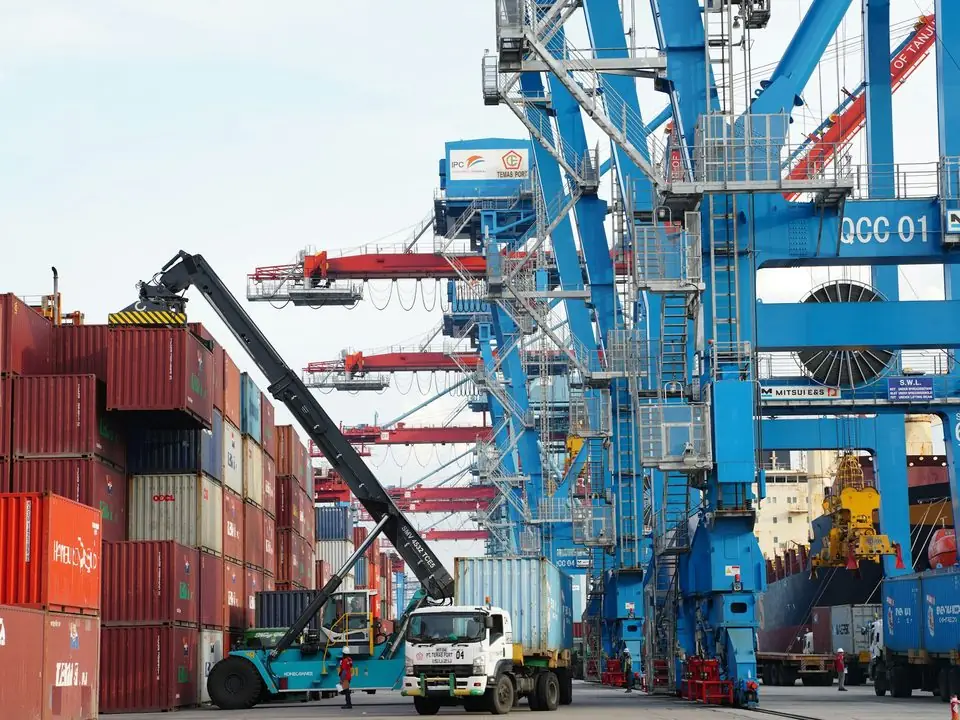
These are the stock problems that bring UAE warehouses to us. Most come from the gap between the physical scan and the system entry.
Pickers work from printed pick lists and pick a similar-looking SKU, such as a different cable gauge or bottle size. The error is found only when the customer complains or returns the goods.
Containers arrive, but the GRN is entered hours later. Sales cannot promise stock that is physically in the warehouse, and supplier invoice matching is delayed.
Food, pharma and cosmetics distributors need batch and expiry on every receipt. Typing them invites errors that break FEFO picking and recall traceability.
Annual counts with paper sheets need the warehouse closed and a team of temporary counters. Variances are found but not explained, and adjustments are posted in bulk.
Without bin barcodes, putaway depends on the memory of senior storekeepers. When they are on leave, goods are put anywhere and cannot be found.
The receiving-to-dispatch flow below shows where scans post. Each scan validates against the ERP document, which is what stops errors.
One shared database: every step updates stock, finance and reports in real time.
Barcode data mostly flows from the device into the ERP, while master data and tasks flow out to the device.
| Data | Direction | Trigger / frequency | Notes |
|---|---|---|---|
| Item master and barcodes | ERP to device | On change or scheduled | Multiple barcodes per item for carton, inner and unit packs |
| Receiving lines and quantities | Device to ERP | Each scan or on confirm | Validated against the purchase order; over-receipt rules apply |
| Batch, serial and expiry | Device to ERP | During receipt | GS1-128 labels can carry batch and expiry in one scan |
| Bin locations | ERP to device and back | Putaway and picking | Location barcodes on shelves and racks |
| Pick lists and tasks | ERP to device | On order release | Picker sees the next task; wrong scans are blocked |
| Stock count results | Device to ERP | Per zone or at count end | Variances reviewed before posting adjustments |
| Labels (item, carton, pallet) | ERP to printer | On receipt, production or packing | ZPL or similar printer language for thermal printers |
| Inter-warehouse transfers | Device to ERP | Scan out and scan in | In-transit stock is visible between sites |
Choose hardware after the process is designed, not before. Compatibility depends on the ERP app or browser in use.
Barcode projects fail when hardware is bought first. We follow the process-first method used across our ERP integration work.
We follow goods from dock to dispatch, note which documents are used, and decide where each scan should happen and what it should validate.
Use supplier EAN codes where they exist, internal Code 128 labels where they do not, and GS1-128 where batch and expiry must travel with the carton. We also label bin locations.
We set up barcode fields, units of measure per pack size, scanning screens and label templates, then test with your actual scanners and printers.
Locations are labeled and a full count is done with scanners, so the go-live starts from accurate stock.
Receiving goes live first, then picking and packing, then cycle counting. Each step is stable before the next begins.
Barcodes are operational, but they support several UAE obligations. Confirm requirements with your advisors and regulators.
Accurate stock movements support correct cost of sales and closing stock in your financial statements and tax returns. Keep movement history for the retention period, generally at least 5 years. See batch tracking with ERP for traceability design.
Food, cosmetics and pharma businesses often need batch-level traceability to support recalls and authority inspections. Check the labeling and traceability rules that apply to your products with the relevant authority.
Goods moving between designated zones and the mainland can have VAT consequences. Scanned transfers with clear source and destination warehouses make these movements easier to report.
Mobile computers hold customer and pricing data. Use device management, user logins on scanning apps and remote wipe for lost devices.
General information, not tax or legal advice. Rules change; confirm current FTA, MOHRE and Ministry of Finance guidance with your advisor.
Typical benefits, described without invented figures.
Wrong items are blocked at the scan, before they reach the customer.
GRNs and delivery notes post as goods move, so sales and purchasing see true availability.
Scanned cycle counts by zone replace weekend shutdowns and explain variances early.
FEFO picking and recalls work because batch data was scanned, not typed.
We configure the system for the rules UAE businesses report against, and test it before go-live.
General information, not tax or legal advice. Confirm current requirements with the FTA, MOHRE or your advisor. See all UAE compliance guides.
On-site workshops in Dubai, Abu Dhabi and Sharjah, and remote or on-site delivery across the Northern Emirates and free zones.
Official sources and references
Facts on this page were checked against these sources in October 2026. Rules change, so confirm current requirements before acting.
Still have a question? Our consultants are happy to help.
Ask an ExpertUsually yes. We record supplier EAN or UPC codes against each item. Where one item has several pack sizes, each pack gets its own barcode and unit of measure in the ERP.
You need GS1-issued barcodes if you sell your own branded products into retail chains that require them. For internal labels on locations and repacked goods, internal codes are fine. Check retailer requirements before deciding.
For a POS counter or a receiving desk, a keyboard-wedge scanner is often enough. For picking in aisles, Android mobile computers with built-in scanners and the ERP's mobile app work far better.
Some mobile apps queue scans offline and sync later; browser-based screens may not. We check Wi-Fi coverage in racked areas, mezzanines and cold rooms before choosing the approach.
Barcodes suit most UAE warehouses and stores. RFID integration makes sense when you need to read many items at once without line of sight, for example in fashion retail or returnable asset tracking.
Yes. The same item barcodes are used at the till and in fulfillment for online orders. See ERP POS integration and ERP Shopify integration for those flows.
Related Solutions
Related Industries
Related ERP Platforms
Share your warehouse layout, item types and current hardware, and we will design the scanning flow and label plan.
Dubai, United Arab Emirates










